
Introduction
This manual provides essential information for the installation, operation, and maintenance of your Lorex LBV8541XB 4K Security Camera. This add-on bullet camera is designed for both indoor and outdoor surveillance, offering 4K resolution, color night vision, and active deterrence features.
Пакеттин мазмуну
- Lorex LBV8541XB 4K HD Bullet Camera
- Mounting Kit (screws and wall anchors)
- 60ft UL Extension Cable
- Кубаттуу адаптер
- Ыкчам баштоо боюнча колдонмолор
Орнотуу жана орнотуу
The Lorex LBV8541XB camera is designed for wall mounting and requires a wired connection to a compatible Lorex Digital Video Recorder (DVR) system. Ensure you have a compatible DVR from the LHV5100, LHV5100W, D841, D841B, D861, D862, D862B, or D871 series.
1. Камераны орнотуу
Select a suitable location for the camera, ensuring it provides the desired field of view and is within reach of the 60ft extension cable. Use the provided mounting kit to securely attach the camera to a wall or other stable surface. The camera's durable housing is IP65-rated, making it suitable for both indoor and outdoor environments, capable of withstanding temperatures from -22°F to 140°F.
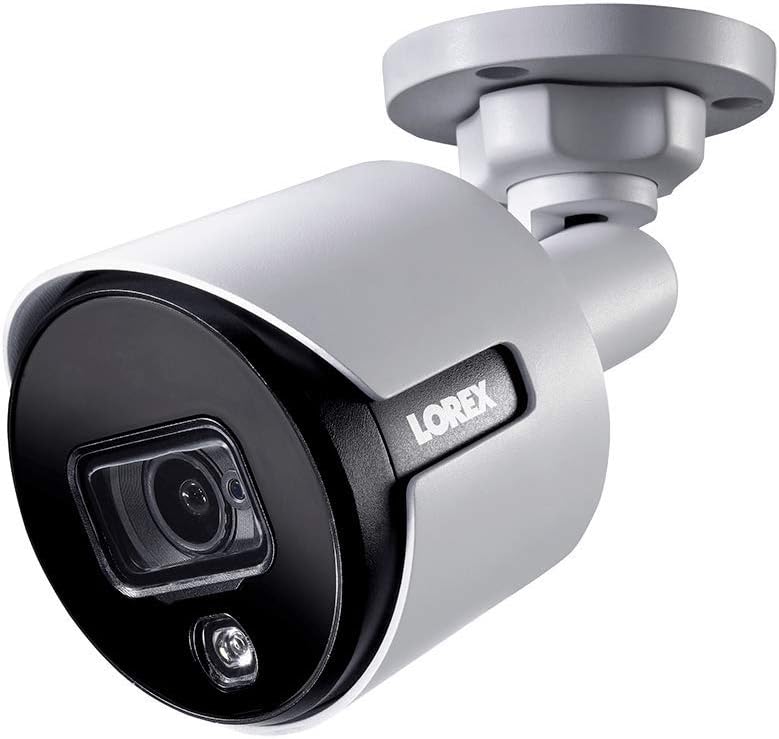
Image: The Lorex LBV8541XB 4K Bullet Security Camera, showing its compact design and mounting bracket. This camera is designed for robust surveillance in various conditions.

Image: Icons representing the camera's weather resistance, including protection against rain, extreme heat, and freezing temperatures. The camera is rated IP65 for outdoor use.
2. Камераны туташтыруу
- Connect the 60ft UL Extension Cable to the camera's BNC video output.
- Connect the other end of the extension cable to an available BNC input on your compatible Lorex DVR.
- Connect the power adapter to the camera's power input and then plug it into a standard electrical outlet.
- Сигналдын жоголушун же электр энергиясынын үзгүлтүккө учурашын алдын алуу үчүн бардык туташуулардын коопсуз экенин текшериңиз.
Камераны иштетүү
Once connected to your Lorex DVR, the camera will begin transmitting video. You can access and control the camera's features through your DVR interface or via the Lorex mobile application on compatible smartphones and tablets.
Негизги өзгөчөлүктөрү:
- 4K токтому: Provides ultra-high-definition video for clear and detailed surveillance.
- 87 градустук талаа View: Captures a wide area, reducing the need for multiple cameras in certain locations.
- Түнкү көрүнүш: Utilizes ambient light to provide full-color video in low-light conditions. In complete darkness, infrared LEDs provide crisp black and white video up to 135 feet.
- Активдүү бөгөт коюу: Features a motion-activated LED warning light and a remote-triggered siren to deter intruders. The siren can be activated manually via the Lorex app or DVR interface.
- Motion-Only Alerts: The camera is configured to trigger alerts based on motion detection, which can be customized through your DVR settings.

Image: A close-up of the camera's front, highlighting the lens and the integrated LED warning light, which activates upon motion detection.

Image: The Lorex camera mounted on a brick wall, demonstrating its active deterrence LED light illuminating an area. This feature helps to deter unwanted activity.

Image: A graphic illustrating the camera's 135ft infrared night vision range and its capability for color night vision in low-light conditions.
Техникалык тейлөө
Regular maintenance ensures optimal performance and longevity of your Lorex security camera.
- Тазалоо: Мезгил-мезгили менен камеранын линзасын жана корпусун жумшак, гamp тоскоол боло турган чаңды, кирди же суу тактарын тазалоо үчүн кездеме view. Абразивдүү тазалагычтардан алыс болуңуз.
- Кабелдик текшерүү: Regularly inspect the video and power cables for any signs of wear, damage, or loose connections. Secure or replace damaged cables promptly.
- Программалык камсыздоонун жаңыртуулары: Лорексти текшериңиз website or your DVR system for available firmware updates for your camera and DVR to ensure you have the latest features and security enhancements.
Проблемаларды чечүү
If you encounter issues with your Lorex LBV8541XB camera, refer to the following common troubleshooting steps:
- Видео сигнал жок:
- Камеранын туура кубатталганын жана кубат адаптери иштеп жатканын текшериңиз.
- Verify that the BNC cable is securely connected at both the camera and the DVR.
- Check if the camera is connected to a compatible DVR input.
- Сүрөттүн сапаты начар:
- Бардык тактарды же кирди кетирүү үчүн камеранын линзасын тазалаңыз.
- Ensure the camera is focused correctly (if adjustable).
- Check the cable for damage or interference.
- Түнкү көрүү маселелери:
- Ensure there are no obstructions blocking the infrared LEDs.
- Verify that the camera's night vision settings are correctly configured on your DVR.
- Note that color night vision requires some ambient light; in complete darkness, the camera will switch to black and white infrared mode.
- Siren Volume is Low:
- Confirm that the siren volume settings on your DVR or Lorex app are set to the maximum level.
- Камеранын динамиктери тосулуп калбаганын текшериңиз.
Техникалык шарттар
| Модель номери | LBV8541XB |
| Резолюция | 4K (8 мегапиксел) |
| талаасы View | 87 градус |
| Түнкү көрүү диапазону | 135 футка чейин (IR) |
| Аба ырайына каршылык | IP65 (Ички / тышкы) |
| Иштөө температурасы | -22°F – 140°F (-30°C – 60°C) |
| Байланыш | Wired (BNC), Wi-Fi for app control |
| Power Source | Электр зымдары (12 вольт) |
| Өлчөмдөрү (L x W x Y) | 5 x 13.1 x 4.2 дюйм |
| Салмагы | 2.29 фунт |
| Материал | Металл |
| UPC | 695529017129 |
Кепилдик жана колдоо
Кепилдик жөнүндө маалымат, техникалык колдоо же кошумча жардам алуу үчүн, расмий Lorex веб-сайтына кириңиз website or contact Lorex customer service. Keep your purchase receipt and model number (LBV8541XB) handy when contacting support.
Расмий Лорекс Webсайт: www.lorex.com