
Продукт бүттүview
The Famidoc FDTH-V0-22C is a versatile digital thermometer designed for monitoring both baby bath water and room temperature. Its upgraded sensor technology provides quick and accurate readings, ensuring a safe and comfortable environment for your baby. The device features a durable, waterproof design and includes high and low-temperature alarms for added safety.
Негизги өзгөчөлүктөрү
- Коопсуз материалдар: Constructed from highly qualified soft plastic, free from formaldehyde, plasticizers, and BPA.
- Суу өткөрбөйт жана бышык: Designed for long-term use in water.
- Quick & Accurate Readings: Updates temperature every 5 seconds using a sensitive probe and precise anti-error algorithm.
- Температура сигналдары: Displays "COLD" for low temperatures and "HOT" with a red LED light flashing for high temperatures.
- Оңой активдештирүү: No on-off button; activates automatically by shaking.
- Көп функциялуу: Suitable for measuring bath water and ambient room temperature.
- Балдарга ылайыктуу дизайн: Features a cute, floating toy design with no sharp edges, making it safe and engaging for babies.

This image displays a close-up of the purple Famidoc baby bath thermometer, highlighting its digital display and smooth, rounded edges.
Орнотуу жана баштапкы колдонуу
Батарея орнотуу
The Famidoc FDTH-V0-22C thermometer comes with a built-in CR2 battery. The battery compartment is sealed for waterproofing. If the display becomes incomplete or dark, the battery may need replacement.
- Термометрдин артындагы батарея бөлүкчөсүн табыңыз.
- Use a coin or appropriate tool to gently twist the battery cover counter-clockwise to unlock and open it.
- Эски CR2 батареясын алып салыңыз.
- Жаңы CR2 батарейкасын оң (+) тарабын өйдө каратып салыңыз.
- Replace the battery cover and twist clockwise to securely lock it, ensuring a watertight seal.
Биринчи жолу активдештирүү
To activate the thermometer for the first time or after a period of inactivity, simply shake the device gently. It will automatically turn on and begin displaying the current temperature.
Иштөө нускамалары
Measuring Bath Water Temperature
- Fill the baby's bathtub with water to the desired level.
- Gently shake the Famidoc thermometer to activate it.
- Place the thermometer into the bath water. The device is designed to float.
- Allow approximately 5 seconds for the thermometer to stabilize and display an accurate reading.
- Observe the digital display for the water temperature in Fahrenheit.
- Температура сигналдары:
- If the water temperature is too low, the display will show "COLD" and the blue LED light will flash.
- If the water temperature is too high (above 102.2°F / 39°C), the display will show "HOT" and the red LED light will flash.
- For optimal baby bath temperature, aim for a range between 90°F (32°C) and 100°F (37.8°C).
- Adjust water temperature as needed by adding warm or cool water until the desired safe range is achieved and no alarm is active.

This image illustrates the thermometer's display in three scenarios: showing "COLD" for low temperature, "HOT" with a red light for high temperature, and a safe temperature without any warning.
Measuring Room Temperature
The Famidoc thermometer can also be used to measure ambient room temperature. Simply shake the device to activate it and place it on a flat surface in the room. The display will show the current room temperature.
Кароо жана тейлөө
- Тазалоо: Hand wash only. Wipe the thermometer with a soft, damp ар бир колдонуудан кийин кездеме. Абразивдүү тазалагычтарды же эриткичтерди колдонбоңуз.
- Сактагыч: Store the thermometer in a cool, dry place when not in use. If not using for an extended period, it is recommended to remove the battery.
- Батареянын иштөө мөөнөтү: The built-in battery has a lifespan of at least one year under normal use.
- Суу өткөрбөйт мөөр: Ensure the battery compartment is always securely closed to maintain its waterproof integrity.
Проблемаларды чечүү
| Көйгөй | Мүмкүн себеп | Чечим |
|---|---|---|
| Display is incomplete or dark | Батарея аз | Replace the CR2 battery. Refer to "Battery Installation" in the Setup section. |
| Thermometer does not activate | Not shaken sufficiently or low battery | Gently shake the device. If it still doesn't activate, replace the battery. |
| Температураны окуу туура эмес көрүнөт | Device not submerged long enough or sensor obstruction | Ensure the thermometer is fully submerged in the water for at least 5 seconds. Check for any debris obstructing the sensor. |
| "COLD" alarm flashes | Water temperature below 89.6°F (32°C) | Add warm water gradually until the alarm stops and the temperature is within the safe range (90-100°F). |
| "HOT" alarm flashes | Water temperature above 102.2°F (39°C) | Add cool water gradually until the alarm stops and the temperature is within the safe range (90-100°F). |

This image shows two babies interacting with the Famidoc thermometer on a floor, demonstrating its dual function as a room thermometer and a safe play item.
Продукт спецификациялары
| Өзгөчөлүк | Деталь |
|---|---|
| Модель аты | FDTH-V0-22C |
| Бренд | Famidoc |
| Түс | Кызгылт көк |
| Материал | Жумшак пластик |
| Дисплей түрү | LCD |
| Температура бирдиги | Фаренгейт (°F) |
| Жооп убактысы | 5 секунд |
| Төмөнкү температура рейтинги | 32°F |
| Жогорку температура рейтинги | 122°F (50°C) |
| Power Source | Батарея менен иштейт |
| Батарея түрү | 1 CR2 батарейка (кошулган) |
| Батареянын иштөө мөөнөтү | Жок дегенде 1 жыл |
| Өзгөчө өзгөчөлүк | Alarm (High/Low Temperature) |
| Продукциянын өлчөмдөрү | 3.28 дюйм (узундугу) |
| Элемент Салмагы | 2.08 унция |
| Коопсуздукту сактоо | RoHS |
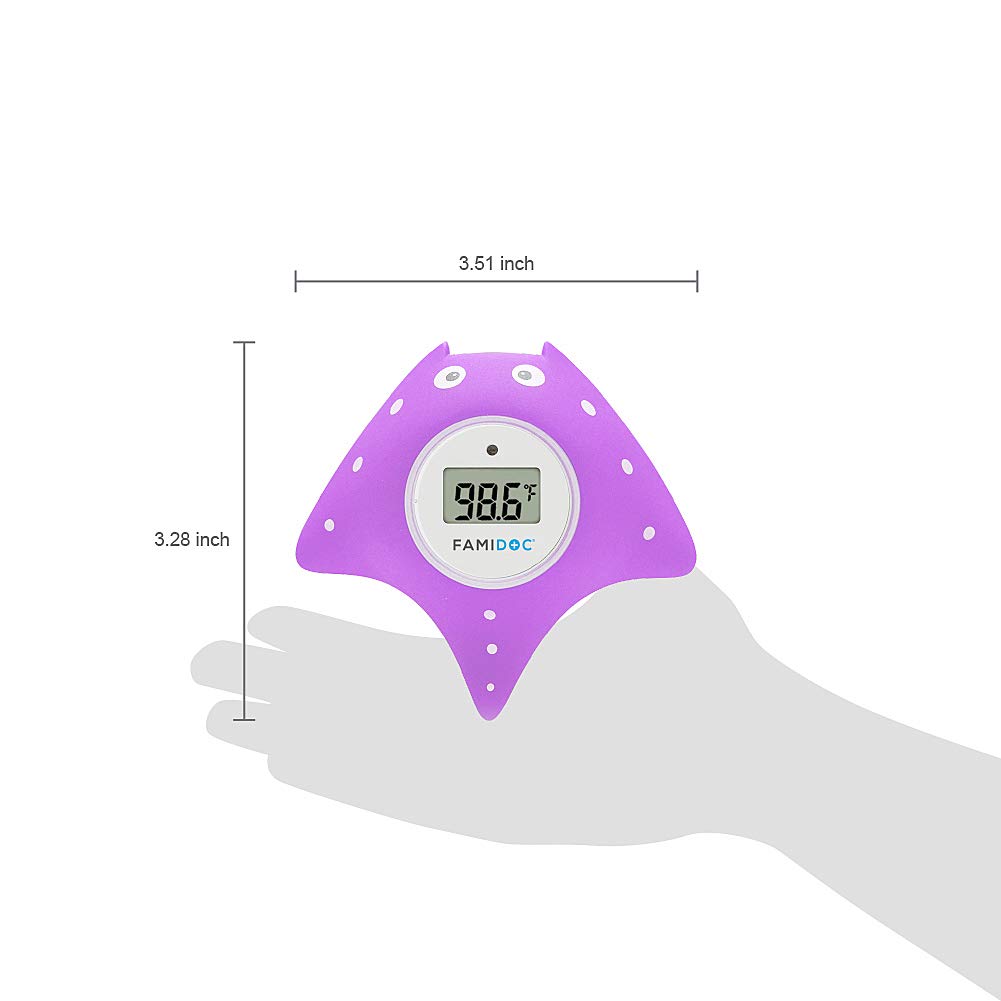
This image provides a visual representation of the thermometer's dimensions, highlighting its compact and ergonomic size.
Кепилдик жана колдоо
For warranty information, technical support, or any inquiries regarding your Famidoc FDTH-V0-22C thermometer, please refer to the contact information provided in the original product packaging or visit the official Famidoc webсайт.

This image shows the Famidoc thermometer alongside its user manual, emphasizing the availability of comprehensive product information and support.