
Introduction
This manual provides essential instructions for the setup, operation, and maintenance of your Easytry123 replacement remote control. This remote is designed to function with various ONKYO AV A/V Receiver models, including RC-745M, TX-NR1007, TX-NR807, RC-717M, RC-738M, TX-SR607, TX-SR607S, RC-742M, and TX-SR707.
Маанилүү эскертүү: As a replacement unit, this remote control may not support all advanced functions or features present on your original ONKYO remote. Its primary purpose is to provide core control over your AV receiver. Please ensure your receiver model is listed above for compatibility.
Жайгашуу
1. Батареяны орнотуу
Алыстан башкаруу пульту эки AAA батарейкасын талап кылат (кошулмага кирбейт). Аларды орнотуу үчүн төмөнкү кадамдарды аткарыңыз:
- Пульттун артындагы батарея бөлүкчөсүнүн капкагын табыңыз.
- Бөлүмдү ачуу үчүн өтмөктү басып, капкакты ылдый жылдырыңыз.
- Insert two AAA batteries, ensuring the positive (+) and negative (-) terminals align correctly with the markings inside the compartment. Incorrect insertion can prevent the remote from functioning.
- Батарея бөлүкчөсүнүн капкагын бекем чыккыча ордуна жылдырыңыз.
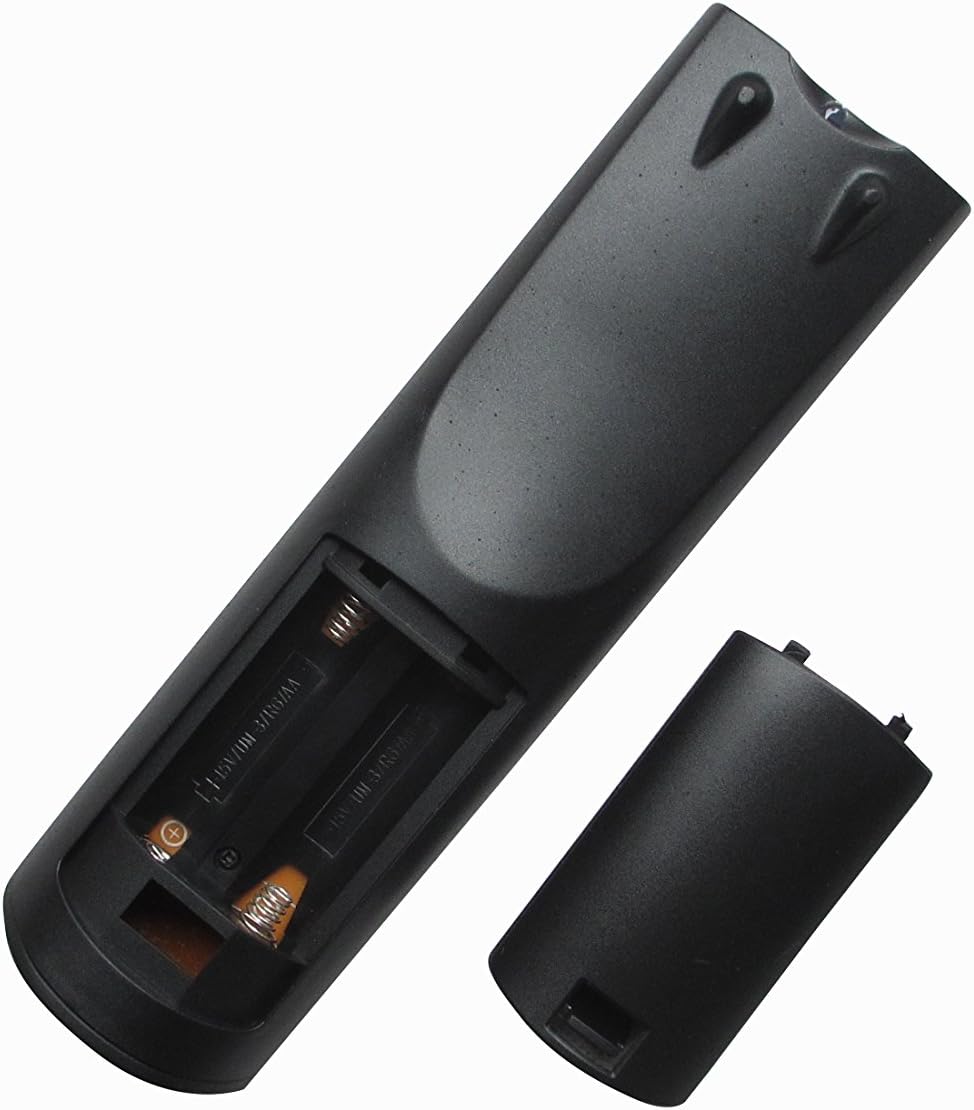
Сүрөт 1: Арткы view of the remote control with the battery compartment open, ready for battery insertion. Note the spring contacts for the negative terminals and raised contacts for the positive terminals.

Сүрөт 2: Башка view of the remote's battery compartment, illustrating the correct orientation for AAA battery placement.
2. Алгачкы колдонуу
This replacement remote control is pre-programmed for the listed ONKYO AV A/V Receiver models. No additional programming or pairing steps are typically required. Once batteries are installed, the remote should be ready for immediate use with your compatible receiver.
Point the remote control directly at your ONKYO AV A/V Receiver and press the desired function button.
Иштөө нускамалары
The Easytry123 replacement remote control provides intuitive access to the primary functions of your ONKYO AV A/V Receiver. While the exact button layout may vary slightly from your original remote, the core functions are generally mapped to standard remote control buttons.
- Күйгүзүү/өчүрүү: колдонуу КҮЧ button to turn your receiver on or off.
- Үндү көзөмөлдөө: Adjust the audio level using the VOLUME + жана Көлөмү - баскычтар.
- Киргизүүнү тандоо: Cycle through available audio/video inputs (e.g., HDMI 1, DVD, CD) using the INPUT or dedicated input selection buttons.
- Үнсүз: Temporarily silence the audio output with the БАСУУ баскычы.
- Навигация: Use the directional arrow buttons and ENTER or OK button for menu navigation on your receiver's display.
For specific advanced functions or detailed operation of your ONKYO receiver's features, please refer to your receiver's original instruction manual.
Техникалык тейлөө
Пультту тазалоо
Алыстан башкаруу пультун көрүнүшүн жана функционалдуулугун сактоо үчүн:
- Бетти жумшак, кургак чүпүрөк менен сүртүңүз.
- өжөр кир үчүн, жеңил гampкездемени суу же жумшак, абразивдүү эмес тазалоочу каражат менен сүртүңүз. Катуу химиялык заттарды же эриткичтерди колдонбоңуз.
- Avoid getting moisture into the battery compartment or any openings.
Батареяны алмаштыруу
Replace the batteries when the remote's response becomes sluggish or it stops functioning. Always replace both batteries at the same time with new AAA batteries. Do not mix old and new batteries, or different types of batteries.
Сактагыч
Эгерде алыстан башкаруу пульту көпкө чейин колдонулбаса, агып кетүүсүн жана алыстан башкаруу пульту бузулуп калышы мүмкүн болгон учурларды болтурбоо үчүн батарейкаларды алып салыңыз.
Проблемаларды чечүү
Эгерде сиз алыстан башкаруу пультуңуз менен көйгөйлөргө туш болсоңуз, төмөнкү кеңири таралган чечимдерди караңыз:
- Пульт жооп бербей жатат:
- Батареялар туура полярдуулук менен (+/-) туура салынганын текшериңиз.
- Батареяларды жаңы AAA батарейкалары менен алмаштырыңыз.
- Ensure there are no obstructions between the remote control and the ONKYO receiver's infrared sensor.
- Make sure you are within the effective range of the receiver and pointing the remote directly at it.
- Айрым функциялар иштебейт:
- As a replacement remote, it may not support all functions of your original ONKYO remote. Focus on core functions like power, volume, and input selection.
- Verify that your ONKYO receiver model is listed as compatible in the introduction section.
- Consult your ONKYO receiver's original manual for specific function details.
- Пульт үзгүлтүккө учурап иштейт:
- Бул көбүнчө батареянын кубаттуулугу аз экенин билдирет. Батареяларды алмаштырыңыз.
- Алуучуга так көрүнөөрүн камсыз кылыңыз.
Эгерде бул кадамдарды жасагандан кийин көйгөйлөр чечилбесе, кошумча жардам алуу үчүн сатуучуга кайрылыңыз.
Техникалык шарттар
| Модель номери: | RM-736M |
| Бренд: | Easytry123 |
| Шайкеш түзмөктөр: | ONKYO AV A/V Receivers (Models: RC-745M, TX-NR1007, TX-NR807, RC-717M, RC-738M, TX-SR607, TX-SR607S, RC-742M, TX-SR707) |
| Байланыш технологиясы: | Инфракызыл (IR) |
| Өзгөчө өзгөчөлүгү: | Эргономикалык дизайн |
| Колдоого алынган түзмөктөрдүн максималдуу саны: | 1 |
| Кубат булагы: | 2 x AAA Батареялар (киргизилген эмес) |
Кепилдик жана колдоо
Specific warranty information for this replacement remote control is typically provided by the seller at the time of purchase. Please refer to your purchase documentation or contact the seller directly for details regarding warranty coverage and support.
For technical assistance or inquiries not covered in this manual, please reach out to the Easytry123 customer support or the retailer from whom you purchased the product.