
Easytry123 Easytry7607
Easytry123 Replacement Remote Control User Manual
Model: Easytry7607 for Integra A/V Receivers
Introduction
This manual provides instructions for the Easytry123 Replacement Remote Control, Model Easytry7607. This remote is designed as a replacement for various Integra A/V Receiver models, including DTR-40.4, DTR-40.3, DTR-30.7, DTR-20.7, DTR-30.4, DHC-80.3, and DTR-50.3, and their corresponding original remote models like RC-833M, RC-899M, RC-838M, and RC-811M. Please read this manual carefully before use to ensure proper operation.
Жайгашуу
1. Батареяны орнотуу
Алыстан башкаруу пульту эки AAA батарейкасын талап кылат (кошулмага кирбейт). Аларды орнотуу үчүн төмөнкү кадамдарды аткарыңыз:
- Пульттун артындагы батарея отсегин табыңыз.
- Өтмөктү ылдый басып, аны ачуу үчүн батареянын капкагын ылдый жылдырыңыз.
- Оң (+) жана терс (-) терминалдары бөлүмдүн ичиндеги белгилер менен туура дал келишин камсыз кылып, эки AAA батарейкасын салыңыз.
- Батареянын капкагын бекем чыккыча ордуна жылдырыңыз.
Сүрөт 1: Back of the remote control with the battery cover removed, illustrating the battery insertion process. Note the polarity markings inside the compartment.
Маанилүү: Ensure batteries are inserted with correct polarity. Incorrect installation can damage the remote control. Do not mix old and new batteries, or different types of batteries.
Операция
Негизги функциялар
This replacement remote control operates using infrared (IR) technology. Point the remote directly at your Integra A/V Receiver. Ensure there are no obstructions between the remote and the receiver's IR sensor.

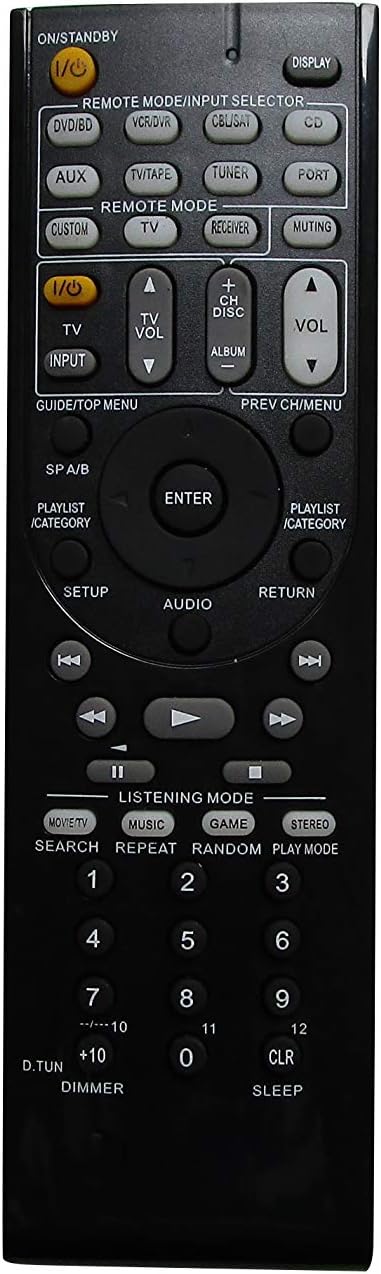
Сүрөт 2: Фронт view of the remote control, showing the layout of all buttons for various functions.
The remote features standard buttons for power, volume control, input selection, and navigation. Refer to Сүрөт 2 for the button layout. Press the corresponding button for the desired function.
Шайкештик жөнүндө эскертүүлөр
- This remote is a replacement and may not offer all the exact same features or button functions as your original Integra remote.
- It does not support programming or learning functions. Remote codes cannot be entered or modified.
- Functionality is dependent on the specific Integra A/V Receiver model. While designed for compatibility, some advanced or model-specific functions may not be supported.
Техникалык тейлөө
Тазалоо
Пультту тазалоо үчүн, аны жумшак, кургак чүпүрөк менен акырын сүртүңүз. Суюк тазалоочу каражаттарды, чачыраткычтарды же абразивдүү материалдарды колдонбоңуз, анткени алар пульттун бетине же ички компоненттерине зыян келтириши мүмкүн.
Батареяны алмаштыруу
Replace batteries when the remote's response becomes sluggish or stops working. Follow the battery installation steps outlined in the Жайгашуу section. Always replace both batteries at the same time with new AAA alkaline batteries.
Проблемаларды чечүү
- Пульт жооп бербей жатат:
- Батареялар туура полярдуулук менен туура салынганын текшериңиз.
- Эски батарейкаларды жаңы AAA щелочтуу батарейкаларына алмаштырыңыз.
- Ensure there is a clear line of sight between the remote control and the A/V receiver's IR sensor. Remove any obstructions.
- Пульт түздөн-түз ресиверге багытталганын текшериңиз.
- Айрым функциялар иштебейт:
- This is a replacement remote and may not support all functions of your original Integra remote. Refer to the Шайкештик жөнүндө эскертүүлөр in the Operation section.
- The remote does not support programming or learning functions.
- Remote feels loose or rattles:
- Батарея капкагы бекем жабылганын текшериңиз.
- If internal components feel loose, contact the seller for assistance.
Техникалык шарттар
| Бренд | Easytry123 |
| Модель номери | Easytry7607 |
| Шайкеш түзмөктөр | Integra A/V Receivers (DTR-40.4, DTR-40.3, DTR-30.7, DTR-20.7, DTR-30.4, DHC-80.3, DTR-50.3, etc.) |
| Байланыш технологиясы | Инфракызыл (IR) |
| Controller Type | Control Button |
| Батарея түрү | 2 x AAA щелочтуу батарейкалар (киргизилген эмес) |
| Түс | Кара |
| Өзгөчө өзгөчөлүк | Эргономикалык дизайн |
Кепилдик маалымат
Specific warranty details for this product are provided by the seller, Easytry123. Please refer to your purchase documentation or contact the seller directly for information regarding warranty coverage and terms.
Кардарларды колдоо
For any questions, concerns, or technical assistance not covered in this manual, please contact the seller, Easytry123, through the platform where the purchase was made. Provide your order number and a detailed description of the issue for prompt support.
Ask a question about this manual
Ask about setup, troubleshooting, compatibility, parts, safety, or missing instructions. Manuals+ will review the question and use this page’s manual context to help answer it.