
Introduction
This manual provides comprehensive instructions for the setup, operation, and maintenance of your new Easytry123 replacement remote control. This remote is designed to be compatible with various ONKYO Home Theater Systems, including models HT-R592, HT-RC330, HT-S5400, HT-S3500, HT-S5500, HT-R391, HT-R590, HT-R591, HT-S7805, and HT-S3800.
Please note that as a replacement unit, some advanced or specific functions of your original remote may not be fully supported. Ensure your ONKYO system model is listed above for optimal compatibility.
Продукт бүттүview
The Easytry123 replacement remote control features an ergonomic design for comfortable handling and intuitive button layout for ease of use. It operates using infrared (IR) technology to communicate with your ONKYO Home Theater System.
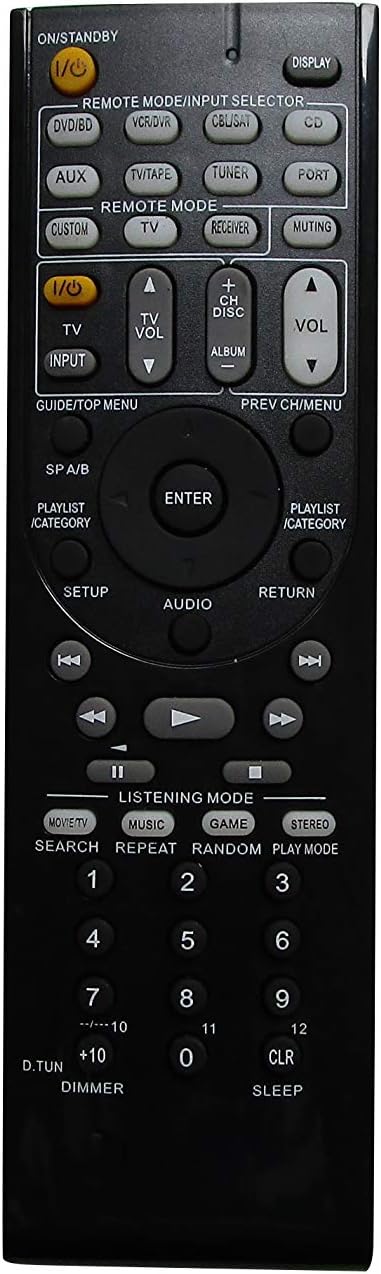
1-сүрөт: Фронт view of the remote control, displaying the power button, input selectors, volume controls, navigation, and various function buttons.

2-сүрөт: Артка view of the remote control, highlighting the battery compartment located at the bottom.
Жайгашуу
Батарея орнотуу
Алыстан башкаруу пульту эки AAA батарейкасын талап кылат (кошулмага кирбейт). Аларды орнотуу үчүн төмөнкү кадамдарды аткарыңыз:
- Алыстан башкаруу пультунун арткы бетиндеги батарея бөлүмүн табыңыз (2-сүрөттү караңыз).
- Батарея уясынын капкагын ылдый жылдырыңыз жана аны алып салыңыз.
- Оң (+) жана терс (-) терминалдары бөлүмдүн ичиндеги белгилер менен туура дал келишин камсыз кылып, эки AAA батарейкасын салыңыз.
- Батарея бөлүкчөсүнүн капкагын бекем чыккыча ордуна жылдырыңыз.
Маанилүү: Always use fresh batteries and replace both batteries at the same time. Do not mix old and new batteries or different types of batteries.
Иштөө нускамалары
This section details the basic functions and operation of your replacement remote control.
Негизги функциялар
- Power (I/O STANDBY): Press this button to turn your ONKYO system on or off (standby mode).
- Көлөмү (+/-): Adjusts the master volume level of your ONKYO system.
- Үнсүз: Аудио чыгышынын үнүн өчүрөт же ачат.
- Input Selector (DVD/BD, VCR/DVR, CBL/SAT, CD, AUX, TV/TAPE, TUNER, PORT): Selects the desired input source connected to your ONKYO system.
- Навигация баскычтары (Өйдө, Төмөн, Солго, Оңго, ENTER): Used to navigate menus and confirm selections on your ONKYO system's display.
- КАЙТУУ: Мурунку менюга же экранга кайтат.
- КӨРСӨТҮҮ: Toggles display information on your ONKYO system.
Remote Mode Selection
The remote features dedicated buttons to switch between different control modes:
- REMOTE MODE/INPUT SELECTOR: These buttons (e.g., DVD/BD, TV, CD, TUNER) function as both input selectors and remote mode activators. Pressing one will switch the remote to control that specific device type, if programmed or compatible.
- АЛУУЧУ: Activates the remote to control the ONKYO receiver functions.
- TV: Activates the remote to control basic TV functions (e.g., power, volume, channel), if compatible and programmed.
Audio/Video Control
- PLAY, PAUSE, STOP, FAST FORWARD, REWIND, SKIP: Standard playback control buttons for compatible media devices connected to your ONKYO system.
- LISTENING MODE (MOVIE/TV, MUSIC, GAME, STEREO): Selects different audio listening modes for optimized sound experience.
- ЖАЙГАШУУ: Accesses the setup menu of your ONKYO system.
- АУДИО: Cycles through audio settings or modes.
Техникалык тейлөө
Алыстан башкаруу пультуңуздун узак мөөнөттүү жана туура иштешин камсыз кылуу үчүн, төмөнкү техникалык тейлөө көрсөтмөлөрүн аткарыңыз:
- Тазалоо: Wipe the remote control regularly with a soft, dry cloth. Do not use liquid cleaners, abrasive pads, or chemical solvents, as these can damage the surface or internal components.
- Батареяны алмаштыруу: Replace batteries promptly when the remote's performance degrades. Remove batteries if the remote will not be used for an extended period to prevent leakage.
- Сактагыч: Пультту салкын, кургак жерде, күндүн түз тийген нурунан, өтө жогорку температурадан жана жогорку нымдуулуктан алыс сактаңыз.
- Колдонуу: Avoid dropping the remote control or subjecting it to strong impacts, which can damage internal circuitry.
Проблемаларды чечүү
Эгер алыстан башкаруу пультуңузда көйгөйлөр пайда болсо, төмөнкү жалпы көйгөйлөрдү жана чечимдерди караңыз:
- Пульт жооп бербей жатат:
- Батареялар туура полярдуулук менен (+/-) туура салынганын текшериңиз.
- Батареяларды жаңыларына алмаштырыңыз.
- Ensure there are no obstructions between the remote control and the ONKYO system's infrared sensor.
- Confirm you are within the effective operating range and pointing the remote directly at the system.
- Айрым функциялар иштебейт:
- Verify that the remote is in the correct mode (e.g., RECEIVER mode for receiver functions, TV mode for TV functions).
- As a replacement remote, some specific or advanced functions of the original ONKYO remote may not be supported. Refer to your ONKYO system's original manual for specific function compatibility.
- Пульт үзгүлтүккө учурап иштейт:
- Бул көбүнчө батареянын кубаттуулугу аз экенин билдирет. Батареяларды алмаштырыңыз.
- Ensure the remote's infrared emitter is clean and free from dust or debris.
Техникалык шарттар
| Бренд | Easytry123 |
| Шайкеш түзмөктөр | ONKYO Home Theater Systems (HT-R592, HT-RC330, HT-S5400, HT-S3500, HT-S5500, HT-R391, HT-R590, HT-R591, HT-S7805, HT-S3800) |
| Байланыш технологиясы | Инфракызыл (IR) |
| Controller Type | Control Button |
| Өзгөчө өзгөчөлүк | Эргономикалык дизайн |
| Power Source | 2 x AAA Батареялар (киргизилген эмес) |
| Өндүрүүчү | Easytry123 |
Кепилдик жана колдоо
Specific warranty information for this Easytry123 replacement remote control is not provided in the product details. For any support inquiries or further assistance, please contact the seller directly through your purchase platform.