
1. Киришүү
This document provides comprehensive instructions for the Easytry123 Replacement Remote Control. This remote is designed to function as a substitute for the original remote controls of various ONKYO Home Theater System models. Please review this manual to ensure proper setup and operation.
While this replacement remote is designed for broad compatibility, some advanced or specific functions present on your original remote may not be fully supported. Refer to the original ONKYO system manual for detailed functions of your specific home theater unit.
2. Шайкеш моделдер
This Easytry123 Replacement Remote Control is compatible with the following ONKYO Home Theater System models:
- ONKYO HT-R670
- ONKYO HT-S6200
- ONKYO HT-R570
- ONKYO HT-S5200
- ONKYO HT-S5200S
- ONKYO HT-S7100
- ONKYO HT-R960
- ONKYO HT-S9100THX
- ONKYO HT-R560
- ONKYO HT-R667
If your specific ONKYO model is not listed above, this replacement remote may not be fully compatible.
3. Орнотуу
3.1 Батареяны орнотуу
- Пульттун артындагы батарея отсегин табыңыз.
- Батарея бөлүмүнүн капкагын ачуу үчүн ылдый же сыртка жылдырыңыз.
- Эки (2) AAA батарейкасын (кошулмага кирбейт) салып, оң (+) жана терс (-) терминалдары бөлүмдүн ичиндеги белгилер менен туура дал келгенин текшериңиз.
- Батарея бөлүмүнүн капкагын бекем чыкылдаган үн чыкканга чейин кайра ордуна жылдырып, кайра ордуна коюңуз.
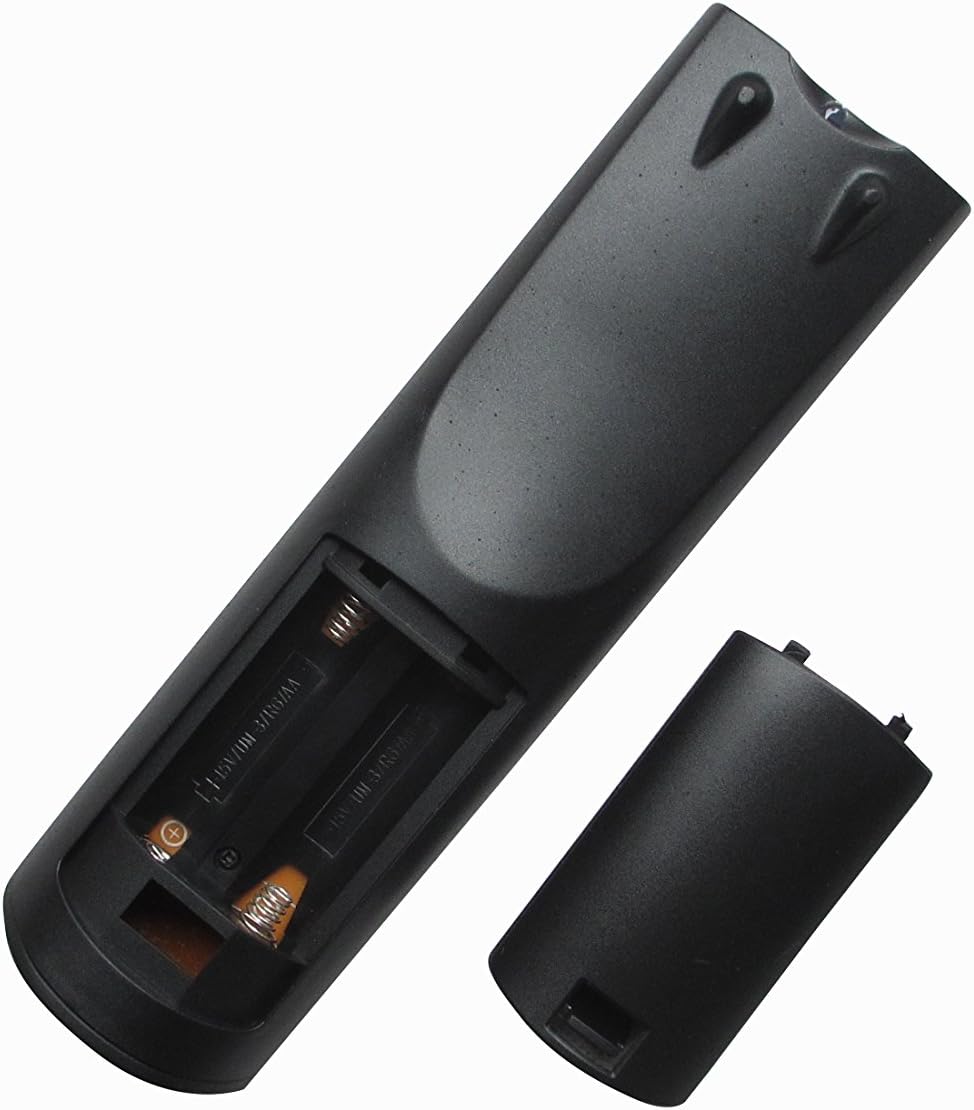
1-сүрөт: Артка view of the remote control with the battery compartment open, illustrating the correct orientation for AAA battery insertion.
The remote control does not require any programming. Once batteries are installed, it is ready for use with compatible ONKYO Home Theater Systems.
4. Иштөө нускамалары
4.1 Алыстан башкаруунун схемасы

Сүрөт 2: Алдыңкы view of the Easytry123 replacement remote control, displaying the arrangement and labeling of all operational buttons.
4.2 Негизги функциялар
Point the remote control directly at the infrared receiver on your ONKYO Home Theater System. Ensure there are no obstructions between the remote and the system.
- КҮТҮҮ РЕЖИМИНДЕ: Powers the system on or puts it into standby mode.
- INPUT SELECTOR (e.g., DVD, CD, TUNER, AUX): Керектүү аудио/видео киргизүү булагын тандайт.
- VOL +/-: Башкы үн деңгээлин тууралайт.
- Үнсүз: Аудионун үнүн басуу функциясын өчүрөт.
- NAVIGATION (Up, Down, Left, Right, ENTER): Менюларда багыттоо жана тандоолорду ырастоо үчүн колдонулат.
- КАЙТУУ: Мурунку менюга же экранга кайтат.
- PLAY/PAUSE, STOP, SKIP (<<, >>): Медиа ойнотуу функцияларын башкарат.
- САНДЫК ТҮЙМӨЛӨР (0-9): Used for direct track selection, radio station tuning, or inputting numerical values.
- КӨРСӨТҮҮ: Changes the information displayed on the system's screen.
- АЛЫСКЫ РЕЖИМ: Switches the remote's operating mode for controlling different components (e.g., TV, DVD). Note that full functionality for external devices may vary.
5. Техникалык тейлөө
- Тазалоо: To clean the remote, gently wipe it with a soft, dry cloth. Do not use liquid cleaners, solvents, or abrasive materials, as these can damage the remote's surface or internal components.
- Батареяны алмаштыруу: Replace batteries when the remote's response becomes sluggish or stops functioning. Always replace both batteries simultaneously with new AAA batteries. Do not mix old and new batteries, or different types of batteries.
- Сактагыч: If the remote will not be used for an extended period, remove the batteries to prevent leakage and potential damage. Store the remote in a cool, dry place away from direct sunlight.
6. Кыйынчылыктарды
- Пульт жооп бербей жатат:
- Батареялар туура полярдуулук менен (+/-) туура салынганын текшериңиз.
- Батареяларды жаңыларына алмаштырыңыз.
- Ensure there are no obstructions between the remote and the ONKYO system's infrared receiver.
- Confirm you are within the effective range and pointing the remote directly at the system.
- Чектелген функциялар:
- This is a replacement remote; some advanced or specific functions of your original ONKYO remote may not be replicated.
- Ensure the remote is in the correct 'REMOTE MODE' if applicable for controlling different devices.
- Verify your ONKYO system model is listed in the 'Compatible Models' section of this manual.
- Баскычтар жабышчаак же жооп бербей жатат:
- This may indicate internal damage or dirt. Do not attempt to disassemble the remote.
- Ensure the remote is kept clean and dry.
7. Техникалык шарттар
| Өзгөчөлүк | Description |
|---|---|
| Бренд | Easytry123 |
| Байланыш технологиясы | Инфракызыл (IR) |
| Шайкеш түзмөктөр | ONKYO Home Theater Systems (specific models listed in Section 2) |
| Колдоого алынган түзмөктөрдүн максималдуу саны | 1 (controls the primary ONKYO system) |
| Өзгөчө өзгөчөлүк | Эргономикалык дизайн |
| Power Source | 2 x AAA Батареялар (киргизилген эмес) |
8. Кепилдик жана колдоо
Specific warranty information for this Easytry123 replacement remote control is not provided in the product details. For any warranty claims, technical support, or further inquiries, please contact the seller directly through your purchase platform.
Колдоо суроо-талаптары үчүн сатып алганыңызды тастыктаган документти сактап коюңуз.