
Introduction
The Hotone Jogg is a compact, low-latency 1-in/2-out USB audio interface pedal designed to integrate your pedalboard with computer-based recording setups. It features high-headroom 24-bit conversion and supports 44.1kHz/48kHz sample rates for high-quality audio. Connectivity includes a 1/4-inch hi-Z instrument input, 1/4-inch unbalanced stereo outputs, an auxiliary input, a headphone output, and an XLR balanced output. The Jogg also provides a Gain knob for input level adjustment and an Output knob for overall output control. An activation code for Hotone's VStomp amp modeling software is included.
Продукт өзгөчөлүктөрү
- 1-in/2-out USB Audio Interface Pedal with 24-bit AD/DA conversion.
- Supports 44.1kHz/48kHz Sampling Rates for Mac/PC/iOS/Android devices.
- Compact and durable stompbox design.
- Features a 1/4-inch hi-Z instrument input.
- Includes 1/4-inch unbalanced stereo outputs.
- Dedicated auxiliary input and headphone output.
- XLR balanced output for professional connections.
- Adjustable Gain knob (up to +12dB) and Output level knob.
- Comes with an activation code for Hotone VStomp amp modeling software.
Жайгашуу
1. Connecting the Jogg Pedal
The Hotone Jogg is designed for easy integration into your audio setup. Follow these steps to connect your device:
- Кубат туташуу: Connect the Jogg to a 9V DC power supply (not included) via the DC 9V input. Alternatively, connect the Jogg to your computer using the provided USB-C cable for bus power.
- Аспап киргизүү: Plug your instrument (e.g., guitar) into the 1/4-inch HI-Z input on the front panel.
- Аудио чыгаруу: Connect your monitoring speakers or headphones to the 1/4-inch unbalanced stereo outputs (OUT R, OUT L) or the dedicated headphone output. For balanced output, use the XLR OUT.
- Көмөкчү киргизүү: Use the AUX IN to connect external audio sources like a smartphone or media player.
- USB туташуу: Connect the Jogg to your computer (Mac/PC) or mobile device (iOS/Android) using the USB-C port. This enables audio transmission and bus power.

1-сүрөт: Жалпысынан view of the Hotone Jogg USB Audio Interface Pedal.
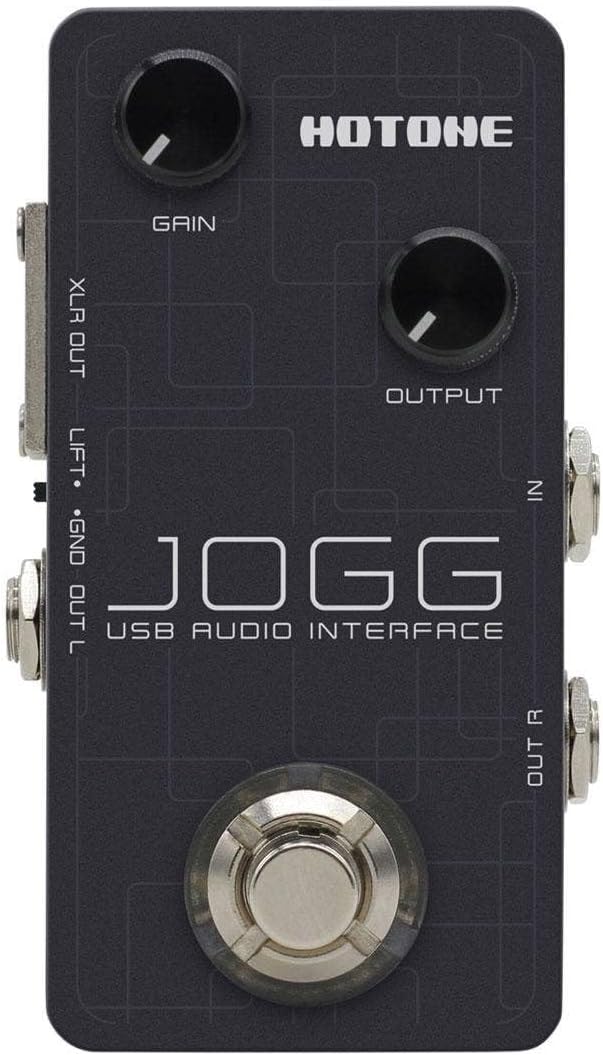
Figure 2: Top panel showing Gain and Output knobs, and input jacks.

Figure 3: Rear panel with USB, DC 9V, AUX IN, and PHONES connections.

4-сүрөт: Каптал view displaying the XLR balanced output.

5-сүрөт: Каптал view showing the 1/4-inch unbalanced stereo outputs (OUT R, OUT L).
2. Программалык камсыздоону орнотуу
For optimal performance and access to included features, ensure you install the necessary drivers and software:
- Айдоочулар: Visit the official Hotone website to download and install the latest USB audio drivers for your operating system (Mac, PC, iOS, Android).
- VStomp Software: Use the provided activation code to download and register Hotone's VStomp amp modeling software. Follow the on-screen instructions for installation.
Иштөө нускамалары
1. Киргизүү күчүн тууралоо
The Jogg features a Gain knob to control the input level of your instrument. Rotate the knob clockwise to increase gain and counter-clockwise to decrease it. Adjust this to achieve a strong signal without clipping (distortion).
2. Controlling Output Level
The Output knob controls the overall output volume of the Jogg. Adjust this to a comfortable listening level for your speakers or headphones.
3. Monitoring Your Audio
Connect headphones to the PHONES output for direct monitoring of your input signal and playback from your computer. Adjust the Output knob to control the headphone volume.
4. Using VStomp Software
Once VStomp is installed and registered, launch the software on your computer. The Jogg will act as the hardware interface, allowing you to utilize VStomp's amp modeling and effects. Refer to the VStomp user manual for detailed instructions on software operation.
Техникалык тейлөө
- Тазалоо: Use a soft, dry cloth to clean the exterior of the Jogg. Avoid abrasive cleaners or solvents.
- Сактагыч: Колдонулбаган учурда педалды салкын, кургак жерде, күндүн түз нурунан жана өтө жогорку температурадан алыс сактаңыз.
- Колдонуу: Handle the pedal with care to prevent damage to knobs, jacks, and internal components.
Проблемаларды чечүү
- Кубат жок: Ensure the USB-C cable is securely connected to both the Jogg and your computer/power source. If using a DC adapter, verify it is the correct voltage (9V) and polarity.
- Үн киргизүү жок: Check all instrument and microphone connections. Verify the Gain knob is adjusted appropriately. Ensure the correct input device is selected in your computer's audio settings or DAW.
- Үн чыгышы жок: Check speaker/headphone connections. Adjust the Output knob. Verify the correct output device is selected in your computer's audio settings or DAW.
- Кечирүү маселелери: Ensure you have installed the latest drivers from the Hotone website. Adjust buffer size settings in your DAW to a lower value (if your system can handle it).
- Software Not Recognizing Jogg: Reinstall the USB drivers. Ensure the Jogg is connected and powered on before launching your DAW or VStomp software.
Техникалык шарттар
| Өзгөчөлүк | Деталь |
|---|---|
| Бренд | HOTONE |
| Модел | Jogg |
| Type | USB Audio Interface Педалы |
| AD / DA айландыруу | 24-бит |
| Sampling тарифтер | 44.1кГц / 48кГц |
| Киргизүүлөр | 1 x 1/4-inch Hi-Z Instrument Input, 1 x Auxiliary Input |
| Чыгуулар | 2 x 1/4-inch Unbalanced Stereo Outputs, 1 x Headphone Output, 1 x XLR Balanced Output |
| Байланыш технологиясы | USB-C (Bus Powered) |
| Шайкеш түзмөктөр | Laptop, Personal Computer, iOS, Android |
| Колдоого алынган программалык камсыздоо | VStomp amp modeling software |
| Элемент Салмагы | 10.4 унция |
Кепилдик жана колдоо
For information regarding product warranty, technical support, and service, please refer to the official Hotone webсайтка же түздөн-түз кардарларды тейлөөгө кайрылыңыз. Сатып алуу квитанциясын кепилдик дооматтары үчүн сатып алуунун далили катары сактаңыз.
Official Hotone Webсайт: hotoneaudio.com