
1. Продукт бүтүп калдыview
The TP-Link Archer T4U Plus is an AC1300 Dual Band Wireless USB Adapter designed to provide high-speed Wi-Fi connectivity for desktop computers. It supports the 802.11ac Wi-Fi standard, offering speeds of up to 867 Mbps on the 5 GHz band and 400 Mbps on the 2.4 GHz band. Equipped with dual high-gain antennas and a USB 3.0 interface, it aims to enhance wireless range and data transfer efficiency.

The TP-Link Archer T4U Plus USB WiFi Adapter, featuring two high-gain antennas and a USB 3.0 cable for connection to a computer.
2. Пакеттин мазмуну
Пакетиңизде төмөнкү заттар бар экенин текшериңиз:
- AC1300 Dual Antennas High-Gain Wireless USB Adapter (Archer T4U Plus)
- 1 метрлик USB 3.0 кабели
- Ыкчам орнотуу колдонмосу
- Ресурстук CD (драйверлер үчүн)
3. Орнотуу нускамалары
3.1 Аппараттык камсыздоону орнотуу
- Адаптерди таңгактан чыгаруу: Carefully remove the Archer T4U Plus adapter and its USB cable from the packaging.
- USB кабелин туташтыруу: Connect one end of the provided 1-meter USB 3.0 cable to the USB 3.0 port on the Archer T4U Plus adapter.
- Компьютерге туташуу: Plug the other end of the USB 3.0 cable into an available USB 3.0 port on your desktop computer. For optimal performance, use a USB 3.0 port (typically blue inside).
- Адаптерди жайгаштырыңыз: Place the adapter in a location that allows for good signal reception, ideally away from obstructions. The adjustable antennas can be rotated and angled for best performance.

The Archer T4U Plus adapter shown connected to a USB port via its included cable, illustrating its desktop placement.
3.2 Драйверди орнотуу
The Archer T4U Plus requires drivers to function correctly. Drivers can be installed via the included Resource CD or by downloading them from the TP-Link webсайт.
For Windows Operating Systems (Windows 11/10/8.1/8/7/XP):
- Ресурстук CDди колдонуу: Insert the Resource CD into your computer's CD-ROM drive. Follow the on-screen instructions to install the drivers.
- Downloading from TP-Link Webсайт: If your computer lacks a CD-ROM drive, visit the official TP-Link support website, search for "Archer T4U Plus", and download the latest drivers for your specific Windows version. Run the downloaded installer and follow the prompts.
- Automatic Installation (Windows 10/11): In some cases, Windows 10 or 11 may automatically detect and install the necessary drivers upon connecting the adapter. Verify installation in Device Manager under "Network Adapters".
For Mac OS (10.15 and earlier):
- Downloading from TP-Link Webсайт: Расмий TP-Link колдоо бөлүмүнө баш багыңыз website, search for "Archer T4U Plus", and download the latest drivers for your Mac OS version.
- Драйверлерди орнотуу: Жүктөлгөндү ачыңыз file and follow the installation instructions. You may need to restart your computer after installation.
4. Иштөө нускамалары
4.1 Зымсыз тармакка туташуу
Once the drivers are successfully installed, you can connect to a Wi-Fi network:
- Тармак орнотууларына кирүү:
- Windows: Система тактасындагы Wi-Fi сөлөкөтүн чыкылдатыңыз (экрандын төмөнкү оң бурчунда).
- MacOS: Click the Wi-Fi icon in the menu bar (top-right corner of the screen).
- Тармакты тандоо: Жеткиликтүү зымсыз тармактардын тизмеси пайда болот. Каалаган тармакты (SSID) тандаңыз.
- Сырсөздү киргизиңиз: Эгер суралса, тармагыңыз үчүн Wi-Fi сырсөзүн (коопсуздук ачкычын) киргизиңиз.
- Туташуу: Зымсыз байланышты түзүү үчүн "Туташуу" баскычын чыкылдатыңыз.
4.2 Dual Band операциясы
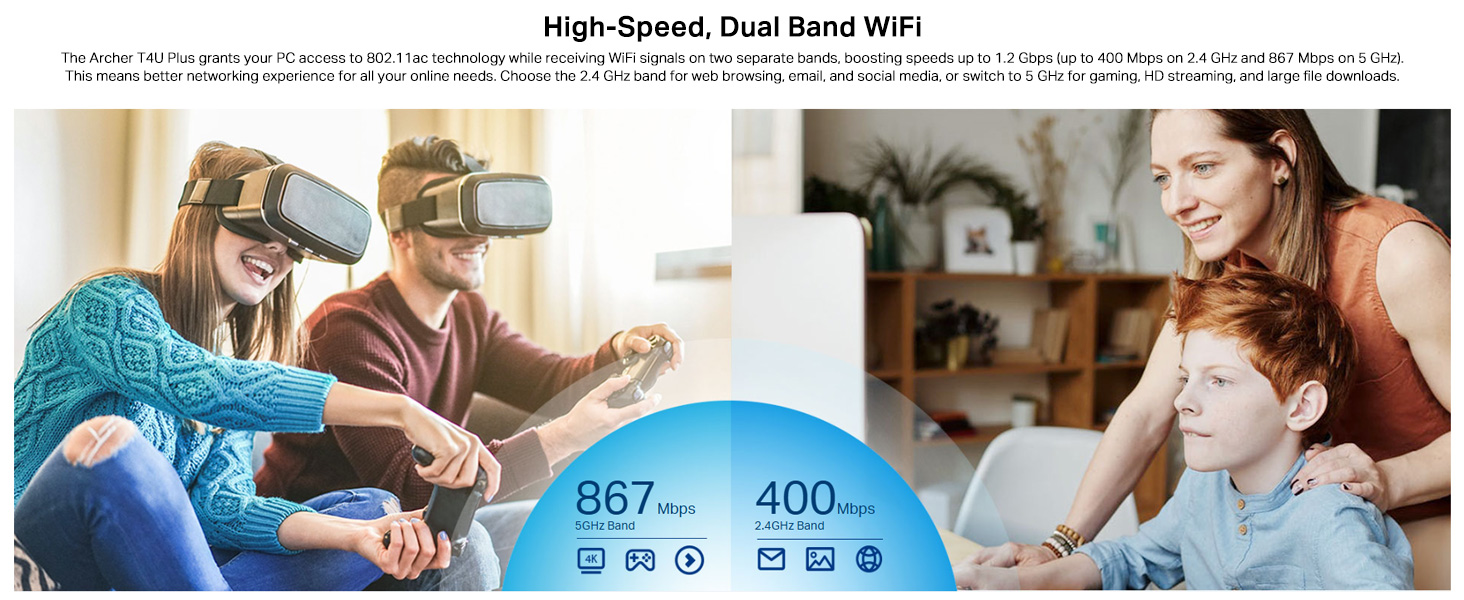
The Archer T4U Plus supports both 2.4 GHz and 5 GHz Wi-Fi bands. You can choose the band that best suits your needs:
- 2.4 ГГц диапазону: Offers broader coverage and better penetration through walls, suitable for general internet use like web серептөө жана электрондук почта.
- 5 ГГц диапазону: Provides faster speeds and less interference, ideal for bandwidth-intensive activities such as online gaming, HD video streaming, and large file которуулар.
Your router may broadcast separate SSIDs for each band (e.g., "MyWiFi_2.4GHz" and "MyWiFi_5GHz"). Select the appropriate network from the available list.

An image illustrating the dual-band capabilities of the adapter, showing 867 Mbps on the 5GHz band for activities like 4K streaming and gaming, and 400 Mbps on the 2.4GHz band for web серептөө жана электрондук почта.
4.3 Enhanced Coverage and MU-MIMO
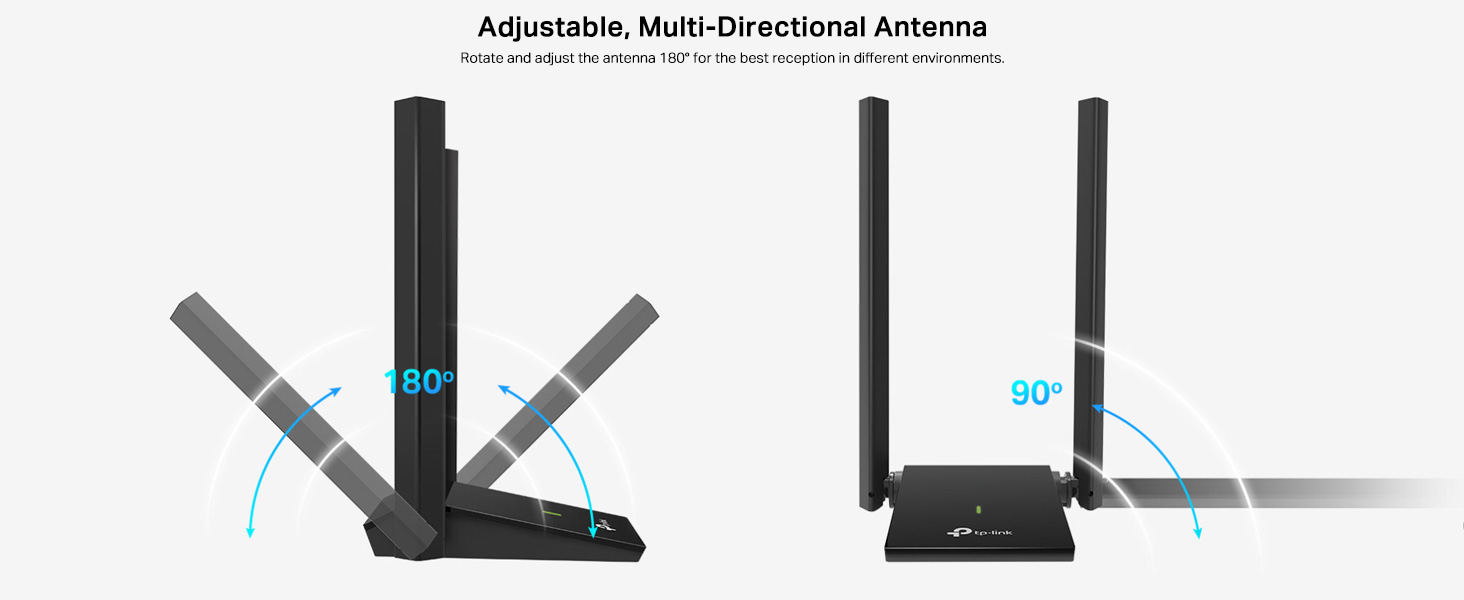
The dual high-gain antennas are designed to improve signal transmission and reception, extending your wireless coverage. For optimal performance, adjust the antennas to point towards your wireless router.
Illustrates the flexibility of the adapter's antennas, which can be rotated 180 degrees and adjusted 90 degrees for optimal signal reception.
The adapter also supports MU-MIMO technology. When used with a compatible MU-MIMO router, this technology allows the adapter to communicate with multiple devices simultaneously, improving network throughput and efficiency.
A visual representation of MU-MIMO technology, showing how the Archer T4U Plus adapter, when paired with a compatible router, can communicate with multiple devices simultaneously for improved network efficiency.
5. Техникалык тейлөө
- Айдоочуларды жаңыртыңыз: TP-Link колдоосун дайыма текшерип туруңуз webоптималдуу иштөөнү жана шайкештикти камсыз кылуу үчүн эң акыркы драйверлер үчүн сайт.
- Аппаратты тазалоо: Адаптерди тазалоо үчүн жумшак, кургак чүпүрөктү колдонуңуз. Суюк тазалоочу каражаттарды же эриткичтерди колдонуудан алыс болуңуз.
- Туура жайгаштыруу: Ensure the adapter is placed in a well-ventilated area and not covered, to prevent overheating.
- Коопсуз туташуу: Ensure the USB cable is securely connected to both the adapter and your computer to prevent intermittent disconnections.
6. Кыйынчылыктарды
- Wi-Fi туташуусу жок:
- Ensure the adapter is properly connected to a USB port.
- Verify that the drivers are correctly installed. Check Device Manager (Windows) or System Information (Mac OS) for the adapter's status.
- Компьютериңизди жана роутерди өчүрүп күйгүзүңүз.
- Башка USB портуна туташып көрүңүз.
- Жай Wi-Fi ылдамдыгы:
- Ensure you are connected to the 5 GHz band if available and your router supports it, for faster speeds.
- Сигнал жакшыраак кабыл алынышы үчүн адаптердин антенналарын тууралаңыз.
- Адаптер менен роутериңиздин ортосундагы физикалык тоскоолдуктарды азайтыңыз.
- Башка түзмөктөрдөн (мисалы, микротолкундуу мештер, зымсыз телефондор) тоскоолдуктарды текшериңиз.
- Адаптериңиздин драйверлерин эң акыркы версияга жаңыртыңыз.
- Тез-тез өчүрүүлөр:
- USB кабелинин бошоп калбагандыгын текшериңиз.
- Башка USB портун, жакшысы USB 3.0 портун колдонуп көрүңүз.
- Жаңыртылган драйверлерди текшериңиз.
- Адаптер ысып кетпегенин текшериңиз.
- Драйверди орнотуу маселелери:
- Disable any antivirus or firewall software temporarily during installation.
- Download drivers directly from the official TP-Link webсиздин конкреттүү операциялык системаңыз үчүн сайт.
- For Linux users, specific driver installation steps may be required, often involving command-line instructions. Refer to community forums or TP-Link's support for detailed guidance.
7. Техникалык шарттар
| Өзгөчөлүк | Description |
|---|---|
| Бренд | TP-Link |
| Модель номери | Archer T4U Plus |
| Аппараттык интерфейс | USB 3.0 |
| Зымсыз стандарт | 802.11ac |
| Маалыматтарды өткөрүү ылдамдыгы | 1300 Мбит/с (5 ГГц жыштыкта 867 Мбит/с, 2.4 ГГц жыштыкта 400 Мбит/с) |
| Антенналар | Кош жогорку күчөткүчтүү 5dBi антенналар |
| Операциялык системалар | Windows 11/10/8.1/8/7/XP, Mac OS 10.15 and earlier |
| Өлчөмдөрү (L x W x Y) | 8.4L x 15.6W x 1.9H Сантиметр |
| Элемент Салмагы | 100 грамм |
| Түс | Кара |
8. Кепилдик жана техникалык колдоо
8.1 Кепилдик маалыматы
Бул продукт менен келет 3 жылдык өндүрүүчүнүн кепилдиги. Кепилдик дооматтары үчүн сатып алганыңыздын далилин сактап коюңуз.
8.2 Техникалык колдоо
For technical assistance, driver downloads, or further inquiries, please contact TP-Link support:
- TP-Link India Private Limited
- Дарек: Green Industrial Park, Dongri Pada, Poman, Kaman-Bhiwandi Road, Vasai East, Palghar, Махараштра – 401208
- Акысыз байланыш: 1800 2094 168
- Электрондук почта колдоо: support.in@tp-link.com
- Өндүрүүчү: TP-Link корпорациясы, Түштүк имарат, №5 Кеюань жолу, Борбордук зона, Илим жана технология паркы, Наньшань, Шэньчжэнь, Кытай Эл Республикасы
For the most up-to-date support information and resources, please visit the official TP-Link webсайт.