Продукт бүттүview
The Sunbuck AV-MP326BT is a versatile 2-channel stereo amplifier designed for home audio systems. It features multiple input options, including 4-way microphone inputs, USB disk, and SD card support, along with Bluetooth connectivity for wireless audio streaming. The amplifier also includes an integrated EQ for sound customization and an LED display for easy operation.
Негизги өзгөчөлүктөр төмөнкүлөрдү камтыйт:
- Support for 4-way microphone input
- Таза LED дисплей
- 2-track output with integrated EQ
- Reverberation, fine-tuning, and balance controls
- SD card and USB interface for media playback
- Bluetooth байланышы

Сүрөт 1: Алдыңкы view of the Sunbuck AV-MP326BT ampкөтөргүч, көрсөтүүчүasing its control panel and inputs.
Коопсуздук нускамалары
Бул түзмөктү иштетүүдөн мурун бардык коопсуздук көрсөтмөлөрүн окуп чыгып, түшүнүп алыңыз. Бул көрсөтмөлөрдү аткарбоо электр тогуна урунууга, өрткө же түзмөктүн бузулушуна алып келиши мүмкүн.
- Электр камсыздоо: Бул amplifier operates on 220V-240V AC, 50/60Hz. Ensure your power source matches these requirements. Do not connect to a different voltage.
- Вентиляция: Ensure adequate ventilation around the unit. Do not block ventilation openings. Avoid placing the amplifier in enclosed spaces or on soft surfaces that may impede airflow.
- Нымдуулук: Аппаратты жамгырдын, нымдуулуктун, тамчылаган суюктуктун же чачырандынын таасирине дуушар кылбаңыз. Аппараттын үстүнө вазалар сыяктуу суюктук толтурулган буюмдарды койбоңуз.
- Жылуулук: Аппаратты радиаторлор, жылуулук регистрлери, мештер же башка аппараттар (анын ичинде) сыяктуу жылуулук булактарынан алыс кармаңыз. ampкөтөргүчтөр) жылуулукту пайда кылуучу.
- Тейлөө: Бул продуктуну өзүңүз тейлөөгө аракет кылбаңыз. Бардык тейлөө кызматтарын квалификациялуу тейлөө кызматкерлерине тапшырыңыз.asing сизди кооптуу көлөмгө дуушар кылышы мүмкүнtage же башка коркунучтар.
- Тазалоо: Unplug the unit from the power outlet before cleaning. Use a dry cloth for cleaning. Do not use liquid cleaners or aerosol cleaners.
- Жайгашкан жери: Түзмөктү кулап кетпеши үчүн, аны туруктуу, тегиз жерге коюңуз.

Figure 2: Detail of the power switch and handle, showing the "POWER ON/OFF" label. Always ensure the unit is off before connecting or disconnecting cables.
Жайгашуу
Follow these steps to set up your Sunbuck AV-MP326BT ampөмүр берүүчү:
- Жайгашкан жери: кой amplifier on a stable, flat surface with adequate ventilation space around it.
- Динамик туташуу: Connect your speakers to the "SPEAKER SYSTEM" terminals on the rear panel. Ensure correct polarity (+ to + and - to -). This amplifier supports speakers with an impedance of 4 to 16 ohms.
- Аудио киргизүү туташуу: Connect your audio sources (e.g., CD player, DVD player, TV) to the "AUDIO INPUT" RCA jacks (L/R) on the rear panel. There are two sets of inputs labeled A and B.
- Микрофон туташуу: If using microphones, connect them to the MIC1, MIC2, MIC3, or MIC4 inputs on the front panel.
- FM антеннасы: Connect the FM antenna to the "FM ANT" terminal on the rear panel for radio reception.
- Кубат туташуу: камсыз кылуу amplifier's power switch is in the OFF position. Connect the power cord to the "POWER SOURCE 220V-240V 50Hz" input on the rear panel, then plug the other end into a suitable wall outlet.
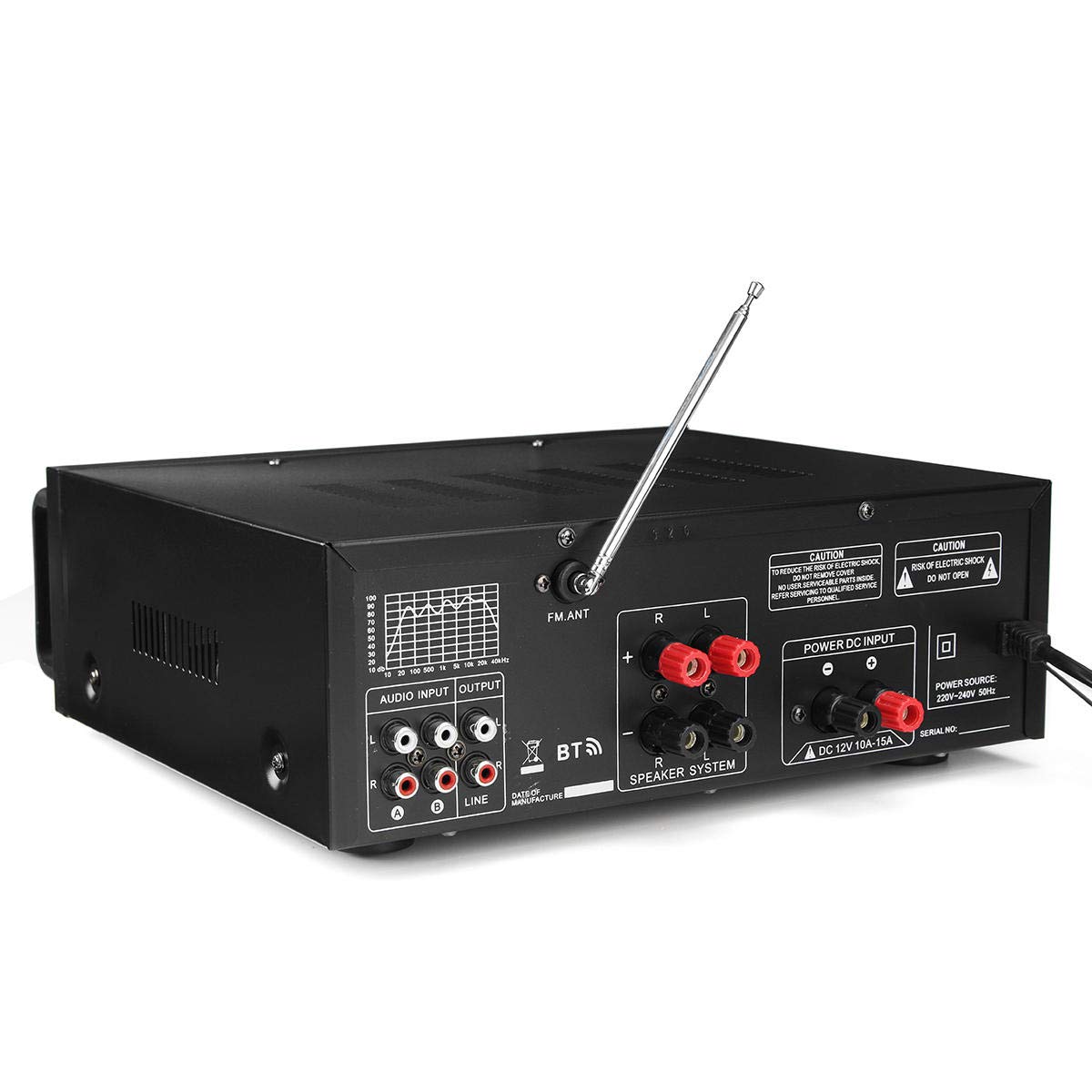
Figure 3: Rear panel connections, including speaker terminals, audio inputs, and power input.

4-сүрөт: Детальдуу view of the "AUDIO INPUT" (A, B) and "OUTPUT" (LINE) RCA jacks.
Иштөө нускамалары
This section details the operation of your amplifier's various functions.
Күйгүзүү/өчүрүү
- Күйгүзүү үчүн amplifier, press the "POWER" switch on the front panel to the ON position. The LED display will illuminate.
- өчүрүү үчүн amplifier, press the "POWER" switch to the OFF position.
Микрофонду башкаруу
- MIC VOL: Adjusts the overall volume of the microphones.
- MIC1/MIC2 VOL, MIC3/MIC4 VOL: Individual volume controls for microphone pairs.
- TREBLE, MID, BASS (Microphone): Adjusts the tone of the microphone input.
- ЭХО: Controls the echo effect applied to microphone vocals.
- КЕЧИК: Adjusts the delay time for the echo effect.
Музыкалык башкаруу
- МУЗЫКА ТОЛУ: Adjusts the overall volume of the music input.
- TREBLE, BASS (Music): Adjusts the tone of the music input.
- БАЛАНС: Adjusts the balance between the left and right audio channels.
- EQ: Use the equalizer sliders to fine-tune specific frequency ranges of the music.
Media Playback (USB Disk / SD Card)
- Insert a USB disk or SD card (up to 64GB, not included) into the respective slot on the front panel.
- The amplifier will automatically detect and begin playing compatible audio files.
- Use the playback controls (Play/Pause, Next, Previous) on the front panel to manage media.
Bluetooth байланышы
- Press the "MODE" button on the front panel until "BT" (Bluetooth) is displayed.
- Bluetooth иштетилген түзмөгүңүздө (смартфон, планшет ж.б.) жеткиликтүү Bluetooth түзмөктөрүн издеңиз.
- Select "Sunbuck AV-MP326BT" (or similar name) from the list to pair.
- Жупташтырылгандан кийин, сиз түзмөгүңүздөн аудиону зымсыз түрдө төмөнкүгө агылта аласыз ampөмүрлүү.

5-сүрөт: Детальдуу view of the microphone and music control knobs, including Treble, Mid, Bass, Echo, Delay, and Balance.

6-сүрөт: бурчтуу фронт view, showing the LED display, USB port, and SD card slot for media playback.
Техникалык шарттар
| Өзгөчөлүк | Спецификация |
|---|---|
| Тtage | 220V-240V AC, 50/60Hz |
| Номиналдуу кубаттуулук (RMS) | 200 Вт + 200 Вт |
| Max Power | 400 Вт + 400 Вт |
| Standard Impedance | 4-16 Ом |
| Frequency Response | 20Hz - 20KHz (+3dB) |
| Сигнал-ызы-чуу катышы (S/N) | ≥ 90дБ |
| бурмалоо | ≤ 0.5% |
| Signal Input Sensitivity | 200mV (+30mV) |
| Микрофон киргизүү сезгичтиги | 9mV (+2mV) |
| Recording Output Level | 1V |
| Auxiliary Output Level | 1V |
| Күчтүн түрү Ampөмүрлүү | AV Power Ampөмүрлүү |
| Вокалдык тракт | 2 Vocal Tract |
| USB Disk / SD Card Support | Max 64GB (Not included) |
Проблемаларды чечүү
Эгер сиз менен көйгөйлөр пайда болсо amplifier, төмөнкү жалпы көйгөйлөрдү жана чечимдерди карагыла:
- Кубат жок:
- Кубат шнурунун эки розеткага тең бекем сайылганын текшериңиз ampкөтөргүч жана иштеп жаткан дубал розеткасы.
- Check if the power switch on the front panel is in the ON position.
- Verify that the wall outlet is supplying power (test with another device).
- Үн чыгышы жок:
- Check all speaker connections for correct polarity and secure fit.
- Ensure the "MUSIC VOL" and "MIC VOL" knobs are turned up.
- Verify that the audio input source (e.g., CD player, phone) is connected correctly and playing audio.
- Confirm the correct input source is selected (if applicable, though this model seems to auto-detect or use mode button for BT/USB/SD).
- Бурмаланган үн:
- Reduce the "MUSIC VOL" or "MIC VOL" to prevent clipping.
- Check speaker impedance. Ensure it is within the 4-16 ohm range.
- Adjust the EQ settings.
- Аудио кабелдердин бузулбагандыгын жана бекем туташтырылгандыгын текшериңиз.
- Bluetooth туташуу маселелери:
- камсыз кылуу amplifier is in Bluetooth mode ("BT" displayed).
- Баштапкы түзмөгүңүздө Bluetooth иштетилгенин текшериңиз.
- Move your source device closer to the amplifier to ensure it's within range.
- Түзмөктү жупташып, кайра жупташып көрүңүз.
- USB Disk / SD Card Not Reading:
- Ensure the USB disk or SD card is inserted correctly and fully.
- Check if the media format is compatible (e.g., FAT32 for USB/SD).
- Аудио экенин текшериңиз files on the media are in a supported format.
- Try a different USB disk or SD card to rule out media issues.
Техникалык тейлөө
Туура тейлөө сиздин узак жана оптималдуу иштешин камсыз кылат ampөмүрлүү.
- Тазалоо: Дайыма сыртын сүртүп туруңуз amplifier with a soft, dry, lint-free cloth. Do not use abrasive cleaners, waxes, or solvents.
- Вентиляция: Periodically check that the ventilation openings are clear of dust and debris. Use a soft brush or compressed air to gently clean them if necessary.
- Сактагыч: сакталган болсо amplifier for an extended period, unplug it from the power outlet and store it in a cool, dry place, away from direct sunlight and extreme temperatures.
- Кабелдик башкаруу: Ensure all cables are neatly organized and not kinked or pinched, which can cause damage over time.
Кепилдик жана колдоо
For information regarding warranty coverage and terms, please refer to the warranty policy provided at the time of purchase or contact your retailer. Keep your purchase receipt as proof of purchase for any warranty claims.
For technical support or service inquiries, please contact the vendor or retailer from whom you purchased the product. They can provide assistance with troubleshooting or guide you through the service process.


