
Spider Farmer SF1000
Spider Farmer SF1000 LED Grow Light User Manual
Model: SF1000 | Brand: Spider Farmer
1. Киришүү
Thank you for choosing the Spider Farmer SF1000 LED Grow Light. This full-spectrum plant light is designed to provide optimal lighting for all stages of plant growth, from seed starting to flowering, in environments such as 2x2ft or 3x3ft grow tents. Featuring high-efficiency Samsung LM301H EVO LEDs and a dimmable function, the SF1000 ensures deeper light penetration and superior plant development. Please read this manual thoroughly before installation and operation to ensure safe and efficient use of your grow light.
2. Коопсуздук маалыматы
- Always disconnect power before installing, cleaning, or performing any maintenance.
- Бул продукт ички колдонуу үчүн гана иштелип чыккан. Сууга же жогорку нымдуулукка дуушар кылбаңыз.
- Do not look directly at the LED lights when they are on, as this may cause eye strain or damage. Protective eyewear is recommended.
- Ensure proper ventilation around the light to prevent overheating, although the SF1000 is designed for efficient heat dissipation.
- Do not attempt to disassemble or modify the light. This will void the warranty and may lead to electrical hazards.
- Балдар жана үй жаныбарлары жетпеген жерде сактаңыз.
- Use only with the provided power cord and components.
3. Пакеттин мазмуну
Пакетиңизде бардык буюмдар бар экенин текшериңиз:
- Spider Farmer SF1000 LED Grow Light Unit
- Hanging Kit (Rope Hangers, Metal Hangers)
- Электр кабели
- User Manual
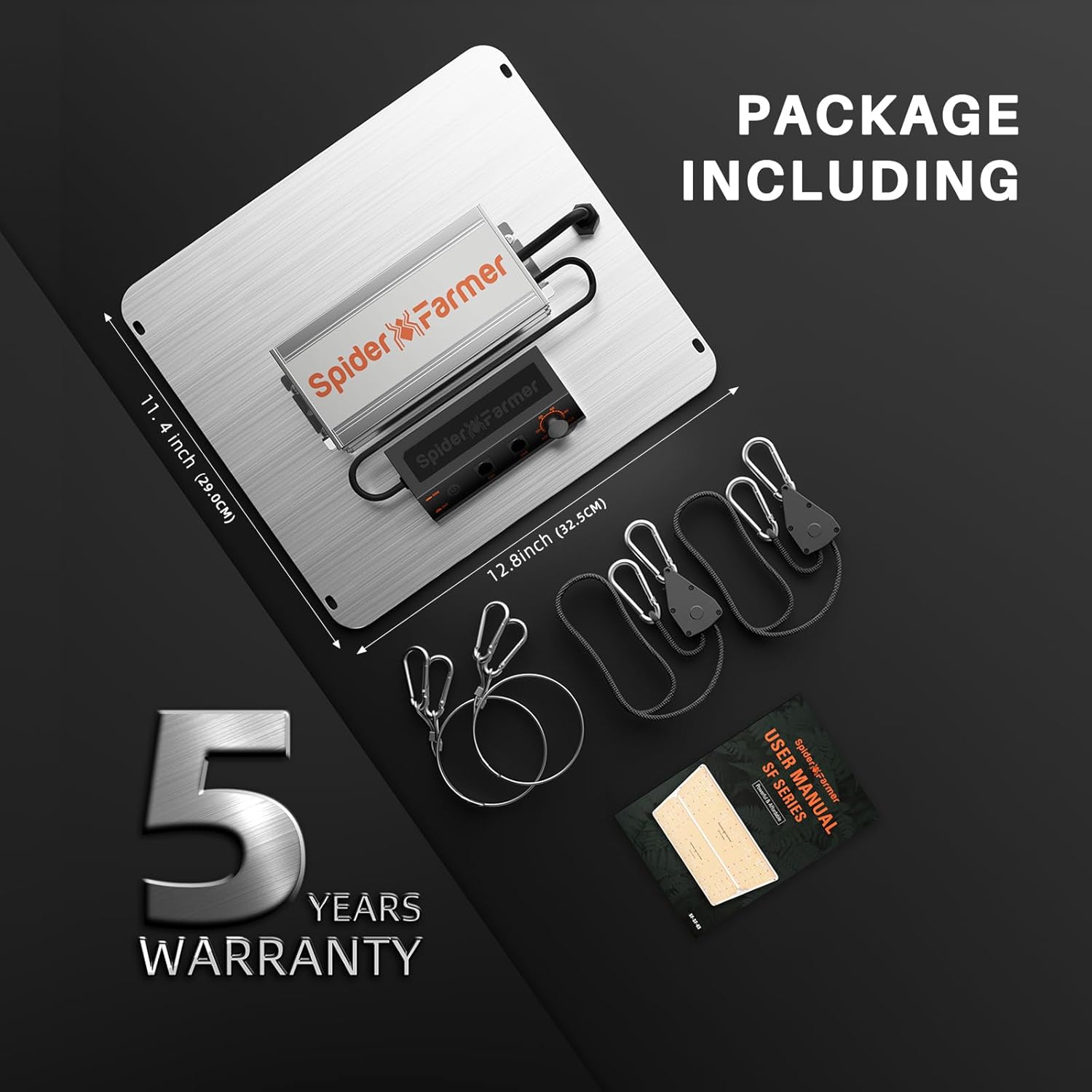
Figure 3.1: Contents of the SF1000 package, showing the grow light, hanging accessories, and instruction manual.
4. Орнотуу нускамалары
4.1 Таңгактан чыгаруу жана текшерүү
Carefully remove all components from the packaging. Inspect the light and accessories for any signs of damage during transit. If any damage is found, contact customer support immediately.
4.2 Hanging the Grow Light
The SF1000 comes with a hanging kit for easy installation. Ensure the mounting surface is sturdy enough to support the weight of the light (approximately 6.2 lbs).
- Attach the metal hangers to the four corners of the grow light unit.
- Connect the rope hangers to the metal hangers.
- Hang the light from a secure fixture in your grow tent or cultivation area. Adjust the height using the rope hangers to achieve the desired distance from your plants.

Figure 4.1: The SF1000 LED Grow Light installed and ready for use, demonstrating its hanging mechanism.
4.3 Электрдик туташуу
Connect the power cord to the light unit and then plug it into a standard 110V AC outlet. Ensure the connection is secure.
5. Иштөө нускамалары
5.1 Powering On/Off and Dimming
The SF1000 features a dimmer knob and a dimmer button for precise control over light intensity.
- Dimmer Knob: Rotate the knob to adjust the light intensity from 0% to 100%. Turning the knob fully counter-clockwise to the "OFF" position will power off the light.
- Диммер баскычы: Press the "DIM" button to turn the dimmer function ON. Press the "EXT" button to turn the dimmer function OFF, allowing the light to operate at full intensity if the knob is not in the "OFF" position.

5.1-сүрөт: Детальдуу view of the dimmer knob and dimmer button for light intensity adjustment.
5.2 Толук спектрдик чыгаруу
The SF1000 provides an optimized full spectrum, including white (3000K, 5000K), red (660nm), and infrared (IR 760nm) light, suitable for all plant growth stages.
- 3000K: Provides more reddish light, beneficial for flowering.
- 5000K: Provides more bluish light, ideal for vegetative growth and promoting germination.
- 660nm Red: Accelerates growth and is especially useful during bloom to speed up flowering time and boost yields.
- 760nm IR: Increases yields. Note that IR light may appear dimmer than other diodes; this is normal.

Figure 5.2: Spectrum distribution of the SF1000, highlighting key wavelengths for plant growth.
5.3 Multi-Light Connection (Daisy Chain)
The SF1000 supports multi-light connection, allowing you to link multiple units and control them with a single dimmer or a compatible GGS controller. This is beneficial for large indoor growing areas.

Figure 5.3: Multiple SF1000 units connected for synchronized control.
6. Growing Tips and PPFD Map
Optimal light distance and intensity vary depending on the plant's growth stage. Refer to the table and PPFD map below for recommended settings for a 2x2ft grow tent.
6.1 Recommended Settings by Growth Stage
| Өсүү Сtage | Distance (Inches) | Караңгылык | Light Cycle (ON/OFF) |
|---|---|---|---|
| Өнүү | 24"-30" | 50% | 18 hr ON / 6 hr OFF |
| Көчөт | 24" | 50-75% | 18 hr ON / 6 hr OFF |
| Vegetative (VEG) | 18"-24" | 75-100% | 18 hr ON / 6 hr OFF |
| Flowering (FLOWER) | 12"-18" | 100% | 12 hr ON / 12 hr OFF |

Figure 6.1: Recommended light settings for various plant growth stages.
6.2 PPFD Map for 2x2ft Grow Tent
The PPFD (Photosynthetic Photon Flux Density) map illustrates the light intensity distribution at different hanging heights within a 2x2ft grow tent. Higher PPFD values indicate more intense light.

Figure 6.2: PPFD measurements at various heights in a 2x2ft grow tent, demonstrating light coverage and intensity.
7. Техникалык тейлөө
- Тазалоо: Ensure the light is unplugged and cool before cleaning. Gently wipe the surface of the light and LEDs with a soft, dry cloth to remove dust and debris. Do not use liquid cleaners or abrasive materials.
- Жылуулук таркатылышы: The SF1000 is designed with an aluminum heat sink for efficient heat dissipation and operates silently without a fan. Ensure the heat sink remains clear of obstructions to maintain optimal cooling performance.

Figure 7.1: The SF1000's design for efficient heat dissipation, ensuring low heat and silent operation.
8. Кыйынчылыктарды
- Жарык күйбөйт:
- Check if the power cord is securely plugged into both the light and the wall outlet.
- Ensure the dimmer knob is not in the "OFF" position.
- Башка аспапка туташтыруу менен розетка иштеп жатканын текшериңиз.
- Light Flickering or Dim:
- Adjust the dimmer knob to increase intensity.
- Ensure the "DIM" button is pressed if you intend to use the dimming function, or "EXT" if you want full brightness.
- Check for loose connections in the power cord.
- Жарыктын бирдей эмес бөлүштүрүлүшү:
- Ensure the light is hung level and centered over your plants.
- Refer to the PPFD map (Section 6.2) to understand expected light distribution at different heights.
- Ашыкча ысып кетүү:
- Although designed for low heat, ensure adequate airflow around the light.
- Do not place the light in an enclosed space without ventilation.
If you encounter issues not listed here or if troubleshooting steps do not resolve the problem, please contact Spider Farmer customer support.
9. Техникалык шарттар
| Өзгөчөлүк | Деталь |
|---|---|
| Модель аты | SF1000 |
| Бренд | Spider Farmer |
| Жарык булагы түрү | LED (Samsung LM301H EVO) |
| Ватtage | 100.5 ватт |
| Натыйжалуулук | 3.14 µmol/J PPE per diode |
| Тtage | 110 вольт (AC) |
| Продукциянын өлчөмдөрү | 10.5"D x 11.8"W x 2.3"H |
| Элемент Салмагы | 6.2 фунт (болжол менен) |
| Материал | Алюминий, Дат баспас болот |
| Аяктоо түрү | Жылмаланган |
| Которуу түрү | Диммер баскычы |
| Өзгөчө өзгөчөлүк | Dimmable, Energy Efficient, Full Spectrum |
| Сунушталган колдонуу | Indoor plant growth lighting, seed starting, bloom promotion |
| Сууга туруктуулук деңгээли | Сууга чыдамдуу эмес |
| Ассамблея талап кылынат | No (Light kit included) |
10. Кепилдик жана колдоо
Жөргөмүш фермери төмөнкүлөрдү камсыз кылат: 5 жылдык кепилдик for the SF1000 LED Grow Light. This warranty covers defects in materials and workmanship under normal use. For any questions, technical assistance, or warranty claims, please contact Spider Farmer customer service.
You can reach us via email or visit our official website for more information and support resources. Please have your product model (SF1000) and purchase details ready when contacting support.
We are committed to providing high-quality grow lights and excellent customer service.
Ask a question about this manual
Ask about setup, troubleshooting, compatibility, parts, safety, or missing instructions. Manuals+ will review the question and use this page’s manual context to help answer it.