
1. Продукт бүтүп калдыview
The LEKATO M00775 Guitar Looper Pedal is a compact and intuitive effect pedal designed for guitarists and bassists. It allows for up to 5 minutes of clear loop recording with unlimited overdubbing, providing a versatile tool for practice, composition, and live performance. The pedal features high-quality 24-bit uncompressed audio and a robust aluminum alloy construction.

Image: The LEKATO M00775 Guitar Looper Pedal, a compact and durable device.
2. Пакеттин мазмуну
Сураныч, пакетте төмөнкү нерселерди текшериңиз:
- 1 x LEKATO Looper Pedal
- 1 x USB кабели
- 1 х Колдонуучунун колдонмосу (бул документ)
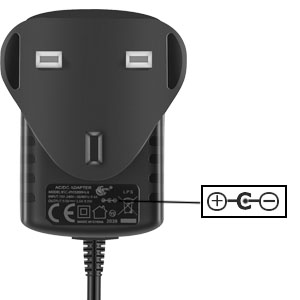
Image: The looper pedal, USB cable, and user manual included in the package. Note: Power adapter is not included.
3. Коопсуздук маалыматы
- Do not expose the unit to rain or moisture to avoid fire or shock hazards.
- в ачпагылаasinг. Ичинде колдонуучу тейлей турган бөлүктөр жок.
- Use only a DC 9V power adapter with a center-negative polarity and a minimum of 300mA current output. Incorrect power supply can damage the unit.
- Балдар жетпеген жерде сактаңыз.
4. Орнотуу
4.1 Электр булагы
The LEKATO M00775 requires a DC 9V power adapter with a center-negative polarity. The current draw is 300mA. Ensure your power adapter meets these specifications to prevent damage to the pedal. The power adapter is not included in the package.

Image: Diagram illustrating the required DC 9V center-negative power polarity for the pedal.
4.2 Аудио байланыштар
Connect your instrument (guitar, bass, etc.) to the INPUT jack on the pedal. Connect the OUTPUT jack of the pedal to your amplifier or audio interface. Use standard 1/4" instrument cables.
4.3 USB туташуу
The USB port is used for connecting the pedal to a computer (Windows/Mac OS) to upload or download WAV loop files. The USB cable provided is for data transfer only and does not supply power to the pedal.

Image: The looper pedal connected to a laptop via its USB port for file өткөрүп берүү.
5. Иштөө нускамалары
The LEKATO M00775 Looper Pedal features a single footswitch for all primary looping functions and a Level knob to adjust playback volume.
5.1 Циклдин негизги функциялары
- Жаздыруу: Press the footswitch once to start recording. The LED indicator will turn red.
- Play/Overdub: Press the footswitch once again to stop recording and start playback. The LED will turn green. To overdub, press the footswitch once during playback. The LED will flash red.
- Артка кайтаруу/кайталоо: During playback, hold the footswitch for 2 seconds to undo the last overdub. Hold again for 2 seconds to redo.
- Токтотуу: Double-press the footswitch quickly to stop playback. The LED will turn off.
- Жок кылуу: While stopped, hold the footswitch for 2 seconds to delete the current loop. The LED will flash red rapidly, then turn off.

Image: A visual guide demonstrating the single-button operation for recording, playing, overdubbing, undoing, and stopping on the LEKATO Looper Pedal.
5.2 Level Knob
The 'LEVEL' knob controls the playback volume of your recorded loops. Adjust it to balance the loop volume with your live instrument signal.
5.3 USB File Башкаруу
Connect the pedal to your computer using the provided USB cable. The pedal will appear as a removable drive. You can then drag and drop WAV files (48kHz, 24-bit) to and from the pedal. This allows for backing up your loops or importing pre-recorded tracks.

Image: The looper pedal connected to a guitar and a laptop, illustrating its use in a musical setup.
6. Техникалык тейлөө
- Clean the pedal with a soft, dry cloth. Do not use liquid cleaners.
- Педалды кургак чөйрөдө, экстремалдык температурадан жана тике күн нурунан алыс сактаңыз.
- Узак мөөнөткө колдонулбаганда электр энергиясын өчүрүңүз.
7. Кыйынчылыктарды
- Үн жок: Check all cable connections (instrument to input, output to amp). Ensure the power adapter is correctly connected and meets specifications. Adjust the 'LEVEL' knob.
- Жаздыруу маселелери: Ensure the input signal is strong enough. Check if the loop memory is full (though it has unlimited overdubbing, initial recording time is 5 minutes).
- USB туташуусу таанылган жок: Try a different USB port or cable. Ensure the pedal is powered on when connecting to the computer.
- Керексиз ызы-чуу: Ensure all cables are properly shielded. Try a different power supply if hum or buzz persists.
8. Техникалык шарттар
| Өзгөчөлүк | Спецификация |
|---|---|
| Модель номери | M00775 |
| Жазуу убактысы | 5 мүнөт |
| Overdubbing | Чексиз |
| Аудио сапаты | 24-bit, 48kHz uncompressed |
| Power талап | DC 9V, 300mA, Center Negative |
| Өлчөмдөрү (L x W x Y) | 9 x 4 x 4.95 см (3.54 x 1.57 x 1.95 дюйм) |
| Салмагы | 310 грамм (0.68 фунт) |
| Байланыш | 1/4" Jack Input, 1/4" Jack Output, USB |
| Материал | Алюминий эритмеси |

Image: The LEKATO Looper Pedal, highlighting its low noise and clean sound capabilities.
9. Кепилдик жана колдоо
For warranty information and technical support, please refer to the documentation provided at the time of purchase or contact your retailer. You can also visit the official LEKATO webкошумча жардам жана продуктуну каттоо үчүн сайт.
LEKATO is committed to providing quality musical accessories. For any inquiries, please reach out to our customer service team.