
Introduction
This manual provides comprehensive instructions for the setup, operation, and maintenance of your Zerone Universal Remote Control. This remote is designed to function with various Pioneer DVD player models, offering a convenient replacement or secondary control unit.
Шайкештик
The Zerone Universal Remote Control is compatible with the following Pioneer DVD player models:
- Pioneer VXX2811
- Pioneer VXX2914
- Pioneer VXX3218
- Pioneer VXX2801
- Pioneer VXX2800
- Pioneer VXX2913
For optimal performance, ensure your DVD player model is listed above.
Жайгашуу
1. Батареяны орнотуу
- Пульттун артындагы батарея отсегин табыңыз.
- Батареянын капкагын ылдый жылдырыңыз же ачкычты басып, көтөрүңүз.
- Insert two (2) AA 1.5V batteries, ensuring the positive (+) and negative (-) terminals align correctly with the markings inside the compartment.
- Батареянын капкагын бекем чыккыча ордуна жылдырыңыз.
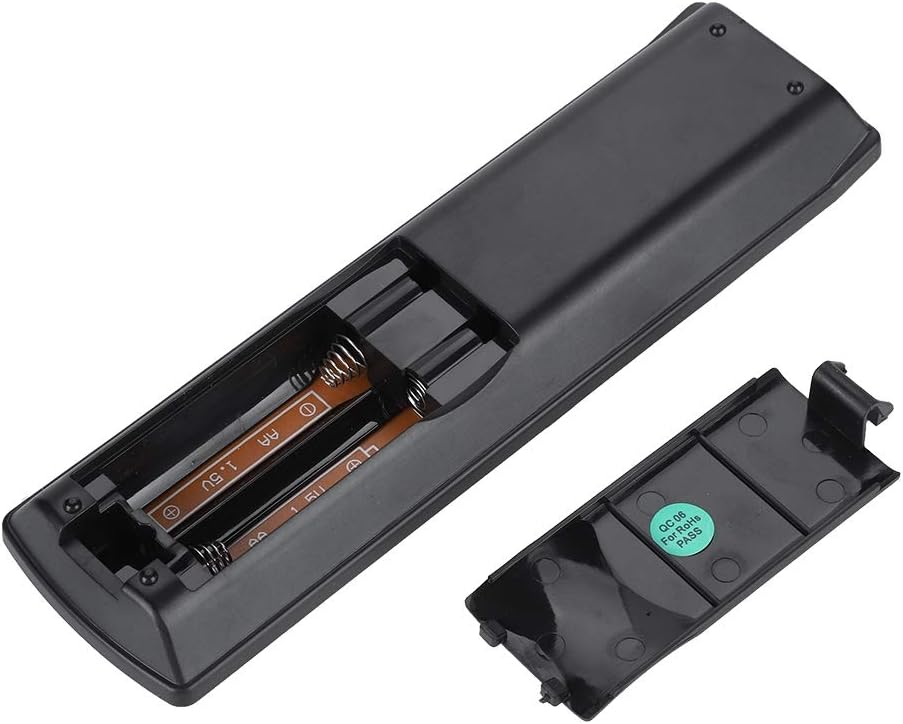
Сүрөт: Арткы view of the Zerone remote control, showing the battery compartment cover.

Image: The battery compartment of the remote control with two AA batteries correctly inserted.
No programming or setup is required. Once batteries are installed, the remote is ready for use with compatible Pioneer DVD players.
Иштөө нускамалары
Point the remote control directly at your Pioneer DVD player. The effective control distance is typically over 8 meters (approximately 26 feet), though this may vary based on environmental factors and the specific DVD player model.

Сүрөт: алдыңкы view of the Zerone Universal Remote Control, displaying all buttons and their labels.
Негизги функциялары:
- КҮТҮҮ/КҮШҮ: Powers the DVD player on or off.
- АЧЫК ЖАБЫК: Диск салгычын ачат же жабат.
- АУДИО: Аудио тректерди же тилдерди тандайт.
- Субтитр: Toggles or selects subtitle options.
- Бурч: Өзгөртөт viewing angle if supported by the DVD.
- Сан баскычтары (0-9): Direct track selection or input.
- ТАЗАЛОО: Clears numerical input.
- КИРҮҮ: Тандоолорду ырастайт.
- ЖОГОРКУ МЕНЮ: Accesses the main menu of the DVD.
- МЕНЮ: Диск менюсуна кирет.
- HOME MENU: Navigates to the home menu of the DVD player.
- КАЙТУУ: Мурунку экранга же менюга кайтып келет.
- Directional Pad (Up, Down, Left, Right) & ENTER: Менюларды багыттоо жана тандоолорду ырастоо.
- Playback Controls (Play, Pause, Stop, Fast Forward, Rewind, Skip Forward, Skip Backward): Standard media playback functions.
- ОЙНОТУУ РЕЖИМИ: Selects playback modes (e.g., repeat, shuffle).
- АЙРАНА: Adjusts surround sound settings.
- ZOOM: Видеону чоңойтуп же кичирейтет.
- КӨРСӨТҮҮ: Экрандагы дисплей маалыматын көрсөтөт.

Image: A hand holding the Zerone remote control, demonstrating its ergonomic design and ease of use.

Image: The remote control positioned in front of a television displaying content, illustrating its intended use.

Image: A visual representation of the remote control's effective operating distance, indicating a range of over 8 meters.
Техникалык тейлөө
- Тазалоо: Пультту жумшак, кургак чүпүрөк менен сүртүңүз. Суюк тазалагычтарды же абразивдүү материалдарды колдонбоңуз.
- Батареяны алмаштыруу: Пульттун реакциясы жайлап калса же иштебей калса, батареяларды алмаштырыңыз. Эки батареяны тең бир убакта жаңысына алмаштырыңыз.
- Сактагыч: Пультту күн нурунан жана экстремалдык температурадан алыс, салкын, кургак жерде сактаңыз.
- Зыяндан качуу: Do not drop the remote or expose it to water.
Проблемаларды чечүү
- Пульт жооп бербей жатат:
- Батареялар туура полярдуулук менен туура орнотулганын текшериңиз.
- Эски батареяларды жаңы AA батареялары менен алмаштырыңыз.
- Check for any obstructions between the remote control and the DVD player's infrared sensor.
- Ensure you are within the effective operating range (typically within 8 meters).
- Кээ бир функциялар иштебейт:
- Verify that your Pioneer DVD player model is listed in the compatibility section.
- Some advanced functions may be specific to the original remote or not supported by all DVD player models.
Техникалык шарттар
| Shell Material | High-grade ABS |
| Control Distance | > 8 meters (316 inches) |
| Батарея түрү | 2 x AA 1.5V Batteries (Not included) |
| Өлчөмдөр | Болжол менен 174 x 49 x 20 мм (6.85 x 1.93 x 0.79 дюйм) |
| Салмагы | Болжол менен 75г (2.46 унция) |
| Модель номери | 743562180017 |
Кепилдик жана колдоо
For warranty information or technical support, please refer to the documentation provided with your purchase or contact the manufacturer, Zerone, directly through their official channels. Keep your purchase receipt as proof of purchase.