
1. Киришүү
The SKYRC D400 Ultimate Duo is a high-performance, dual-channel AC/DC balance charger designed for charging various battery types, including LiPo, LiHV, LiFe, LiIon, NiMH, NiCd, and Pb batteries. It features two independent circuits, allowing simultaneous charging of two different battery types. The charger supports power distribution in both AC and DC modes to optimize charging efficiency and reduce charging time. Additionally, Channel 2 can function as a DC power supply, providing up to 150 watts for external DC devices.
2. Пакеттин мазмуну
Төмөндө тизмеленген нерселердин баары пакетиңизге камтылганын текшериңиз:
- SKYRC D400 Charger Unit
- AC Power Cord
- Cable XH Adaptor
- Banana connectors with XT60 connector Charging Cable
- Additional Charging Cable
- Instruction Manual

Image: The SKYRC D400 charger with its AC power cord, XH adaptor, banana connectors with XT60 charging cable, and instruction manual.
3. Продукт бүтүп калдыview
The SKYRC D400 features a robust design with clear labeling for all ports and controls. Understanding the layout is crucial for safe and efficient operation.
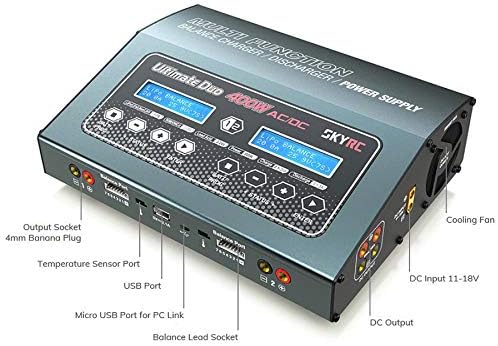
Сүрөт: жогорудан төмөнгө view of the SKYRC D400 charger highlighting the output sockets (4mm Banana Plug), Temperature Sensor Port, USB Port, Micro USB Port for PC Link, Balance Lead Socket, and Cooling Fan.
Негизги компоненттерге төмөнкүлөр кирет:
- Output Sockets (4mm Banana Plug): For connecting main battery leads.
- Температура сенсорунун порту: For connecting an optional temperature sensor to monitor battery temperature during charging.
- USB порт: For firmware updates or charging USB-powered devices.
- Micro USB Port for PC Link: For connecting to a computer for advanced settings and data logging.
- Balance Lead Socket: For connecting battery balance leads to ensure even cell voltagд заряддоо учурунда.
- Муздатуу желдеткич: Иштөө учурунда жылуулукту кетирүү үчүн автоматтык түрдө иштетилет.
- Туруктуу киргизүү (11-18V): For connecting to an external DC power source.
- DC чыгаруу: Channel 2 can provide up to 150W DC power for external devices.

Сүрөт: каптал view of the SKYRC D400 charger, clearly showing the DC Input (11-18V), DC Output, and Smart Fan with a "DO NOT COVER!" warning.
4. Орнотуу
4.1 Кубат туташтыруу
The D400 charger can be powered by either AC (Alternating Current) or DC (Direct Current) sources.
- AC кубаттуулугу: Connect the provided AC power cord to the AC input port on the charger and then to a standard 100-240V AC mains outlet.
- DC кубаттуулугу: Connect an external DC power source (11-18V) to the DC input port on the charger. Ensure the polarity is correct.
4.2 Батареяны туташтыруу
Before connecting any battery, ensure the charger is powered on and the correct battery type and charging parameters are selected on the display.
- Connect the main charging cable (e.g., banana connectors with XT60) to the appropriate output socket (CHA or CHB) on the charger.
- Connect the main charging cable to your battery.
- Connect the battery's balance lead to the corresponding balance lead socket on the charger. This is crucial for balanced charging of multi-cell batteries.
- Repeat for the second channel if charging two batteries simultaneously.
5. Иштөө нускамалары
5.1 Basic Charging Process
After connecting the battery, the charger will typically detect the battery type or prompt you to select it. Follow the on-screen instructions to set the charging parameters.
- Navigate through the menu using the control buttons to select the desired charging mode (e.g., Charge, Balance Charge, Fast Charge, Storage, Discharge).
- Select the battery type (e.g., LiPo, NiMH) and the number of cells (e.g., 1S-7S for LiPo).
- Set the desired charging current (Amps). Refer to your battery's specifications for recommended charging rates.
- Confirm the settings and start the charging process. The charger will display real-time charging information.
5.2 Эки каналдуу иштөө
The D400 features two independent charging channels (CHA and CHB), allowing you to charge two different batteries simultaneously with different settings.
- Connect the first battery to CHA and configure its settings.
- Connect the second battery to CHB and configure its settings independently.
- Start charging for both channels.
5.3 Электр энергиясын бөлүштүрүү
The charger supports intelligent power distribution. For example, if the total power is 400W, Channel 1 can draw 300W while Channel 2 draws 100W. Note that the maximum power for Channel 2 is 200W, while Channel 1 can reach 400W. This feature optimizes charging speed when using both channels.
5.4 DC Power Supply Function
Channel 2 of the D400 can act as a DC power supply, providing a maximum of 150 watts DC power. This allows you to power various DC devices directly from the charger.
- Ensure no battery is connected to Channel 2 for charging.
- Select the DC Power Supply mode for Channel 2 from the menu.
- Каалаган чыгаруу көлөмүн коюңузtage (6-15V DC adjustable).
- Connect your DC device to the DC Output port on Channel 2.
5.5 App Remote Control and Monitoring
The charger may support remote control and monitoring via a dedicated mobile application (e.g., ISDT Link or similar). This allows you to view charging status, adjust parameters, and end charging processes remotely.
Video: Demonstrates the ISDT BattAir Plugin & K4 Charger, showing how to connect a battery, automatically adjust charging parameters, set voltage parameters via a mobile app, and remotely monitor and end the charging process. While this video features a different charger model (K4), the app functionality for remote control and monitoring is similar to what might be available for the D400.
6. Техникалык тейлөө
- Заряддоочу түзүлүштү чаңдан жана калдыктардан таза жана таза кармаңыз. Тазалоо үчүн жумшак, кургак чүпүрөктү колдонуңуз.
- Ensure proper ventilation around the charger. Do not block the cooling fan or air vents.
- Заряддоо түзүлүштү күн тийбеген жана экстремалдык температурадан алыс, салкын, кургак жерде сактаңыз.
- Regularly inspect cables and connectors for any signs of wear or damage. Replace damaged components immediately.
7. Кыйынчылыктарды
- Заряддагыч күйбөй жатат: Check the AC power cord connection or DC input source. Ensure the power outlet is functional.
- Батарея табылган жок: Verify that the main charging leads and balance leads are securely connected to both the charger and the battery. Ensure the battery type and cell count are correctly selected.
- Заряддоо катасы жөнүндө билдирүү: Consult the charger's display for specific error codes or messages. Refer to the full manual (if available) for detailed explanations and solutions. Common issues include incorrect battery settings, damaged battery, or connection problems.
- Ашыкча ысып кетүү: Ensure the charger has adequate ventilation and the cooling fan is not obstructed. Reduce the charging current if necessary.
8. Техникалык шарттар
| Өзгөчөлүк | Спецификация |
|---|---|
| Бренд | SKYRC |
| Модель номери | SKY100123 |
| Киргизүү көлөмүtage | AC 100-240V / DC 11-18V |
| Charge Circuit Power | AC Mode: CH1/CH2: 50-200W (Power Distribution), DC Mode: CH1/CH2: 200W (Power Distribution) |
| Discharge Circuit Power | 10 Вт |
| Заряддын учурдагы диапазону | 0.1-20A |
| Разряд токунун диапазону | 0.1-5A |
| Баланс агымы | Макс 500мА/клетка |
| LiPo/LiFe/LiIon/LiHV Cell Count | 1-7S |
| NiMH/NiCd Cell Count | 1-18S |
| Pb Battery Voltage | 2-24V |
| DC Power Supply Output | 6-15V / 150W (Channel 2) |
| Элемент Салмагы | 0.3 килограмм (10.6 унция) |
9. Кепилдик жана колдоо
For warranty information, technical support, or service inquiries, please contact SKYRC directly or refer to the official product webсайт. Сатып алуу квитанциясын кепилдик дооматтары үчүн сатып алуунун далили катары сактаңыз.