
Easytry123 Replacement Remote for Philips TVs
Easytry123 Replacement Remote Control User Manual
For Philips LED LCD HDTV TV Models: 32PHT4002, 43PHT4002, 32PHT4001 Series
1. Киришүү
This manual provides essential instructions for the Easytry123 Replacement Remote Control. This remote is designed as a direct replacement for original remote controls used with various Philips LED LCD HDTV TV models, including the 32PHT4002, 43PHT4002, and 32PHT4001 series. It operates using infrared (IR) technology and does not require any programming or setup codes. Simply insert batteries and begin use.
Маанилүү эскертүү: This is a replacement remote and may not support all advanced functions or smart TV features present on some original remotes. Please ensure your original remote's appearance matches this replacement for optimal compatibility.
2. Коопсуздук маалыматы
- Батареяларды балдар жетпеген жерде сактаңыз.
- Эски жана жаңы батарейкаларды же ар кандай типтеги батареяларды аралаштырбаңыз.
- Эгер алыстан башкаруу куралы узак убакыт бою колдонулбаса, батарейкаларды алып салыңыз.
- Колдонулган батарейкаларды жергиликтүү эрежелерге ылайык жок кылыңыз.
- Пультту күндүн түз нуруна, жылуулук булактарына же нымдуулукка дуушар кылбаңыз.
3. Пакеттин мазмуну
- 1 x Easytry123 Replacement Remote Control
Note: Batteries (2 x AAA) are not included and must be purchased separately.
4. Продукт бүтүп калдыview
The following image illustrates the layout of the remote control and its primary buttons.

Сүрөт 4.1: Фронт view of the Easytry123 Replacement Remote Control. This image displays the full array of buttons, including power, channel, volume, navigation, and playback controls, arranged ergonomically on the black remote.
Баскыч функциялары:
- Күч (●): Телевизорду күйгүзөт же өчүрөт.
- Булак: Киргизүү булактарын тандайт (HDMI, AV ж.б.).
- TV: Телевизор режимине которулат.
- Навигация панели (Өйдө, Төмөн, Солго, Оңго, ОК): Менюларды багыттоо жана тандоолорду ырастоо.
- Back/Exit Menu: Мурунку экранга кайтат же учурдагы менюдан чыгат.
- Home/Smart TV: Accesses the TV's home screen or smart TV features.
- Жогорку меню: Негизги менюну ачат.
- Аудио: Аудио жөндөөлөрүн тууралайт.
- Параметрлер: Контекстти сезгич параметрлерди көрсөтөт.
- Гид: Электрондук программа колдонмосун ачат.
- CH+/CH-: Каналдарды өйдө же ылдый өзгөртөт.
- VOL+/VOL-: Үндүн көлөмүн көбөйтөт же азайтат.
- Үнсүз: Телевизордун үнүн өчүрөт же өчүрөт.
- Сан баскычтары (0-9): Түздөн-түз канал тандоо.
- Ойнотуу башкаруулары (ойнотуу, тындыруу, токтотуу, артка түрүү, алдыга жылдыруу): Медианы ойнотууну көзөмөлдөйт.
- Түс баскычтары (кызыл, жашыл, сары, көк): Accesses specific functions within menus or applications.
- Субтитр: Субтитрлерди күйгүзөт/өчүрөт.
- Текст: Accesses teletext (if supported by TV).
5. Орнотуу
5.1 Батареяны орнотуу
Алыстан башкаруу пультун иштеши үчүн эки (2) AAA батарейкасы керек. Аларды орнотуу үчүн төмөнкү кадамдарды аткарыңыз:
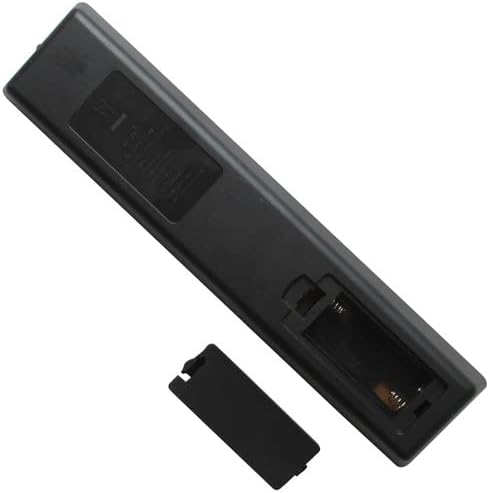
- Пульттун артындагы батарея бөлүкчөсүнүн капкагын табыңыз.
- Аны алып салуу үчүн өтмөктү басып, капкакты ылдый жылдырыңыз.
- Оң (+) жана терс (-) терминалдары бөлүмдүн ичиндеги белгилер менен туура дал келишин камсыз кылып, эки AAA батарейкасын салыңыз.
- Батарея бөлүкчөсүнүн капкагын бекем чыккыча ордуна жылдырыңыз.

Сүрөт 5.1: Артка view of the remote control with the battery compartment cover removed, revealing the empty battery slots.
Сүрөт 5.2: Артка view of the remote control with two AAA batteries correctly inserted into the battery compartment.
Эми алыстан башкаруу пульту колдонууга даяр. Эч кандай программалоо же жупташтыруунун кажети жок.
6. Иштөө нускамалары
To operate your TV with the Easytry123 Replacement Remote Control:
- Point the remote control directly towards the infrared receiver on your Philips TV.
- Пульт менен телевизордун ортосунда эч кандай тоскоолдуктар жок экенин текшериңиз.
- Press the desired button to perform the corresponding function (e.g., Power, Volume Up, Channel Down).
The effective operating range is typically up to 8 meters (26 feet) without obstacles.
7. Кыйынчылыктарды
| Көйгөй | Мүмкүн болгон себеп / Чечим |
|---|---|
| Пульт иштебей жатат. |
|
| Алыстан башкаруу пульту үзгүлтүккө учурап иштейт. |
|
| Айрым баскычтар иштебейт. |
|
8. Техникалык шарттар
- Бренд: Easytry123
- Шайкеш түзмөктөр: Philips LED LCD HDTV Televisions (Models: 32PHT4002/98, 43PHT4002/98, 43PHT4002/56, 43PHT4002/05, 32PHT4001, 32PHT4001/12)
- Байланыш технологиясы: Инфракызыл (IR)
- Контроллердин түрү: Control Button
- Өзгөчө өзгөчөлүгү: Ergonomic, Direct Replacement (no setup required)
- Кубат булагы: 2 x AAA Батареялар (киргизилген эмес)
9. Кепилдик жана колдоо
As a replacement product, specific warranty details may vary. Please refer to the retailer or seller (Easytry123) from whom you purchased this remote control for information regarding warranty coverage and customer support. For general troubleshooting not covered in this manual, ensure your TV's original manual is consulted for specific TV functions.
Ask a question about this manual
Ask about setup, troubleshooting, compatibility, parts, safety, or missing instructions. Manuals+ will review the question and use this page’s manual context to help answer it.