
1. Продукт бүтүп калдыview
This DCU TECNOLOGIC universal remote control is designed for use with LG LCD/LED televisions. It offers an operable distance of up to 8 meters and is ready to use without any complex setup procedures. The remote includes dedicated buttons for popular streaming services like Netflix and Prime Video, enhancing your viewтажрыйбасы.
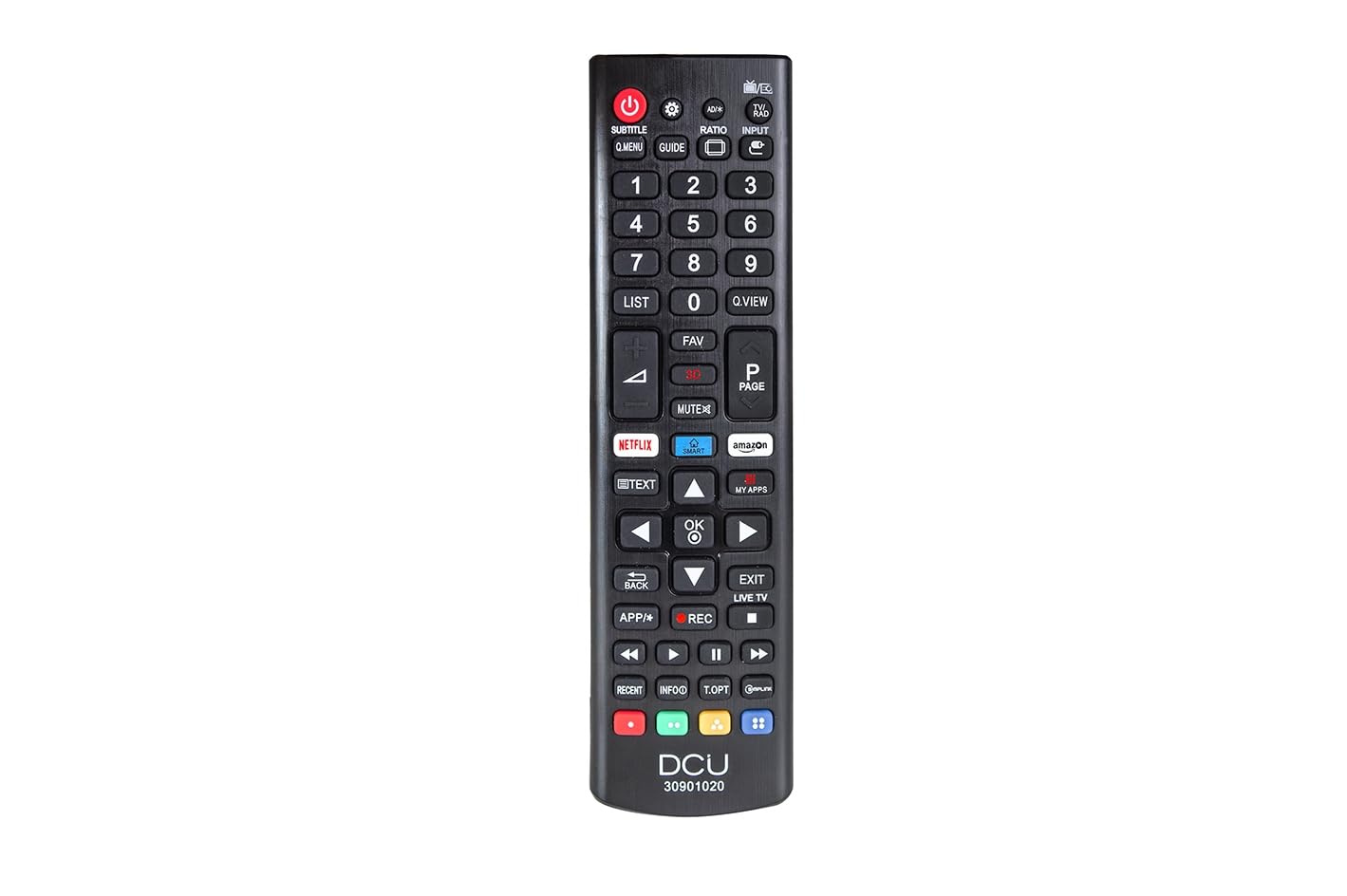
Алдыңкы бети көрсөтүлгөн сүрөт view of the DCU TECNOLOGIC LG Universal Remote Control, highlighting its button layout including dedicated Netflix and Prime Video buttons.
2. Орнотуу
2.1 Батареяны орнотуу
The remote control requires two (2) AAA batteries for operation. Batteries are not included with the product.
- Пульттун артындагы батарея отсегин табыңыз.
- Батарея бөлүмүнүн капкагын ачуу үчүн ылдый же жебе менен көрсөтүлгөн багытта жылдырыңыз.
- Оң (+) жана терс (-) терминалдары бөлүмдүн ичиндеги белгилер менен туура дал келишин камсыз кылып, эки AAA батарейкасын салыңыз.
- Батарея бөлүкчөсүнүн капкагын бекем чыккыча ордуна жылдырыңыз.
The remote control is now ready for use. No additional programming or pairing is required for compatible LG LCD/LED TVs.
3. Иштөө нускамалары
This remote control functions identically to an original LG remote for basic TV operations.
3.1 Негизги функциялар
- Кубат баскычы: Телевизорду күйгүзөт же өчүрөт.
- Үнүн жогорулатуу/төмөндөтүү: Үн деңгээлин тууралайт.
- Канал өйдө/төмөн: Телеканалдарды өзгөртөт.
- Сан баскычтары (0-9): Телеканалдарды түз тандаңыз.
- Чабыттоо баскычтары (өйдө, ылдый, солго, оңго, OK/Enter): Менюда навигация жана тандоо үчүн колдонулат.
- Үнсүз баскычы: Телевизордун үнүн басат.
3.2 Special Features: Netflix and Prime Video Buttons
The remote includes dedicated buttons for quick access to Netflix and Amazon Prime Video. Pressing these buttons will launch the respective application on your LG Smart TV.
Маанилүү эскертүү: The functionality of the Netflix and Prime Video buttons depends on whether your original LG TV remote control had these specific buttons and if your TV supports these applications. If your original remote did not feature these buttons, or if your TV model does not support direct app launch via remote, these buttons on the universal remote may not function.
4. Техникалык тейлөө
- Тазалоо: Пультту тазалоо үчүн жумшак, кургак чүпүрөктү колдонуңуз. Суюк тазалоочу каражаттарды же абразивдүү материалдарды колдонбоңуз.
- Батареяны алмаштыруу: Пульттун реакциясы жайлап калса же иштебей калса, батареяларды алмаштырыңыз. Эки батареяны тең бир убакта жаңысына алмаштырыңыз.
- Сактагыч: Пультту кургак жерде, күндүн түз тийген нурунан, өтө жогорку температурадан жана жогорку нымдуулуктан алыс сактаңыз.
- Тамчылардан качуу: Пультти физикалык таасирден коргоңуз, анткени тамчылар ички компоненттерге зыян келтириши мүмкүн.
5. Кыйынчылыктарды
| Көйгөй | Мүмкүн себеп | Чечим |
|---|---|---|
| Пульт иштебей жатат. | Dead or incorrectly inserted batteries. Obstruction between remote and TV. Remote is too far from the TV. | Check and replace batteries, ensuring correct polarity. Remove any objects blocking the line of sight to the TV's IR receiver. Move closer to the TV (within 8 meters). |
| Netflix/Prime Video buttons do not work. | Original TV remote did not have these buttons. TV model does not support direct app launch. | Verify if your original LG TV remote had these specific buttons. Ensure your TV is a Smart TV and supports these applications. The universal remote replicates original remote functions; if the original lacked these, the universal remote's buttons may not activate them. |
| Баскычтар жооп бербей же жабышчаак. | баскычтардын астындагы кир же таштанды. | Clean the remote control with a soft, dry cloth. Avoid pressing buttons excessively hard. |
6. Техникалык шарттар
| Өзгөчөлүк | Деталь |
|---|---|
| Бренд | DCU TECNOLOGIC |
| Модель номери | 30901020 |
| Шайкеш түзмөктөр | LG LCD/LED Televisions |
| Байланыш технологиясы | Инфракызыл (IR) |
| Максималдуу диапазон | 8 метр |
| Power Source | 2 x AAA Батареялар (киргизилген эмес) |
| Продукциянын өлчөмдөрү | 5 x 5 x 15 см |
| Салмагы | 120 г |
| Өзгөчөлүктөр | Universal, Dedicated Netflix & Prime Video Buttons |
7. Кепилдик жана колдоо
Information regarding product warranty and customer support is not provided in the available product details. Please refer to the product packaging or contact the retailer for specific warranty terms and support options.