
1. Киришүү
This manual provides comprehensive instructions for the DCU TECNOLOGIC Universal Remote Control, Model 30901010. This remote is designed to control a wide range of LCD/LED televisions, including both newer and older models from various brands. It features dedicated buttons for popular streaming services like Netflix and YouTube.
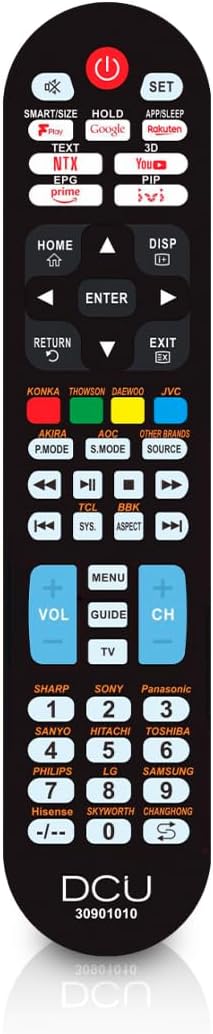
Image: The DCU TECNOLOGIC Universal Remote Control, black in color, showing its full button layout.
2. Орнотуу жана жупташтыруу
To set up your universal remote control with your television, follow these steps:
- Ensure your television is turned on.
- Point the universal remote control towards your television from a distance of less than 1 meter (approximately 3 feet).
- басып, кармап туруңуз SET алыстан башкаруудагы баскыч.
- Кармоону уланта бериңиз SET button until the volume indicator appears on your TV screen.
- Once the volume indicator appears, release the SET баскычын дароо.
The remote will now search for compatible codes for your TV. This process can take anywhere from 30 seconds to several minutes as it cycles through codes for various brands. Once the volume indicator appears, the remote has successfully found a compatible code and is paired with your TV.

Image: A visual representation of the remote control next to a television, illustrating the easy setup process.
3. Иштөө нускамалары
The DCU TECNOLOGIC Universal Remote Control provides all commonly used functions and menu buttons for your TV. Familiarize yourself with the button layout for optimal use.
Special Function Buttons: Netflix and YouTube
This remote includes dedicated buttons for direct access to Netflix and YouTube. Please note that the functionality of these buttons depends on whether the original remote control for your TV model had similar features. If your original TV remote did not have a Netflix or YouTube button, the universal remote may not be able to create this new functionality, and these buttons might not work.

Image: The universal remote control with highlighted Netflix and YouTube buttons, indicating their presence for quick access.
Шайкеш келген бренддер
This universal remote control is compatible with TVs from almost all brands and models manufactured before 2021. Main compatible brands include, but are not limited to:
- AKIRA
- ANSONIC
- AOC
- BBK
- ЧАНХОН
- DAEWOO
- DMTECH
- ELENBREG
- Haier
- Hisense
- HITACHI
- JVC
- КОНКА
- LG
- NPG
- OPENBOX
- Panasonic
- PHILIPS
- ПРИМА
- SAMSUNG
- САНЬО
- SELECLINE
- SHARP
- SKYWORTH
- SONY
- СУПРА
- TCL
- TDSYSTEMS
- ТОМСОН
- TOSHIBA

Image: A visual list of major TV brands compatible with the DCU TECNOLOGIC universal remote control.
4. Техникалык тейлөө
To ensure the longevity and optimal performance of your universal remote control, consider the following maintenance tips:
- Батареяны алмаштыруу: The remote requires 2 x AAA batteries (not included). Replace batteries when the remote's response becomes sluggish or it stops functioning. Ensure correct polarity when inserting new batteries.
- Тазалоо: Wipe the remote with a soft, dry cloth. Avoid using liquid cleaners or abrasive materials, as they may damage the surface or internal components.
- Сактагыч: Пультту күн нурунан жана экстремалдык температурадан алыс, салкын, кургак жерде сактаңыз.
- Колдонуу: Avoid dropping the remote or subjecting it to strong impacts, which can damage its internal circuitry.
5. Кыйынчылыктарды
| Көйгөй | Мүмкүн себеп | Чечим |
|---|---|---|
| Пульт жооп бербейт. | Батареялар өлүп калган же туура эмес салынган. | Replace batteries with new 2 x AAA batteries, ensuring correct polarity. |
| Remote does not control the TV after setup. | Pairing process was not completed successfully or interrupted. | Repeat the setup and pairing process (Section 2). Ensure you release the SET button immediately when the volume indicator appears. |
| Netflix/YouTube buttons do not work. | Original TV remote did not have these specific buttons, or TV does not support direct app launch via IR. | This is expected behavior if your TV's original remote did not feature these buttons. Use your TV's smart menu to access these applications. |
| Limited functionality after pairing. | The remote found a basic code, but not the most comprehensive one for your TV model. | Repeat the setup process. The remote will continue searching for codes. It may take several attempts to find the optimal code. |
6. Техникалык шарттар

Image: A visual summary of the remote control's key characteristics and specifications.
- Модель аты: 30901010
- Бренд: DCU TECNOLOGIC
- Байланыш технологиясы: Инфракызыл
- Контроллердин түрү: Control Button
- Максималдуу диапазон: 8 метр
- Энергияга талаптар: 2 x AAA батарейкалар (киргизилген эмес)
- Колдоого алынган түзмөктөрдүн максималдуу саны: 1
- Продукциянын өлчөмдөрү (L x W x Y): 40 x 310 x 160 миллиметр
- Пакеттин өлчөмдөрү (L x W x Y): 22.7 x 5 x 2.4 сантиметр
- Пакет Салмагы: 0.14 килограмм
- Түсү: Universal (Black)
- Модель жылы: 2023
- Биринчи жеткиликтүү болгон күнү: 25-июль 2019-жыл
7. Кепилдик жана колдоо
The DCU TECNOLOGIC Universal Remote Control comes with a 3 жылдык кепилдик from the date of purchase, covering manufacturing defects. For technical assistance or warranty claims, please contact DCU TECNOLOGIC customer support through their official channels.


Image: Icons representing 3-year warranty and technical service availability.
For further information or to find contact details, please visit the official DCU TECNOLOGIC webсайтка же продуктунун таңгагына кайрылыңыз.