
Cudy FS1010P
Cudy 8 Port PoE+ Switch with 2 Uplink Ports
Model: FS1010P
Instruction Manual
1. Киришүү
This manual provides detailed instructions for the installation, configuration, and operation of your Cudy FS1010P 8 Port PoE+ Switch. Please read this manual thoroughly before using the device to ensure proper functionality and safety.

Image: The Cudy FS1010P 8 Port PoE+ Switch, highlighting its 8 PoE+ ports and 2 uplink ports.
2. Продукциянын өзгөчөлүктөрү
The Cudy FS1010P is an unmanaged 8-port PoE+ switch designed for reliable network expansion and power delivery. Key features include:
- 8 PoE+ Ports: Provides power and data over a single Ethernet cable, compliant with IEEE 802.3af/at standards.
- 2 Uplink Ports: Dedicated ports for connecting to a router or network backbone.
- 120W Total PoE Power: Sufficient power budget for multiple PoE devices such as IP cameras, VoIP phones, and wireless access points.
- PD Detect and Port Power Prioritization: Automatically detects PoE devices and delivers up to 32W per port (802.3at) or 15.4W (802.3af). Prioritizes power delivery to critical devices.
- Узартуу режими: Extends PoE and data transmission distance up to 250 meters (820 feet) at 10 Mbps per port.
- VLAN режими: Isolates PoE+ ports from each other to enhance network security and performance.
- Watchdog Function: Automatically detects and restarts unresponsive PoE devices, ensuring continuous operation.
- Plug and Play: Requires no software or configuration for basic operation.
- желдеткичсиз дизайн: Ensures silent operation, suitable for various environments.
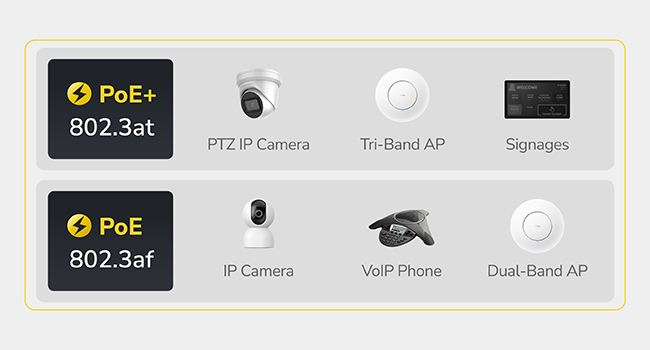
Image: Illustration of devices compatible with PoE (802.3af) and PoE+ (802.3at) standards, including IP cameras, VoIP phones, and access points.
3. Пакеттин мазмуну
Пакетиңизге төмөнкү буюмдардын киргизилгенин текшериңиз:
- Cudy FS1010P PoE+ Switch
- Электр кабели
- Орнотуу боюнча колдонмо

Image: The Cudy FS1010P switch, power cord, and quick installation guide as included in the product box.
4. Физикалык бүтүрүүview
Familiarize yourself with the ports and indicators on the switch.
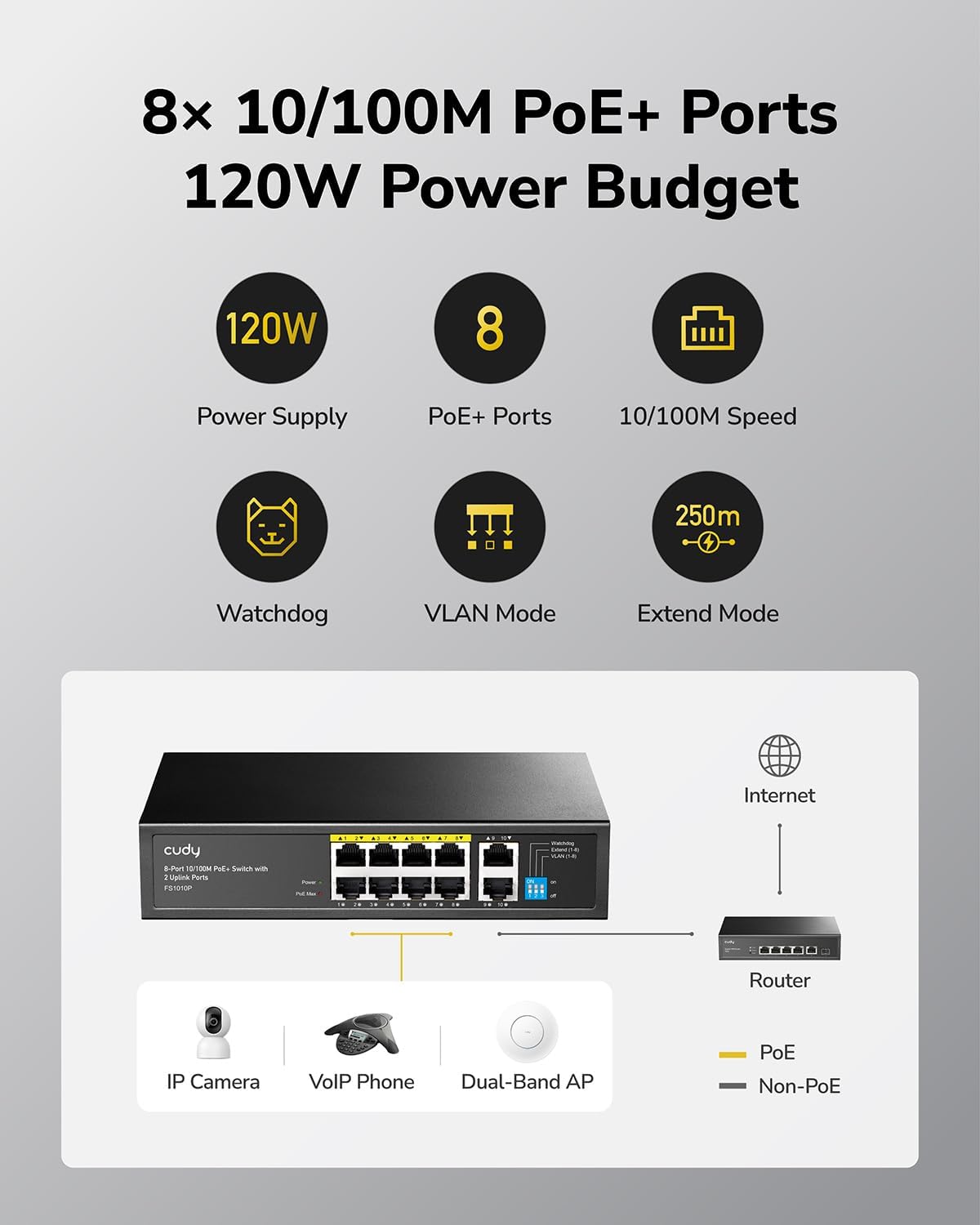
Image: A diagram showing the front panel of the Cudy FS1010P switch with 8 PoE+ ports, 2 uplink ports, and LED indicators for power, PoE Max, and port status.
LED көрсөткүчтөрү:
- PWR (кубат): Которгучтун кубат абалын көрсөтөт.
- PoE Макс: Flashes when the total PoE power budget reaches 90% utilization.
- Link/Act (Per Port): Indicates network activity and connection status for each port.
DIP өчүргүчтөр:
The FS1010P features DIP switches for selecting different operating modes:
- Узартуу режими: When enabled, extends the PoE and data transmission distance.
- VLAN режими: When enabled, isolates PoE+ ports for enhanced security.
5. Орнотуу нускамалары
The Cudy FS1010P is a plug-and-play device, requiring minimal setup.
- Туташуу кубаты: Connect the provided power cord to the switch's power input and then to a power outlet. The PWR LED will illuminate.
- Uplinkти туташтыруу: Connect one of the 2 uplink ports (ports 9 or 10) to your router or network backbone using a standard Ethernet cable.
- PoE түзмөктөрүн туташтыруу: Connect your PoE-compatible devices (e.g., IP cameras, VoIP phones, wireless access points) to any of the 8 PoE+ ports (ports 1-8) using Ethernet cables. The switch will automatically detect and power these devices.
- Байланышты текшерүү: Check the Link/Act LED for each connected device. A solid light indicates a successful connection, and a flashing light indicates data activity.

Image: A hand plugging an Ethernet cable into a port on a network switch, illustrating the connection process.
6. Иштөө режимдери
The FS1010P offers two special operating modes configurable via DIP switches:
6.1. Узартуу режими
Extend Mode allows for longer cable runs for PoE devices. When enabled, the transmission distance for PoE and data can reach up to 250 meters (820 feet). Note that in Extend Mode, the data rate per port is limited to 10 Mbps.
- Иштетүү үчүн: Set the corresponding DIP switch to the "ON" position for Extend Mode.
- Өчүрүү үчүн: Set the corresponding DIP switch to the "OFF" position for Normal Mode (100m distance, 10/100 Mbps).

Image: A visual representation of the Extend Mode DIP switch setting, showing extended range up to 250m at 10 Mbps and normal range of 100m at 10/100 Mbps.
6.2. VLAN Mode
VLAN Mode enhances network security by isolating the PoE+ ports from each other. This prevents broadcast storms and unauthorized access between connected devices on different ports, improving overall network stability and security.
- Иштетүү үчүн: Set the corresponding DIP switch to the "ON" position for VLAN Mode.
- Өчүрүү үчүн: Set the corresponding DIP switch to the "OFF" position for Normal Mode (ports communicate freely).
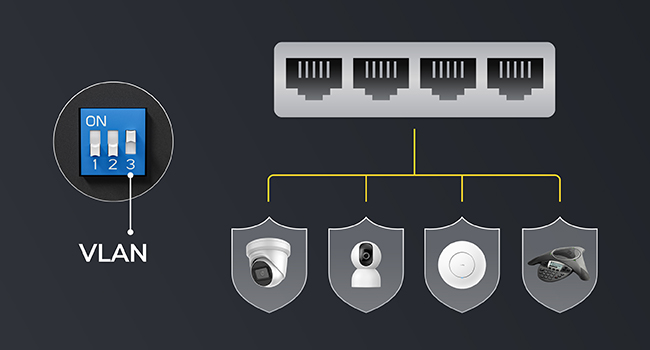
Image: A diagram showing the VLAN Mode DIP switch setting, illustrating how ports are isolated from each other for enhanced security.
7. PoE Management
The FS1010P incorporates intelligent Power over Ethernet management features.
7.1. PoE Watchdog
The Watchdog function continuously monitors the status of connected PoE devices. If a device becomes unresponsive, the switch will automatically restart the corresponding PoE port to restore functionality, ensuring reliable operation without manual intervention.
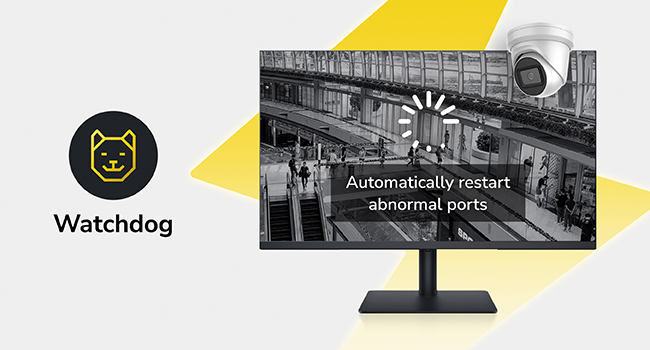
Image: An icon representing the Watchdog feature, with an illustration of a camera being automatically restarted by the switch.
7.2. Intelligent Power Management
The switch features intelligent power management to prevent overload. If the total power consumption exceeds the 120W budget, the switch will automatically remove power from the lowest priority devices to maintain stability for critical connections. The PoE Max LED will flash when 90% of the power budget is utilized.

Image: A graphic showing a "PoE Max" warning when 90% of the power budget is used, and an illustration of intelligent power management automatically shedding power from less critical devices if the budget is exceeded.
8. Техникалык шарттар
| Модель номери | FS1010P |
| Порттардын саны | 10 (8 PoE+ ports, 2 Uplink ports) |
| PoE стандарты | IEEE 802.3af / боюнча |
| Жалпы PoE кубаттуулугу бюджети | 120 Вт |
| Маалыматтарды өткөрүү ылдамдыгы | 10/100 Mbps (PoE+ ports), 10/100 Mbps (Uplink ports) |
| Режим аралыгын узартуу | Up to 250m (820ft) at 10 Mbps |
| Өлчөмдөрү (L x W x Y) | 8.66" x 5.91" x 1.73" (220 мм x 150 мм x 44 мм) |
| Элемент Салмагы | 1.98 фунт |
| Иштин материалы | Пластик |
| Иштөө температурасы | 0°Cден 40°Cге чейин (32°F—104°F) |
| EMC коргоо | Surge: Power DM 2kV, CM 4kV; RJ45 CM 4kV. ESD: Contact 6kV; Air 8kV. |

Image: The Cudy FS1010P switch with its dimensions labeled: 8.66 inches (length), 5.91 inches (width), and 1.73 inches (height).
9. Кыйынчылыктарды
- Кубат жок: Ensure the power cord is securely connected to both the switch and a working power outlet. Check if the PWR LED is illuminated.
- Портто шилтеме/аракет жок:
- Verify the Ethernet cable is properly connected at both ends.
- Туташкан аппараттын күйгүзүлгөнүн жана туура иштегенин текшериңиз.
- Башка Ethernet кабелин же портту колдонуп көрүңүз.
- PoE түзмөгү электр кубатын албай жатат:
- Confirm the device is PoE-compatible (IEEE 802.3af/at).
- Check the PoE Max LED. If it's flashing, the power budget might be exceeded. Disconnect non-essential PoE devices or use a switch with a higher power budget.
- Ensure the cable length does not exceed 100 meters (or 250 meters if Extend Mode is enabled).
- Slow Network Speed in Extend Mode: This is normal. Extend Mode limits port speed to 10 Mbps to achieve longer distances. For higher speeds, disable Extend Mode (limiting distance to 100m).
- Intermittent Device Connection: The Watchdog function should automatically restart unresponsive devices. If issues persist, check the device itself or the cable.
10. Коопсуздук маалыматы
- Аппаратты сууга же ашыкча нымдуулукка дуушар кылбаңыз.
- Аппаратты өзүңүз ачууга же оңдоого аракет кылбаңыз. Бардык тейлөөлөрдү квалификациялуу кызматкерлерге тапшырыңыз.
- Ашыкча ысып кетүүнүн алдын алуу үчүн өчүргүчтүн айланасында туура желдетүүнү камсыз кылыңыз.
- Аппарат менен кошо берилген кубат адаптерин гана колдонуңуз.
- The device is equipped with surge and ESD protection. However, avoid installing during lightning storms.
Image: A graphic depicting lightning bolts and a shield icon, representing the switch's built-in surge and ESD protection features.
11. Кепилдик жана колдоо
Кепилдик жөнүндө маалымат жана техникалык колдоо алуу үчүн, расмий Cudy компаниясына кайрылыңыз website or contact Cudy customer service. The installation guide included in your package may also contain specific warranty details.
Өндүрүүчү: Shenzhen Cudy Technology Co., Ltd.