
Introduction
This manual provides comprehensive instructions for the Zerone RM-YD038 Universal Remote Control. This remote is designed as a replacement for various models, including RM-YD033, RM-ED040, RM-YD034, and RM-YD035, and is compatible with specific TV models such as KDL32EX500, KDL55HX729, and KDL40EX723. Please read this manual carefully to ensure proper setup and operation of your new remote control.
1. Орнотуу
1.1 Батареяны орнотуу
The Zerone RM-YD038 remote control requires two (2) AAA batteries (sold separately) for operation. Follow these steps to install the batteries:
- Пульттун артындагы батарея отсегин табыңыз.
- Өтмөктү ылдый басып, аны ачуу үчүн батареянын капкагын ылдый жылдырыңыз.
- Оң (+) жана терс (-) терминалдары бөлүмдүн ичиндеги белгилер менен туура дал келишин камсыз кылып, эки AAA батарейкасын салыңыз.
- Батареянын капкагын бекем чыккыча ордуна жылдырыңыз.

1-сүрөт: Капкагы алынган, AAA батареясын салууга даяр батарея бөлүмү.
1.2 Алгачкы колдонуу
No programming or setup is required for this universal remote control. Once the batteries are correctly installed, the remote is ready for immediate use with compatible devices.
2. Иштөө нускамалары
The Zerone RM-YD038 remote control features a standard layout for easy navigation and control of your television. Below is an overview of key functions:
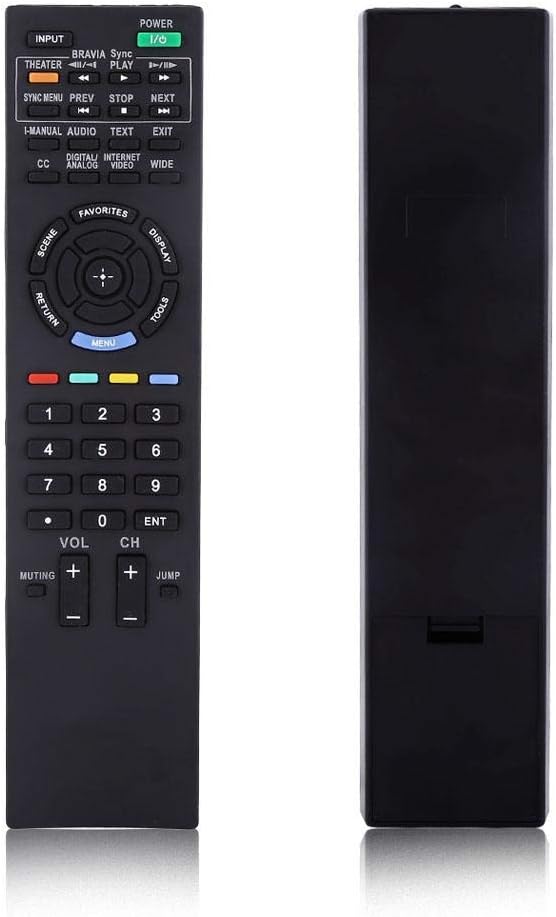
Сүрөт 2: Алдыңкы view of the Zerone RM-YD038 Remote Control.
- Кубат баскычы (Green, top right): Turns the television on or off.
- Киргизүү баскычы (Top left): Cycles through available input sources (HDMI, AV, etc.).
- Чабыттоо ачкычы (Circular pad in the middle): Used for menu navigation. The central button typically acts as "Enter" or "OK". This dedicated menu navigation key allows direct access to digital TV functions.
- Үнүн жогорулатуу/төмөндөтүү (VOL +/-): Adjusts the audio volume.
- Канал өйдө/төмөн (CH +/-): Changes television channels.
- Үнсүз баскыч (Muting): Mutes or unmutes the television audio.
- Number Pad (0-9): Directly enters channel numbers.
- Меню баскычы (Blue, below navigation pad): Accesses the television's main menu.
- Кайтуу баскычы (Left of navigation pad): Returns to the previous screen or menu.
- Ойнотуу башкаруулары (Play, Stop, Pause, Rewind, Fast Forward): Controls media playback if your TV supports it.

Figure 3: The remote control held in hand, showing button layout.

4-сүрөт: Детальдуу view пульттун баскычтарынын.
3. Техникалык тейлөө
3.1 Тазалоо
To maintain the remote control's functionality and appearance, clean it regularly:
- Пульттун бетин сүртүү үчүн жумшак, кургак чүпүрөктү колдонуңуз.
- өжөр кир үчүн, бир аз гampчүпүрөктү суу же жумшак, абразивдүү тазалагыч менен жууп салыңыз. Ашыкча нымдуулуктан сактаныңыз.
- Катуу химиялык заттарды, эриткичтерди же абразивдүү тазалоочу губкаларды колдонбоңуз, анткени алар пульттун сырткы көрүнүшүнө же ички компоненттерине зыян келтириши мүмкүн.
3.2 Батареяны алмаштыруу
Replace batteries when the remote's response becomes sluggish or it stops functioning. Refer to Section 1.1 for battery installation instructions. Always replace both batteries at the same time with new AAA batteries.
3.3 Сактоо
Узак мөөнөткө колдонулбаганда, пульттун агып кетишинин жана мүмкүн болуучу зыяндын алдын алуу үчүн батарейкаларды алып салуу сунушталат.
4. Кыйынчылыктарды
If you experience issues with your Zerone RM-YD038 remote control, please refer to the following common troubleshooting steps:
- Алыстан жооп бербейт:
- Ensure batteries are correctly installed with proper polarity (+/-).
- Replace old batteries with new ones. Weak batteries are a common cause of unresponsiveness.
- Пульт менен телевизордун инфракызыл кабыл алгычынын ортосундагы тоскоолдуктарды текшериңиз.
- Түз эфир диапазонунда экениңизди жана пультту түз телевизорго багыттап жатканыңызды текшериңиз.
- Buttons Require Excessive Pressure:
- This can sometimes occur with new remotes or after extended use. Ensure you are pressing the buttons firmly and directly.
- If the issue persists, ensure the remote is clean and free of debris around the buttons.
- Limited Range or Poor Signal:
- Replace batteries, as low battery power can reduce signal strength.
- Ensure there are no strong light sources (like direct sunlight or certain types of lighting) interfering with the IR signal.
- Remote Makes Unusual Sounds:
- If the remote produces unusual sounds, particularly after a fall, it may indicate internal damage. Consider replacing the unit.
Бул кадамдар маселени чечпесе, кошумча жардам алуу үчүн кардарларды тейлөө кызматына кайрылыңыз.
5. Техникалык шарттар
| Өзгөчөлүк | Деталь |
|---|---|
| Бренд | Zerone |
| Модель номери | RM-YD038 (Internal Model: Zer oneuhiskbndp2) |
| Шайкеш келген алыстан башкаруу моделдери | RM-YD033, RM-ED040, RM-YD034, RM-YD035 |
| Туура келген сыналгы моделдери | KDL32EX500, KDL55HX729, KDL40EX723 |
| Power Source | 2 x AAA Батареялар (киргизилген эмес) |
| Элемент Салмагы | 2.39 унция (болжол менен 67.7 грамм) |
| Өзгөчө өзгөчөлүк | Универсалдуу алмаштыруу |
| Колдоого алынган түзмөктөрдүн максималдуу саны | 1 (Телевидение) |
| ASIN | B07WCN3S2V |
| Дата биринчи жеткиликтүү | 12-август, 2019-жыл |

Figure 5: Dimensions of the Zerone RM-YD038 Remote Control.
6. Кепилдик жана колдоо
6.1 Кепилдик маалыматы
Specific warranty details for the Zerone RM-YD038 remote control are not provided in this manual. Please refer to the product packaging or the retailer's webтиешелүү кепилдик шарттары жана эрежелери менен сайтта таанышыңыз.
6.2 Кардарларды колдоо
For further assistance, technical support, or inquiries regarding your Zerone RM-YD038 remote control, please contact the retailer or manufacturer directly. Contact information can typically be found on the product packaging or the official Zerone webсайт.