Introduction
The Gigaset E290A is a cordless telephone designed for ease of use, featuring an integrated answering machine. It combines a modern design with functions specifically developed for users with visual, auditory, or tactile needs. The large keys, highly readable backlit display, and ergonomic handset shape ensure comfortable operation for all ages. This manual provides essential information for setting up, operating, and maintaining your Gigaset E290A.
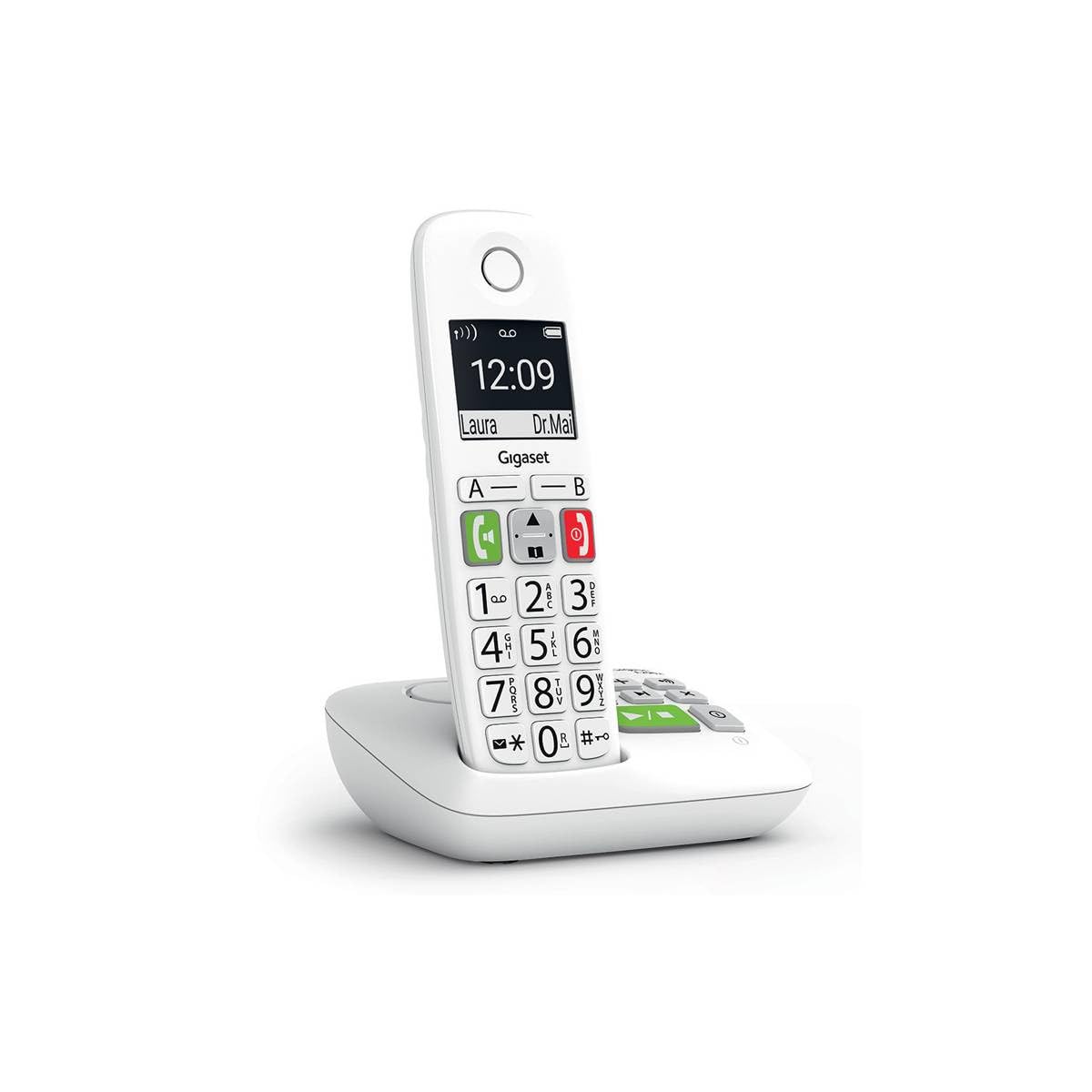
Image: The Gigaset E290A cordless phone, showing the handset and base station.
Коопсуздук маалыматы
- Use only the power adapter and telephone cord supplied with the device.
- Телефонду экстремалдык температурага, түз күндүн нуруна же жогорку нымдуулукка дуушар кылбаңыз.
- Avoid placing the phone near heat sources or in areas with strong electromagnetic fields.
- Use only approved rechargeable batteries. Do not dispose of batteries in fire.
- Аппаратты ачпаңыз casing. Оңдоо иштерин ыйгарым укуктуу тейлөө кызматкерлери гана жүргүзүшү керек.
- Телефонду балдар жетпеген жерде сактаңыз.
Пакеттин мазмуну
Пакетиңизде төмөнкү заттар бар экенин текшериңиз:
- 1 Gigaset E290A телефону
- 1 Gigaset E290A Base Station with integrated answering machine
- 1 Power Adapter for the base station
- 1 Телефон линиясы
- 2 AAA кайра заряддалуучу батарейка
- 1 Батарея капкагы
- Бул Колдонуучунун колдонмосу
Жайгашуу
1. Базалык станцияны туташтыруу
- Кубат адаптерин базалык станцияга туташтырыңыз жана аны розеткага сайыңыз.
- Телефон линиясын базалык станцияга туташтырыңыз жана экинчи учун телефонуңуздун розеткасына сайыңыз.
- Place the base station on a flat, stable surface, away from other electronic devices that might cause interference.

Image: The Gigaset E290A base station, illustrating the connection points for power and telephone line.
2. Inserting Batteries into the Handset
- Телефондун артындагы батарея бөлүкчөсүнүн капкагын ачыңыз.
- Туура полярдуулукту (+/-) камсыз кылуу менен бирге берилген эки AAA кайра заряддалуучу батарейканы салыңыз.
- Батарея уясынын капкагын жабыңыз.
- Place the handset on the base station to charge. The display will indicate charging status. Allow at least 8 hours for the initial charge.
3. Телефонду каттоо
The handset is usually pre-registered to the base station. If not, or if you are adding an additional handset:
- On the base station, press and hold the registration/paging key for approximately 3 seconds. The base station will enter registration mode.
- On the handset, navigate to the menu, select Орнотуулар, анда Каттоо, and follow the on-screen prompts. You may need to enter a PIN (default is 0000).
- Once registered, the handset display will show the internal number (e.g., "HS 1").
Иштөө нускамалары
Чалууларды кабыл алуу жана кабыл алуу
- Чакыруу: Enter the phone number using the large keypad and press the green call key (📞).
- Чалуу кабыл алуу: Телефон шыңгыраганда, жашыл чалуу баскычын басыңыз (📞) жооп берүү.
- Чалууну аяктоо: Кызыл баскычты басып, чалууну аяктаңыз (⛔).
- Hands Free Чалуу: During a call, press the hands-free key (🔊) to activate the speakerphone.

Image: Close-up of the Gigaset E290A handset, highlighting the large, easy-to-read keys for dialing.
Using the Answering Machine
The Gigaset E290A features an integrated digital answering machine with up to 30 minutes of recording time.
- Жандыруу/өчүрүү: Access the answering machine menu on the handset or press the dedicated key on the base station.
- Ойнотулган билдирүүлөр: Press the play key on the base station or navigate through the handset menu.
- Жарыяны жаздыруу: Follow the menu prompts to record your personal greeting.
Телефон китепчеси
Store up to 150 contacts in the phonebook.
- Байланыш кошуу: Go to the phonebook menu, select "New Entry," and enter the name and number.
- Quick Dial Keys: The phone has two direct access keys (A and B) for quickly calling two pre-stored numbers. Assign these numbers via the phonebook settings.
Call блоктоо
Block unwanted calls by adding up to 32 numbers to a blacklist. You can also block anonymous calls.
- Adding to Blacklist: From the call list or phonebook, select a number and choose the "Block" option.
- Blocking Anonymous Calls: Enable this feature in the call blocking settings to automatically reject calls from hidden numbers.

Image: Illustration of the call blocking feature on the Gigaset E290A, showing how to manage unwanted calls.
Аудио жөндөөлөрү
- Audio Boost Mode: Activate this mode for an even louder volume, facilitating high-definition listening.
- Угуу аппаратынын шайкештиги: The phone is compatible with hearing aids. You can also adjust the frequency range to suit personal hearing capabilities.
Дисплей орнотуулары
- Jumbo Mode: In Jumbo mode, all dialed digits appear in large characters on the 34 x 37 mm backlit black and white display, which has increased contrast for optimal readability.
- Меню навигациясы: Menu navigation is also simplified with an adapted character size.

Image: The Gigaset E290A display showing large characters in Jumbo Mode for enhanced readability.
Техникалык тейлөө
- Тазалоо: Телефонду жана базалык станцияны жумшак, гamp кездеме. Абразивдүү тазалагычтарды же эриткичтерди колдонбоңуз.
- Батареяга кам көрүү: To maintain battery life, fully discharge and recharge the handset batteries periodically. If the phone will not be used for an extended period, remove the batteries.
- Сактагыч: Колдонулбаган учурда телефонду салкын, кургак жерде сактаңыз.
Проблемаларды чечүү
| Көйгөй | Мүмкүн себеп | Чечим |
|---|---|---|
| Телефондо дисплей жок | Батареялар бош же туура эмес салынган. | Charge batteries for at least 8 hours. Check battery polarity. |
| Терүү үнү жок | Телефон линиясы туташкан эмес же бузулган. | Check telephone line connection to base and wall socket. Try a different cord. |
| Handset cannot register | Base station not in registration mode or incorrect PIN. | Ensure base is in registration mode. Re-enter default PIN (0000). |
| Үн сапаты начар | Телефон базадан өтө алыс жайгашкан, тоскоолдук жаралган же батареясы аз. | Move closer to the base. Avoid other electronic devices. Charge handset. |
| Difficulty programming features | Complex menu navigation or unfamiliarity with settings. | Refer to the specific section in this manual for detailed steps. Contact support if issues persist. |
Техникалык шарттар
| Бренд | Gigaset |
| Модель номери | E290A |
| Түс | Ак |
| Телефон түрү | Зымсыз |
| Жооп берүү системасынын түрү | Санарип |
| Шайкеш түзмөктөр | Telephone networks (PSTN, ISDN), external communication devices |
| Батареялар талап кылынат | 2 AAA (Alkaline) |
| Материал | Пластик |
| Power Source | Электр кабели |
| Элементтин өлчөмдөрү (LxWxH) | 22.4 x 16.6 x 8.8 см |
| Элемент Салмагы | 169 грамм |
Кепилдик жана колдоо
For warranty information, please refer to the warranty card included with your product or visit the official Gigaset website. Information regarding spare parts availability and software updates is not provided in this manual.
For technical support, frequently asked questions, or to download the full detailed manual, please visit the Gigaset Communication Store or the official Gigaset support webсайт.