
1. Киришүү
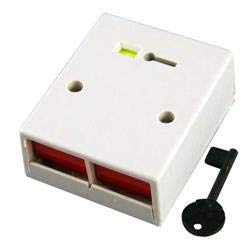
Бул колдонмодо орнотуу, иштетүү жана техникалык тейлөө боюнча кеңири көрсөтмөлөр камтылган CQR Hold-up PA Double Push Panic Button. This device is designed to provide a reliable and immediate alert in emergency situations, integrating seamlessly with compatible alarm control panels. It features a double-press activation mechanism and a key-reset function to prevent accidental activation and ensure secure operation.
Сураныч, туура иштешин жана коопсуздугун камсыз кылуу үчүн орнотуу жана колдонуудан мурун бул колдонмону кылдат окуп чыгыңыз.
2. Коопсуздук маалыматы
- Электр коопсуздугу: Installation should only be performed by qualified personnel in accordance with all local and national electrical codes. Ensure power to the alarm control panel is disconnected before wiring.
- Монтаждоо: Mount the device securely on a stable surface to prevent accidental dislodgement.
- Курчап турган чөйрө: Do not expose the device to extreme temperatures, humidity, or direct water. It is designed for indoor use only.
- Тейлөө: Түзмөктү өз алдынча ачууга же оңдоого аракет кылбаңыз. Бардык тейлөө иштерин квалификациялуу тейлөө кызматкерлерине тапшырыңыз.
- Сыноо: Regularly test the panic button's functionality in conjunction with your alarm system to ensure it is operating correctly.
3. Пакеттин мазмуну
Төмөндө тизмеленген нерселердин баары пакетиңизде бар экенин текшериңиз:
- CQR Hold-up PA Double Push Panic Button Unit
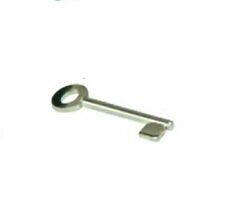
- Key for Reset Function
- Mounting Screws (may vary)
- Бул Колдонуучунун колдонмосу
4. Орнотуу жана орнотуу
The CQR Hold-up PA Double Push Panic Button is designed for surface mounting and integration with a compatible alarm control panel.
4.1. Монтаждоо орду
Choose a discreet yet easily accessible location for mounting, such as under a counter, desk, or near a point of sale. Ensure the surface is clean, dry, and structurally sound.
4.2. Wiring to Alarm Control Panel
- Кубатты өчүрүү: Before beginning any wiring, ensure the alarm control panel is completely powered off and disconnected from its main power source and backup battery.
- Access Wiring Terminals: c ачasing of the panic button (if applicable) to expose the wiring terminals. Refer to your alarm control panel's manual for specific zone input terminals for panic devices.
- Зымдарды туташтыруу: Connect the panic button's output wires to the designated panic zone input terminals on your alarm control panel. This device typically operates as a Normally Closed (NC) contact, opening upon activation. Consult the wiring diagram provided with your alarm control panel for correct polarity and connection points.
- Коопсуз зымдар: Бардык зым байланыштары коопсуз жана туура изоляцияланганын текшериңиз.
- Жабуу Casing: Carefully close the panic button casing.
4.3. Агрегатты монтаждоо
- Марк Тешиктер: Use the panic button unit as a template to mark the drilling locations for the mounting screws on your chosen surface.
- Бургулоочу тешиктер: Drill pilot holes if necessary, appropriate for the mounting screws.
- Коопсуз түзмөк: Align the panic button with the drilled holes and secure it firmly using the provided mounting screws. Do not overtighten.
4.4. Power On and Test
Once installation is complete, restore power to the alarm control panel. Perform a functional test of the panic button as described in the "Operating Instructions" section to ensure it triggers the alarm system correctly.
5. Иштөө нускамалары
5.1. Activating the Panic Button
To activate the panic alarm, simultaneously press both red push buttons on the front of the unit. The double-press mechanism is designed to minimize accidental activations while ensuring quick response in an emergency.
Upon successful activation, the panic button will latch, and the alarm control panel will initiate the programmed panic response (e.g., siren activation, silent alarm, notification to monitoring station).
5.2. Resetting the Panic Button
After activation, the panic button will remain in a latched state until manually reset. To reset the device:
- Insert the provided key into the keyhole located on the top surface of the panic button.
- Turn the key clockwise (or counter-clockwise, depending on the specific mechanism) until the buttons release and return to their original position.
- Remove the key. The panic button is now reset and ready for re-activation.
Маанилүү: Always keep the reset key in a secure and accessible location known only to authorized personnel.
6. Техникалык тейлөө
The CQR Hold-up PA Double Push Panic Button requires minimal maintenance to ensure reliable operation.
- Тазалоо: Periodically wipe the exterior of the unit with a soft, dry cloth. Do not use abrasive cleaners, solvents, or excessive moisture.
- Сыноо: It is recommended to test the panic button's functionality at least once a month to confirm its connection to the alarm system and proper activation/reset.
- Текшерүү: Visually inspect the unit for any signs of damage, loose wiring, or tampring.
7. Кыйынчылыктарды
If you encounter issues with your CQR Hold-up PA Double Push Panic Button, refer to the following common problems and solutions:
| Көйгөй | Мүмкүн себеп | Чечим |
|---|---|---|
| Panic button does not activate alarm. |
|
|
| Panic button does not reset with key. |
|
|
| Accidental activations. |
|
|
If the problem persists after attempting these solutions, please contact your alarm system installer or the manufacturer's technical support.
8. Техникалык шарттар
| Өзгөчөлүк | Деталь |
|---|---|
| Модел | Hold-up PA Double Push |
| ASIN | B07WWCXZC9 |
| Бренд | CQR |
| Өндүрүүчү | Security Components LTD |
| Түс | Ак |
| Жандандыруу түрү | Double Press Latching |
| Баштапкы абалга келтирүү механизми | Ачкычты калыбына келтирүү |
| Шайкештик | Universal operation with Alarm control panel |
| Дата биринчи жеткиликтүү | 22-август, 2019-жыл |
9. Кепилдик жана колдоо
Specific warranty information for the CQR Hold-up PA Double Push Panic Button is not provided within this manual. For details regarding warranty coverage, terms, and conditions, please refer to the documentation included with your purchase or contact the retailer or manufacturer directly.
For technical support, installation assistance, or troubleshooting beyond the scope of this manual, please contact your alarm system installer or the manufacturer, Security Components LTD, through their official channels.
You can visit the CQR Store on Amazon for more information: CQR Store