
1. Киришүү
The DAOKI 5-Way Navigation Button Module (Model GR-US-036) provides a compact, multi-directional input solution for various electronic projects. This module integrates five directional controls (Up, Down, Left, Right, Middle Click) and additional Set and Reset buttons, making it suitable for MCU, AVR, Arduino, and gaming applications where a small, joystick-like control is required.
This manual provides essential information for the proper installation, operation, and maintenance of your navigation button module.
2. Пакеттин мазмуну
Төмөндө тизмеленген нерселердин баары пакетиңизге камтылганын текшериңиз:
- 5 x Five-Direction Navigation Button Modules
- 1 x 8-Pin Female-to-Female Dupont Wire
- 1 x 8-Pin Female-to-Male Dupont Wire
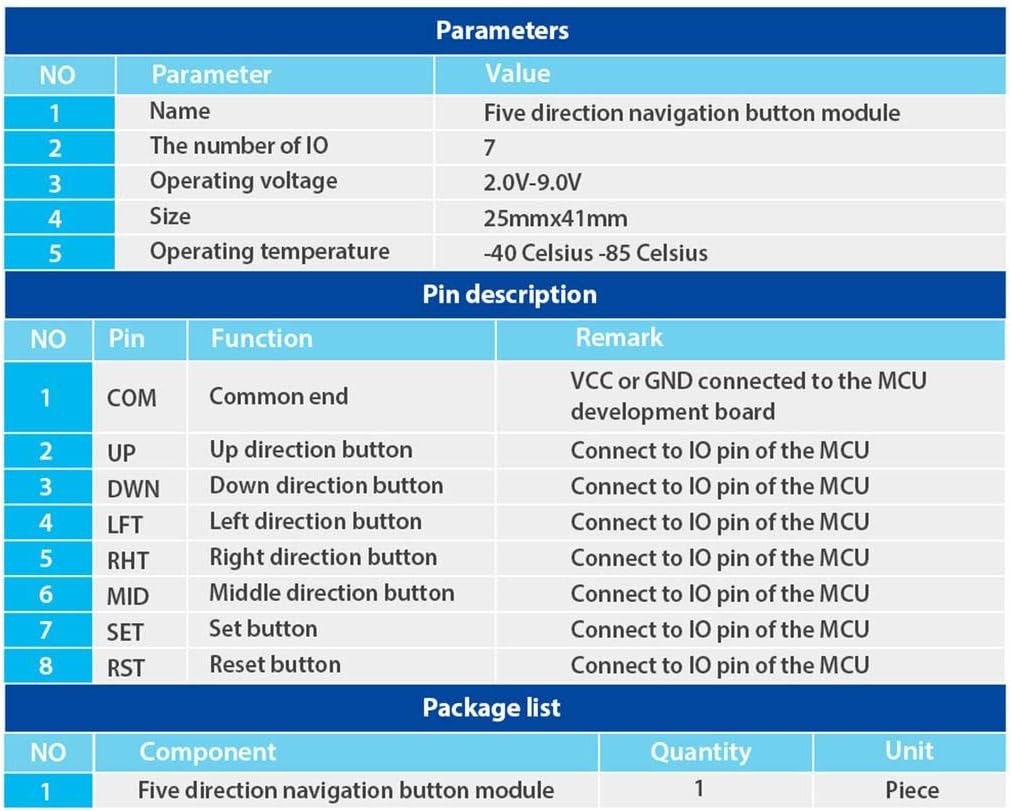
2.1-сүрөт: Table detailing module parameters, pin descriptions, and package contents.
3. Техникалык шарттар
The following are the technical specifications for the DAOKI 5-Way Navigation Button Module:
| Параметр | Нарк |
|---|---|
| Operating Voltage | 2.0В - 9.0В |
| Иштөө температурасы | -40 °Cден 85 °Cге чейин |
| Өлчөмдөрү (L x W) | 41 мм x 25 мм (1.61" x 0.98") |
| Number of IO Pins | 7 |
| Башкаруу түрү | 5-Way Directional (Up, Down, Left, Right, Middle Click) + Set + Reset |
| Туташтыргыч түрү | Dupont Wire |
| Шайкеш түзмөктөр | Microcontrollers (MCU), Arduino, Gaming Devices |
| Материал | Copper, Plastic, Stainless Steel |
| Байланыш материалы | Алтын |
| Эл аралык коргоо рейтинги | IP54 |

3.1-сүрөт: Module dimensions for integration planning.
4. Pin Description
The module features 8 pins for connection to a microcontroller or development board. Understanding each pin's function is crucial for correct wiring.
| Pin | Функция | Эскертүү |
|---|---|---|
| COM | Common End | Connect to VCC or GND of the MCU development board. |
| UP | Up Direction Button | Connect to an IO pin of the MCU. |
| DWN | Down Direction Button | Connect to an IO pin of the MCU. |
| LFT | Сол багыт баскычы | Connect to an IO pin of the MCU. |
| RHT | Right Direction Button | Connect to an IO pin of the MCU. |
| MID | Middle Direction Button | Connect to an IO pin of the MCU. |
| SET | Орнотуу баскычы | Connect to an IO pin of the MCU. |
| RST | Калыбына келтирүү баскычы | Connect to an IO pin of the MCU. |

4.1-сүрөт: Жогорку view of the module with pin labels.

4.2-сүрөт: Module with joystick cap removed, showing the internal switch.

4.3-сүрөт: Төмөнкү view модулдун.
5. Орнотуу жана орнотуу
The installation of electronic modules requires basic knowledge of electronics and practical skills. Please proceed with caution.
5.1. Электр кубатын кошуу
- туташтыруу COM pin of the module to either the VCC (positive power supply) or GND (ground) of your MCU development board, depending on your circuit design and desired logic.
- электр менен жабдууну камсыз кылуу voltage 2.0V жана 9.0V белгиленген диапазондо.
5.2. Data Pin Connection
- туташтыруу UP, DWN, LFT, RHT, MID, SET, жана RST pins of the module to individual digital input/output (IO) pins on your microcontroller (MCU).
- Use the provided Dupont wires for secure connections.

5.1-сүрөт: Example wiring diagram for connecting the module to a development board.
5.3. Монтаждоо
The module is designed for panel mounting. Secure it using appropriate fasteners through the mounting holes on the PCB.
6. Иштөө нускамалары
Once correctly wired and powered, the module functions as a digital input device. Each button press (Up, Down, Left, Right, Middle, Set, Reset) will change the state of its corresponding IO pin on the MCU, which can then be read and processed by your program.
- Багыттык көзөмөл: Moving the joystick in any of the four cardinal directions (Up, Down, Left, Right) will activate the respective directional button.
- Ортоңку чыкылдатуу: Pressing the joystick straight down activates the middle click function.
- SET баскычы: The 'SET' button provides an additional input for configuration or menu selection.
- RST баскычы: The 'RST' button can be used for reset functions or other programmed actions.
Refer to your microcontroller's programming environment and documentation for details on reading digital input states from the connected IO pins.
7. Техникалык тейлөө
The DAOKI 5-Way Navigation Button Module is designed for durability and requires minimal maintenance. Follow these guidelines to ensure its longevity:
- Тазалоо: Keep the module free from dust and debris. Use a soft, dry cloth for cleaning. Avoid using liquids or abrasive cleaners.
- Курчап турган чөйрө: Operate the module within its specified temperature range (-40 °C to 85 °C). Avoid exposure to extreme humidity or corrosive environments.
- Колдонуу: Handle the module with care to prevent physical damage to the components or solder joints.
8. Кыйынчылыктарды
If you encounter issues with your DAOKI 5-Way Navigation Button Module, consider the following troubleshooting steps:
- Баскычтардан жооп жок:
- Verify all pin connections (COM, UP, DWN, LFT, RHT, MID, SET, RST) are secure and correctly wired to the MCU.
- Электр менен жабдууну текшериңизtagанын 2.0V-9.0V диапазонунда экенине ынануу үчүн.
- Confirm that your MCU code is correctly configured to read the digital input states from the connected IO pins.
- Test the module with a different set of Dupont wires to rule out faulty cables.
- Intermittent Button Response:
- Inspect solder joints on the module and your development board for any cold joints or shorts.
- Ensure there is no physical obstruction preventing full button travel.
- Check for electromagnetic interference if operating in a noisy electrical environment.
- Физикалык зыян:
- If the module has been dropped or subjected to excessive force, internal components may be damaged. Visual inspection for cracks or bent pins is recommended.
If issues persist after following these steps, consult relevant online forums or resources for microcontroller projects, or contact the manufacturer for further assistance.
9. Кепилдик жана колдоо
Specific warranty information for the DAOKI 5-Way Navigation Button Module (Model GR-US-036) was not provided in the product data. For details regarding warranty coverage, technical support, or replacement parts, please refer to the retailer's return policy or contact DAOKI directly through their official channels.