
Walfront STC-3018
Walfront STC-3018 Digital Temperature Controller User Manual
Модел: STC-3018
Продукт бүттүview
The Walfront STC-3018 is a microcomputer intelligent digital display thermostat designed for precise temperature and humidity control. It features a dual screen for simultaneous display of current and set temperatures, making it suitable for various applications requiring automated temperature management, such as in seafood machines and cooling water systems.
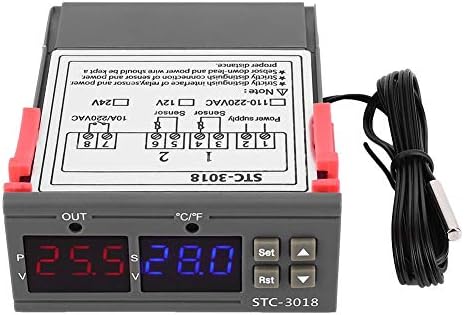
Сүрөт: алдыңкы view of the Walfront STC-3018 Digital Temperature Controller, showing the dual LED displays and control buttons.
Негизги өзгөчөлүктөрү
- ABS Flame Retardant Plastic Shell: Ensures enhanced safety during operation.
- Microcomputer Intelligent Digital Display: Dual screen for displaying both current and set temperatures.
- Included NTC Sensor: Comes with a 1-meter long sensor for convenient temperature detection.
- Жогорку тактык: Provides precise temperature measurement and control.
- Ар тараптуу колдонмо: Ideal for automatic switching of refrigeration and heating devices, including seafood machines and cooling water systems.
Техникалык шарттар
| Параметр | Нарк |
|---|---|
| Продукт модели | СТК-3018 |
| Кошумча томtage | 12V/24V/110V - 220VAC |
| Температураны көзөмөлдөө диапазону | -55°Cден 120°Cге чейин |
| Экранды көрсөтүү | Dual Screen Dual Display |
| Machine Power Consumption | 3 Вттан аз |
| Температураны өлчөөнүн тактыгы | ±1 °C (-50 °C ~ 70 °C) |
| Резолюция | 0.1 °C |
| Сенсор түрү | NTC Sensor (line length approx. 1 meter) |
| Айлана-чөйрөнүн температурасы | 0°Cден 60°Cге чейин |
| Салыштырмалуу нымдуулук | 20% ~ 85% (конденсация жок) |
| Машинанын өлчөмү | Болжол менен 75 x 34.5 x 85 мм / 3 x 1.4 x 3.3 дюйм |
| Орнотуу ачылышы | Approx. 71 x 29mm / 2.8 x 1.1in |
| Турак жай материалы | ABS flame retardant plastic shell |
| Элемент Салмагы | 3.87 унция |
| UPC | 713135318215 |

Image: The STC-3018 controller showing its physical dimensions of 71mm (2.8in) and 29mm (1.1in) for installation opening.
Орнотуу жана орнотуу
Panel Introduction
Familiarize yourself with the control panel components before installation.
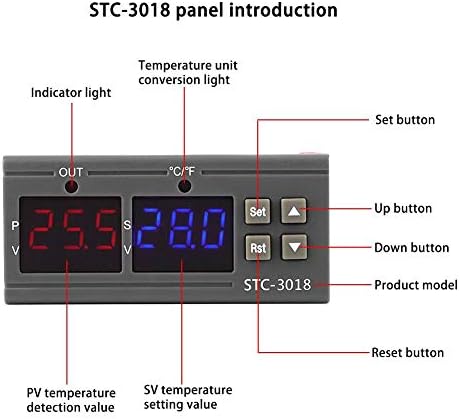
Image: Diagram illustrating the STC-3018 control panel, labeling the indicator light, temperature unit conversion light, Set button, Up button, Down button, Reset button, PV temperature detection value, and SV temperature setting value.
Зымдар диаграммасы
Proper wiring is crucial for the safe and correct operation of the device. Refer to the diagrams below for connection instructions.

Image: Two wiring diagrams for the STC-3018. The top diagram shows wiring for a load with an independent power supply, while the bottom diagram shows wiring for a load with the same power supply as the controller. Both diagrams indicate connections for power supply, sensor, and output.
Маанилүү эскертүү: Strictly distinguish the interface of the relay/sensor and power supply. The sensor down-lead and power wire should be kept a proper distance apart to avoid interference.
Иштөө нускамалары
Температура параметрлерин орнотуу
- Күйгүзүү: Ensure the device is correctly wired and powered on. The dual LED displays will show the current temperature (PV) and the set temperature (SV).
- Кирүү Орнотуулары: басыңыз коюу button once to enter the temperature setting mode. The SV display will flash.
- Температураны жөндөө: колдонуу Up (▲) жана Төмөн (▼) buttons to adjust the desired set temperature (SV).
- Жөндөөлөрдү ырастоо: басыңыз коюу button again to confirm the new setting and exit the setting mode. The device will now operate according to the new set temperature.
- Кайтаруу: To reset the device, press the Rst баскычы.
Температуранын бирдигин конверсиялоо
The STC-3018 supports temperature unit conversion. Refer to the panel introduction image for the location of the temperature unit conversion light. Specific instructions for changing units (e.g., Celsius to Fahrenheit) are typically found in the full product manual or by holding the 'Set' button for an extended period to access advanced parameters. Please consult the manufacturer's website or contact support for detailed steps if needed.
Техникалык тейлөө
- Тазалоо: Regularly wipe the device with a soft, dry cloth. Do not use abrasive cleaners or solvents.
- Сенсорго кам көрүү: Ensure the temperature sensor is clean and free from debris. Avoid bending or damaging the sensor cable.
- Экологиялык шарттар: Operate the controller within the specified ambient temperature and humidity ranges (0~60°C, 20%~85% relative humidity, no condensation) to ensure longevity.
- Туташуу текшерүү: Мезгил-мезгили менен бардык зымдарды байланыштарды текшерип, алар бекем жана коррозияга учурабайт.
Проблемаларды чечүү
| Көйгөй | Мүмкүн себеп | Чечим |
|---|---|---|
| Түзмөк күйбөйт. | Электр менен камсыздоо жок же зымдар туура эмес туташтырылган. | Электр туташууларын текшерип, үнүн туура чыгарыңызtage (12V/24V/110V-220VAC) is supplied. Verify wiring against the diagram. |
| Температураны өлчөө так эмес. | Damaged or improperly connected sensor. Sensor not in optimal measuring position. | Inspect sensor for physical damage. Ensure sensor is securely connected. Reposition sensor to accurately measure the desired area. |
| Controller not switching heating/cooling. | Incorrect temperature settings. Output wiring issue. | Verify the set temperature (SV) and ensure it aligns with the desired operation (heating or cooling). Check the output wiring to the connected device. |
| Дисплей ката кодун көрсөтөт. | Sensor fault or internal error. | Refer to the full product manual for specific error codes. Often indicates a sensor open circuit or short circuit. Replace sensor if faulty. |
If the problem persists after attempting these solutions, please contact Walfront customer support.
Кепилдик жана колдоо
For warranty information and technical support, please refer to the documentation included with your purchase or visit the official Walfront webсайт. Кепилдик дооматтары үчүн сатып алуу дүмүрчөгүңүздү сактаңыз.
Walfront Store: https://www.amazon.com/stores/Walfront/page/FECAC109-E5D3-4C74-B6F1-3FA643B2EA7D
Ask a question about this manual
Ask about setup, troubleshooting, compatibility, parts, safety, or missing instructions. Manuals+ will review the question and use this page’s manual context to help answer it.