
1. Introduction and Overview
Thank you for choosing the Bewinner 12-inch LED Digital Photo Frame. This device allows you to display your favorite photos, play music and videos, and utilize clock and calendar functions. It features a high-resolution 12-inch LED screen (1280x800) and supports various media formats.

Image: The digital photo frame showcasing its 12-inch LED screen with a high-resolution image.
The frame is constructed from high-quality ABS material and comes with an infrared remote control for convenient operation. It includes built-in speakers and a 3.5mm headphone jack for audio output.
Пакеттин мазмуну:
- 1 x Bewinner Digital Photo Frame
- 1 x Алыстан башкаруу
- 1 x Кубат адаптери/кубаттагыч
- 1 x Frame Stand
- 1 х Колдонуучунун колдонмосу (бул документ)
2. Орнотуу
2.1 Пакеттен чыгаруу
Carefully remove all components from the packaging. Ensure all items listed in the package contents are present and undamaged.
2.2 Стендди бекитүү
Locate the detachable frame stand. Insert the stand into the designated slot on the back of the digital photo frame. Ensure it is securely attached to provide stable support on any flat surface.

Сүрөт: Арткы view of the digital photo frame with the stand in place, highlighting the port layout.
2.3 Кубат туташтыруу
Connect the provided power adapter to the DC IN port on the digital photo frame. Plug the other end of the adapter into a standard electrical outlet. The frame will typically power on automatically or enter standby mode.
2.4 Inserting a Memory Card or USB Drive
The digital photo frame supports external storage via SD cards (up to 32GB, not included) and USB 2.0 host devices. Insert your SD card into the memory card slot or connect a USB flash drive to the USB host port. Ensure the media is inserted correctly.
Эскертүү: This device does not have significant internal storage for media files. An external SD card or USB drive is required to display photos, videos, or music.

Сүрөт: Side profile of the digital photo frame, illustrating the various input ports including USB and SD card slots.
3. Иштөө нускамалары
The digital photo frame can be operated using the buttons on the back of the frame or the included infrared remote control.
3.1 Негизги навигация
- Кубат баскычы: Turns the frame on or off.
- Menu/Setup Button: Accesses the main menu and settings.
- Жебе баскычтары (Өйдө/Төмөн/Сол/Оң): Менюлар аркылуу чабыттап, параметрлерди тандаңыз.
- Кирүү баскычы: Тандоолорду ырастайт.
- Чыгуу баскычы: Returns to the previous screen or main display.
- Үн баскычтары: Adjust audio volume (VOL+, VOL-).
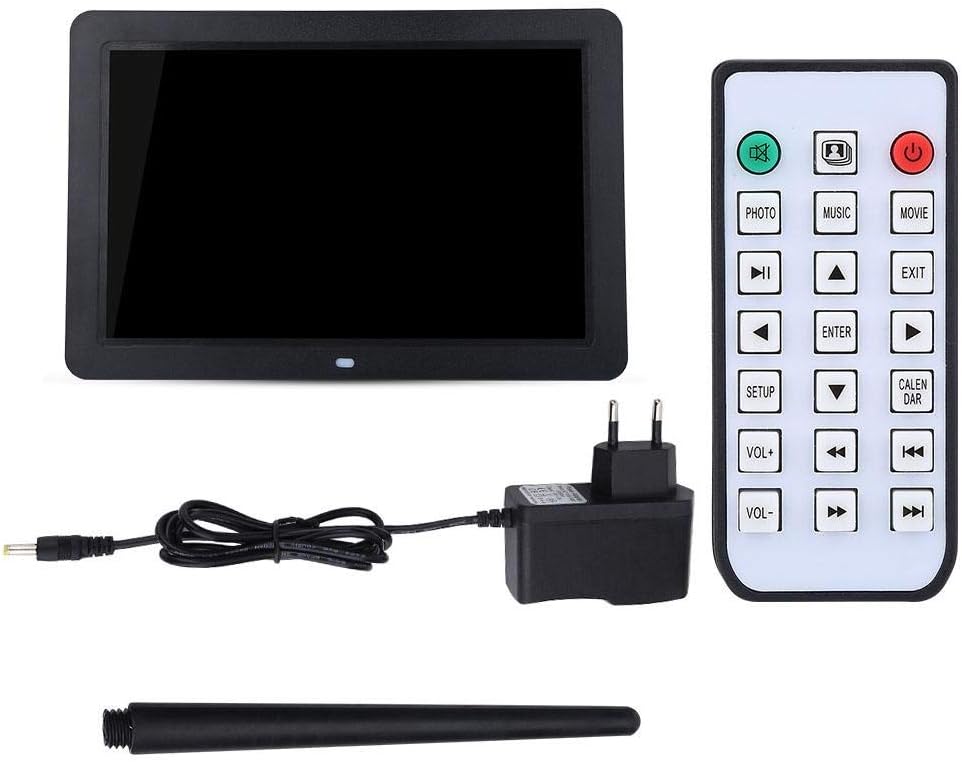
Image: The included remote control, showing buttons for various functions like Photo, Music, Movie, Setup, Calendar, and volume control.
3.2 Photo Playback
The frame supports JPEG and JPG image formats. To view сүрөттөр:
- Ensure your photos are stored on a compatible SD card or USB drive.
- From the main menu, select "Photo" or press the ФОТО пульттагы баскыч.
- Navigate to your desired folder or select "All Photos" to start a slideshow.
- You can configure slideshow duration, transition effects, and brightness settings in the "Setup" menu.

Image: The digital photo frame displaying a high-resolution image, demonstrating its photo playback capability.
3.3 Музыканы ойнотуу
The frame supports MP3 audio format. To play music:
- Store your MP3 files on a compatible SD card or USB drive.
- From the main menu, select "Music" or press the МУЗЫКА пульттагы баскыч.
- Музыкаңызды карап чыгыңыз files and select a track to play.
- Adjust the volume using the VOL+ and VOL- buttons. You can also connect headphones to the 3.5mm jack.

Image: The digital photo frame displaying a visual while playing music, with an overlay indicating MP3 support.
3.4 Видеону ойнотуу
The frame supports various video formats including RM, RMVB, MKV, MOV, M4V, MPG, FLV, PMP, AVI, VOB, DAT, MP4, and 3PG. To play videos:
- Store your video files on a compatible SD card or USB drive.
- From the main menu, select "Movie" or press the КИНО пульттагы баскыч.
- Browse your video files and select a video to play.
- VOL+ жана VOL- баскычтарын колдонуп үндү тууралаңыз.
3.5 Clock and Calendar Functions
The digital photo frame includes built-in clock and calendar functions. To access these:
- From the main menu, select "Calendar" or press the КАЛЕНДАРИ пульттагы баскыч.
- You can set the time and date in the "Setup" menu.
3.6 Орнотуулар жана ыңгайлаштыруу
Access the "Setup" menu to customize various settings:
- Тил: Каалаган тилиңизди тандаңыз.
- Дисплейдин жөндөөлөрү: Adjust brightness, contrast, and aspect ratio.
- Слайдшоу жөндөөлөрү: Configure interval, transition effects, and playback mode (e.g., sequential, random).
- Убакыт жана дата: Учурдагы убакытты жана күндү коюу.
- Авто ойнотуу: Set the frame to automatically play music, images, videos, or a mixed sequence upon startup.
4. Техникалык тейлөө
4.1 Экранды тазалоо
To clean the LED screen, gently wipe it with a soft, lint-free cloth. For stubborn smudges, slightly dampчүпүрөктү суу же экранга коопсуз тазалоо эритмеси менен жабыңыз. Катуу химиялык заттарды же абразивдүү материалдарды колдонуудан алыс болуңуз.
4.2 Жалпы кам көрүү
- Keep the digital photo frame away from direct sunlight, excessive heat, and moisture.
- Аппаратты түшүрүүдөн же катуу таасирлерден сактаныңыз.
- Do not attempt to disassemble the frame, as this will void any potential warranty and may cause damage.
- Узак убакыт бою колдонулбай турганда, кубат адаптерин сууруп коюңуз.
5. Кыйынчылыктарды
If you encounter issues with your Bewinner Digital Photo Frame, please refer to the following common problems and solutions:
| Көйгөй | Мүмкүн болгон себеп / Чечим |
|---|---|
| Рамка күйбөйт. |
|
| No photos/videos/music displayed. |
|
| Пульт иштебей жатат. |
|
| Images appear washed out or too bright/dark. |
|
| Audio is distorted or no sound. |
|
6. Техникалык шарттар
| Өзгөчөлүк | Деталь |
|---|---|
| Бренд | Bewinner |
| Модель номери | Bewinner1moich0rzq-03 |
| Screen Size | 12 дюйм |
| Дисплей түрү | LED |
| Резолюция | 1280 x 800 (WXGA) |
| Аспект катышы | 16:9 |
| Жарыктык | 250 кд/м² |
| Shell Material | ABS (акрилонитрил бутадиен стирол) |
| Түс | Кара |
| Тышкы сактагычты колдоо | SD Card (up to 32GB), USB 2.0 Host |
| Колдоого алынган сүрөт форматтары | JPEG, JPG (Base Encoding) |
| Колдоого алынган музыка форматтары | MP3 |
| Колдоого алынган видео форматтары | RM, RMVB, MKV, MOV, M4V, MPG, FLV, PMP, AVI, VOB, DAT, MP4, 3PG |
| Supported E-book Format | TXT |
| Камтылган динамик | 8Ω2W * 2 |
| Операция ыкмасы | Infrared Remote Control, On-frame Buttons |
| Interfaces | 3.5mm Headphone Jack, Memory Card Slot, USB 2.0 Host, Mini USB Adapter, Charging Port |
| Өлчөмдөрү (L x W x Y) | Болжол менен 30.5 x 20.2 x 2.5 см (12.0 x 7.9 x 1.0 дюйм) |
| Салмагы | Болжол менен 895г |
| Power Source | Кабель электр |

Image: Dimensional diagram of the digital photo frame, indicating its width and height.
7. Кепилдик жана колдоо
Information regarding specific warranty terms and conditions for the Bewinner Digital Photo Frame is not provided in the product details. For warranty claims or technical support, please refer to the retailer or manufacturer's official webпродуктту сатып алган сайт.
Please note that information on spare parts availability and guaranteed software updates is also not available.