
1. Киришүү
Thank you for choosing the BESTEK PD20W Power Strip Tower. This manual provides essential information for the safe and efficient use of your device. Please read it thoroughly before operation and retain it for future reference.
This compact power strip is designed to provide convenient power and charging solutions for multiple electronic devices. It features a vertical cube design, optimizing space and offering versatile placement options.

Image: The BESTEK PD20W Power Strip Tower, showcasing its 7-in-1 functionality with 3 AC outlets, 3 USB-A ports, and 1 USB-C port, connected to various devices on a nightstand.
2. Маанилүү коопсуздук нускамалары
- 15 максималдуу жүк көтөрүмдүүлүгүнөн ашпаңыз Amps.
- Бул түзмөк имараттын ичинде гана колдонууга арналган. Нымдуулукка же нымдуу шарттарга дуушар кылбаңыз.
- Балдар жетпеген жерде сактаңыз.
- Электр тилкесин бөлүктөргө бөлбөңүз же өзгөртпөңүз.
- Ensure the power strip is fully plugged into a grounded outlet.
- Башка электр тилкелери же узарткыч зымдар менен бирге колдонуудан алыс болуңуз.
- Продукт ашыкча өзгөчөлүктөргө ээtage, short circuit, overload, and overcurrent protection. If the power strip trips, unplug all devices and reset the power switch.
- The housing is made of flame-retardant PC material for enhanced safety.
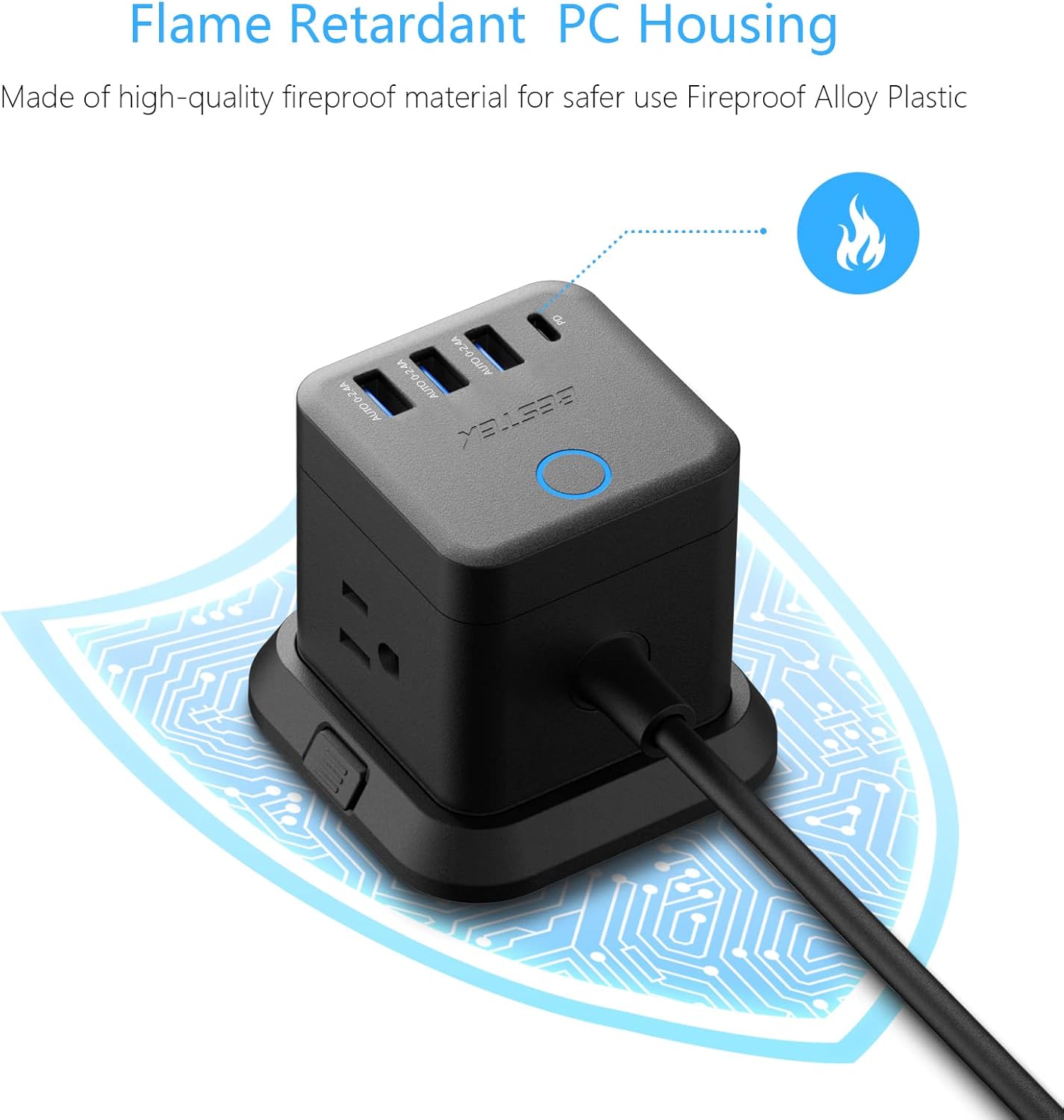
Image: Close-up of the power strip highlighting its flame-retardant PC housing, indicated by a flame icon and a protective circuit board graphic.
3. Продукциянын компоненттери
The BESTEK PD20W Power Strip Tower includes the following components:
- 3 AC розеткалары: Standard North American Type B - 3 pin outlets.
- 3 USB-A порттору: For charging various USB-A compatible devices.
- 1 USB-C PD 20W Port: Тез кубаттоо үчүн шайкеш келген USB-C түзмөктөрү үчүн.
- 5 футтук узартуу шнуру: жайгаштырууда ийкемдүүлүктү камсыз кылат.
- Алынуучу база: Allows for stable desktop use or mounting.
- Кубат которгучу: Controls power to all outlets and USB ports.
- 45-Degree Flat Plug: Designed to fit in narrow spaces behind furniture.

Image: Illustration showing the 45-degree flat plug design, demonstrating how it allows furniture to sit closer to the wall.
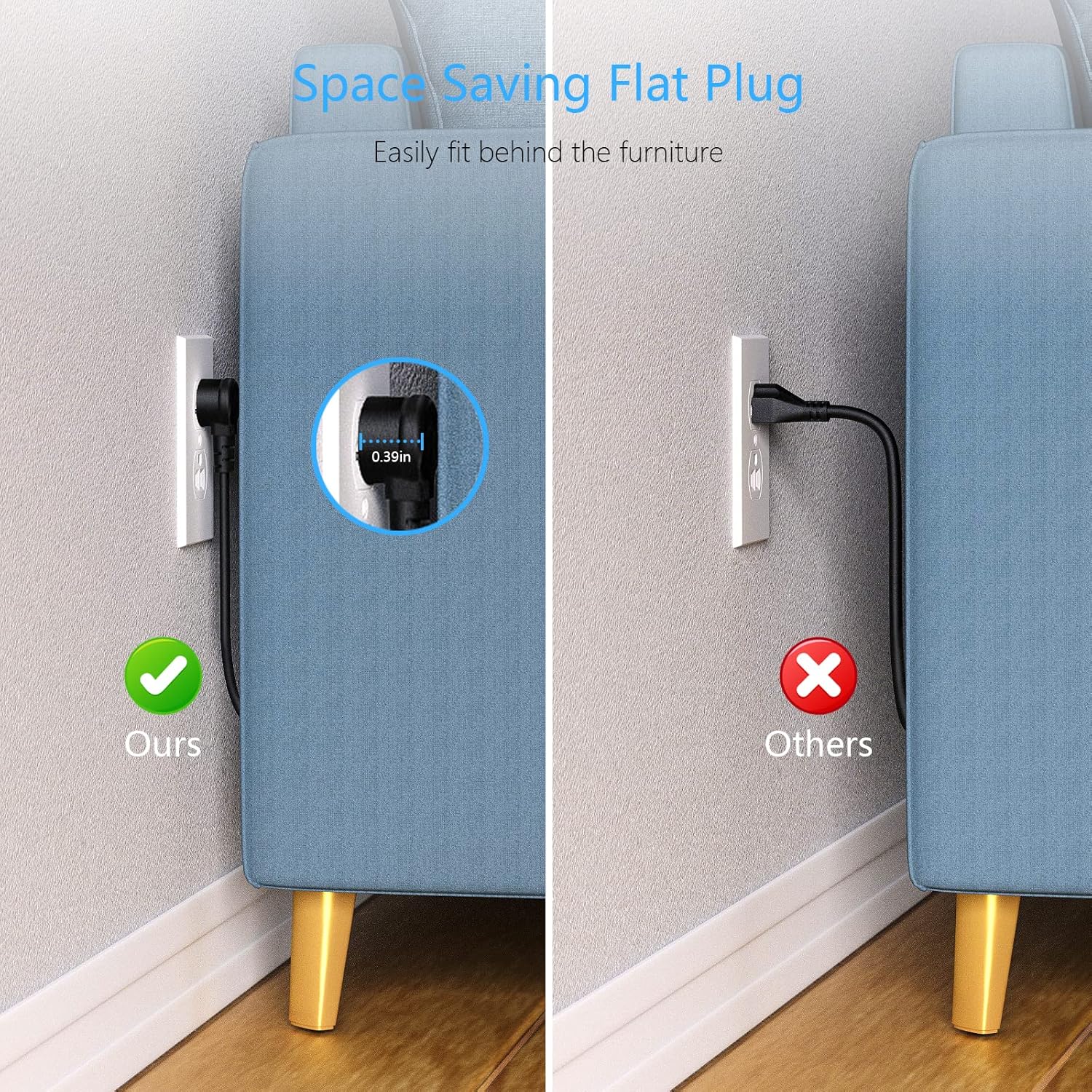
Image: A comparison showing the space-saving benefit of the flat plug, allowing a couch to be placed closer to the wall compared to a standard plug.
4. Орнотуу жана орнотуу
4.1 Компьютерде колдонуу
- Электр тилкесин туруктуу, тегиз бетке коюңуз.
- Ensure the detachable base is securely attached for stability.
- Plug the power strip's 5-foot extension cord into a grounded wall outlet.
- Press the power switch on top of the unit to turn it on. The indicator light will illuminate.

Image: The BESTEK Power Strip Tower placed on a desk, ready for use.
4.2 Монтаждоо параметрлери
The power strip can be mounted using screws or adhesive (included). Ensure the mounting surface is clean, dry, and suitable for holding the device and connected cables.
- Бурама бекитүү:
- Detach the base from the power strip.
- Use the provided screws to secure the base to your desired surface (e.g., under a desk, on a wall).
- Reattach the power strip to the secured base.
- 3M Glue Fixing (Adhesive):
- Монтаждоо бетин кылдат тазалаңыз.
- Apply the 3M adhesive pads to the bottom of the detachable base.
- Press the base firmly onto the desired surface for at least 30 seconds.
- Allow the adhesive to cure for 24 hours before attaching the power strip and connecting devices.

Image: The BESTEK Power Strip Tower mounted discreetly under a desk, demonstrating its space-saving capability.

Сүрөт: деталдуу view of the screw fixing method for mounting the power strip's base.

Сүрөт: деталдуу view of the 3M adhesive fixing method for mounting the power strip's base.
5. Иштөө нускамалары
5.1 Түзмөктөрдү туташтыруу
- Ensure the power strip is plugged into a wall outlet and the power switch is ON.
- For AC Powered Devices: Plug your devices directly into any of the 3 AC outlets.
- For USB-A Powered Devices: Connect your device's USB-A charging cable to one of the 3 USB-A ports. These ports provide up to 2.4A Max output per port.
- For USB-C Powered Devices: Connect your device's USB-C charging cable to the USB-C PD 20W port. This port supports PD3.0 with output options of 5V/3A, 9V/2.22A, or 12V/1.67A for fast charging compatible devices.
The built-in smart technology detects connected devices and delivers optimal charging speed automatically.
Video: A demonstration of the BESTEK Power Strip Tower, showcasing its compact design and various ports for connecting multiple devices simultaneously.
6. Техникалык тейлөө
- Unplug the power strip from the wall outlet before cleaning.
- Сыртын жумшак, кургак чүпүрөк менен сүртүңүз. Суюк тазалоочу каражаттарды же аэрозольдорду колдонбоңуз.
- Keep the power strip away from dust and debris to ensure proper ventilation.
- Regularly check the power cord for any signs of damage. If damaged, discontinue use immediately.
7. Кыйынчылыктарды
| Көйгөй | Мүмкүн себеп | Чечим |
|---|---|---|
| Түзмөктөргө кубат жок. | Power switch is off, power strip is unplugged, or circuit breaker tripped. | Ensure power switch is ON. Check if the power strip is securely plugged into a live wall outlet. If the power strip has an overload protection reset button, press it. Reduce the number of connected devices if overloaded. |
| Devices not charging via USB ports. | Cable issue, device not compatible, or power strip is off. | Try a different USB cable. Ensure your device is compatible with the USB port type (USB-A or USB-C PD). Verify the power strip is on. |
| Электр тилкеси жылуу сезилет. | Normal operation or excessive load. | A slight warmth during operation is normal. If it feels excessively hot, unplug all devices immediately and reduce the load. Ensure proper ventilation around the unit. |
8. Техникалык шарттар
- Бренд: БЕСТЕК
- Модель номери: 1
- Түсү: Кара
- Жалпы электр розеткалары: 3 AC розеткасы
- Жалпы USB порттору: 4 (3 USB-A, 1 USB-C)
- USB-A чыгаруу: 2.4A Max per port
- USB-C чыгышы (PD3.0): 5V/3A, 9V/2.22A, 12V/1.67A (20W макс)
- Максималдуу ток: 15 Amps
- Толугу менен коргоо рейтинги: 600 Джоуль
- Электр сайгыч түрү: B түрү - 3 пин (Түндүк Америка)
- Корндун узундугу: 5 Фут
- Материал: Copper, Plastic, Rubber (Flame Retardant PC Housing)
- Өзгөчөлүктөр: Compact, Portable, Detachable Base, 45-Degree Flat Plug
- Шайкеш түзмөктөр: Camera, Laptop, Personal Computer, Printer, Router, Scanner, Smartphone, Smartwatch, Speaker, Tablet
9. Кепилдик жана колдоо
This BESTEK product comes with a 24 айлык коргоо планы. In addition, a 30 күндүк кайтаруу саясаты is available for refunds or replacements. Please refer to your purchase documentation for specific terms and conditions.
For technical support or warranty claims, please contact BESTEK customer service:
- Электрондук почта: Refer to your product packaging or the official BESTEK webбайланыш маалыматы үчүн сайт.
- Телефон: Refer to your product packaging or the official BESTEK webбайланыш маалыматы үчүн сайт.
- Онлайн колдоо: Visit the official BESTEK webКөп берилүүчү суроолор жана колдоо булактары үчүн сайт.
Image: Icons representing BESTEK's service plan (24 months protection, 30 days return, return on defects) and customer support options (24H, Email, Phone).