
Introduction
This manual provides detailed instructions for the setup, operation, and maintenance of your HANNLOMAX HX-135CR Alarm Clock Radio. This device features a PLL FM radio, dual alarms, a projection clock, dual USB charging ports (2.4A and 1A), and a 1.2-inch red LED display. Please read these instructions carefully before using the product.
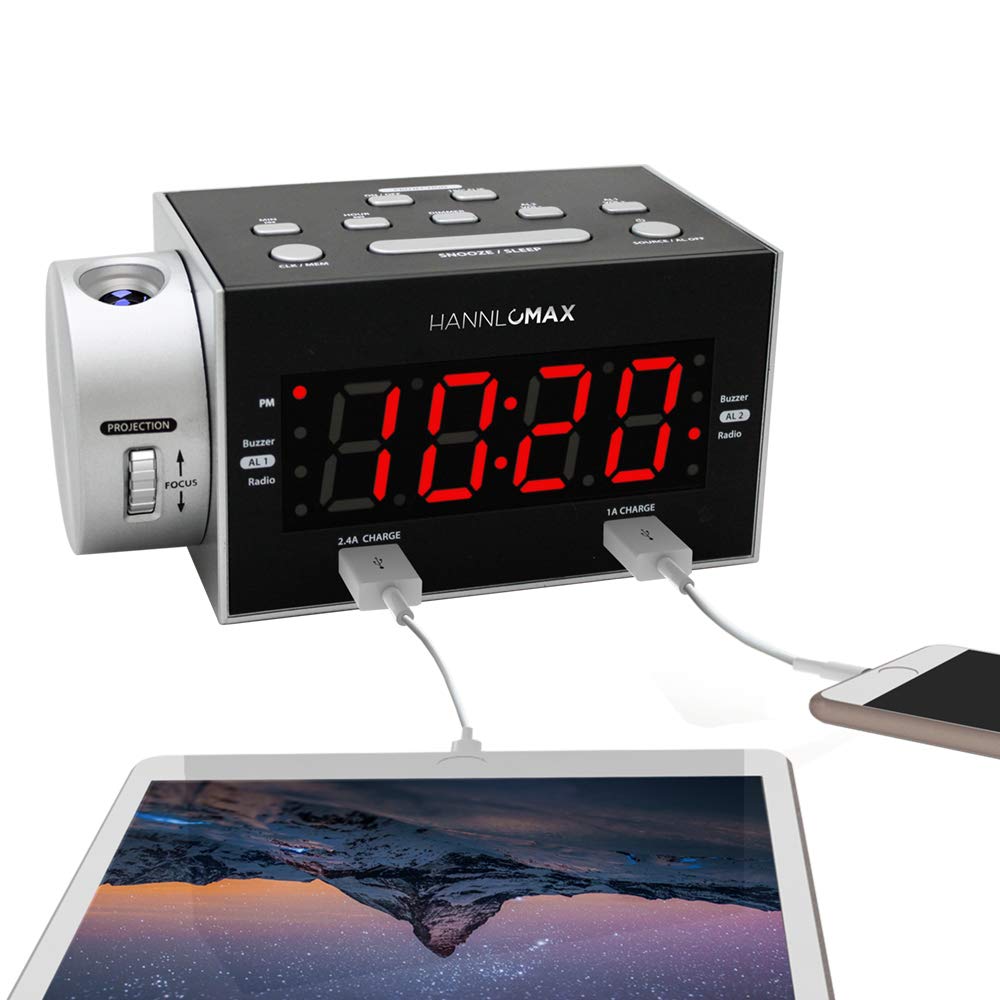
Image: The HANNLOMAX HX-135CR Alarm Clock Radio displaying the time on its LED screen and projecting the time onto a surface.
Продукт бүттүview
Familiarize yourself with the various components and controls of your alarm clock radio.

Image: A diagram highlighting key features of the HANNLOMAX HX-135CR, including the 1.2-inch LED display, clock projection, dual USB charging ports (2.4A and 1A), and alarm wake-up options.
Башкаруу баскычтары жана функциялары:
- MIN / HOUR: Adjusts minutes and hours for time and alarm settings.
- ДИММЕР: LED дисплейдин жарыктыгын тууралайт.
- УЙКУГА КАЛТЫРУУ / УЙКУГА КАЛТЫРУУ: Activates snooze during an alarm; sets sleep timer for radio.
- SOURCE / AL OFF: Toggles between FM radio and clock display; turns off active alarm.
- CLK / MEM: Enters clock setting mode; saves FM radio presets.
- AL1 / AL2: Selects Alarm 1 or Alarm 2 for setting.
- AL SET: Сигнал орнотуу режимине кирет.
- AL ON / OFF: Toggles Alarm 1 or Alarm 2 on or off.
- СКАН: FM радиостанцияларын автоматтык түрдө сканерлейт жана сактайт.
- PROJECTION ON/OFF: Turns the time projection on or off.
- БАГЫТТАРЫ: Adjusts the clarity of the projected time.
- PROJECTION ANGLE ADJUSTMENT: Rotates the projection lens for optimal viewing.
Жайгашуу
1. Power Connection
- Connect the provided AC/DC adapter to the DC IN jack on the back of the unit.
- Plug the adapter into a standard wall outlet. The unit will power on, and the display will flash.
2. Memory Backup Battery Installation
For memory backup during power outages, install two (2) AAA batteries (not included).
- Аппараттын астындагы батарея бөлүкчөсүнүн капкагын ачыңыз.
- Бөлүмдүн ичинде көрсөтүлгөндөй туура полярдуулукка (+ жана -) карап, эки AAA батарейкасын салыңыз.
- Батарея уясынын капкагын жабыңыз.
Эскертүү: Batteries only provide backup for time and alarm settings; the display will not illuminate during a power outage.
3. FM Antenna Setup
Extend the external FM antenna wire fully for optimal radio reception. Adjust its position as needed to improve signal quality.
Иштөө нускамалары
1. Убакытты белгилөө
- басып, кармап туруңуз CLK / MEM баскычы дисплей жарк этмейинче.
- басыңыз HOUR Саатты орнотуу үчүн баскычын кайра-кайра басыңыз. Түштөн кийинки сааттар үчүн PM индикаторун байкаңыз.
- басыңыз MIN мүнөттөрдү коюу үчүн баскычын кайра-кайра басыңыз.
- Басыңыз CLK / MEM ырастоо жана убакыт орнотуу режиминен чыгуу үчүн кайра.
2. Дисплейдин жарыктыгын жөндөө (күңүрттөө)
басыңыз DIMMER LED дисплейинин ар кандай жарыктык деңгээлдерин айландыруу үчүн баскычын кайра-кайра басыңыз.
3. Using the Time Projection

Image: The HANNLOMAX HX-135CR projecting the time '10:20' in red onto a ceiling or wall.
- Проекция КҮЙГҮЗҮҮ/ӨЧҮРҮҮ: басыңыз ПРОЕКЦИЯ КҮЙГҮЗҮҮ/ӨЧҮРҮҮ button to activate or deactivate the time projection.
- Фокусту жөндөө: айлантыңыз ФОКУС wheel on the side of the projection arm to sharpen the projected image.
- Жөндөө бурчу: The projection arm can be rotated 180 degrees to direct the time onto a wall or ceiling.
4. FM радиосунун иштеши
- басыңыз SOURCE / AL OFF button to switch to FM radio mode. The FM frequency will appear on the display.
- Автоматтык сканерлөө: басып, кармап туруңуз SCAN button to automatically scan and save available FM stations as presets.
- Кол менен жөндөө: баскычын кыскача басыңыз HOUR or MIN buttons to manually tune the frequency up or down.
- Алдын ала орнотууларды эстөө: баскычын кыскача басыңыз CLK / MEM Сакталган алдын ала коюлган станцияларды карап чыгуу үчүн баскычын басыңыз.
5. Ойготкучтарды орнотуу (Кош ойготкучтар)
The unit features two independent alarms (AL1 and AL2).
- басыңыз AL1 or AL2 button to select the desired alarm. The alarm time will flash.
- басып, кармап туруңуз AL SET ойготкуч убактысы жаркылдаганга чейин баскычты басыңыз.
- басыңыз HOUR ойготкучтун саатын коюу үчүн баскычты басыңыз.
- басыңыз MIN button to set the alarm minutes.
- Басыңыз AL SET again to select the wake-up source: Buzzer or Радио. If Radio is selected, the last tuned FM station will be used.
- Басыңыз AL SET once more to confirm and exit alarm setting mode.
- Ойготкучту иштетүү же өчүрүү үчүн, тиешелүү баскычты басыңыз AL ON / OFF button (AL1 ON/OFF or AL2 ON/OFF). An indicator light will show if the alarm is active.
6. Тындырма функциясы
Ойготкуч чыкканда, басыңыз УКТОО / УКТУУ button to temporarily silence it for 9 minutes. The alarm will sound again after this period.
7. Уйку таймери
FM радиосун угуп жатканда, баскычын басыңыз УКТОО / УКТУУ button repeatedly to set a sleep timer (e.g., 90, 60, 30, 15 minutes). The radio will automatically turn off after the selected duration.
8. USB заряддоо порттору
The unit features two USB charging ports:
- Бир 2.4A port for faster charging of compatible devices.
- Бир 1A port for standard charging.
Connect your smart devices (e.g., smartphones, tablets) to these ports using their respective USB cables for charging.
Техникалык тейлөө
Тазалоо
Wipe the unit with a soft, dry cloth. Do not use abrasive cleaners or solvents, as they may damage the surface.
Батареяны алмаштыруу
If the memory backup function fails during a power outage, replace the two AAA batteries in the battery compartment, ensuring correct polarity.
Проблемаларды чечүү
| Көйгөй | Мүмкүн себеп | Чечим |
|---|---|---|
| Түзмөк күйбөйт. | AC/DC adapter not properly connected or power outlet is faulty. | Ensure the AC/DC adapter is securely plugged into the unit and a working wall outlet. |
| Дисплей күңүрт же окулбайт. | Жарыктыкты күңүрттөө жөндөөсү өтө төмөн. | басыңыз DIMMER button repeatedly to increase brightness. |
| Alarm does not sound or cannot be turned off. | Alarm not activated or incorrect setting. | Ensure the correct alarm (AL1 or AL2) is set and its AL ON/OFF button is pressed to activate it. To turn off a sounding alarm, press SOURCE / AL OFF. To disable an alarm permanently, press its AL ON/OFF баскычын индикатор жарыгы өчкөнчө басыңыз. |
| Poor FM radio reception or static. | FM антеннасы узартылган эмес же сигнал аймагы начар. | Fully extend the FM antenna wire and reposition it for better reception. Try moving the unit to a different location. |
| Болжолдонгон убакыт бүдөмүк. | Projection focus needs adjustment. | айлантыңыз ФОКУС wheel on the projection arm until the image is clear. |
| Buttons seem unresponsive or change wrong settings. | Incorrect button sequence or temporary software glitch. | Ensure you are following the instructions for the specific function. If issues persist, unplug the unit for a few minutes, then plug it back in to reset. |
Техникалык шарттар

Image: A diagram showing the dimensions of the HANNLOMAX HX-135CR, with a width of 163mm, height of 78mm, and projection arm extending 85mm.
- Бренд: Hannlomax
- Модел: HX-135CR
- Дисплей түрү: Digital LED (Red, 1.2 inches)
- Өзгөчөлүктөр: Alarm, Auto Dimmable, Time Projection, PLL FM Radio
- Кубат булагы: Corded Electric (AC/DC Adapter included)
- Эстутумдун камдык көчүрмөсү: 2 x AAA батарейкаларды талап кылат (киргизилген эмес)
- USB кубаттоо порттору: 1 x 2.4A, 1 x 1A
- Продукциянын өлчөмдөрү: 6.42"W x 3.07"H (163mm W x 78mm H, projection arm extends 85mm)
- Элемент Салмагы: 1.19 фунт
- Материал: Acrylonitrile бутадиен Styrene
- Байланыш технологиясы: AC/DC адаптери