
1. Киришүү
This user manual provides detailed instructions for the safe and efficient operation of the QJE PS3010N Adjustable Digital DC Power Supply. This device is designed to provide a stable and adjustable DC voltage and current output, suitable for various electronic testing, research, and development applications. Please read this manual thoroughly before operating the unit and retain it for future reference.
2. Коопсуздук нускамалары
WARNING: Failure to follow these safety instructions may result in electric shock, fire, or damage to the power supply or connected equipment.
- Киргизүү көлөмүн камсыз кылыңызtage matches the power supply's rating (220V AC).
- Электр менен камсыздоону нымдуу же ысык абалда иштетпеңизamp шарттар.
- в ачпагылаasinЭлектр менен камсыздоонун g бөлүгү. Ичинде колдонуучу тейлей турган тетиктер жок. Бардык тейлөө иштерин квалификациялуу адистерге тапшырыңыз.
- Ensure proper ventilation. Do not block the cooling fan or vents.
- Connect the ground terminal of the power supply to a proper earth ground.
- Before connecting or disconnecting any load, ensure the power supply is turned off or the output is set to zero.
- Avoid short-circuiting the output terminals for extended periods, even though the unit has short-circuit protection.
3. Продукт бүтүп калдыview
The QJE PS3010N is a compact and efficient digital DC power supply. Familiarize yourself with its components:
3.1 алдыңкы панели
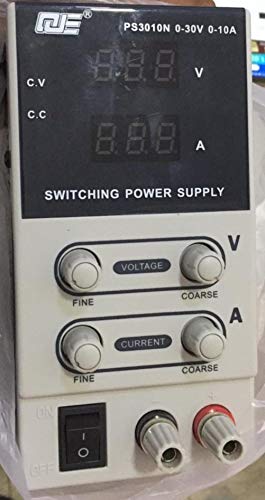
Figure 1: Front Panel Layout of QJE PS3010N
This image displays the front panel of the QJE PS3010N power supply, showing the digital voltage and current displays, voltage and current adjustment knobs (fine and coarse), power switch, and output terminals.
- Digital Voltage Дисплей (V): Чыгарылыштын көлөмүн көрсөтөтtage вольтто.
- Digital Current Display (A): Shows the output current in Amperes.
- Тtage Adjustment Knobs (Fine/Coarse): Used to set the desired output voltage. The coarse knob makes large adjustments, while the fine knob allows for precise tuning.
- Current Adjustment Knobs (Fine/Coarse): Used to set the desired current limit. The coarse knob makes large adjustments, while the fine knob allows for precise tuning.
- Кубат өчүргүч (КҮЙГҮЗҮҮ/ӨЧҮРҮҮ): Toggles the main power to the unit.
- Output Terminals (+/-): Connect your load here. Red for positive (+), Black for negative (-).
- CV/CC Indicators: LEDs indicating Constant Voltage (CV) or Constant Current (CC) operating mode.
3.2 Арткы панель
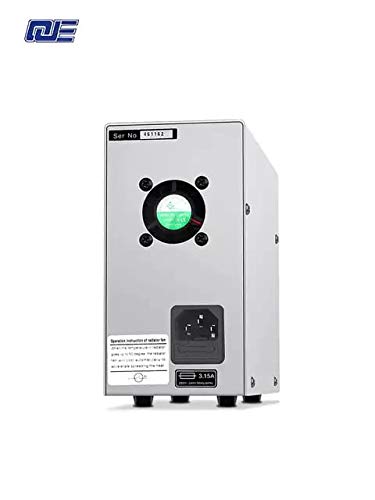
Figure 2: Арткы панелдин жайгашуусу
This image shows the rear panel of the power supply, featuring the AC power input socket, cooling fan, and fuse holder.
- AC кубаттуулугун киргизүү: Connect the provided AC power cord here.
- Муздатуу желдеткич: Оптималдуу муздатууну камсыз кылуу үчүн ылдамдыкты ички температурага жараша автоматтык түрдө тууралайт.
- Страховка кармагыч: Contains the main protective fuse for the unit.
4. Орнотуу
- Пакеттен чыгаруу: Carefully remove the power supply from its packaging. Inspect for any signs of damage during transit.
- Жайгашкан жери: Place the unit on a stable, level surface with adequate ventilation. Ensure there is sufficient space around the cooling fan at the rear.
- Кубат туташуу:
- Алдыңкы панелдеги кубат которгучу "OFF" абалында экенин текшериңиз.
- Connect the provided AC power cord to the AC power input socket on the rear panel.
- Plug the other end of the AC power cord into a grounded 220V AC wall outlet.
- Алгачкы текшерүү: Before connecting any load, turn on the power supply. The digital displays should illuminate, showing default voltage жана учурдагы окуулар.
5. Иштөө нускамалары
5.1 Күйгүзүү/өчүрүү
- Күйгүзүү үчүн: Flip the power switch on the front panel to the "ON" position. The displays will light up.
- Өчүрүү үчүн: Flip the power switch to the "OFF" position. The displays will turn off.
5.2 Adjusting Voltage
- Ensure no load is connected or the load can safely handle the maximum voltage.
- колдонуу Coarse Voltage үндү жөндөө үчүн баскычtage close to your desired value.
- колдонуу Fine Voltage knob to precisely adjust the voltage to the exact required value.
- Томtage display will show the current output voltage.
5.3 Adjusting Current Limit
The current adjustment knobs set the maximum current the power supply will deliver. This is crucial for protecting sensitive circuits.
- Method 1 (Without Load):
- Каалаган чыгаруу көлөмүн коюңузtage (мисалы, 5V).
- Short-circuit the output terminals (connect positive to negative with a short, thick wire for a brief moment). The CC indicator will light up, and the current display will show the maximum current.
- колдонуу Coarse Current жана Fine Current knobs to set the desired current limit.
- Remove the short circuit. The power supply will return to constant voltage режими.
- Method 2 (With Load):
- Connect your load.
- Томду коюңузtage to your desired value.
- Adjust the current limit knobs. If the load draws less than the set limit, the unit operates in CV mode. If the load attempts to draw more than the set limit, the unit switches to CC mode, and the output voltage will drop to maintain the set current.
5.4 Constant Voltage (CV) жана туруктуу ток (CC) режимдери
- Constant Voltage (CV) режими: When the load current is below the preset current limit, the power supply maintains a constant output voltage as set by the voltage knobs. The CV indicator will be lit.
- Туруктуу ток (ТК) режими: When the load current reaches the preset current limit, the power supply automatically switches to constant current mode. The output voltage will decrease to prevent the current from exceeding the set limit. The CC indicator will be lit.
5.5 Коргоо функциялары
The power supply incorporates several protection mechanisms:
- Ашык-томtage Коргоо (OVP): Protects the load from excessive voltage.
- Short Circuit Protection (OCP): Limits current in case of a short circuit at the output.
- Over-Temperature Protection (OTP): Shuts down the unit if internal temperature exceeds safe limits.
6. Техникалык тейлөө
- Тазалоо: Тазалоодон мурун электр кубатын розеткадан сууруп алыңыз. Сыртын сүртүү үчүн жумшак, кургак чүпүрөктү колдонуңуз. Абразивдүү тазалоочу каражаттарды же эриткичтерди колдонбоңуз.
- Вентиляция: Regularly check that the cooling fan and vents are free from dust and obstructions to ensure proper airflow.
- Сактагычты алмаштыруу: If the unit does not power on, check the fuse located on the rear panel. Replace it only with a fuse of the same type and rating (e.g., 3.15A).
- Сактагыч: Узак мөөнөткө колдонулбаганда, кубат менен камсыздоону салкын, кургак жерде, тике күн нурунан жана өтө температурадан алыс сактаңыз.
7. Кыйынчылыктарды
| Көйгөй | Мүмкүн себеп | Чечим |
|---|---|---|
| Түзмөк күйбөйт. | No AC power; Blown fuse; Faulty power cord. | Check AC outlet and power cord connection. Replace fuse if necessary. |
| Чыгаруунун көлөмү жокtagе/ток. | Output terminals not connected; Voltage/current knobs set to zero; Unit in CC mode with low current limit. | Ensure proper connections. Adjust voltage/current knobs. Check CC indicator and current limit setting. |
| Чыгуу томtage drops unexpectedly. | Load current exceeds set current limit (CC mode activated). | Increase the current limit using the current adjustment knobs or reduce the load. |
| Түзмөк ашыкча ысып, өчүп калат. | Blocked ventilation; Excessive load; High ambient temperature. | Ensure clear airflow around the fan. Reduce load. Operate in a cooler environment. |
8. Техникалык шарттар
- Киргизүү көлөмүtage: 220V AC
- Output Voltage: 0-30В DC
- Чыгуу ток: 0-10А DC
- Чыгуу күчү: 300 Вт (макс.)
- Дисплейдин чечилиши: 100 мВ / 10 мА
- Power Effect: CV ≤ 1% + 10мВ
- Load Effect: CV ≤ 1% + 5мВ
- Ripple Noise: CV ≤ 200mVp-p
- Көрсөткүчтүн тактыгы: LCD/V: 1% ± 1d; LCD/A: 1% ± 2d
- Муздатуу ыкмасы: Intelligent temperature control fan, forced air cooling
- Иш чөйрөсү: -10°C to 40°C, Relative humidity <80%
- Сактоо чөйрөсү: -20°C to 40°C, Relative humidity <80%
- Өлчөмдөрү: 205 мм x 85 мм x 160 мм (болжол менен)
- Элемент Салмагы: 1.5 кг (болжол менен)
9. Кепилдик жана колдоо
This QJE PS3010N power supply comes with a 1 ай кепилдик from the date of purchase. This warranty covers manufacturing defects under normal use. It does not cover damage caused by misuse, accident, unauthorized modification, or improper operation.
For technical support or warranty claims, please contact your retailer or the manufacturer, QJE, with your purchase details and model number.
Өндүрүүчү: QJE