
Introduction
This manual provides comprehensive instructions for the setup, operation, maintenance, and troubleshooting of your Alfawise S2 Smart Watch. Please read this manual carefully before using the device to ensure proper functionality and to maximize your user experience. Keep this manual for future reference.
Продукт бүттүview
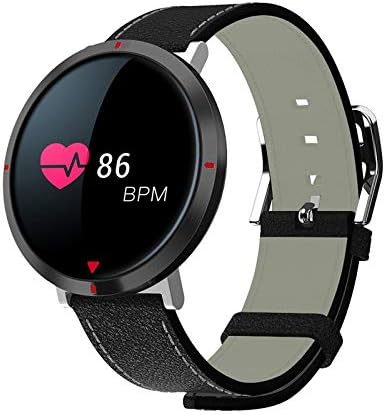
1-сүрөт: Alfawise S2 Smart Watch. The circular display shows a heart rate of 86 BPM, indicated by a heart icon and numerical value. The watch features a black case and a black mixed-material band with white stitching.
The Alfawise S2 Smart Watch is designed to track various daily activities and provide notifications. It features a circular display, a durable mixed-material band, and integrated sensors for health monitoring.
Негизги компоненттер:
- Дисплей: Touch-sensitive screen for interaction and information display.
- Watch Case: Houses the internal electronics and sensors.
- Боо: Mixed material band for comfortable wear.
- Заряддоо байланыштары: Located on the back of the watch for power input.
- Жүрөктүн кагышынын сенсору: Жүрөктүн кагышын үзгүлтүксүз көзөмөлдөө үчүн арткы бетинде жайгашкан.
Жайгашуу
1. Аппаратты заряддоо
- Кубаттоочу кабелди USB кубат адаптерине (кошулмада жок) же компьютердин USB портуна туташтырыңыз.
- Align the magnetic charging pins of the cable with the charging contacts on the back of the watch. The watch will vibrate and display a charging indicator.
- Charge the watch fully before first use. A full charge typically takes approximately 2 hours.
2. Колдонмону орнотуу жана жупташтыруу
- Коштоочу тиркемени жүктөп алыңыз: Издөө the official Alfawise S2 companion app in your smartphone's app store (Google Play Store for Android or Apple App Store for iOS). Install the app.
- Bluetooth иштетүү: Смартфонуңузда Bluetooth иштетилгенин текшериңиз.
- Колдонмону ачуу: Launch the installed companion app on your smartphone.
- Түзмөктү жупташтыруу: Follow the in-app instructions to search for and pair your Alfawise S2 Smart Watch. The watch should appear in the list of available devices. Select it to establish a connection.
- Маалыматтарды синхрондоштуруу: Once paired, the watch will synchronize time and health data with your smartphone.
Иштөө нускамалары
Негизги навигация
- Экранды ойготуу: Raise your wrist or press the side button (if present) to wake the screen.
- Өйдө/ылдый сүрүү: Менюлар жана эскертмелер аркылуу чабыттоо.
- Солго/Оңго сүрүү: Ыкчам функцияларга же башка маалымат экрандарына кириңиз.
- таптаңыз: Бир нерсени тандаңыз же аракетти ырастаңыз.
Негизги өзгөчөлүктөрү
- Кирүүчү чалуулар: The watch will vibrate and display caller ID for incoming calls when connected to your smartphone. You can typically reject calls from the watch.
- жөө: Tracks your daily steps, distance, and estimated calories burned. View data on the watch or in the companion app.
- Жүрөктүн кагышын көзөмөлдөөчү: Continuously monitors your heart rate. Access real-time readings on the watch and historical data in the app.
- Кан басымын өлчөө: Provides an estimate of your blood pressure. For accurate medical readings, consult a healthcare professional.
- Кандагы кычкылтекти өлчөө: Measures your blood oxygen saturation (SpO2). This feature is for reference only and not for medical diagnosis.
- Уйку монитору: Automatically tracks your sleep patterns, including deep sleep, light sleep, and wake times. Review sleep analysis in the companion app.
- Ойготкуч: Set alarms through the companion app. The watch will vibrate at the set time.
- Health Data Synchronization: All collected health and activity data automatically synchronizes with the companion app on your smartphone, allowing for detailed analysis and tracking over time.
Техникалык тейлөө
Тазалоо
- Regularly clean the watch screen and case with a soft, damp кездеме.
- Clean the charging contacts and heart rate sensor on the back of the watch to ensure proper function.
- Катуу химиялык заттарды, абразивдүү тазалагычтарды же эриткичтерди колдонуудан алыс болуңуз.
Батареяга кам көрүү
- Батареяны бат-баттан толук кубаттап калуудан алыс болуңуз.
- Do not expose the watch to extreme temperatures, as this can affect battery life.
- If storing the watch for an extended period, charge it to approximately 50% and store it in a cool, dry place.
Проблемаларды чечүү
| Көйгөй | Мүмкүн чечим |
|---|---|
| Саат күйбөй жатат. | Саат толук заряддалганын текшериңиз. Аны заряддагычка кеминде 30 мүнөт туташтырыңыз. |
| Смартфон менен жупташтыруу мүмкүн эмес. |
|
| Ден соолук маалыматын туура эмес окуу. |
|
| Эскертмелер алынган жок. |
|
Техникалык шарттар
| Өзгөчөлүк | Деталь |
|---|---|
| Модель номери | S2 |
| Бренд | Alfawise |
| Операция системасы | Мульти |
| Байланыш | Bluetooth 4.0, зымсыз |
| Шайкештик | Android жана iOS |
| Топтун материалы | Аралаш |
| Түс | Кара |
| Элемент Салмагы | 140 г |
| Пакеттин өлчөмдөрү | 17 x 7.8 x 3 см |
Кепилдик жана колдоо
For warranty information, technical support, or service inquiries, please refer to the warranty card included with your product or visit the official Alfawise webсайт. Сатып алганыңыздын далили катары сатып алуу дүмүрчөгүңүздү сактаңыз.
Эскертүү: Продукциянын мүнөздөмөлөрү жана функциялары алдын ала эскертүүсүз өзгөртүлүшү мүмкүн.