
FIFINE T669
FIFINE Studio Condenser USB Microphone T669 User Manual
Модел: T669
1. Орнотуу колдонмосу
1.1 Кутудан чыгаруу жана компоненттерди текшерүү
Carefully unpack all items from the box. Verify that all components listed below are present and in good condition.
- Конденсатор микрофон
- Scissor Boom Arm Stand
- C-Clamp
- Поп чыпкасы
- Айнек
- Шок тоо
- 8.2ft USB-B to USB Cable
- металл Ring
- User Manual

1.1-сүрөт: All components included in the FIFINE T669 microphone kit.
1.2 Assembling the Microphone Kit
- C-Cl тиркеңизamp: C-clamp to the edge of your desk or table. Ensure the table thickness is less than 2.1 inches for proper fit. Tighten the screw until the clamp бекем орунда турат.
- Insert the Boom Arm: Slide the base of the boom arm stand into the hole on the C-clamp. Tighten the locking screw on the clamp to secure the arm.
- Mount the Shock Mount: Амортизаторду жебе колунун жиптүү учуна бураңыз.
- Микрофонду бекитүү: Gently place the FIFINE T669 microphone into the shock mount. The microphone should be held securely by the elastic bands of the shock mount.
- Install the Pop Filter: Attach the pop filter's clamp to the boom arm. Position the pop filter directly in front of the microphone, approximately 2-3 inches away, to reduce plosive sounds.
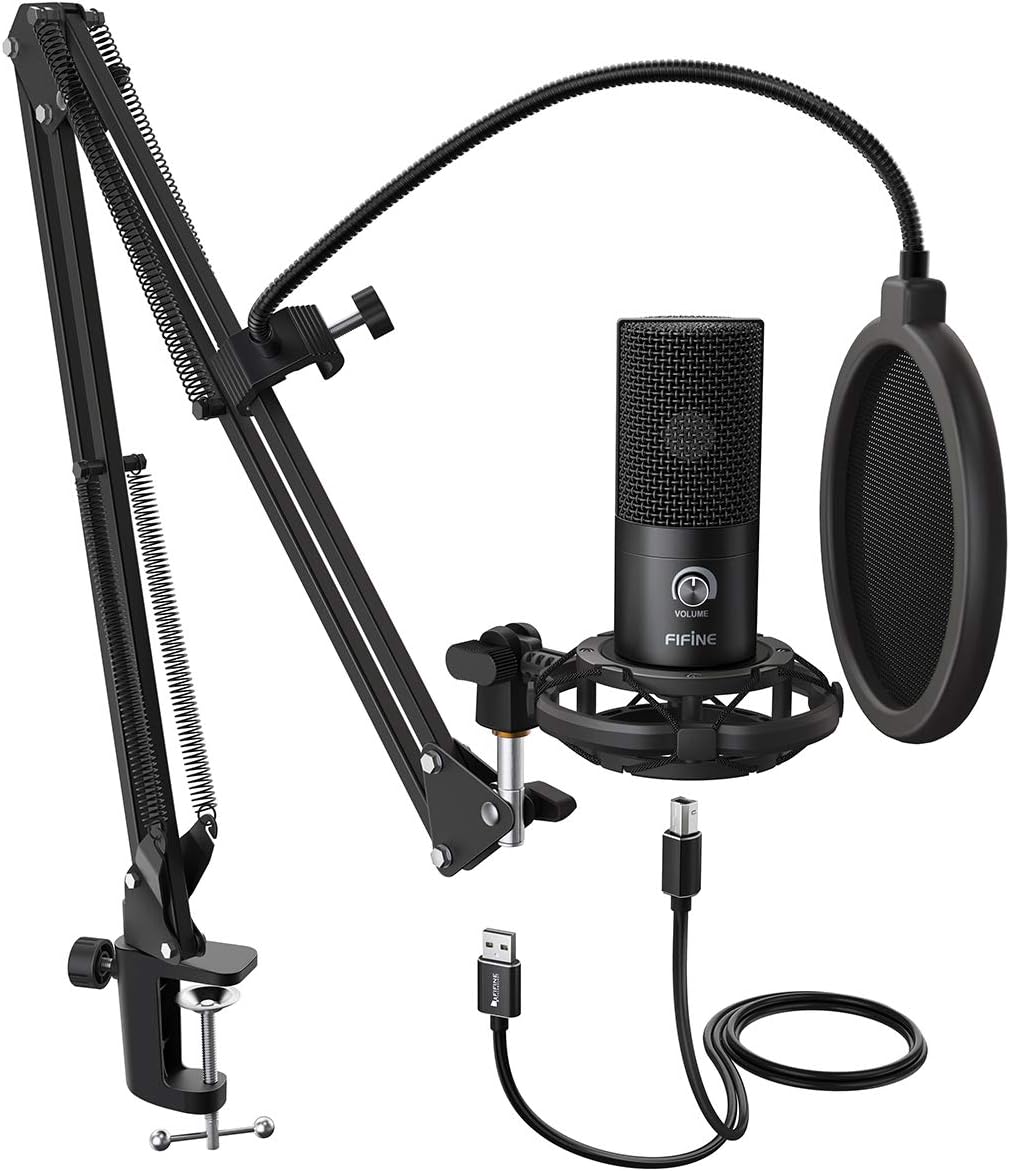
1.2-сүрөт: Fully assembled FIFINE T669 microphone kit.

1.3-сүрөт: Boom arm C-clamp тиркемелер боюнча көрсөтмөлөр.
1.3 Түзмөгүңүзгө туташуу
The FIFINE T669 microphone features a USB output for direct connection to your computer.
- USB кабелин туташтыруу: Plug the USB-B end of the provided 8.2ft USB cable into the microphone's USB port.
- Компьютерге туташуу: Plug the USB-A end of the cable into an available USB port on your PC, laptop, or PS4/PS5.
- Драйверди орнотуу: The microphone is plug-and-play and does not require additional drivers for Windows, Mac OS, or PS4/PS5. Your operating system should automatically recognize the device.
- Киргизүү түзмөгү катары тандаңыз: After connecting, navigate to your device's sound settings and select "FIFINE Microphone" (or similar) as your default input device.
Эскертүү: Бул микрофон туура келбейт with Xbox consoles or mobile phones.

1.4-сүрөт: Device compatibility for the FIFINE T669 microphone.

1.5-сүрөт: USB-A connector for the FIFINE T669 microphone.
2. Иштөө нускамалары
2.1 Негизги операция
Once connected, the microphone is ready for use. The T669 features a convenient volume knob for quick adjustments.
- Plug and Play: The microphone will be automatically detected by your computer.
- Үн баскычы: Rotate the 'VOLUME' knob on the microphone to adjust the input gain. Turn clockwise to increase sensitivity and counter-clockwise to decrease it. Adjust this to achieve optimal recording levels without distortion.

2.1-сүрөт: Convenient Volume Knob for input gain adjustment.
2.2 Optimizing Sound Quality
To achieve the best possible sound quality from your FIFINE T669 microphone, consider the following:
- Кардиоиддик полярдык үлгү: The T669 utilizes a cardioid polar pattern, meaning it primarily picks up sound from the front of the microphone and rejects sound from the sides and rear. Position the microphone directly facing the sound source (e.g., your mouth) for clear audio and to minimize ambient noise.
- Поп чыпкасын колдонуу: The included pop filter is crucial for reducing plosive sounds (harsh 'p' and 'b' sounds) and protecting the microphone from moisture. Ensure it is positioned correctly between your mouth and the microphone.
- Шок орнотуу: The shock mount isolates the microphone from vibrations and handling noise transmitted through the boom arm or desk. Avoid bumping the desk during recording.

2.2-сүрөт: Microphone diaphragm and cardioid polar pattern.
2.3 Тиркемелер
The FIFINE T669 is versatile and suitable for various audio applications:
- Podcasting and Voiceovers: Captures clear and rich vocal audio.
- Gaming and Streaming: Provides excellent voice communication for online gaming and live streaming platforms.
- Музыка жаздыруу: Suitable for home studio recording of vocals and acoustic instruments.
- Видеоконференция: Enhances audio clarity for Zoom, Skype, and other online meeting applications.
3. Техникалык тейлөө жана кам көрүү
Proper maintenance ensures the longevity and optimal performance of your microphone.
3.1 Тазалоо
- Use a soft, dry cloth to wipe the microphone body and boom arm.
- For the microphone grille, use a soft brush to gently remove any dust or debris.
- Микрофондун сырткы көрүнүшүнө же ички компоненттерине зыян келтириши мүмкүн болгондуктан, суюк тазалоочу каражаттарды, эриткичтерди же абразивдүү материалдарды колдонбоңуз.
3.2 Сактоо
- Колдонулбаган учурда микрофонду күн тийбеген жана өтө температурадан алыс, салкын, кургак жерде сактаңыз.
- If disassembling, ensure all components are clean and dry before storing them in their original packaging or a protective case.
4. Кыйынчылыктарды
If you encounter issues with your FIFINE T669 microphone, refer to the following common problems and solutions:
- Үн чыгышы жок:
- Ensure the USB cable is securely connected to both the microphone and your computer.
- Check your computer's sound settings to confirm the FIFINE microphone is selected as the default input device.
- Adjust the volume knob on the microphone to an audible level.
- Микрофонду компьютериңиздин башка USB портуна туташтырып көрүңүз.
- Компьютериңизди өчүрүп күйгүзүңүз.
- Бурмаланган же түшүнүксүз үн:
- Reduce the input gain using the volume knob on the microphone if the sound is distorted (clipping).
- Ensure the pop filter is correctly positioned to minimize plosives.
- Айлана-чөйрөңүздөгү фондук ызы-чууну текшерип, аны азайтууга аракет кылыңыз.
- Ensure the microphone is positioned correctly, facing the sound source directly.
- Микрофон компьютер тарабынан таанылбайт:
- Башка USB портун колдонуп көрүңүз.
- Иштөө тутумуңуз жаңыртылганын текшериңиз.
- Verify that the microphone is compatible with your device (not compatible with Xbox or phones).
- Check Device Manager (Windows) or System Information (Mac) to see if the device appears, even with an error.
For further assistance, please refer to the official FIFINE support resources or the detailed user manual PDF available online.
5. Техникалык шарттар
| Өзгөчөлүк | Спецификация |
|---|---|
| Модель аты | T669 Кара |
| Полярдык үлгү | Бир багыттуу (Кардиоид) |
| Байланыш технологиясы | USB |
| Туташтыргыч түрү | USB Type-A |
| Жыштык диапазону | 20Гц-20КГц |
| Ызы-чуунун катышы | 78 дБ |
| Ызы-чуу деңгээли | 70 дБ |
| Элемент Салмагы | 700 грамм (1.54 фунт) |
| Продукциянын өлчөмдөрү | 16.5 x 9.61 x 2.99 дюйм |
| Материал | Металл |
| Шайкеш түзмөктөр | Personal Computer (Laptop, PC, PS4/PS5) |
| Power Source | Электр зымдары |
6. Кепилдик жана колдоо
FIFINE products are designed for reliability and performance. For specific warranty details, please refer to the warranty information provided with your purchase or visit the official FIFINE webсайт.
6.1 Техникалык колдоо
If you require technical assistance or have questions not covered in this manual, please contact FIFINE customer support. Contact information can typically be found on the FIFINE official webсайтында же продуктунун таңгагында.
An electronic version of this user manual is available for download at: FIFINE T669 User Manual (PDF)
Ask a question about this manual
Ask about setup, troubleshooting, compatibility, parts, safety, or missing instructions. Manuals+ will review the question and use this page’s manual context to help answer it.