
LC-dolida usb c to hdmi vga ethernet
LC-dolida USB C to HDMI VGA USB3.0 Adapter User Manual
Model: usb c to hdmi vga ethernet
Бренд: LC-dolida
1. Киришүү
The LC-dolida USB C Hub Adapter is a versatile 7-in-1 device designed to expand the connectivity of your USB-C enabled laptop, tablet, or smartphone. It provides multiple ports including HDMI, VGA, Ethernet, USB 3.0, 3.5mm audio, and Power Delivery (PD) charging, enhancing your device's capabilities for various applications such as external display connections, high-speed data transfer, and network access.
2. Негизги өзгөчөлүктөрү
- Көп порттуу байланыш: Equipped with HDMI, VGA, RJ45 Ethernet, 3.5mm audio jack, 2x USB 3.0 ports, and a Power Delivery (PD) charging port.
- Жогорку чечилиштеги видео чыгаруу: HDMI supports resolutions up to 4K@30Hz, and VGA supports up to 1080P@60Hz. Both can be used simultaneously for dual display at 1080P.
- Тез жана туруктуу тармак: RJ45 Ethernet port supports up to 1000Mbps for reliable wired internet connection.
- Эффективдүү электр энергиясы: USB-C PD charging port supports up to 87W to keep your device charged while using the hub.
- Жогорку ылдамдыктагы маалыматтарды өткөрүп берүү: Two USB 3.0 ports offer data transfer speeds up to 5Gbps, allowing connection of external USB devices.
- Аудио чыгаруу: Integrated 3.5mm audio jack for connecting headphones or speakers.
- Кеңири шайкештик: Compatible with various USB-C devices including 2018/17/16 MacBook/Pro/Air, Google Chromebook Pixel, Surface Book 2, and supports Samsung Dex for compatible smartphones.
3. Пакеттин мазмуну
- LC-dolida USB C Hub Adapter (Model: usb c to hdmi vga ethernet)
- User Manual
4. Техникалык шарттар
| Өзгөчөлүк | Деталь |
|---|---|
| Бренд | LC-dolida |
| Модель номери | usb c to hdmi vga ethernet |
| Аппараттык платформа | Ноутбук, компьютер |
| Операциялык системанын шайкештиги | Windows 10 (and above for some features), macOS, Android (for Samsung Dex) |
| Элемент Салмагы | 3.8 унция |
| Пакеттин өлчөмдөрү | 6.69 x 3.7 x 0.71 дюйм |
| HDMI чыгышы | Up to 4K@30Hz, 1080P@60Hz (backward compatible) |
| VGA чыгаруу | 1080P@60Hz чейин |
| Синхрондуу дисплей | HDMI and VGA can be used simultaneously (both at 1080P) |
| Ethernet порту | RJ45, supports up to 1000Mbps |
| USB 3.0 порттору | 2 ports, data transfer up to 5Gbps |
| Power Delivery (PD) Port | USB-C, max 87W charging |
| Аудио Jack | 3.5мм |
| Шайкеш түзмөктөр | Laptops, Monitors, Projectors, Smartphones (with USB-C video output support) |
5. Орнотуу нускамалары
- Хабды туташтыруу: Plug the USB-C connector of the LC-dolida hub into the USB-C port of your host device (laptop, tablet, or smartphone).
- Connect External Displays (HDMI/VGA):
- For HDMI output, connect an HDMI cable from the hub's HDMI port to your monitor or TV.
- For VGA output, connect a VGA cable from the hub's VGA port to your monitor or projector.
- For audio output via VGA, connect a 3.5mm audio cable from the hub's audio jack to your speakers or headphones.
Эскертүү: HDMI and VGA can be used simultaneously, but both displays will output at 1080P resolution.

Figure 1: Connecting to HDMI and VGA displays. HDMI supports up to 4K, VGA up to 1080P. 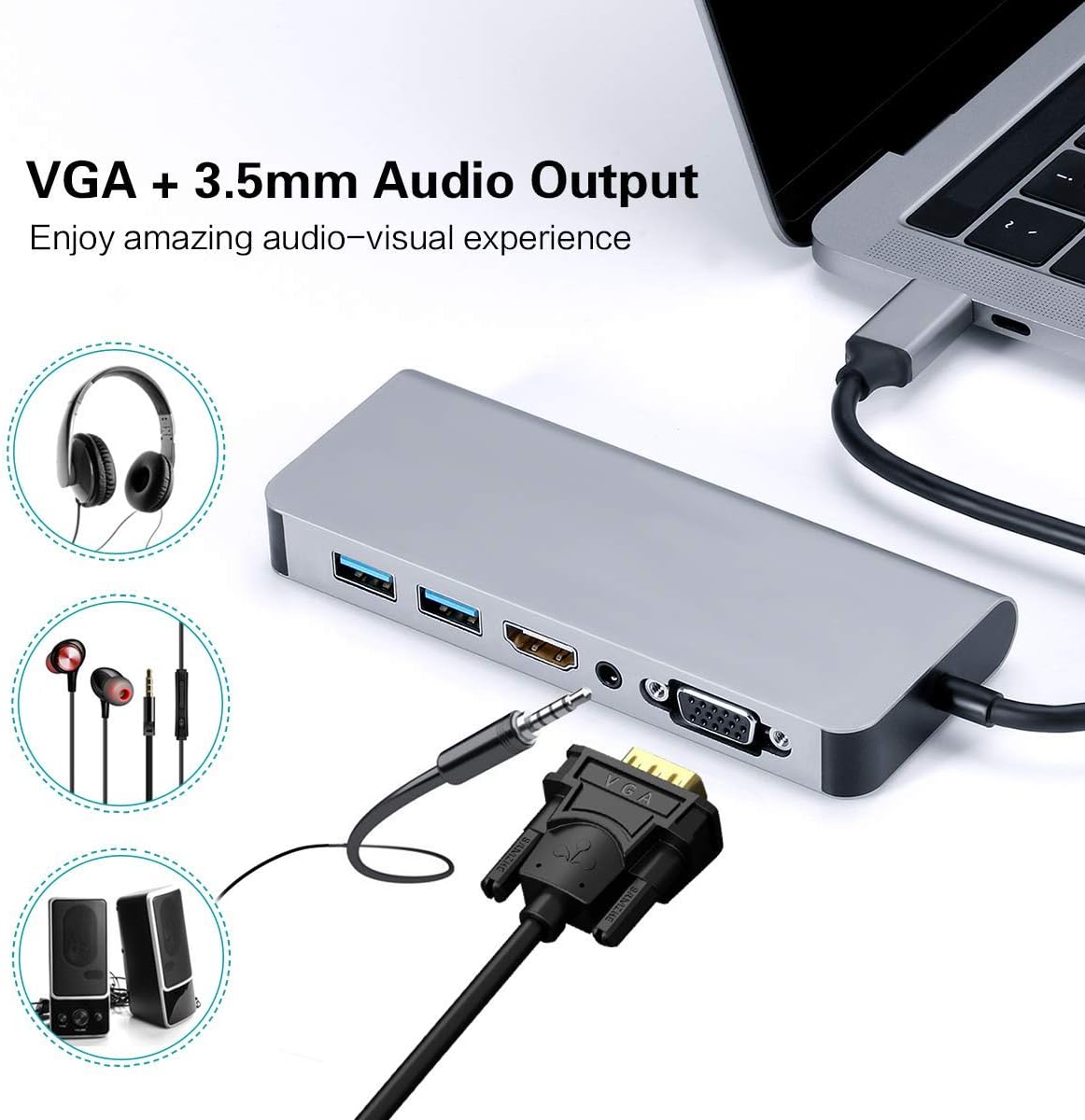
Figure 2: VGA and 3.5mm Audio Output for an enhanced audio-visual experience. - Тармакка туташуу: For a stable wired internet connection, plug an Ethernet cable into the RJ45 port on the hub.
- USB түзмөктөрүн туташтыруу: Plug your USB peripherals (e.g., mouse, keyboard, USB drive) into the USB 3.0 ports.
- Power the Host Device: If your host device requires charging, connect your USB-C power adapter to the Power Delivery (PD) port on the hub. This allows your device to charge while using the hub's other functions.

Figure 3: Power Delivery and Data Transfer via USB 3.0 ports.
6. Иштөө нускамалары
6.1 Көрсөтүү режимдери
The hub supports both Mirror Mode and Extend Mode when connecting to external displays.
- MirrorMode: Duplicates your host device's screen onto the external display(s). This is ideal for presentations or sharing content.
- Узартуу режими: Extends your desktop across multiple screens, allowing for increased workspace. This mode is typically supported by laptops.
Эскертүү: Extend Mode functionality is primarily for laptops. For smartphones, it typically mirrors the display or activates specific desktop environments like Samsung Dex.

6.2 Samsung Dex Experience
For compatible Samsung smartphones (S10/S10+/S10e/S9/S9+/S8/S8+/S8 Active/Huawei Mate10/Pro), the hub can enable a PC-like desktop experience via Samsung Dex. To activate Dex mode, ensure external power is supplied to the hub via the PD charging port.
Эскертүү: Samsung Dex functionality may require your phone's operating system to be upgraded to Windows 10 or above. Always ensure your device is compatible and updated.


6.3 Расмий продукт Video
Video 1: An official demonstration of the 7-in-1 USB C Multiport Hub by LC-Dolida, showcasing its various functions and connectivity options.
7. Кыйынчылыктарды
- Дисплей чыгышы жок:
- Ensure your host device's USB-C port supports video output (DisplayPort Alternate Mode).
- Check all cable connections (USB-C to hub, HDMI/VGA to display).
- Verify the input source on your monitor/TV is set correctly (e.g., HDMI 1, VGA).
- Хост түзмөгүңүздү өчүрүп күйгүзүп көрүңүз.
- For Samsung Dex, ensure external power is connected to the hub.
- USB түзмөктөрү таанылбайт:
- Хабдын хост түзмөгүңүзгө коопсуз туташканын текшериңиз.
- USB түзмөгүңүздүн иштешин ырастоо үчүн аны түздөн-түз башкы түзмөгүңүзгө туташтырууга аракет кылыңыз.
- If using high-power USB devices, ensure external power is supplied to the hub via the PD port.
- Slow Ethernet Speed:
- Check your Ethernet cable for damage.
- Ensure your network drivers are up to date on your host device.
- Роутериңиз/модемиңиз туура иштеп жатканын текшериңиз.
- кубаттоо маселелери:
- Ensure your USB-C power adapter is connected to the hub's PD port and is functional.
- Хост түзмөгүңүздүн USB-C Power Delivery колдоорун текшериңиз.
- Some devices, like the Samsung S8+, may not charge fully or quickly through the hub if the power input is insufficient for both the hub and the device.
8. Кароо жана тейлөө
- Keep the hub away from water, fire, and corrosive materials.
- Бордду түшүрүп алуудан же катуу соккуга кабылтуудан алыс болуңуз.
- Аппаратты өз алдынча бөлүүгө же оңдоого аракет кылбаңыз. Жардам алуу үчүн кардарларды колдоо бөлүмүнө кайрылыңыз.
- Clean the hub with a soft, dry cloth. Avoid using harsh chemicals or abrasive cleaners.
- Хабды колдонбогондо салкын, кургак жерде сактаңыз.
9. Кепилдик жана колдоо
LC-dolida products are designed for reliability and performance. For any issues or questions regarding your LC-dolida USB C Hub Adapter, please contact our customer support team. We are committed to providing assistance and ensuring your satisfaction.
Please refer to the product packaging or the official LC-dolida webатайын кепилдик маалымат жана байланыш маалыматы үчүн сайт.
Ask a question about this manual
Ask about setup, troubleshooting, compatibility, parts, safety, or missing instructions. Manuals+ will review the question and use this page’s manual context to help answer it.