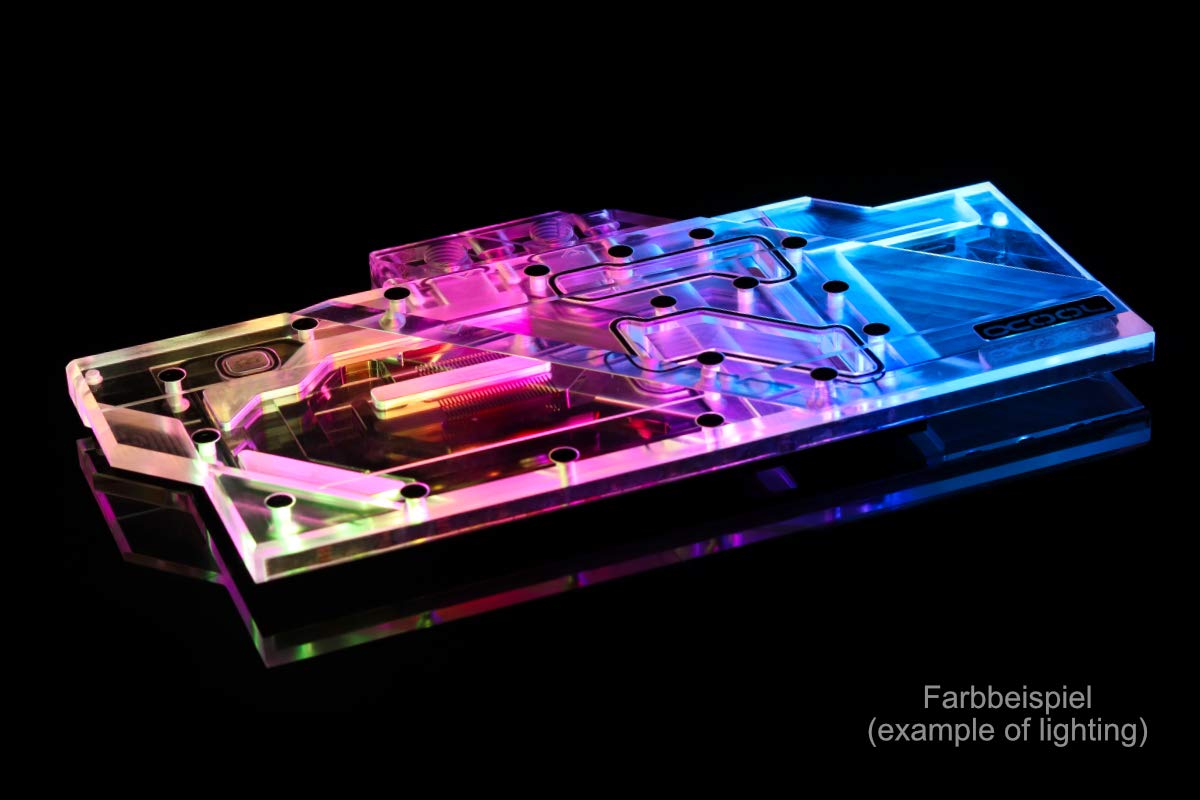
This manual provides detailed instructions for the installation, operation, and maintenance of your Alphacool Eisblock Aurora Plexi GPX-A water block, designed specifically for the AMD Radeon 5700 XT Sapphire Nitro+ graphics card. This product is engineered to provide superior cooling performance for your GPU, enhancing stability and potentially extending the lifespan of your hardware. Please read this manual thoroughly before proceeding with installation.
The Alphacool Eisblock Aurora Plexi GPX-A features a nickel-plated copper cooling block, a durable plexiglass top cover, and integrated digital RGB lighting for aesthetic customization. Its design focuses on efficient heat transfer and improved flow rate.
2. Коопсуздук маалыматы
Эскертүү: Improper installation or handling of this product can lead to damage to your graphics card, other computer components, or personal injury. If you are unsure about any step, seek professional assistance.
Always disconnect power from your computer before beginning any installation or maintenance.
Сезимтал компоненттерге электростатикалык разряддын (ЭСЗ) зыян келтирбеши үчүн антистатикалык кол кап кийиңиз же антистатикалык билек боосун колдонуңуз.
Ensure all fittings are securely tightened to prevent leaks. Use appropriate tools and do not overtighten.
Perform a leak test with distilled water or a dedicated leak testing solution before powering on your system.
Use only compatible coolants in your liquid cooling loop. Mixing incompatible coolants can lead to corrosion and system failure.
Балдар жетпеген жерде сактаңыз.
3. Пакеттин мазмуну
Please verify that all items listed below are present in your package. If any items are missing or damaged, contact your retailer or Alphacool support immediately.
Alphacool Eisblock Aurora Plexi GPX-A Water Block
Mounting Screws and Spacers
Thermal Pads (pre-cut or sheet)
Термикалык паста
G1/4" Stop Plugs
Digital RGB Adapter Cable (3-Pin, 5V)
Көрсөтмө (бул документ)
4. Орнотуу жана орнотуу
Follow these steps carefully to install your Alphacool Eisblock Aurora Plexi GPX-A water block onto your AMD Radeon 5700 XT Sapphire Nitro+ graphics card.
4.1. Даярдоо
Куралдар чогултуу: You will need a small Phillips head screwdriver, a clean microfiber cloth, isopropyl alcohol, and anti-static protection.
Кубатты өчүрүү: Ensure your computer is completely powered off and unplugged from the wall.
Remove Graphics Card: Carefully remove your AMD Radeon 5700 XT Sapphire Nitro+ graphics card from your computer.
Disassemble Stock Cooler:
Place the graphics card on an anti-static surface.
Locate and remove all screws securing the stock cooler to the PCB. Pay attention to any screws on the backplate or around the GPU die.
Gently detach the stock cooler. Be mindful of any fan or RGB cables connected to the PCB. Disconnect these carefully.
Clean the GPU die and memory chips thoroughly with isopropyl alcohol and a microfiber cloth to remove all traces of old thermal paste and thermal pad residue.
4.2. Applying Thermal Materials
Apply Thermal Pads: Refer to the included diagram (if provided with your specific product) for the correct placement of thermal pads on the VRM components, memory modules, and other designated areas of the graphics card PCB. Ensure good contact.
Термикалык пастаны колдонуу: Apply a small amount of the provided thermal paste to the center of the GPU die. A pea-sized dot or a thin line is usually sufficient. The pressure from the water block will spread it evenly.
4.3. Mounting the Water Block
Суу блогунун абалы: Carefully align the Alphacool Eisblock Aurora Plexi GPX-A water block with the mounting holes on the graphics card PCB. Ensure the GPU die makes direct contact with the copper base of the water block.
Коопсуз суу блогу: Insert the provided mounting screws through the PCB and into the water block. Tighten them in a diagonal pattern (e.g., top-left, bottom-right, top-right, bottom-left) gradually until snug. Do not overtighten.
Install Stop Plugs: Screw the G1/4" stop plugs into any unused port on the water block. Ensure they are finger-tight, then use a tool to gently snug them up.
Connect Digital RGB: Connect the 3-Pin 5V Digital RGB cable from the water block to a compatible header on your motherboard or RGB controller.
Image: Alphacool Eisblock Aurora Plexi GPX-A water block showcasing its digital RGB lighting effects. This image illustrates the aesthetic potential of the installed block.
Сүрөт: асты view of the Alphacool Eisblock Aurora Plexi GPX-A water block, highlighting the mounting screw holes and the contact areas for the GPU and other components.
4.4. Leak Testing
Integrate into Loop: Connect the water block to your existing or new liquid cooling loop using appropriate fittings and tubing.
Fill Loop: Fill your liquid cooling loop with distilled water or a recommended coolant.
Агып кетүү сыноосун жүргүзүү:
Power on only the pump (using a PSU jumper or dedicated pump power supply) without powering on the rest of the system.
Allow the pump to run for at least 12-24 hours, carefully inspecting all connections and the water block for any signs of leaks. Place paper towels under components to easily spot drips.
Only proceed to power on your full system once you are absolutely certain there are no leaks.
5. Иштөө нускамалары
Once installed and leak-tested, your Alphacool Eisblock Aurora Plexi GPX-A water block operates as part of your custom liquid cooling loop. Ensure your pump is always running when the system is powered on.
Температураны көзөмөлдөө: Use monitoring software to keep an eye on your GPU temperatures to ensure optimal cooling performance.
RGB башкаруу: If connected to a compatible RGB header, you can control the lighting effects using your motherboard's software or a dedicated RGB controller.
Системаны өчүрүү: Always shut down your system properly. Avoid sudden power cuts to prevent potential issues with the cooling loop.
6. Техникалык тейлөө
Regular maintenance is crucial for the longevity and performance of your liquid cooling system.
Муздаткычты алмаштыруу: It is recommended to replace the coolant in your loop every 6-12 months, depending on the coolant type and usage.
Системаны тазалоо: When replacing coolant, consider flushing the entire loop with distilled water or a dedicated cleaning solution to remove any buildup.
Компоненттерди текшерүү: Periodically inspect the water block, tubing, and fittings for any signs of wear, corrosion, or leaks.
Clean Radiators/Fans: Keep your radiators and fans clean from dust buildup to ensure efficient heat dissipation.
7. Кыйынчылыктарды
Бул бөлүм сиз кабылышы мүмкүн болгон жалпы көйгөйлөрдү карайт.
RGB жарыктандыруу жок:
Ensure the 3-Pin 5V Digital RGB cable is correctly connected to a compatible header.
Check your motherboard's BIOS or RGB software for proper configuration.
Verify the RGB header on your motherboard is enabled and functioning.
High GPU Temperatures:
Confirm the pump is running and coolant is flowing.
Check for air bubbles trapped in the loop; tilt your system to help dislodge them.
Ensure thermal paste and pads are correctly applied and making good contact.
Verify radiator fans are spinning and not obstructed.
Check for blockages in the water block or other loop components.
Leaks Detected:
Immediately power off the system and disconnect from power.
Identify the source of the leak.
Tighten fittings or replace faulty components/tubing as necessary.
Clean up any spilled coolant thoroughly.
Perform another leak test before powering on the system.
8. Техникалык шарттар
Продукт аты:
Alphacool Eisblock Aurora Plexi GPX-A
Модель номери:
1017642 (11753)
Шайкештик:
AMD Radeon 5700 XT Sapphire Nitro+
Өлчөмдөрү (L x W x Y):
260 x 143 x 23 мм (10.24"L x 5.63"W x0.91"H)
Таза Салмагы:
Болжол менен 800 г (2.54 фунт)
Cooler Material:
Никель менен капталган жез
Top Cover Material:
Plexiglass
Темалар:
4 x G1/4"
Digital RGB Power:
3-Pin 5V (0.5A)
Максималдуу иштөө температурасы:
60 °C
9. Кепилдик жана колдоо
Alphacool products are manufactured to high quality standards. For specific warranty terms and conditions, please refer to the warranty information provided with your purchase or visit the official Alphacool webсайт.
For technical support, troubleshooting assistance, or inquiries regarding replacement parts, please contact Alphacool customer service through their official webсайт же сатуучу.
Ask about setup, troubleshooting, compatibility, parts, safety, or missing instructions. Manuals+ will review the question and use this page’s manual context to help answer it.