
Introduction
Thank you for choosing the iFrogz Neckband 2 Wireless Bluetooth Earphones. These earphones are designed to provide quality sound and a comfortable, secure fit for your daily activities. Featuring Bluetooth connectivity, an integrated microphone, and magnetic earbuds, they offer a convenient audio experience.
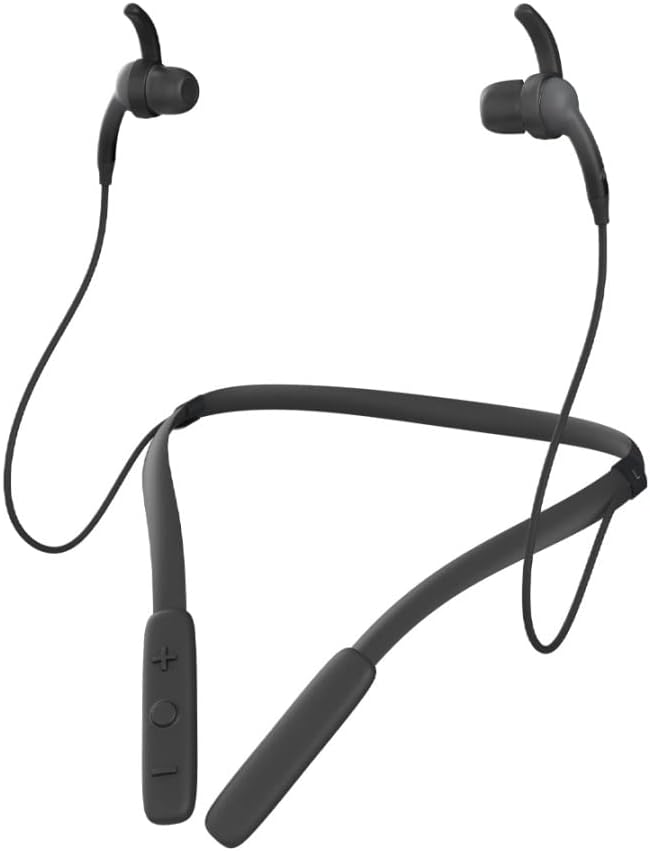
Сүрөт: алдыңкы view of the iFrogz Neckband 2 Wireless Bluetooth Earphones, showcasing моюнга тагылуучу боонун дизайны жана кулакчындар.
Пакеттин мазмуну
Сураныч, төмөнкү нерселер үчүн кутучаны белгилеңиз:
- iFrogz Neckband 2 Wireless Earphones
- USB заряддоо кабели
- Multiple sizes of earbud tips (three sizes)
- Removable sport wings (one set)

Сүрөт: алдыңкы view of the iFrogz Neckband 2 retail packaging, showing the product and key features.

Сүрөт: Артка view of the iFrogz Neckband 2 retail packaging, detailing features like 8mm neodymium drivers, magnetic earbuds, IPX2 sweat resistance, and up to 8 hours of battery life.
Жайгашуу
1. Кулакчындарды кубаттоо
Before first use, fully charge your iFrogz Neckband 2 earphones. Connect the provided USB charging cable to the charging port on the neckband and plug the other end into a USB power source. The LED indicator will show charging status.
- Кубаттоо убактысы: Толук заряддоо үчүн болжол менен 1-2 саат.
- Battery Life: Up to 8 hours of playback time.
2. Bluetooth Жупташтыруу
- Ensure your earphones are charged and turned off.
- Көп функциялуу баскычты (көбүнчө кубат баскычы) басып, жупташтыруу режимин көрсөткөн LED индикатору кызыл жана көк күйгүчө басып туруңуз.
- Түзмөгүңүздө (смартфон, планшет ж.б.) Bluetooth иштетиңиз жана жеткиликтүү түзмөктөрдү издеңиз.
- Select "iFrogz Neckband 2" from the list of devices.
- Туташтырылгандан кийин, LED индикатору көк түскө айланат же жай күйөт.
3. Тууралоону тууралоо
For optimal sound quality and comfort, choose the earbud tips and sport wings that best fit your ears. The iFrogz Neckband 2 comes with three sizes of earbud tips and one set of removable sport wings.
- Experiment with different tip sizes to find a snug seal in your ear canal.
- Attach the sport wings if you need extra stability during active use.
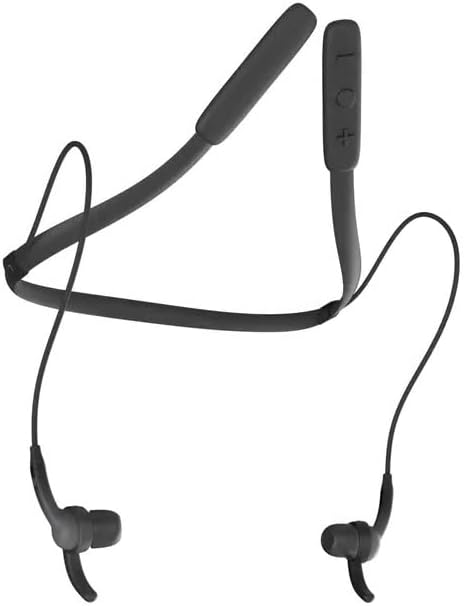
Сүрөт: жогорудан төмөнгө view of the iFrogz Neckband 2, showing the flexible neckband and earbud placement.
Иштөө нускамалары
Controls Overview
The control buttons are located on the neckband for easy access.
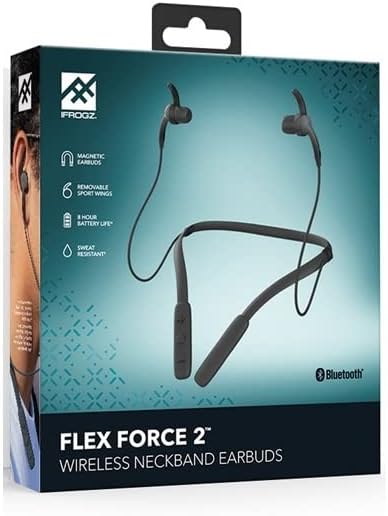
Image: Close-up of the control panel on the iFrogz Neckband 2, showing the volume and multi-function buttons.
| Баскыч/Аракет | Функция |
|---|---|
| Power Button / Multi-function Button |
|
| Үнүн жогорулатуу (+) |
|
| Үнүн азайтуу (-) |
|
Магниттик кулакчындар
The iFrogz Neckband 2 features magnetic earbuds. When not in use, the earbuds can be magnetically attached together, helping to keep them secure around your neck and prevent tangling.
Техникалык тейлөө
Тазалоо
To maintain the performance and hygiene of your earphones:
- Кулакчындарды жана моюнга тагылуучу боону жумшак, кургак, мамыксыз чүпүрөк менен акырын сүртүңүз.
- Зарыл болсо, кулакчындын учтарын алып салып, жумшак самын жана суу менен тазалаңыз. Кайрадан орнотуудан мурун алардын толугу менен кургаганын текшериңиз.
- Катуу химиялык заттарды же абразивдүү материалдарды колдонуудан алыс болуңуз.
Сактагыч
Store your earphones in a cool, dry place away from direct sunlight and extreme temperatures. When storing, you can use the magnetic feature to keep the earbuds together.
Батареяга кам көрүү
Батареянын иштөө мөөнөтүн узартуу үчүн:
- Батареяны бат-баттан толук кубаттап калуудан алыс болуңуз.
- Charge the earphones regularly, even if not in frequent use.
- Do not expose the earphones to extreme heat or cold.
Проблемаларды чечүү
| Көйгөй | Мүмкүн чечим |
|---|---|
| Наушник күйбөйт. | Ensure the earphones are fully charged. Connect to a power source and check the charging indicator. |
| Түзмөк менен жупташтыруу мүмкүн эмес. |
|
| Үн жок же үнү төмөн. |
|
| Үн сапаты начар. |
|
| Батареянын иштөө мөөнөтү кыска. |
|
Техникалык шарттар
| Өзгөчөлүк | Деталь |
|---|---|
| Модель номери | 304001790 |
| Байланыш | Зымсыз Bluetooth |
| Өзгөчөлүктөр | Volume Control, Integrated Microphone, Neckband Design, Magnetic Earbuds |
| Форма фактору | In-Ear |
| Түс | Кара |
| Материал | Пластик |
| Айдоочулар | 8mm Neodymium (from box image) |
| Терге каршылык | IPX2 (from box image) |
| Батареянын иштөө мөөнөтү | Up to 8 hours (from box image) |
Кепилдик жана колдоо
Кепилдик маалымат
The iFrogz Neckband 2 includes a "Earbud Tips for Life™" limited lifetime warranty. This warranty covers the earbud tips. If your earbud tips get worn or damaged, they may be replaced. Please refer to the manufacturer's official website or contact their support for full warranty terms and conditions.
Кардарларды колдоо
For further assistance, technical support, or warranty claims, please visit the official iFrogz webсайтка же кардарларды тейлөө бөлүмүнө кайрылыңыз. Байланыш маалыматы, адатта, продуктунун таңгагында же өндүрүүчүнүн дарегинде тапса болот webсайт.