
1. Киришүү
This manual provides detailed instructions for the installation, operation, and maintenance of your Lapetus 4-channel 1080N Hybrid 5-in-1 AHD DVR. This Digital Video Recorder is designed for comprehensive surveillance, supporting multiple camera technologies including Analog, HD-TVI, CVI, AHD, and wired IP cameras. It features H.265+ video compression for efficient storage and offers various recording and remote viewжөндөмдүүлүктөрүн.
Негизги өзгөчөлүктөрү:
- 5-in-1 Hybrid Compatibility: Supports CVBS, AHD, TVI, CVI, and wired IP cameras.
- 1080N Resolution: Так жана деталдуу видео foo камсыз кылатtage.
- H.265+ Video кысуу: Advanced compression technology for reduced storage space and improved efficiency compared to H.264.
- Кыймылды аныктоо: Configurable motion detection zones and real-time alerts.
- Алыстан Viewing: Түз эфирдеги жана жаздырылган тамак-ашка кирүүtage via smartphone, tablet, or PC using the XMEYE app.
- Бир нече жаздыруу режимдери: Continuous, scheduled, and motion-triggered recording options.


2. Кутуда эмне бар
Upon unboxing your Lapetus DVR, please verify that all the following components are included:
- Lapetus 4CH 1080N Hybrid 5-in-1 AHD DVR Unit
- Кубаттуу адаптер
- USB чычкан
- Колдонуучунун Колдонмосу (бул документ)
- Mounting Screws for HDD (if applicable)

3. Орнотуу
3.1 Аппараттык камсыздоону орнотуу
Follow these steps to connect your DVR to a monitor and input devices:
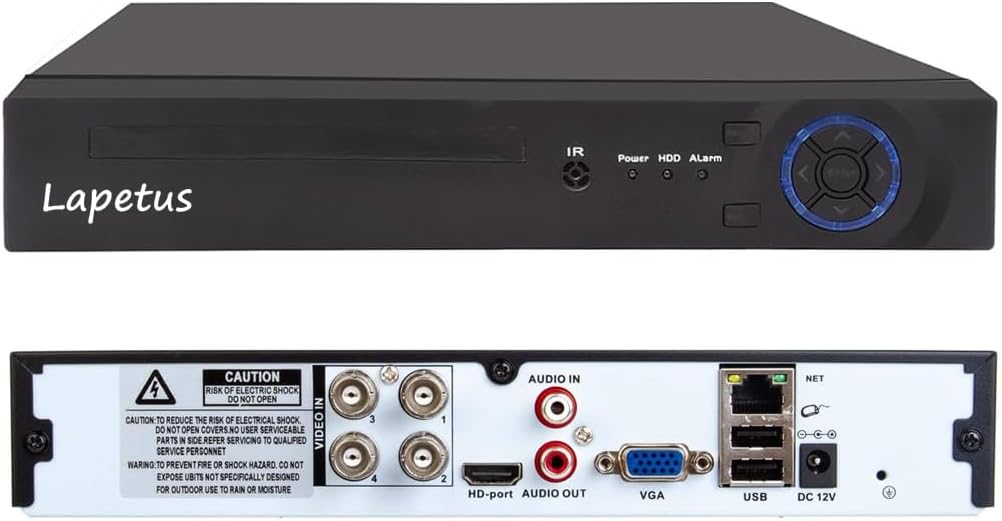
- Connect your monitor to the DVR using either the HDMI or VGA port.
- USB чычканын DVRдин арткы жагындагы USB портторунун бирине сайыңыз.
- Connect the power adapter to the DVR's DC 12V input and then to a power outlet.
- Connect your surveillance cameras to the 'VIDEO IN' BNC ports on the back of the DVR. Ensure each camera is also powered.
- Алыстан кирүү үчүн, DVRдин LAN портунан Ethernet кабелин роутериңизге туташтырыңыз.
3.2 Катуу дискти орнотуу
The DVR unit does not include a hard drive. A hard drive is required for recording and playback. It is recommended to use a surveillance-grade HDD. Make sure to turn off the DVR before installing or replacing the hard drive.
- Unscrew the top cover of the DVR unit.
- Connect the SATA data cable and power cable from the DVR to the corresponding ports on the hard drive.
- Secure the hard drive to the bottom of the DVR casing using the provided screws.
- Үстүнкү капкакты ордуна коюп, бурама менен бекитиңиз.
3.3 Баштапкы конфигурация
Upon first power-up, the DVR will guide you through an initial setup wizard. This typically includes:
- Каалаган тилиңизди тандоо.
- Setting the date and time, including time zone.
- Creating a strong password for the administrator account.
- Configuring network settings (DHCP is usually enabled by default).
- Adjusting display resolution to match your monitor (e.g., 1920x1080).
3.4 Мобилдик колдонмону орнотуу
Алыстан иштетүү үчүн viewing, download and configure the XMEYE mobile application:
- Scan the QR code displayed on your DVR's monitor or search for "XMEYE" in your device's app store (iOS App Store, Android APK).
- Install and open the XMEYE app. Register a user account and log in.
- Tap the "+" icon to add a new device. Scan the QR code on your DVR's monitor or manually enter the device's serial number.
- Ийгиликтүү туташкандан кийин, сиз төмөнкүлөрдү жасай аласыз view live feeds and manage your DVR remotely.

4. Иштөө
4.1 Live View
After successful setup, the DVR will display live feeds from connected cameras on your monitor. You can switch between single-camera view, көп камералуу торчо view (e.g., 1+7, 2+2), and customize the display layout using the mouse.
4.2 Жаздыруу жана ойнотуу
The DVR supports various recording methods and allows for easy playback of recorded footage.
- Тынымсыз жаздыруу: Рекорддор 24/7.
- Пландаштырылган жаздыруу: Жаздыруу үчүн атайын убакыттарды коюңуз.
- Кыймылды аныктоо жазуусу: Кыймыл аныкталганда гана жаздырат, бул сактагычтагы орунду үнөмдөйт.
To play back footage, access the playback menu, select the desired date and camera, and use the timeline to navigate through recordings. Options for fast forward, fast retreat, and single-frame play are available.

4.3 Кыймылды аныктоо
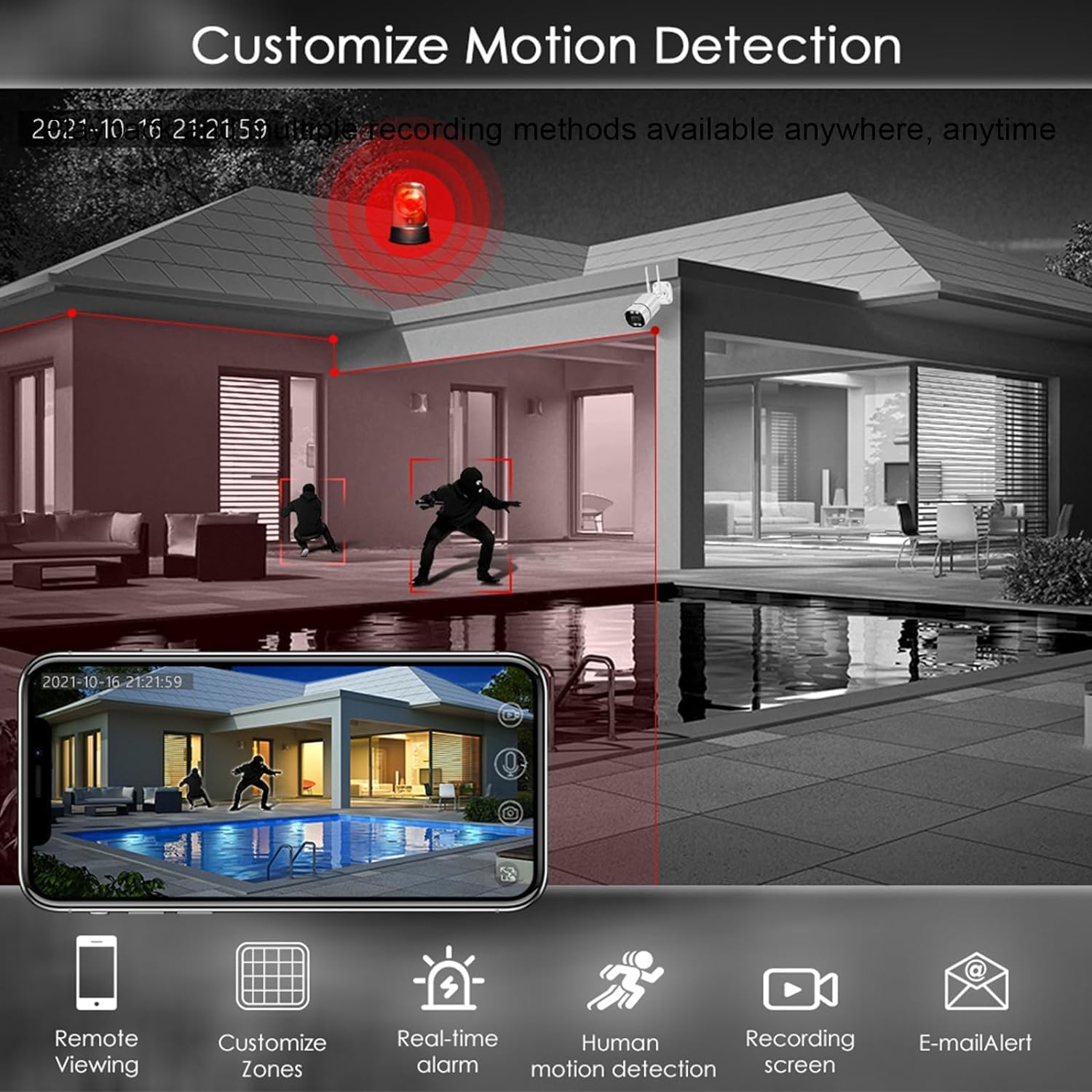
Configure motion detection settings to enhance security and optimize storage:
- Аймактарды ыңгайлаштыруу: Камеранын ичинде белгилүү бир аймактарды аныктаңыз view кыймылды аныктоо үчүн.
- Real-time Alarm: Receive instant alerts when motion is detected.
- Адамдын кыймылын аныктоо: Advanced detection to minimize false alarms.
- E-mail Alert: Receive notifications via email.
4.4 Алыстан Viewing
Utilize the XMEYE mobile app to view your camera feeds and recorded footage from anywhere with an internet connection. The app provides a user-friendly interface for managing your surveillance system on the go.
5. Техникалык тейлөө
5.1 Жалпы тейлөө
- Keep the DVR unit in a well-ventilated area to prevent overheating.
- Regularly clean the exterior of the DVR with a soft, dry cloth.
- Бардык кабелдик байланыштар коопсуз экенин текшериңиз.
5.2 Сактагычты башкаруу
Periodically check the hard drive status and free space. If the hard drive becomes full, older footage will be overwritten unless configured otherwise. You can format the hard drive through the DVR's system settings if needed.
6. Кыйынчылыктарды
- Видео чыгаруу жок: Check monitor cable connections (HDMI/VGA) and ensure the monitor is set to the correct input. Verify DVR power.
- Жаздыруу жок: Ensure a hard drive is installed and properly formatted. Check recording schedules and motion detection settings.
- Алыстан Viewмаселелер: Verify the DVR has an active internet connection (LAN cable connected to router). Ensure the XMEYE app is correctly configured and the device is added.
- Сүрөттүн сапаты начар: Check camera connections. Ensure the DVR's display resolution matches your monitor's capabilities.
- DVR күйбөй жатат: Кубат адаптерин жана розетканы текшериңиз.
7. Техникалык шарттар
- Модель номери: LT-6704NS
- Каналдардын саны: 4
- Видео кысуу: H.265 +
- Видео киргизүү: CVBS, AHD, TVI, CVI, Wired IP
- Видео чыгуулары: Сапаттуу, VGA
- Аудио киргизүү каражаттары: RCA
- USB порттору: Ооба
- Тармак интерфейси: LAN (Ethernet)
- Электр камсыздоо: DC 12V
- Өлчөмдөрү: 13.8 x 10.9 x 3 дюйм
- Элемент Салмагы: 2.49 фунт
8. Кепилдик жана колдоо
For warranty information and technical support, please refer to the documentation provided with your purchase or contact Lapetus customer service. Protection plans may be available for extended coverage.