
1. Киришүү
Welcome to the user manual for your Google Pixel 4 XL smartphone. This guide provides essential information to help you get started, understand its features, and maintain your device. The Google Pixel 4 XL is designed to offer a seamless Android experience with advanced camera capabilities, intuitive gesture controls, and the integrated Google Assistant.

Figure 1.1: Google Pixel 4 XL (Oh So Orange)
2. Орнотуу
2.1 Кутуда эмне бар
- Google Pixel 4 XL смартфону
- AC адаптер
- USB кабели (USB-Cден USB-Cге)
- OTG Dongle (USB-A to USB-C adapter)
- SIM лоток чыгаруучу курал
- Quick Start Guide
2.2 SIM картаны салуу
- SIM карта салгычын Pixel 4 XL телефонуңуздун капталынан табыңыз.
- SIM лоток чыгаруучу куралды лотоктун жанындагы кичинекей тешикке киргизип, лоток чыгып кеткенче бекем басыңыз.
- Place your Nano SIM card into the tray with the gold contacts facing down. Ensure it fits securely.
- SIM лотокту кылдаттык менен кайра телефонго түртүңүз.

2.1-сүрөт: SIM картанын лотокунун жайгашкан жери
2.3 Баштапкы күйгүзүү жана орнотуу
- Google логотиби пайда болгонго чейин Кубат баскычын (оң жагында жайгашкан) басып туруңуз.
- Кааласаңыз, тилиңизди тандоо, Wi-Fi'га туташуу жана эски түзмөктөн маалыматтарды өткөрүү үчүн экрандагы көрсөтмөлөрдү аткарыңыз.
- Google Каттоо эсебиңиз менен кириңиз же жаңысын түзүңүз.
- Set up security features such as Face Unlock.
2.4 Аппаратты заряддоо
Connect the USB cable to the AC adapter and plug it into a power outlet. Connect the other end of the USB cable to the USB-C port at the bottom of your Pixel 4 XL. The device supports fast charging. For optimal battery health, avoid fully discharging the battery frequently.
3. Иштөө нускамалары
3.1 Негизги навигация
The Pixel 4 XL uses a touchscreen interface for navigation. Swipe up from the bottom to go to the home screen, swipe from the left or right edge to go back, and swipe up and hold to view акыркы колдонмолор.

Figure 3.1: Pixel 4 XL Front Display
3.2 Google Жардамчысы
The new Google Assistant is integrated into the Pixel 4 XL. You can activate it by squeezing the sides of your phone or by saying "Hey Google." Use your voice to send texts, share photos, get directions, and more.
3.3 Камеранын өзгөчөлүктөрү
The Pixel 4 XL camera offers advanced photography capabilities:
- Point and Shoot: Capture brilliant color and control exposure balance.
- Түнкү көрүнүш: Take clear photos in low-light conditions, including astrophotography for capturing the Milky Way.
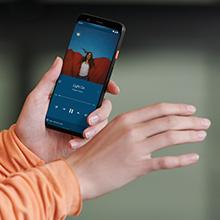
Figure 3.2: Using the Pixel 4 XL Camera
3.4 Motion Sense (Quick Gestures)
Utilize Quick Gestures to control your phone without touching it. Wave your hand above the screen to skip songs, silence calls, and more. Motion Sense functionality is available in specific regions including the US, Canada, Singapore, Australia, Taiwan, and most European countries.
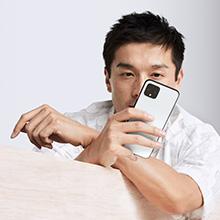
Figure 3.3: Motion Sense in Action
3.5 Call Screen
The Google Assistant's Call Screen feature helps filter out spam calls. It can proactively screen unknown callers and provide a transcript of the conversation, allowing you to decide whether to answer.
3.6 Расмий продукт Video
Video 3.1: An official video from Google Inc showcasing the features of the Google Pixel 4, including Google Assistant and Motion Sense. This video provides a visual overview of key functionalities.
4. Техникалык тейлөө
4.1 Аппаратыңызды тазалоо
To clean your Pixel 4 XL, use a soft, lint-free cloth. Avoid abrasive materials, solvents, or aerosol sprays. For stubborn marks, slightly dampen the cloth with water. Do not submerge the device in water.
4.2 Программалык камсыздоо жаңыртуулары
Google regularly releases software updates to improve performance, add features, and enhance security. Ensure your device is connected to Wi-Fi and has sufficient battery life before installing updates. You can check for updates in Settings > System > System update.
4.3 Батареяга кам көрүү
Батареянын иштөө мөөнөтүн узартуу үчүн:
- Ашыкча температурадан сактаныңыз.
- Use the provided charger or a compatible Qi-certified wireless charger.
- Enable Adaptive Battery in settings to optimize app usage.
- Disable features like Motion Sense and Always-on Display if not actively needed to conserve power.
4.4 Маалыматтын резервдик көчүрмөсү
Regularly back up your data to your Google Account. This includes photos, videos, contacts, and app data. Go to Settings > System > Backup to manage your backup settings.
5. Кыйынчылыктарды
5.1 Жалпы маселелер жана чечимдер
- Түзмөк жооп бербей жатат: Кайра иштетүүгө мажбурлоо үчүн кубат баскычын 30 секунддай басып туруңуз.
- Колдонмолор бузулуп жатат: Clear the cache and data for the problematic app in Settings > Apps & notifications > See all apps > [App Name] > Storage & cache.
- Байланыш көйгөйлөрү (Wi-Fi/Bluetooth): Try toggling Wi-Fi or Bluetooth off and on. If the issue persists, reset network settings in Settings > System > Reset options > Reset Wi-Fi, mobile & Bluetooth.
- Батареянын иштөө мөөнөтү начар: Review battery usage in Settings > Battery to identify apps consuming excessive power. Adjust screen brightness and disable unnecessary features.
5.2 Заводдук абалга кайтаруу
Заводдук абалга кайтаруу телефонуңуздагы бардык маалыматтарды өчүрүп, аны баштапкы заводдук жөндөөлөрүнө кайтарат. Бул туруктуу программалык камсыздоо маселелерин чечет. Warning: Back up all important data before proceeding.
- Орнотуулар > Система > Калыбына келтирүү параметрлерине өтүңүз.
- "Бардык маалыматтарды өчүрүү (заводдук жөндөөлөргө кайтаруу)" баскычын таптаңыз.
- Чечимиңизди ырастап, экрандагы көрсөтмөлөрдү аткарыңыз.
6. Техникалык шарттар
Key technical specifications for the Google Pixel 4 XL:
| Өзгөчөлүк | Спецификация |
|---|---|
| Бренд | Гугл |
| Модель аты | Pixel 4 XL |
| Операция системасы | Android |
| Эстутум сактоо сыйымдуулугу | 64 ГБ |
| RAM эстутум орнотулган өлчөмү | 6 ГБ |
| Screen Size | 6.3 дюйм |
| Резолюция | 1440 x 2960 |
| Жаңыртуу ылдамдыгы | 120 Гц |
| CPU модели | Snapdragon S3 |
| CPU ылдамдыгы | 2.84 ГГц |
| Түс | Oh So Orange |
| SIM карта уячаларынын саны | Жалгыз SIM |
| Туташтыргыч түрү | USB түрү C |
| Biometric Security Feature | Жүздү таануу |
| Сууга туруктуулук деңгээли | Сууга чыдамдуу |
| Наушник уясы | Наушник уячасы жок |
| Алдыңкы сүрөт сенсорунун чечилиши | 8 депутат |
| Видео тартуунун резолюциясы | 4k (30fps) |
| Дисплей түрү | OLED |
| Зымсыз камсыздоочу | Кулпусу ачылган |
| Батареянын орточо иштөө мөөнөтү | 12 саат |
7. Кепилдик маалыматы
Your Google Pixel 4 XL comes with a 2 жылдык өндүрүүчүнүн кепилдиги. This warranty covers defects in materials and workmanship under normal use. It does not cover damage caused by accidents, misuse, unauthorized repairs, or normal wear and tear.
For detailed terms and conditions, please refer to the warranty card included with your product or visit the official Google support webсайт.
8. Колдоо
If you require further assistance or encounter issues not covered in this manual, please utilize the following resources:
- Онлайн жардам: Visit the official Google Pixel Help Center for comprehensive articles, FAQs, and troubleshooting guides.
- Коомчулук форумдары: Engage with other Pixel users and experts in Google's official product forums.
- Колдоо кызматы менен байланышуу: Access direct support options (chat, phone, email) through the Google Pixel Help Center.
Always ensure you are referring to official Google support channels for accurate and up-to-date information.