
1. Киришүү
This manual provides instructions for the Easytry123 RC602S replacement remote control. This remote is designed to operate various TCL Smart UHD LED LCD HDTV models. Please note that as a replacement unit, some advanced or specific functions of your original remote may not be fully supported. Ensure your TV model is listed for optimal compatibility.
2. Орнотуу
2.1 Батареяны орнотуу
The RC602S remote control requires two (2) AAA batteries (not included). Follow these steps to install the batteries:
- Пульттун артындагы батарея отсегин табыңыз.
- Өтмөктү ылдый басып, аны ачуу үчүн батареянын капкагын ылдый жылдырыңыз.
- Оң (+) жана терс (-) терминалдары бөлүмдүн ичиндеги белгилер менен туура дал келишин камсыз кылып, эки AAA батарейкасын салыңыз.
- Батареянын капкагын бекем чыккыча ордуна жылдырыңыз.

Сүрөт 2.1: Алдыңкы view of the RC602S remote control with the battery compartment detached, illustrating the battery insertion area. Ensure correct polarity when inserting batteries.
2.2 Шайкештикти текшерүү
This remote is compatible with the following TCL Smart UHD LED LCD HDTV models:
- TCL 50P20US
- TCL 65P20US
- TCL 49C2US
- TCL U55P6046
- TCL 55C2US
- TCL U65P6046
- TCL U60P6046
If your TV model is not listed, this remote may not function correctly or provide full functionality. No programming is typically required for these compatible models; simply insert batteries and point the remote at your TV.
3. Иштөө нускамалары
The RC602S remote control uses infrared (IR) technology. Ensure there is a clear line of sight between the remote's emitter and your TV's IR receiver for proper operation. Point the remote directly at the television.
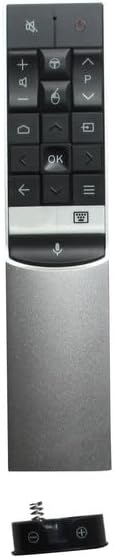
Сүрөт 3.1: Бүттүview of the RC602S remote control, displaying its ergonomic design and button layout.
3.1 Негизги функциялар
- Кубат баскычы (Red Circle): Телевизорду күйгүзөт же өчүрөт.
- Үнсүз баскычы (X менен динамик): Телевизордун үнүн өчүрөт же үнүн чыгарат.
- Үнүн жогорулатуу/төмөндөтүү (+/-): Үн деңгээлин тууралайт.
- Канал өйдө/төмөн (P^/P˅): Телеканалдарды өзгөртөт.
- Чабыттоо баскычтары (Жебелер): Менюларда багыттоо жана параметрлерди тандоо үчүн колдонулат.
- OK баскычы (OK): Менюлардагы тандоолорду ырастайт.
- Үй баскычы (House icon): Сыналгынын акылдуу башкы экранына же негизги менюсуна кирет.
- Арткы баскыч (Сол жебе): Мурунку экранга же менюга кайтат.
- Киргизүү/Булак баскычы (Rectangle with Arrow): Киргизүү булагын (HDMI, AV ж.б.) тандайт.
- Menu/Options Button (Three Horizontal Lines): Opens context-sensitive menus or settings.
- Үн менен башкаруу баскычы (Микрофон сүрөтчөсү): Activates voice command features (if supported by your TV model and configured).
4. Техникалык тейлөө
4.1 Пультту тазалоо
Пультту тазалоо үчүн жумшак, кургак чүпүрөктү колдонуңуз. өжөр кир үчүн, бир аз гampкездемени суу же жумшак, абразивдүү эмес тазалоочу каражат менен сүртүңүз. Катуу химиялык заттарды же ашыкча нымдуулукту колдонуудан алыс болуңуз, анткени алар пульттун электроникасына зыян келтириши мүмкүн.
4.2 Батареяны алмаштыруу
Replace batteries when the remote's response becomes sluggish or stops working. Always replace both batteries at the same time with new AAA batteries. Do not mix old and new batteries, or different types of batteries, as this can lead to leakage or malfunction.
4.3 Сактоо
When not in use for extended periods, it is recommended to remove the batteries to prevent potential leakage and damage to the remote control.
5. Кыйынчылыктарды
- Пульт жооп бербей жатат:
- Батареялар туура полярдуулук менен туура салынганын текшериңиз.
- Эски батареяларды жаңы AAA батареялары менен алмаштырыңыз.
- Пульт менен телевизордун инфракызыл кабыл алгычынын ортосунда эч кандай тоскоолдуктар жок экенин текшериңиз.
- Пультту түз сыналгыга багыттаңыз.
- Limited functionality or certain buttons not working:
- As a replacement remote, some specific or advanced functions of your original TV remote may not be supported. This is normal for universal or replacement remotes.
- Verify that your TV model is listed in the compatibility section (Section 2.2).
- Баскычтар жабышчаак же жооп бербей жатат:
- Алыстан башкаруу пультун 4.1-бөлүмдө сүрөттөлгөндөй тазалаңыз.
6. Техникалык шарттар
| Бренд | Easytry123 |
| Модел | RC602S |
| Байланыш технологиясы | Инфракызыл (IR) |
| Шайкеш түзмөктөр | TCL Televisions |
| Колдоого алынган түзмөктөрдүн максималдуу саны | 1 |
| Батареялар талап кылынат | 2 x AAA (киргизилген эмес) |
| Өзгөчө өзгөчөлүк | Эргономикалык дизайн |
7. Кепилдик жана колдоо
This Easytry123 RC602S remote control is a replacement unit. Specific warranty information is not provided with the product. For any issues or support inquiries, please contact the seller directly through your purchase platform. Ensure you have your order details available when contacting support.