
1. Киришүү
Thank you for choosing the iClever BK10 Bluetooth Keyboard. This manual provides essential information for setting up, operating, maintaining, and troubleshooting your new wireless keyboard. Please read it carefully to ensure optimal performance and longevity of your device.
Кутуда эмне бар
- iClever BK10 Bluetooth клавиатурасы
- USB-C заряддоо кабели
- User Manual
- Protective Silicone Cover (for key protection)

Figure 1: Included items with the iClever BK10 Bluetooth Keyboard.
2. Негизги өзгөчөлүктөрү
- Sleek & Wireless Design: Constructed with stainless steel and ABS, featuring a 10-degree tilt for comfortable desktop use.
- Multi-Device & Multi-OS Compatibility: Seamlessly switch between up to 3 devices using Bluetooth 5.1 technology. Automatically recognizes and adapts to Windows, macOS, iPadOS, Android, iPhone, and Chromebooks.
- Responsive & Low-Profile Ачкычтар: Scissor-key mechanism provides enhanced feedback, stability, and quiet typing (below 50 dB). Optimized key-travel and anti-slip tapes ensure comfort and precision.
- Compact & Efficient: Full-size layout with a standard numeric keypad. Includes hotkeys for Calculator, Fn lock, Mute, Volume up/down, and more to boost productivity.
- USB-C Rechargeable & Energy Saving: Built-in rechargeable battery offers up to 45 days of use after a 2-hour charge. Features an automatic power-saving sleep mode after 30 minutes of inactivity.
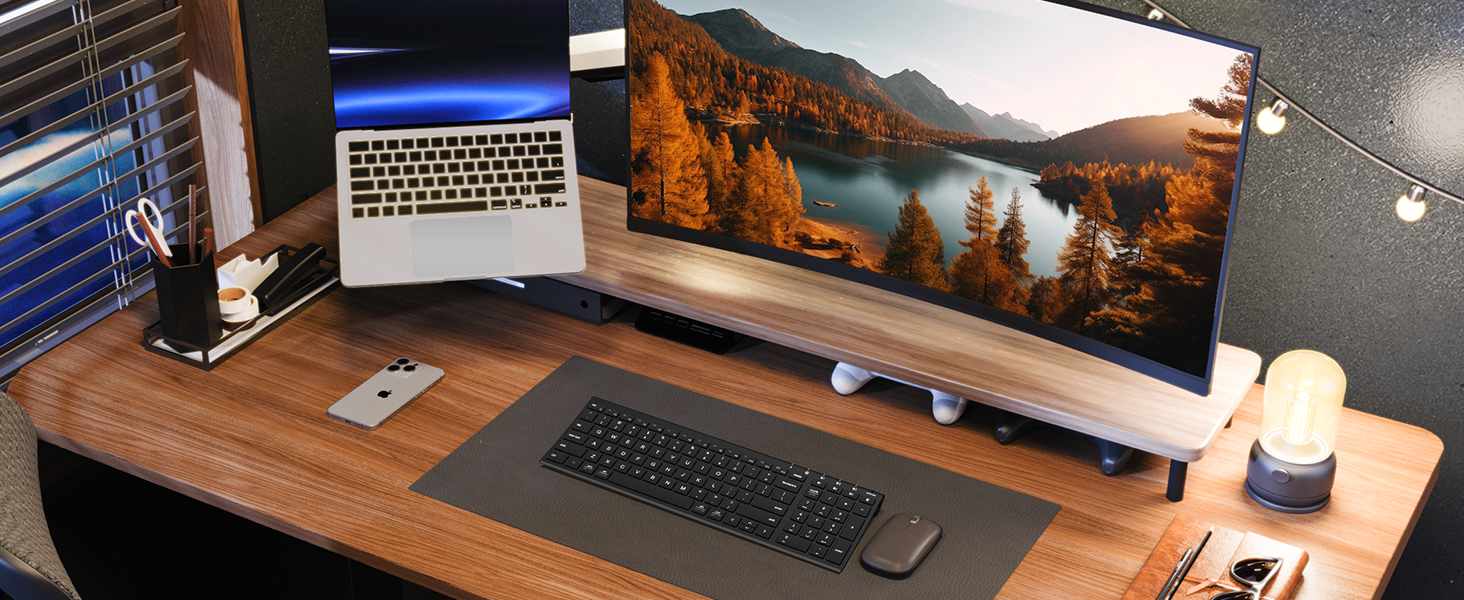
Figure 2: The sleek and wireless design of the iClever BK10 keyboard.
3. Орнотуу
3.1 Баскычтопту заряддоо
Before initial use, fully charge the keyboard using the provided USB-C cable. Connect the USB-C end to the keyboard's charging port (located on the right side) and the USB-A end to a power source (e.g., computer USB port, USB wall adapter). The charging indicator light will illuminate during charging and turn off when fully charged.

Figure 3: USB-C charging port on the iClever BK10 keyboard.
3.2 Күйгүзүү/өчүрүү
Locate the ON/OFF switch on the top right side of the keyboard. Slide the switch to the 'ON' position to power on the keyboard. Slide it to 'OFF' when not in use to conserve battery life.
3.3 Bluetooth жупташтыруу
The iClever BK10 keyboard supports pairing with up to three devices simultaneously. Follow these steps to pair your devices:
- ON/OFF которгучу аркылуу клавиатураны күйгүзүңүз.
- Press and hold one of the Bluetooth channel keys (B1, B2, or B3) for 3-5 seconds until its indicator light starts flashing rapidly. This indicates the keyboard is in pairing mode.
- On your device (computer, tablet, smartphone), go to Bluetooth settings and search for available devices.
- Select "iClever BK10" from the list of found devices.
- Follow any on-screen prompts to complete the pairing process. The indicator light on the keyboard will stop flashing and remain solid for a few seconds, then turn off, indicating successful pairing.
- Repeat these steps for up to two additional devices using the other Bluetooth channel keys (B2 and B3).

Figure 4: Multi-device connectivity of the iClever BK10 keyboard.
4. Иштөө нускамалары
4.1 Түзмөктөрдүн ортосунда которулуу
To switch between paired devices, simply press the corresponding Bluetooth channel key (B1, B2, or B3) once. The keyboard will connect to the selected device automatically.
4.2 Функционалдык баскычтар жана ысык баскычтар
The iClever BK10 keyboard features a row of function keys (F1-F12) that also serve as hotkeys for various media and system controls. To use the hotkey functions, press the 'Fn' key simultaneously with the desired function key. Some common hotkeys include:
- Fn+F1: Үй
- Fn+F2: издөө
- Fn+F3: Баарын тандаңыз
- Fn+F4: Көчүрүү
- Fn+F5: Паста
- Fn+F6: Кесүү
- Fn+F7: Мурунку трек
- Fn+F8: Ойнотуу/Тыныгуу
- Fn+F9: Кийинки трек
- Fn+F10: Үнсүз
- Fn+F11: Үндү төмөндөтүү
- Fn+F12: Үндү көтөрүү
The keyboard also includes dedicated keys for Calculator, Fn lock, and a standard numeric keypad for efficient data entry.

Figure 5: ашыкview of keyboard layout and multi-OS features.
4.3 Operating System Layout Recognition
The keyboard automatically recognizes different operating systems (Windows, macOS, iPadOS, Android) and adjusts its key layout accordingly. For example, the 'Win' key functions as 'Alt' on Mac, and 'Alt' functions as 'Cmd'.
5. Техникалык тейлөө
5.1 Тазалоо
To clean your keyboard, power it off and disconnect any cables. Use a soft, lint-free cloth slightly dampened with water or a mild cleaning solution. Avoid excessive moisture and harsh chemicals. The included silicone cover can be removed and washed with mild soap and water.
5.2 Батареяга кам көрүү
Батареянын иштөө мөөнөтүн көбөйтүү үчүн:
- Батареяны бат-баттан толук кубаттап калуудан алыс болуңуз.
- Charge the keyboard when the battery indicator is low.
- Клавиатураны узак убакыт бою колдонбосо, салкын, кургак жерде сактаңыз.
- The keyboard enters a power-saving sleep mode after 30 minutes of inactivity. Press any key to wake it up.
6. Кыйынчылыктарды
6.1 Баскычтоп туташпайт/жупташтырылбайт
- Баскычтоптун күйгүзүлгөнүн жана толук заряддалганын текшериңиз.
- Түзмөгүңүздө Bluetooth иштетилгенин текшериңиз.
- Place the keyboard within the effective range (typically 10 meters) of your device.
- If already paired, try unpairing the keyboard from your device's Bluetooth settings and then re-pairing it.
- Баскычтопту да, түзмөгүңүздү да өчүрүп-күйгүзүп көрүңүз.
6.2 Ачкычтар жооп бербейт
- Check if the keyboard is connected to the correct device (verify the active Bluetooth channel).
- Батареянын заряды өтө төмөн эмес экенин текшериңиз.
- Clean any debris from around the affected keys.
6.3 Connectivity Issues/Lag
- Башка зымсыз түзмөктөрдөн (мисалы, Wi-Fi роутерлери, зымсыз телефондор) алыстап, тоскоолдуктарды азайтыңыз.
- Түзмөгүңүздүн Bluetooth драйверлери жаңыртылганын текшериңиз.
- Try connecting to a different Bluetooth channel on the keyboard.
7. Техникалык шарттар
| Өзгөчөлүк | Деталь |
|---|---|
| Модель номери | BK10 |
| Байланыш технологиясы | Bluetooth 5.1 |
| Шайкеш түзмөктөр | Windows laptops/desktops, MacBook/iMac, iPad/iPhone, Android tablets/phones, Chromebooks |
| Ачкычтардын саны | 104 |
| Ачкычтын которуштуруу түрү | Кайчы которгуч |
| Ызы-чуу деңгээли | <50 дБ |
| Power Source | Заряддалуучу Батарея (USB-C) |
| Батареянын иштөө мөөнөтү | Up to 45 days (after 2 hours charging) |
| Продукциянын өлчөмдөрү (L x W x Y) | 14.41" x 4.92" x 0.63" |
| Материал | Акрилонитрил бутадиен стирол, алюминий |
8. Кепилдик жана колдоо
8.1 Кепилдик маалыматы
The iClever BK10 Bluetooth Keyboard comes with a 12-ай кепилдик сатып алынган күндөн тартып. Бул кепилдик өндүрүш кемчиликтерин камтыйт жана сиздин буюмуңуз нормалдуу колдонууда материалдык жана жасалгалоо кемчиликтери жок экенин камсыздайт.
8.2 Кардарларды колдоо
If you encounter any issues or have questions regarding your iClever BK10 Bluetooth Keyboard, please refer to the contact information provided in your product packaging or visit the official iClever support webжардам үчүн сайт.