
1. Продукт бүтүп калдыview
The SSONTONG A16 Dash Cam is designed to record your driving journey, offering features such as night vision, parking monitoring, G-sensor, loop recording, and motion detection. This manual provides instructions for proper setup, operation, and maintenance.

Image 1.1: The SSONTONG A16 Dash Cam with its included accessories, including the main camera unit, car charger, USB cable, and user manual.

Image 1.2: The SSONTONG A16 Dash Cam, highlighting the wide-angle lens and the slot for the included 32GB SD card.
2. Пакеттин мазмуну
Пакетиңизде бардык буюмдар бар экенин текшериңиз:
- SSONTONG A16 Dash Cam Unit
- Унаа заряддагыч
- USB кабели
- Соруу Тоосу
- 32GB Micro SD Card (pre-inserted)
- User Manual
3. Орнотуу
3.1. Микро SD картаны орнотуу
The 32GB Micro SD card is typically pre-inserted into the dash cam. Ensure it is properly seated. For optimal performance, use a Class 10 or above Micro SD card (8GB-32GB recommended). Format the card before first use and periodically thereafter.
3.2. Камераны орнотуу
- Алдыңкы айнегиңиздеги каалаган жерди тазалаңыз.
- Сорох устуоруйаны сызык камерага туттуу.
- Соргучту алдыңкы айнекке бекем басып, аны бекитүү үчүн рычагды тартыңыз.
- Тунук болушу үчүн камеранын бурчун тууралаңыз view жолдун.
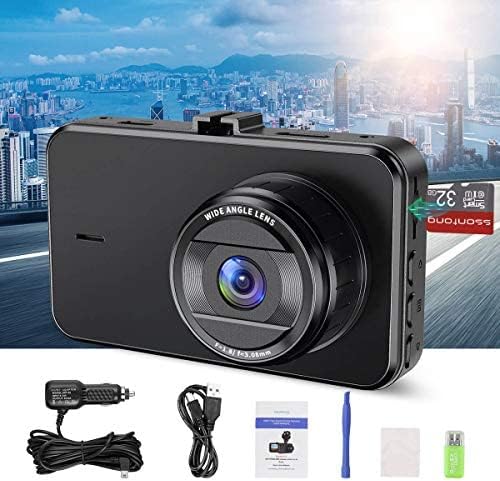
Image 3.1: The compact size of the SSONTONG A16 Dash Cam, featuring a 3-inch IPS screen, designed for easy installation and minimal obstruction of view.
3.3. Power Connection
Connect the dash cam to your vehicle's power outlet using the provided car charger. The USB cable is primarily for connecting to a computer for file playback, not for continuous power supply during operation. The built-in 200mAh battery is for maintaining settings and saving the last recording upon power loss; it is not intended for standalone operation.
4. Иштөө нускамалары
4.1. Негизги операция
Once connected to power, the dash cam will typically power on and begin recording automatically. Use the touch controls to navigate the menu and adjust settings.
4.2. Негизги өзгөчөлүктөрү
- Цикл жаздыруу: Records video in continuous loops, overwriting the oldest fileSD карта толгондо.
- G-сенсор: Күтүүсүз титирөөлөрдү же кагылышууларды автоматтык түрдө аныктап, учурдагы видео флэш-дискти кулпулайтtagанын кайра жазылышын болтурбоо үчүн д.
- Кыймылды аныктоо: When enabled, the camera will start recording automatically if it detects movement in front of the vehicle while parked.
- Унаа токтотуучу жай: Provides surveillance when the vehicle is parked, often triggered by G-sensor events.
- Түнкү көрүнүш: Жарык аз шарттарда жаздыруу мүмкүнчүлүгүн жакшыртат.
- HDR (жогорку динамикалык диапазон): Improves video quality by balancing exposure in varying light conditions.
- Аудио жаздыруу: Records audio inside the vehicle. This feature can usually be toggled on or off in the settings.

Image 4.1: The SSONTONG A16 Dash Cam demonstrating its night vision capabilities, providing clear video footage even in low-light urban environments.

Image 4.2: The SSONTONG A16 Dash Cam capturing a 170-degree wide-angle view, ensuring comprehensive coverage of the road ahead.

Image 4.3: Visual representation of the SSONTONG A16 Dash Cam's core features, including Loop Recording, G-sensor, HDR, Motion Detection, Night Vision, Parking Monitor, Screen Saver, Audio Recording, and 1080P Full HD video resolution.
5. Техникалык тейлөө
5.1. SD картаны башкаруу
To prevent the SD card from becoming full and affecting recording, it is recommended to format the card monthly. This helps maintain optimal performance and storage capacity.
5.2. Тазалоо
Gently wipe the camera lens and screen with a soft, dry cloth to remove dust or smudges. Avoid using abrasive cleaners or solvents.
6. Кыйынчылыктарды
- Камера жаздырбай жатат же катып калат:
- Ensure the Micro SD card is Class 10 or above and between 8-32GB.
- Format the SD card regularly (monthly is recommended).
- Try resetting the camera to factory settings if issues persist.
- SD card full error:
- Ensure Loop Recording is enabled.
- Turn off Motion Detection if not needed, or adjust G-sensor sensitivity to 'Low'.
- SD картаны форматтоо.
- Camera prompts to connect power:
- The built-in battery is for saving settings and emergency shutdown only. The dash cam requires continuous power from the car charger during operation. Ensure the car charger is properly connected.
- ойной албайт fileкомпьютерде:
- The dash cam records in .AVI format. Some computers may require specific codecs or a third-party media player to view булар files.
- Ensure you are using the USB cable to connect the camera to the computer, not the car charger.
7. Техникалык шарттар
| Өзгөчөлүк | Спецификация |
|---|---|
| Модель номери | A16 |
| Пакеттин өлчөмдөрү | 5.55 x 4.37 x 2.83 дюйм |
| Элемент Салмагы | 8 унция |
| Батареялар | 1 Батарея талап кылынат (кошулган) |
| Байланыш технологиясы | USB |
| Өзгөчөлүктөр | G-Sensor, Loop Recording, Night Vision, Motion Detection, Parking Monitor |
| Башка дисплей өзгөчөлүктөрү | Зымсыз |
| Түс | Кара |
| Видео тартуунун резолюциясы | 1080p |
| Монтаж түрү | Соруу Тоосу |
| Башкаруу ыкмасы | тийүү |
| Камтылган компоненттер | Эстутум картасы |
8. Коопсуздук боюнча маанилүү маалымат
- Do not operate the dash cam in extreme temperatures.
- Ensure the dash cam does not obstruct your view айдап бара жатканда.
- Аппаратты суудан жана нымдан алыс кармаңыз.
- Аппаратты өз алдынча бөлүүгө же оңдоого аракет кылбаңыз.
