
Introduction
This manual provides comprehensive instructions for the USARMT TLC-925 universal remote control. Designed for ease of use, this remote is compatible with a wide range of TCL LED LCD Smart TVs. It comes pre-programmed, requiring no complex setup before use.
Please read this manual carefully to ensure proper operation and to maximize your remote control's functionality.
Продукт бүттүview
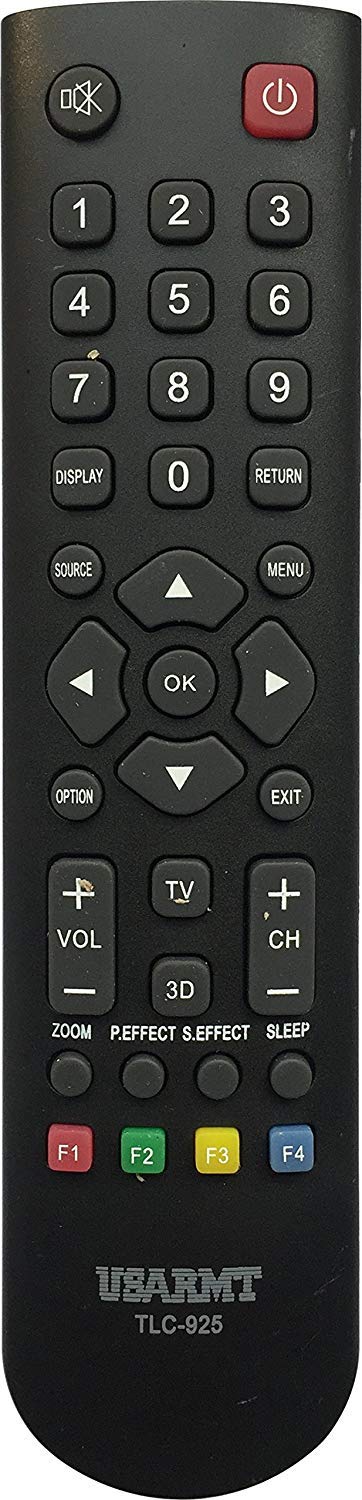
Сүрөт: алдыңкы view of the USARMT TLC-925 Universal Remote Control. This remote features a standard button layout for TV operation.
The USARMT TLC-925 remote control is a direct replacement or secondary remote for many TCL LED LCD Smart TV models. Its design focuses on simplicity and immediate functionality.
Жайгашуу
Батарея орнотуу
Пультка эки AAA батарейкасы керек (киргизилген эмес). Орнотуу үчүн:
- Пульттун артындагы батарея отсегин табыңыз.
- Батареянын капкагын ачуу үчүн ылдый же сыртка жылдырыңыз.
- Оң (+) жана терс (-) терминалдары бөлүмдүн ичиндеги диаграммаларга дал келишин камсыз кылып, эки AAA батарейкасын салыңыз.
- Батареянын капкагын бекем чыккыча ордуна жылдырыңыз.
Initial Use (No Programming Required)
The USARMT TLC-925 remote control is pre-programmed for compatible TCL TV models. Once batteries are installed, it is ready for immediate use. Point the remote directly at your TCL TV and press any function button (e.g., Power, Volume Up) to test its operation.
Заводдук абалга кайтаруу
If you experience issues or wish to reset the remote to its default factory settings, follow these steps:
- басып, кармап туруңуз КҮЧ баскычы жана 0 баскычын бир эле учурда.
- Continue holding both buttons for approximately 2 seconds. The remote will reset.
Иштөө нускамалары
To operate your TCL TV with the USARMT TLC-925 remote control, ensure there is a clear line of sight between the remote's infrared emitter and the TV's IR receiver. Point the remote directly at the TV.
- Кубат баскычы: Телевизорду күйгүзөт же өчүрөт.
- Сан баскычтары (0-9): Каналдарды түз тандайт.
- Үнүн жогорулатуу/төмөндөтүү: Телевизордун үн деңгээлин тууралайт.
- Канал өйдө/төмөн: Каналдарды ырааттуу түрдө өзгөртөт.
- Үнсүз баскычы: Телевизордун үнүн өчүрөт же кайра күйгүзөт.
- Киргизүү/Булак баскычы: Жеткиликтүү киргизүү булактары (HDMI, AV ж.б.) аркылуу циклдерди жүргүзөт.
- Чабыттоо баскычтары (өйдө, ылдый, солго, оңго, OK/Enter): Used to navigate menus and confirm selections on Smart TV interfaces.
- Башка функция баскычтары: Specific buttons (e.g., Menu, Guide, Back, Exit) will perform their corresponding functions on your TCL TV.
Note: The exact functionality of some buttons may vary slightly depending on your specific TCL TV model.
Техникалык тейлөө
Тазалоо
Алыстан башкаруу пультун тазалоо үчүн жумшак, кургак чүпүрөктү колдонуңуз. Өтө кир болсо, бир азampкездемени суу же жумшак, абразивдүү эмес тазалоочу каражат менен сүртүңүз. Күчтүү химиялык заттарды колдонбоңуз же пультту суюктукка салбаңыз.
Батареяны алмаштыруу
Replace batteries when the remote's performance degrades or if it stops responding. Always replace both batteries at the same time with new AAA batteries. Do not mix old and new batteries, or different types of batteries.
Сактагыч
When not in use for extended periods, remove the batteries to prevent leakage, which can damage the remote. Store the remote in a cool, dry place away from direct sunlight and extreme temperatures.
Проблемаларды чечүү
| Көйгөй | Мүмкүн себеп | Чечим |
|---|---|---|
| Пульт жооп бербей жатат. | Өлүк же туура эмес орнотулган батарейкалар. | Туура полярдуулукту камсыз кылуу менен батарейкаларды жаңы AAA батарейкалары менен алмаштырыңыз. |
| Пульт жооп бербей жатат. | Пульт менен телевизордун ортосундагы тоскоолдук. | Ensure a clear line of sight to the TV's IR receiver. |
| Алыстан башкаруу үзгүлтүккө учурап иштейт. | Алсыз батарейкалар. | Батареяларды алмаштырыңыз. |
| Remote does not control all TV functions. | TV model not fully compatible or specific function not supported by remote. | Verify your TV model is listed in the compatibility section. Some advanced Smart TV features may require the original TV remote. Perform a factory reset if necessary. |
Техникалык шарттар
| Бренд | USARMT |
| Модел | TLC-925 |
| Элемент Салмагы | 3 унция |
| Өзгөчө өзгөчөлүк | Универсал |
| Колдоого алынган түзмөктөрдүн максималдуу саны | 1 |
| Шайкеш түзмөктөр | Television (TCL LED LCD Smart TVs) |
| Байланыш технологиясы | Инфракызыл |
| Дата биринчи жеткиликтүү | 30-октябрь, 2019-жыл |
Шайкеш TCL сыналгы моделдери
The USARMT TLC-925 remote control is compatible with the following TCL LED LCD Smart TV models:
- L26HDF12TA
- L26HDM12
- L32HDF12TA
- L32HDM12
- L32HDP60
- L40FHDF12TA
- L40FHDM12
- L40FHDP60
- LE32HDE5300
- LE32HDF3300
- LE32HDF3300TA
- LE32HDF3300TT
- LE32HDF3310
- LE32HDP21TA
- LE39FHDF3300
- LE39FHDF3300TA
- LE39FHDF3300TT
- LE39FHDF3310
- LE42FHDE5300
- LE43FHDF3300
- LE43FHDF3300TA
- LE46FHDE5300
- LE48FHDF3300Z
- LE48FHDF3300ZTA
- LE48FHDF3310
- LE55FHDF3300Z
- LE55FHDF3300ZTA
- LE55FHDF3310
- 23F3300
- 28D2700
- 32B2800
- 32D100
- 32D2700
- 40D100
- 40FD2700
- 48FD2700
- 49D100
- LE32FHDE3010
- LE32HDF3010
- LE39FHDE3010
- LE40FHDE3010
- LE48FHDE3010
- LE50FHDE3010
- RC2000N02
- 32F2700
- 32S3600
- 39S3600
- 48F2700
- RC3000N02
- 48FS4610
- 48FS4690
- 50FS4690
- 55FS4610
- 55FS4690
Кепилдик жана колдоо
This product is backed by a 30-Day Hassle-Free Return Policy. For any questions or concerns regarding your USARMT TLC-925 remote control, customer support inquiries are typically responded to within 1 business day.
For further assistance, please refer to the retailer's support channels or contact the manufacturer, USARMT, through their official support avenues.