
1. Киришүү
This manual provides detailed instructions for the safe and proper installation and operation of your MOUNTUP MU0009 Full Motion TV Wall Mount. Please read this manual thoroughly before installation to ensure correct setup and to prevent damage or injury. This mount is designed for most 26-60 inch LED, LCD, OLED, and 4K TVs weighing up to 77 lbs (35 kg).
The full motion design allows for optimal viewing flexibility, including swivel, tilt, and extension capabilities. It features a robust alloy steel construction for durability and security.

Image: The MOUNTUP MU0009 full motion TV wall mount with a television extended from the wall, demonstrating its range of motion.
2. Коопсуздук маалыматы
- Бардык нускамаларды окуңуз: Before installation, read and understand all assembly instructions. If you have any questions, contact customer support.
- Салмак сыйымдуулугу: 77 фунттан (35 кг) ашпаңыз. Бул чектен ашып кетүү олуттуу жаракат алууга же мүлккө зыян келтирүүгө алып келиши мүмкүн.
- Экрандын өлчөмү: Бул орнотуу 26 жана 60 дюймдук телевизорлор үчүн иштелип чыккан.
- Дубал түрү: This mount is designed for installation on wood studs or solid concrete/brick walls. Жалгыз гипсокартон үстүнө ОРНОТПОЙТ. Орнотуучу бети орнотуунун жана телевизордун жалпы салмагын коопсуз көтөрө ала тургандыгын текшериңиз.
- Куралдар: Use appropriate tools for installation. A stud finder, drill, level, and socket wrench are typically required.
- Жардам: Due to the size and weight of TVs, it is recommended to have at least two people for installation.
- Аппараттык камсыздоо: Берилген жабдууларды гана колдонуңуз. Эгерде кандайдыр бир тетиктер жок болсо же бузулуп калса, кардарларды колдоо кызматына кайрылыңыз.
- Орнотуудан кийинки текшерүү: After installation, ensure the mount is securely fastened and the TV is stable before use.
3. Техникалык шарттар
| Өзгөчөлүк | Деталь |
|---|---|
| Модель номери | MU0009 |
| TV өлчөмү шайкештиги | 26 - 60 дюйм |
| Салмак сыйымдуулугу | 77 фунтка чейин (35 кг) |
| VESA шайкештиги | 100x100ммден 400x400ммге чейин |
| Монтаж түрү | Full Motion (Articulating) |
| Айналма тоо | 180° чейин (телевизордун өлчөмүнө жараша) |
| Тилтүү диапазону | 0°тан -10°ка чейин |
| Деңгээлди тууралоо | +/- 3° post-installation |
| Дубалдан узартуу | 2" (кичирейтилген) 15.3" (узартылган) чейин |
| Материал | Эритме болот |
| Түс | Кара |
| Элемент Салмагы | 2 килограмм |
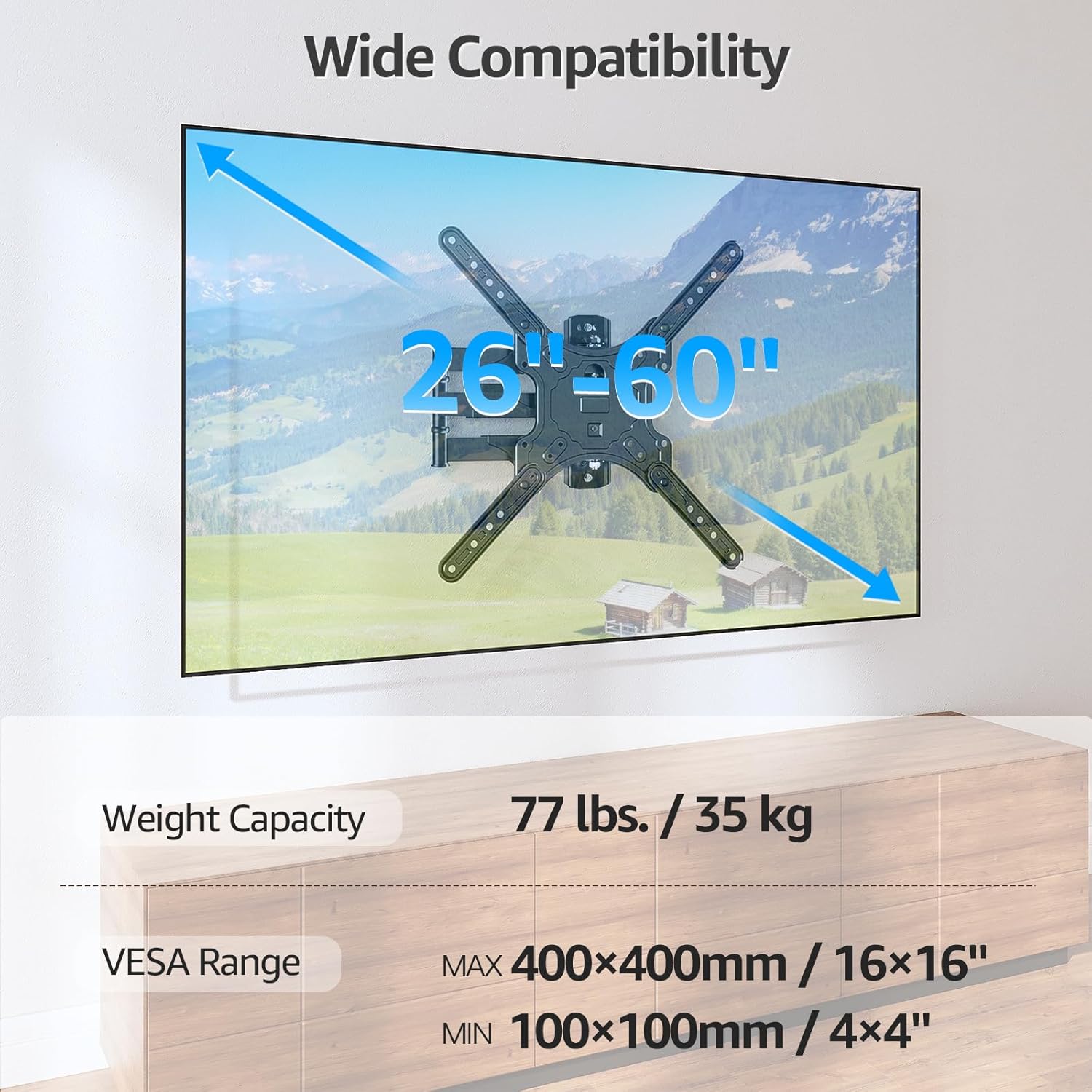
Image: Visual representation of the mount's compatibility, including supported TV sizes (26-60 inches), weight capacity (77 lbs / 35 kg), and VESA range (100x100mm to 400x400mm).
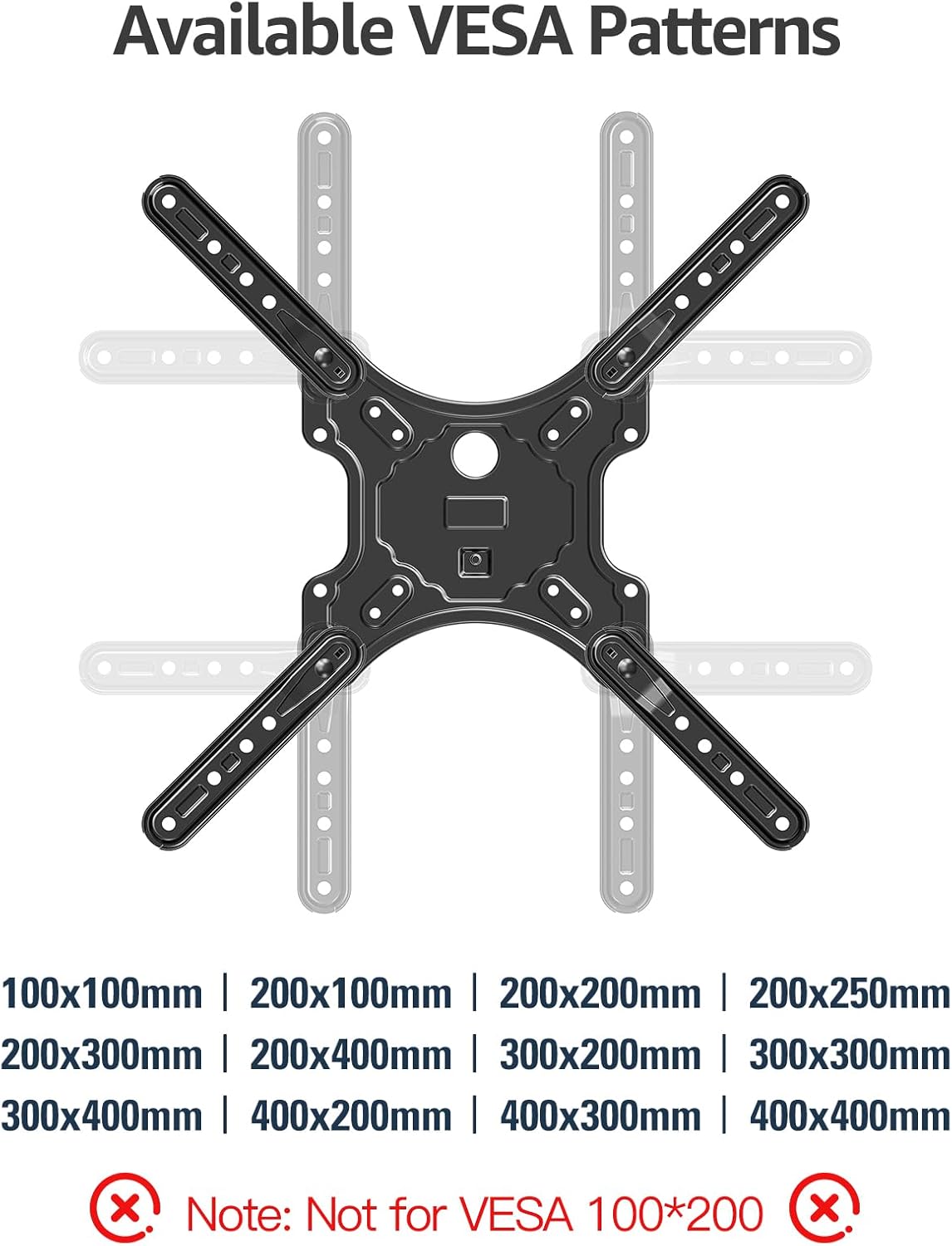
Image: A detailed diagram showing the available VESA patterns that the MOUNTUP MU0009 mount can accommodate, ranging from 100x100mm to 400x400mm.
4. Орнотуу (Орнотуу)
Before beginning, ensure you have all necessary tools and hardware. It is highly recommended to have a second person assist with the installation.
4.1. Check Wall Compatibility
The MOUNTUP MU0009 is designed for installation on a single wood stud or solid concrete/brick walls. Do not mount on drywall alone.
- Жыгач шпилькаларды орнотуу: Locate the center of a wood stud using a stud finder.
- Concrete/Brick Wall Installation: Use appropriate concrete anchors (not included, but typically provided with the mount) and a masonry drill bit.

Image: Illustration of diverse wall compatibility, showing installation on a wood stud and a concrete/brick wall, with a clear warning not to mount on drywall alone.
4.2. Кадам-кадам орнотуу
Follow these general steps for installation. Refer to the included instruction sheet for detailed diagrams and specific hardware usage.
- Step 1: Mount Brackets to TV. Attach the VESA plate and extension arms to the back of your TV using the appropriate screws, washers, and spacers from the hardware kit. Ensure the brackets are centered and securely tightened.
- Step 2: Install Wall Plate. Mark the desired height and position for the wall plate on your chosen wall type. Drill pilot holes according to the instructions for your wall type (wood stud or concrete). Secure the wall plate to the wall using the provided lag bolts. Ensure it is level and firmly attached.
- Step 3: Hang TV on Wall Plate. Carefully lift the TV (with brackets attached) and hook it onto the wall plate. Secure the TV to the wall plate using the safety screws or locking mechanisms as indicated in the detailed instructions.

Image: A visual guide to the easy 3-step installation process: 1. Mount brackets to TV, 2. Install wall plate, 3. Hang TV on the wall plate.
4.3. Бурчка орнотуу
The single stud design and 15.3-inch extension make this mount suitable for corner installations, allowing the TV to be positioned optimally within a corner space.

Image: The MOUNTUP MU0009 TV mount shown installed in a room corner, highlighting its corner mounting solution capability.
5. Операция
Once installed, your MOUNTUP MU0009 TV wall mount offers various adjustments for an optimal viewтажрыйбасы.
- Айлануучу: The articulating arms allow the TV to swivel up to 180° (90° left to 90° right), depending on TV size and wall clearance. Gently push or pull the TV to the desired angle.
- Россия: The mount offers a tilt range of 0° to -10°. Use the tool-free tilt adjustment knobs on the TV brackets to set the desired vertical angle, reducing glare.
- Кеңейтүү жана артка тартуу: The mount can extend up to 15.3 inches from the wall and retract back to 2 inches, providing flexibility for viewing and saving space when not in use.
- Деңгээлди тууралоо: A post-installation leveling adjustment of +/- 3° allows for perfect TV alignment even if the wall plate was not perfectly level during installation.

Image: Illustration of the mount's swivel function, enabling a comfortable viewing experience by rotating the TV up to 90 degrees left or right.
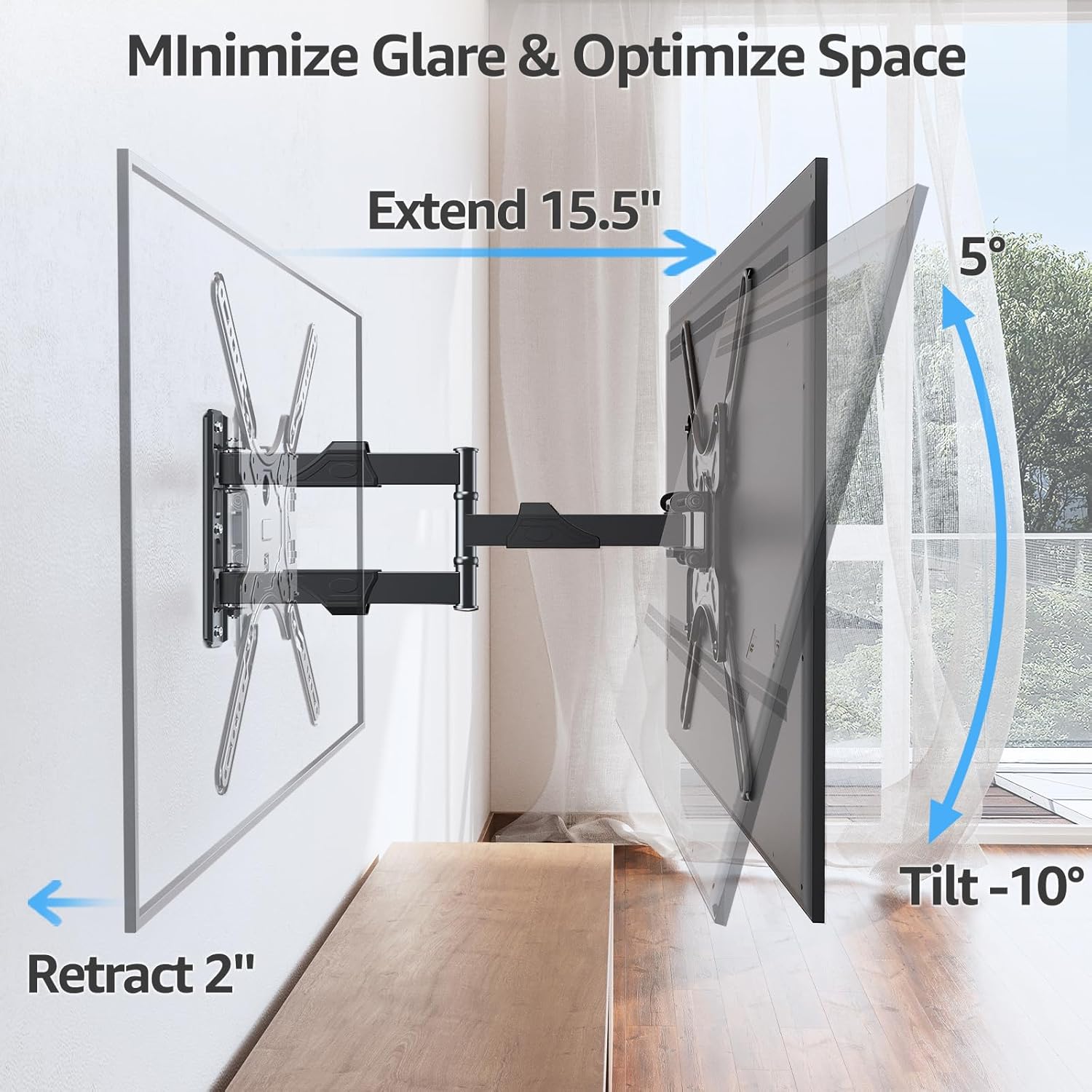
Image: Demonstrates how the mount extends up to 15.5 inches, retracts to 2 inches, and tilts up to -10 degrees to minimize glare and optimize space.
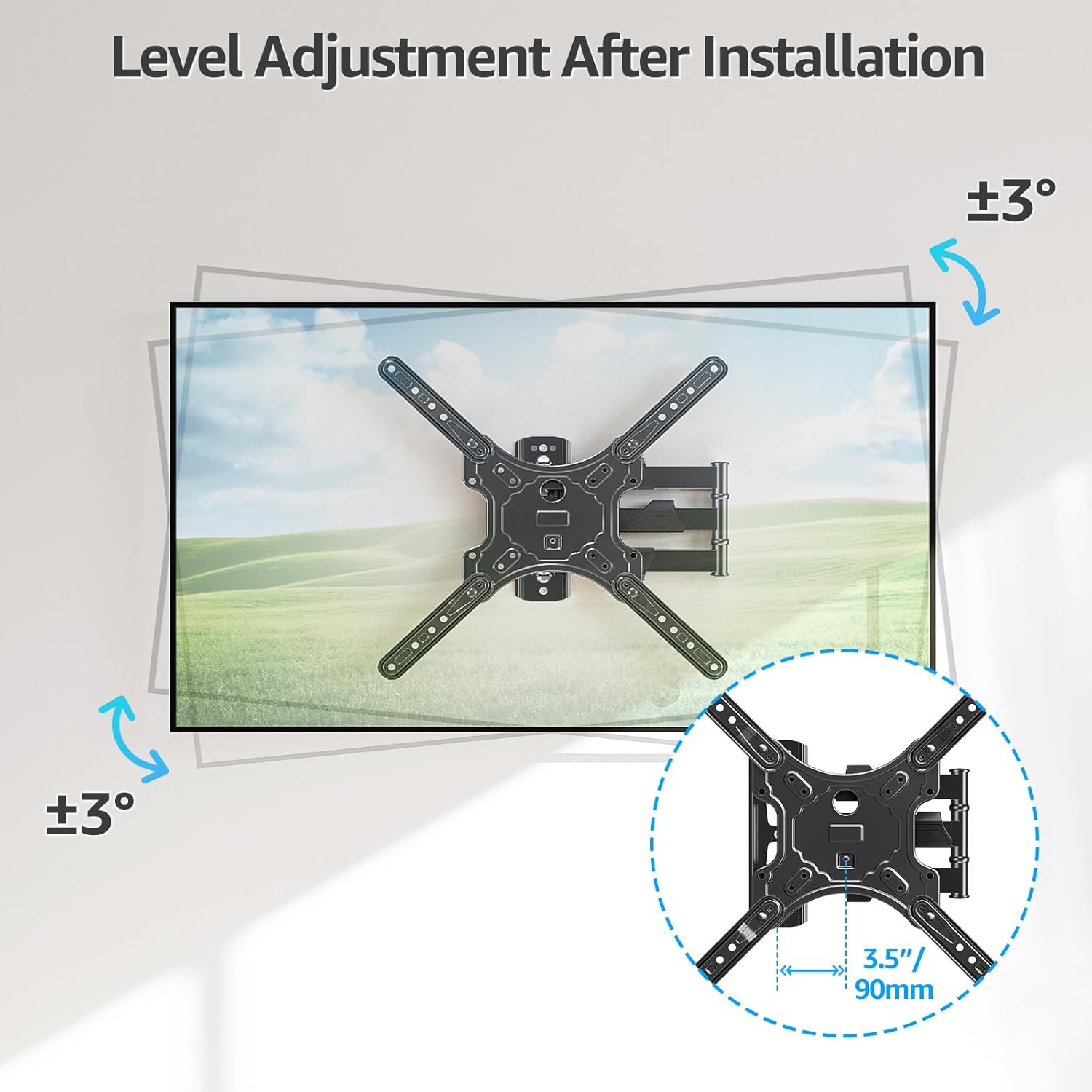
Image: Illustrates the level adjustment feature, allowing for a +/- 3 degree rotation of the TV after installation for perfect leveling.
5.1. Кабелдик башкаруу
Utilize the included cable ties to organize and secure cables along the articulating arms, providing a cleaner and more organized appearance.

Image: The MOUNTUP MU0009 mount with cables neatly managed along its arms, contributing to a clean living room aesthetic.
6. Техникалык тейлөө
- Үзгүлтүксүз текшерүүлөр: Мезгил-мезгили менен бардык бурамалар менен байланыштарды текшерип туруңуз, алар бекем жана бекем бойдон калууда.
- Тазалоо: Орноткучту жумшак, кургак чүпүрөк менен тазалаңыз. Каптамага зыян келтире турган абразивдүү тазалоочу каражаттардан же эриткичтерден алыс болуңуз.
- Майлоо: Муунткуч муундар жылмакай иштөө үчүн иштелип чыккан жана жалпысынан майлоону талап кылбайт. Эгерде кыймыл катып калса, кардарларды тейлөө кызматына кайрылыңыз.
7. Кыйынчылыктарды
- ТВ деңгээл эмес: Use the post-installation level adjustment feature (+/- 3°) to fine-tune the TV's horizontal position.
- Тоо бошоп калгандай сезилет: Re-check all wall plate and TV bracket screws. Ensure they are tightened securely. If mounted on a wood stud, verify the stud was properly located and the lag bolts are fully engaged. If on concrete, ensure anchors are correctly installed.
- Difficulty moving TV: Ensure no cables are snagged. Check that all joints are free from obstruction. If the mount is new, it may require a few movements to loosen up.
- Жетишпеген бөлүктөр: Refer to the package contents list. If any parts are missing, contact MOUNTUP customer support immediately.
8. Расмий продукт видео көрсөтмөсү
Watch the official MOUNTUP product video for a visual guide on the features and installation of the MU0009 TV Wall Mount.
Video: Official MOUNTUP video demonstrating the features and installation process of the MU0009 Swivel TV Wall Mount for 26-60 inch TVs.
9. Кепилдик жана колдоо
This MOUNTUP product comes with a 3 жылдык кепилдик. For any pre-purchase questions, installation assistance, or warranty claims, please contact our professional support team.
Байланыш маалыматы: Refer to the contact details provided on the product packaging or the official MOUNTUP webсайт.