
1. Киришүү
The Waytronic WT-14 Infrared Motion Sensor Activated Sound Speaker is a versatile device designed to play custom recorded messages or sounds upon detecting motion. It is suitable for various applications, including greeting visitors, providing security alerts, reminding individuals, or even deterring animals. This manual will guide you through the setup, operation, and maintenance of your device.
2. Продукт бүтүп калдыview
The WT-14 features a built-in microphone for direct recording, an infrared motion sensor for activation, and a speaker for audio output. It offers adjustable volume and flexible mounting options.
Негизги өзгөчөлүктөрү:
- Жазуу функциясы: Built-in microphone allows instant recording of up to 130 seconds of audio.
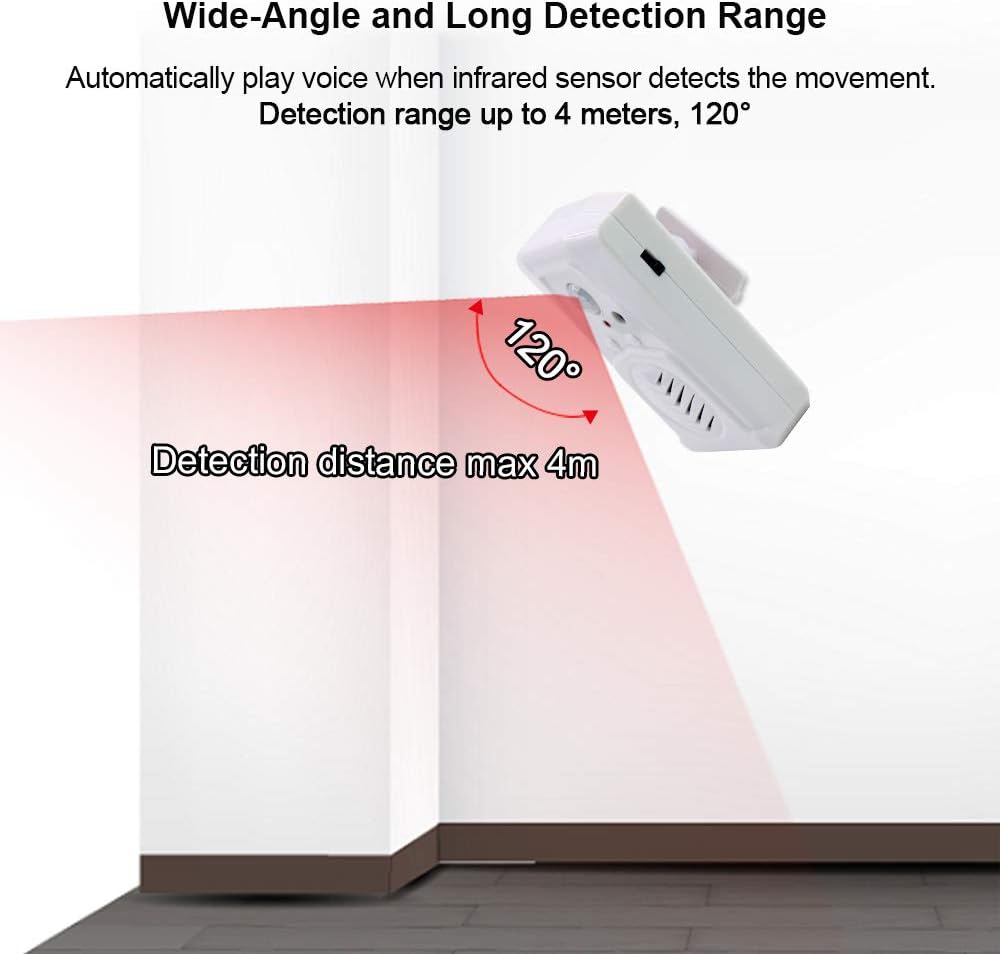
- Кеңири аныктоо диапазону: Infrared sensor detects motion horizontally at 120 degrees and vertically at 60 degrees, with a maximum detection distance of 4 meters (13 feet).
- Жөнгө салынуучу Көлөмү: Two-level volume control for clear sound output.
- Ар тараптуу колдонмолор: Ideal for door entrance greetings, daily reminders, sale advertising, security alerts, and animal deterrence.
- Жөнөкөй орнотуу: Designed for indoor use with included mounting accessories.
- Кубат параметрлери: Operates on 3 AAA batteries (not included) or via a 5V USB cable.
Түзмөктүн компоненттери:

Сүрөт 2.1: Алдыңкы view of the Waytronic WT-14 with labeled components.
- PIR сенсор: Detects motion to trigger audio playback.
- Button A (Record): Press and hold to record audio.
- Button B (Play/Stop): Press to manually play or stop the recorded audio.
- Speaker with Built-in MIC: Outputs sound and captures audio for recording.
- Volume/ON/OFF Switch: Controls power and adjusts sound volume.
- Батарея Case: Located on the back for 3 AAA batteries.
- Screw Mounting Hole & Bracket Mounting: Коопсуз орнотуу үчүн.
3. Пакеттин мазмуну
Пакетиңизде бардык буюмдар бар экенин текшериңиз:
- Waytronic WT-14 Motion Sensor Activated Sound Speaker
- Монтаждоо бурамалар
- Ball Mounting Accessories
- Колдонуучунун Колдонмосу (бул документ)
4. Орнотуу
4.1 Аппаратты кубаттоо
The WT-14 can be powered by batteries or a USB cable.
- Батарея орнотуу: Open the battery compartment on the back of the device and insert 3 AAA batteries (not included), ensuring correct polarity.
- USB Power: Connect a 5V USB cable (not included) to the USB port on the side of the device.
4.1-сүрөт: Артка view with battery compartment and mounting points.

4.2-сүрөт: Каптал view showing USB power port and switch.
4.2 Аппаратты орнотуу
The device can be mounted using the included screws and ball mounting accessories.
- Орнотуу үчүн ылайыктуу ички жерди тандаңыз.
- Attach the ball mounting bracket to the desired surface using the provided screws.
- Secure the WT-14 device onto the ball mounting accessory. The ball joint allows for 360-degree rotation to optimize the detection angle.

Figure 4.3: Ball mounting accessory for flexible positioning.
4.3 Жайгаштыруу маселелери
For optimal performance and to prevent false triggers, observe the following guidelines:
- Үй ичинде гана орнотуңуз.
- Күн тийген жерлерден алыс болуңуз.
- Do not place near large temperature variations, such as air conditioners or heaters.
- Position the device to cover the desired detection area, considering the 120-degree horizontal and 60-degree vertical detection angles, and a maximum range of 4 meters (13 feet).

Figure 4.4: Detection range illustration.
5. Операция
5.1 Аудио жаздыруу
The WT-14 allows you to record custom audio messages directly using its built-in microphone.
- Ensure the device is powered on using the side switch.
- Басып кармап туруңуз Button A (Record). The indicator light may change to confirm recording is active.
- Speak clearly into the built-in microphone. The maximum recording time is 130 seconds.
- бошотуу А баскычы жазууну токтотуу.
- Маанилүү: For successful recording, ensure your message is longer than 3 seconds.

Figure 5.1: Audio file change methods (Button Recording only).
5.2 Аудиону ойнотуу
Audio can be played automatically via motion detection or manually.
- Motion Activated Playback: Once a message is recorded, the device will automatically play the audio when the infrared sensor detects movement within its range.
- Кол менен ойнотуу: Басыңыз Button B (Play/Stop) to manually play the last recorded message. Press it again to stop playback.
5.3 Үндү тууралоо
The device features a two-level volume adjustment.
- колдонуу Volume/ON/OFF Switch located on the side of the device to select between high and low volume settings.
6. Тиркемелер
The Waytronic WT-14 can be used in various scenarios:
- Door Entrance Greeting: Welcome visitors to your shop or home with a custom message.
- Security Reminder: Play a warning message or sound when motion is detected in a restricted area.
- Daily Audio Reminder: Set up reminders for tasks or medication.
- Sale Advertising: Announce special offers in a retail environment.
- Animal Deterrent: Record sounds to repel unwanted animals from specific areas.
- Holiday/Festival Sounds: Play festive greetings or spooky sounds for Halloween.

Figure 6.1: Common applications of the sound speaker.

6.2-сүрөт: Мисamples of animal repelling and security reminder uses.
7. Кыйынчылыктарды
If you encounter issues with your WT-14 device, please refer to the following common solutions:
| Көйгөй | Мүмкүн себеп | Чечим |
|---|---|---|
| Түзмөк күйбөйт. | Batteries are dead or incorrectly inserted; USB cable not connected or faulty. | Check battery polarity and replace if necessary. Ensure USB cable is securely connected to a working power source. |
| Recording is unsuccessful or unclear. | Recording duration too short; microphone too far; background noise. | Ensure recording for at least 3 seconds. Speak closer to the microphone. Record in a quiet environment. |
| Үн ойнотуу жок. | Volume set to minimum; no message recorded; speaker malfunction. | Adjust volume using the side switch. Record a message if none exists. If problem persists, contact support. |
| Motion sensor not triggering or false triggers. | Incorrect placement; sensor obstructed; environmental factors. | Ensure device is placed in an optimal location, away from direct sunlight, heat sources, or air currents. Clear any obstructions from the sensor's view. |
| Detection range is shorter than expected. | Environmental interference; sensor angle. | Adjust the device's angle using the ball mounting accessory. Ensure no objects are partially blocking the sensor's field of view. |
8. Техникалык шарттар
| Өзгөчөлүк | Спецификация |
|---|---|
| Модель номери | WT-14 (Part Number: WT-M14) |
| Бренд | Waytronic |
| Түс | Ак |
| Power Source | 3 AAA Batteries (not included) or 5V USB |
| Элемент Салмагы | 85 грамм (3 унция) |
| Продукциянын өлчөмдөрү | 3.54 x 2.36 x 1.02 дюйм |
| Максималдуу аныктоо диапазону | 4 метр (13 фут) |
| Horizontal Detection Angle | 120 градус |
| Vertical Detection Angle | 60 градус |
| Жазуу убактысы | 130 секундага чейин |
| Монтаж түрү | Door Mount / Wall Mount (with ball mounting accessory) |
| Колдонуу чөйрөсү | Indoor |
9. Коопсуздук маалыматы
- This device is intended for indoor use only. Do not expose to rain or moisture.
- Түзмөктү бөлүктөргө бөлүүгө же өзгөртүүгө аракет кылбаңыз. Бул кепилдикти жокко чыгарып, зыян келтириши мүмкүн.
- Балдар жетпеген жерде сактаңыз.
- Dispose of batteries according to local regulations. Do not mix old and new batteries or different types of batteries.
- Avoid placing the device in direct sunlight or near heat sources to prevent overheating and malfunction.
10. Кепилдик жана колдоо
Waytronic provides customer support for any questions or issues you may have regarding your WT-14 device. If you encounter problems not covered in this manual or require further assistance, please contact Waytronic customer service. Refer to your purchase documentation for specific warranty details.
For inquiries, please visit the Waytronic Store on Amazon.