
HOCO BS31 - Army green
Hoco BS31 Bright Sound Sports Wireless Speaker - Instruction Manual
1. Киришүү
Thank you for choosing the Hoco BS31 Bright Sound Sports Wireless Speaker. This manual provides essential information for the proper setup, operation, and maintenance of your device. Please read it thoroughly before use to ensure optimal performance and longevity.
2. Продукт бүтүп калдыview жана өзгөчөлүктөрү
The Hoco BS31 is a compact and portable wireless speaker designed for versatile audio playback. It features robust connectivity options and a durable design, making it suitable for various environments.
- Wireless V4.2 JLAC6928B for stable and efficient connection.
- Integrated 53mm speaker for clear audio output.
- Class A polymer battery with 500mAh capacity for extended playback.
- Multiple playback modes: Wireless (Bluetooth), TF card, and AUX input.
- Compact and lightweight design, weighing only 140g.
- Supports A2DP, AVRCP, HFP, HSP protocols for broad compatibility.

Сүрөт: алдыңкы view of the Hoco BS31 speaker in army green, showcasing its compact design and front controls.

Image: The Hoco BS31 speaker held in a hand, demonstrating its small, palm-sized, and portable nature.
3. Пакеттин мазмуну
Сураныч, пакетте төмөнкү нерселерди текшериңиз:
- Hoco BS31 Wireless Speaker
- USB заряддоо кабели
- User Manual
4. Башкаруу элементтери жана интерфейстер
Familiarize yourself with the speaker's buttons and ports for proper operation.
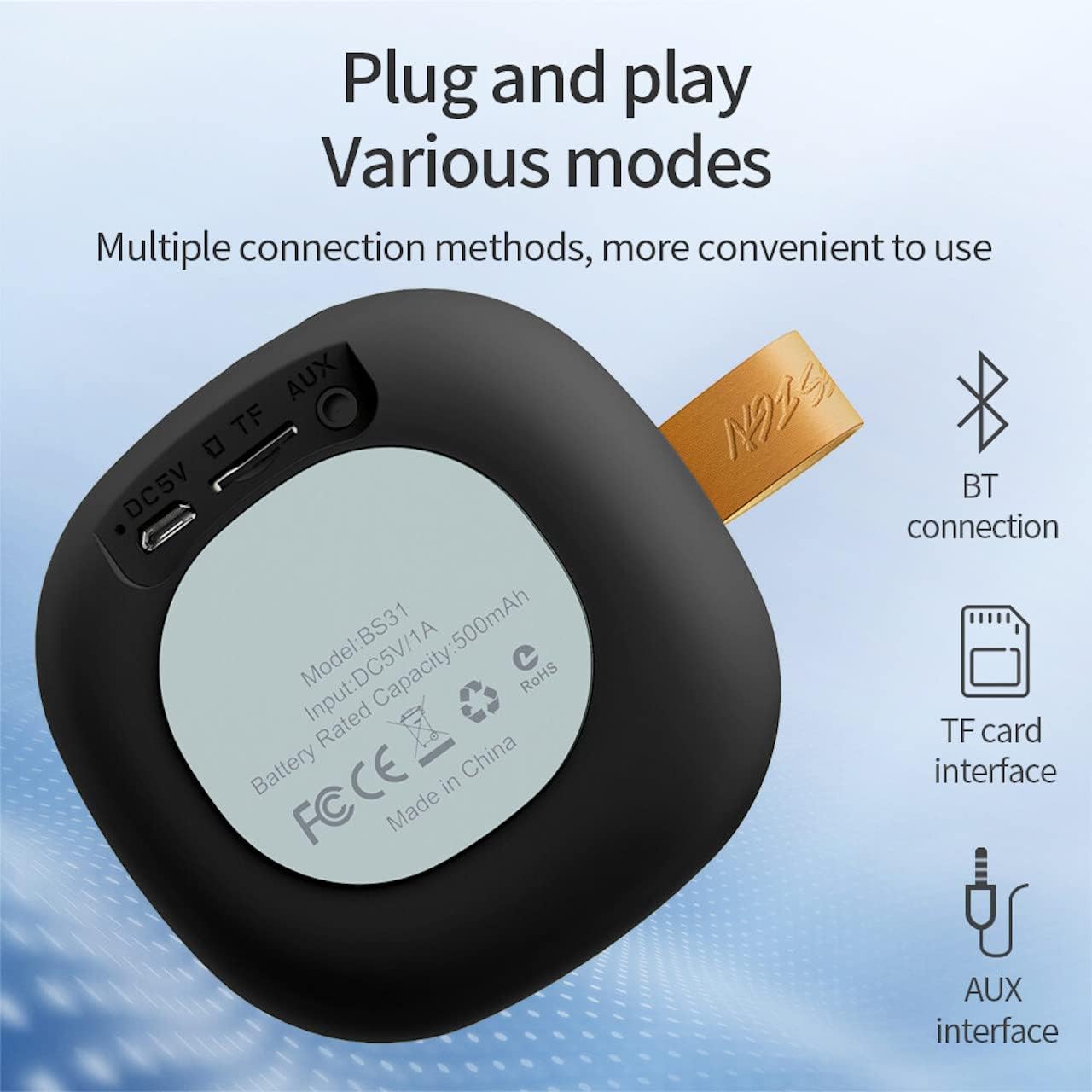
Image: A diagram illustrating the functions of the control buttons on the Hoco BS31 speaker.
- Кубат баскычы (⏻): Press and hold to switch on/off. Short press to play/pause music or answer/end calls.
- Previous Song / Volume Up (⏮): Short press for previous song. Long press to increase volume.
- Next Song / Volume Down (⏭): Short press for next song. Long press to decrease volume.
- Mode Button (⏸): Bluetooth, TF картасы жана AUX режимдерин которуу үчүн кыска басыңыз.

Сүрөт: Арткы view of the Hoco BS31 speaker, highlighting the DC 5V charging port, TF card slot, and AUX input.
- DC 5V порт: Берилген USB кабелин колдонуп, динамикти кубаттоо үчүн.
- TF карта уячасы: Музыканы түз ойнотуу үчүн TF (MicroSD) картасын салыңыз.
- AUX порту: 3.5 мм аудио кабелин колдонуу менен тышкы аудио түзмөктөрдү туташтырыңыз.
5. Орнотуу
5.1. Динамикти кубаттоо
Before first use, fully charge the speaker. Connect the provided USB charging cable to the DC 5V port on the speaker and the other end to a USB power adapter (not included) or a computer's USB port. The charging time is approximately 2 hours. The indicator light will show charging status (e.g., red for charging, off when fully charged).
5.2. Күйгүзүү / Өчүрүү
To power on the speaker, press and hold the Power button (⏻) until you hear an audible prompt. To power off, press and hold the Power button again until the speaker shuts down.
6. Иштөө нускамалары
6.1. Bluetooth Жупташтыруу
- Ensure the speaker is powered on and in Bluetooth pairing mode (indicated by a flashing blue light or audible prompt). If not, short press the Mode button (⏸) to switch to Bluetooth mode.
- Мобилдик түзмөгүңүздө (смартфон, планшет ж.б.) Bluetooth иштетип, жеткиликтүү түзмөктөрдү издеңиз.
- Select "Hoco BS31" from the list of found devices.
- Once paired, the speaker will indicate a successful connection (e.g., solid blue light or audible prompt).
- You can now play audio from your device through the Hoco BS31 speaker.
6.2. TF карта режими
MP3 аудиосу бар TF (MicroSD) картасын салыңыз files into the TF card slot. The speaker will automatically detect the card and switch to TF card playback mode. Use the Previous/Next Song buttons to navigate tracks.
6.3. AUX режими
Connect one end of a 3.5mm audio cable (not included) to the AUX port on the speaker and the other end to the audio output jack of your external device (e.g., MP3 player, computer). The speaker will automatically switch to AUX mode. Control playback from your external device.

Image: Visual representation of the Hoco BS31's multiple connection methods, including Bluetooth, TF card, and AUX.
6.4. Музыканы ойнотуу жана чакыруу функциялары
- Ойнотуу/тындыруу: Short press the Power button (⏻).
- Кийинки ыр: Short press the Next Song button (⏭).
- Мурунку ыр: Short press the Previous Song button (⏮).
- Көлөмү: Long press the Previous Song button (⏮).
- Үнүн азайтуу: Long press the Next Song button (⏭).
- Чалууга жооп берүү/аяктоо: Short press the Power button (⏻) when a call comes in.
- Чакырууну четке кагуу: Press and hold the Power button (⏻) when a call comes in.

Image: The Hoco BS31 speaker positioned next to a smartphone, demonstrating its use for music playback.
7. Техникалык тейлөө жана кам көрүү
- Динамикти кургак кармаңыз. Аны сууга же ашыкча нымдуулукка тийгизбеңиз.
- Динамикти жумшак, кургак чүпүрөк менен тазалаңыз. Абразивдүү тазалагычтарды же эриткичтерди колдонбоңуз.
- Avoid extreme temperatures. Do not store the speaker in very hot or cold environments.
- Do not attempt to disassemble or repair the speaker yourself. This will void the warranty and may cause damage.
- Батареянын иштөө мөөнөтүн сактоо үчүн, колдонулбаса дагы, динамикти үзгүлтүксүз кубаттап туруңуз.
8. Кыйынчылыктарды
| Көйгөй | Мүмкүн себеп | Чечим |
|---|---|---|
| Динамик күйбөйт. | Батарея аз. | Динамикти кеминде 30 мүнөткө заряддаңыз. |
| Bluetooth түзмөгү менен жупташтыруу мүмкүн эмес. | Speaker not in pairing mode; device Bluetooth off; too far apart. | Ensure speaker is in pairing mode. Turn Bluetooth on/off on device. Move devices closer. |
| Үн жок. | Үнү өтө төмөн; туура эмес режим; түзмөк ойнотулбай жатат. | Increase speaker/device volume. Check correct mode (BT, TF, AUX). Ensure audio is playing on source device. |
| TF картасы таанылган жок. | Карта туура эмес киргизилген; колдоого алынбаган формат; бузулган карта. | Reinsert TF card. Ensure files are MP3 format. Try a different TF card. |
9. Техникалык шарттар
| Өзгөчөлүк | Деталь |
|---|---|
| Модел | BS31 |
| Динамик өлчөмү | 53мм |
| Өлчөмдөр | 86 x 86 x 44 мм |
| Салмагы | 140г |
| Wireless Version | V4.2 (JLAC6928B) |
| Колдоого алынган протоколдор | A2DP, AVRCP, HFP, HSP |
| Батарея сыйымдуулугу | 500mAh (Class A polymer battery) |
| Заряддоо Voltage | DC 5V |
| Заряддоо убактысы | Болжол менен 2 саат |
| Музыка/Чалуу убактысы | Болжол менен 3 саат |
| Туташуу параметрлери | Wireless (Bluetooth), TF card, AUX |
| Максималдуу чыгаруу күчү | 5 Ватт |
10. Кепилдик жана колдоо
Hoco products are manufactured to high quality standards. For warranty information and technical support, please refer to the warranty card included with your product or visit the official Hoco webсайт.
Официалдуу Webсайт: www.hocotech.com
Ask a question about this manual
Ask about setup, troubleshooting, compatibility, parts, safety, or missing instructions. Manuals+ will review the question and use this page’s manual context to help answer it.