
Introduction
Вampler Terraform is a multi-modulation guitar effects pedal designed to provide a wide range of modulation effects in a compact unit. It features 11 distinct effect blocks, stereo and mono routing options, MIDI control, and expression pedal integration. This manual provides detailed instructions for setting up, operating, and maintaining your Terraform pedal.
Жайгашуу
Power талаптар
The Terraform pedal requires a 9-18V DC power supply, center negative, with a minimum current draw of 100mA. Ensure your power supply meets these specifications to prevent damage and ensure optimal performance.
Байланыштар
The pedal offers versatile connectivity options for integration into various guitar rigs.
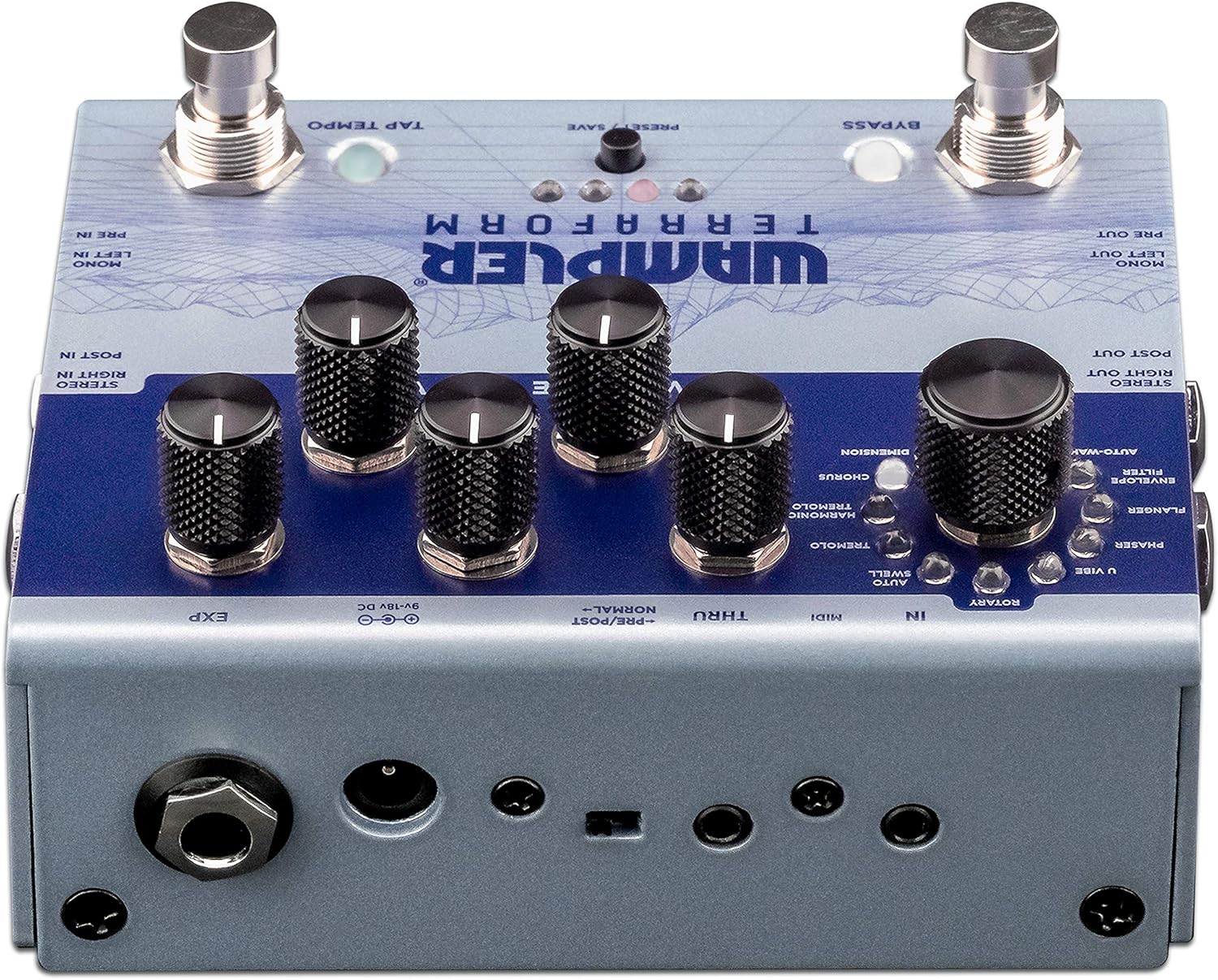
Figure 1: Rear panel connections of the Wampler Terraform pedal.
- Power Input (9-18V DC): Connect your compatible power supply here.
- Mono Left In / Pre In: Standard mono input for your guitar signal.
- Mono Left Out / Pre Out: Standard mono output.
- Stereo Right In / Post In: Input for stereo operation or for effects placed after drive pedals.
- Stereo Right Out / Post Out: Output for stereo operation.
- MIDI In/Thru: Connect MIDI devices for control and synchronization. The pedal includes 3.5mm to 5-pin DIN adapters.
- EXP (Expression Pedal): Connect an expression pedal for real-time control over various parameters.
Баштапкы кубаттуулук
After connecting power and your instrument, the pedal will power on. The LEDs will illuminate, indicating its current state and selected preset.
Иштөө нускамалары
The Terraform pedal features a user-friendly interface with dedicated knobs and footswitches for intuitive control.

Figure 2: ашыкview Вampler Terraform pedal controls.
Controls
- Effect Selector Knob: This large knob allows you to choose between the 11 available modulation effects. The effects include: Dimension, Chorus, Harmonic Tremolo, Tremolo, AutoSwell, Rotary, U-Vibe, Phaser, Flanger, Envelope Filter, and AutoWah.
- Rate Knob: Adjusts the speed or rate of the selected modulation effect.
- Тереңдик баскычы: Controls the intensity or depth of the modulation.
- Аралаштыруу баскычы: Mixes the wet (effected) signal with the dry (unaffected) signal.
- Variable Knob: This control's function changes depending on the selected effect, offering additional parameter adjustment specific to each modulation type.
- Үн баскычы: Педалдын жалпы чыгаруу көлөмүн тууралайт.

Figure 3: Detail of the effect selection knob.

Figure 4: Detail of the Rate, Depth, and Blend control knobs.
Бут өчүргүчтөр
- Бут өчүргүчтү айланып өтүү: Таасирди кошот же жокко чыгарат.
- Tap Tempo Footswitch: Allows you to tap in the desired tempo for time-based effects.
Алдын ала орнотуулар
The Terraform pedal can store up to 8 presets. These presets can be recalled via the front panel button, the footswitches, or through MIDI commands. Refer to the full manual for detailed instructions on saving and recalling presets.
Expression Pedal Functionality
An external expression pedal can be connected to control any of the five main control parameters (Rate, Depth, Blend, Variable, Volume). You can also set the heel and toe points for precise control over the parameter range.
Stereo and Mono Routing
The pedal supports both mono and full stereo operation. Additionally, it allows for splitting the mono signal to route certain effects before your drive pedals or amplifier gain, while other effects follow in your ampлифердин эффекттер цикли.
MIDI башкаруу
The Terraform pedal is fully MIDI mappable, allowing for external control of parameters, preset changes, and synchronization with other MIDI-enabled gear.
Техникалык тейлөө
Тазалоо
To clean the pedal, use a soft, dry cloth. Avoid using abrasive cleaners or solvents, as these can damage the finish and internal components.
Power Supply Care
Ар дайым педалдын үнүн катуулугуна дал келген жөнгө салынуучу кубат булагын колдонуңуз.tage and current requirements. Consider using a power surge protector to safeguard your equipment from electrical fluctuations and ground noise.
Сактагыч
Колдонулбаган учурда педалды кургак чөйрөдө, өтө жогорку температурадан жана түз күн нурунан алыс сактаңыз.
Проблемаларды чечүү
Үн жок же үзгүлтүктүү үн
- Check all cable connections (input, output, power) to ensure they are secure.
- Verify that the power supply is correctly connected and providing the specified voltage жана ток.
- Аспабыңыздын жана ampкөтөргүчтөр туура иштеп жатат.
- Check the pedal's bypass status.
Unwanted Noise or Hum
- Ensure you are using a high-quality, isolated power supply.
- Сигнал чынжырыңыздагы жерге туташтыруу циклдерин текшериңиз.
- Ар кандай кабелдер менен сыноо.
Pedal Not Responding to Controls
- Verify the pedal is powered on.
- If using MIDI, ensure MIDI connections are correct and the pedal is receiving the expected commands.
- If using an expression pedal, ensure it is properly connected and calibrated.
If issues persist, consult the Wampler support resources or contact customer service.
Техникалык шарттар
| Өзгөчөлүк | Деталь |
|---|---|
| Бренд | Wampлер |
| Модель аты | Терраформ |
| Модель номери | WAMTERRAFORM |
| Продукциянын өлчөмдөрү (L x W x Y) | 7" x 6" x 4" |
| Элемент Салмагы | 1.41 фунт |
| Тtage | 9-18 Volts DC (Center Negative) |
| Ampөчүрүү | 100 миллионampс (минималдуу) |
| Аудио чыгаруу эффекттери | Dimension, Chorus, Harmonic Tremolo, Tremolo, AutoSwell, Rotary, U-Vibe, Phaser, Flanger, Envelope Filter, AutoWah |
| Controls Type | Knob, Footswitch |
| Power Source | DC Power Supply |
| Аппараттык интерфейс | 1/4-inch Audio, 3.5mm MIDI, Expression Pedal |
| Сигнал форматы | Аналог |
Кепилдик жана колдоо
Кепилдик маалымат
Вampler Terraform Multi-Modulation Guitar Effects Pedal comes with a 5 жылдык кепилдик covering parts and labor from the date of purchase. This warranty covers defects in materials and workmanship under normal use. Please retain your proof of purchase for warranty claims.
Кардарларды колдоо
For technical assistance, troubleshooting, or warranty service, please visit the official Wampлер website or contact their customer support team. Detailed contact information can typically be found on the Wampлер webсайтында же таңгактоо материалдарында.