
1. Киришүү
The EPEVER Tracer 3215BN is a 30A Maximum Power Point Tracking (MPPT) solar charge controller designed for 12V/24V battery systems. It efficiently converts solar energy to charge various battery types, including Sealed, Gel, and Flooded lead-acid batteries. This controller features an integrated LCD display for system monitoring and configuration, along with advanced protection functions to ensure system reliability.
2. Продукциянын өзгөчөлүктөрү
- Өркүндөтүлгөн MPPT технологиясы: Ensures maximum power point tracking with an efficiency of no less than 99.5%, optimizing solar energy harvesting.
- Жогорку конверсиянын эффективдүүлүгү: Achieves a maximum conversion efficiency of 98%.
- Fast Tracking Speed: Ultra-fast tracking and accurate recognition of multiple power points.
- Күчтүү дизайн: Features a common negative design and die-cast aluminum construction for effective heat dissipation.
- Комплекстүү коргоо: Includes all-round electronic fault self-test and enhanced electronic protection functions to prevent system damage.
- Байланыш интерфейси: Equipped with an RS-485 communication bus interface and Modbus communication protocol for expanded applications and monitoring via PC or external display units like MT52.
- Software Upgrade Support: Allows for future software enhancements.
- Колдонуучуга ыңгайлуу индикаторлор: LED indicators provide clear system status.
- Flexible Load Control: Offers multiple load control modes including manual control, light ON/OFF, light On+Timer, and time control.
- Батарея шайкештиги: Supports Sealed, Gel, Flooded, and User-defined battery types.
- Температураны компенсациялоо: Includes a battery temperature compensation function.
- Энергетикалык статистика: Provides real-time energy statistics.
3. Орнотуу жана орнотуу
Proper installation is crucial for the safe and efficient operation of your EPEVER Tracer 3215BN controller. Follow these steps carefully.
3.1 Компонентти идентификациялоо

This image illustrates the various components and ports of the Tracer 3215BN controller, including the Heat Sink, RTS Port, Charging LED indicator, Solar Terminal, Battery LED indicator, Button, RS-485 Port, Battery Terminal, and Load Terminal.
3.2 Электр өткөргүч схемасы
Connect the components in the specified order to prevent damage to the controller and other system components.

This diagram shows the connection sequence: Solar Panel (PV) to the controller, controller to Battery, and controller to Load (e.g., lights, fan, TV, computer via inverter). Ensure correct polarity for all connections.
- Батареяны туташтыруу: First, connect the battery to the controller's battery terminals. Ensure correct polarity (+ to + and - to -). The controller requires battery power to operate.
- Күн панелдерин туташтыруу: Next, connect the solar panels to the controller's PV terminals. Verify correct polarity.
- Жүктү туташтыруу: Finally, connect your DC loads to the controller's load terminals. If using AC loads, connect them through an inverter, which is then connected to the battery.
Маанилүү коопсуздук эскертүүсү: Always disconnect power from solar panels and battery before making or breaking any connections to the controller. Ensure all connections are tight to prevent loose contacts and overheating.
3.3 Байланыш порттору

This image highlights the RTS (Remote Temperature Sensor) Port and the RS-485 Port, used for external temperature sensing and communication respectively.
- RTS Port: Connect the optional Remote Temperature Sensor (RTS) here for accurate battery temperature compensation.
- RS-485 порту: Use this port for connecting to a PC, MT52 remote meter, or other monitoring devices via Modbus protocol.
4. Иштөө нускамалары
Once installed, the controller will automatically begin charging the battery from the solar panels. The LCD display provides real-time information about the system status.
4.1 ЖК дисплей жана баскычтар
The integrated LCD display shows various parameters such as battery voltage, charging current, load status, and error codes. Use the buttons adjacent to the display to navigate through menus and adjust settings.
4.2 Жүктү башкаруу режимдери
The controller offers several load control modes:
- Кол менен башкаруу: Turn the load ON or OFF manually.
- Жарык КҮЙГҮЗҮҮ/ӨЧҮРҮҮ: Load turns ON at dusk and OFF at dawn.
- Light On+Timer: Load turns ON at dusk and stays ON for a set duration.
- Убакытты көзөмөлдөө: Load operates during specific programmed times.
4.3 Remote Monitoring and Settings
The Tracer 3215BN supports remote monitoring and parameter adjustment through various accessories.
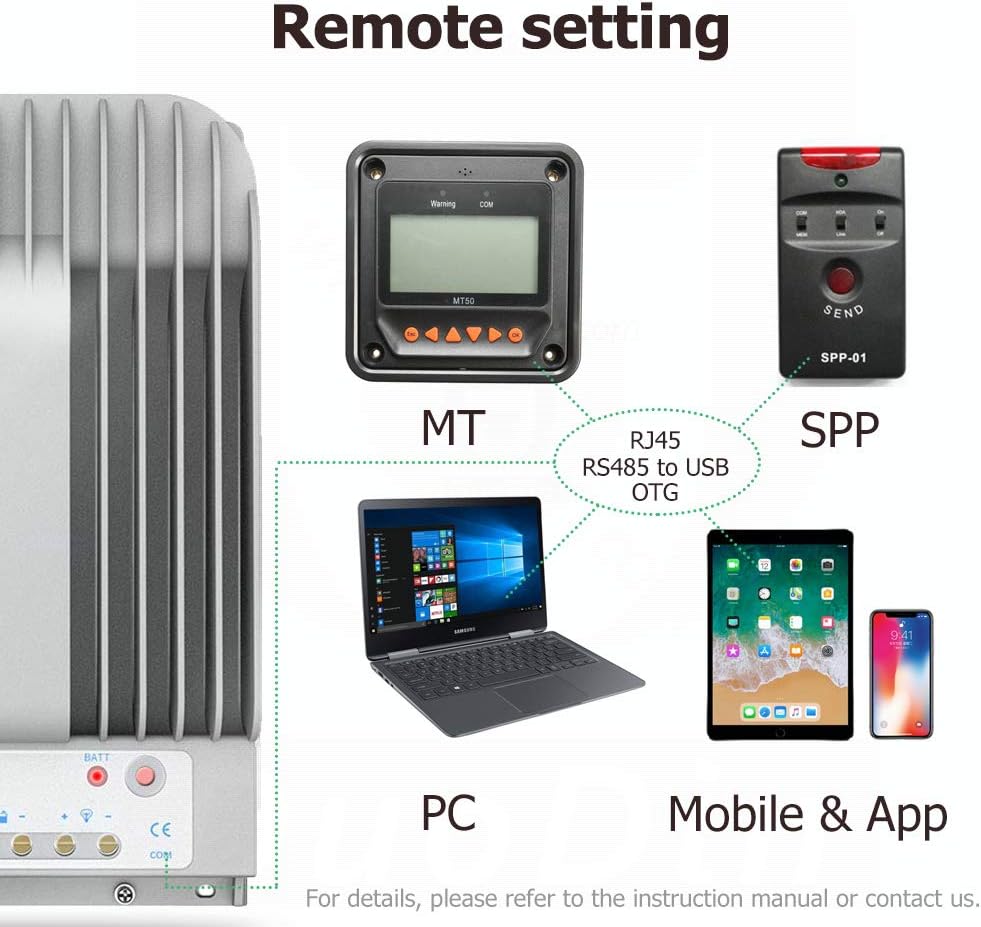
This image illustrates how the controller can be connected to an MT (remote meter), SPP (wireless module), PC, or mobile application for remote monitoring and configuration.
- MT Remote Meter: Connect an EPEVER MT series remote meter (e.g., MT52) to view real-time data and modify parameters from a distance.
- Компьютердик Программалык камсыздоо: Use EPEVER PC software by connecting the controller via an RS-485 to USB adapter for detailed monitoring, data logging, and advanced settings.
- Мобилдик колдонмо: Connect a compatible wireless module (e.g., Bluetooth or WiFi) to use the EPEVER mobile application for convenient monitoring and control via smartphone or tablet.
5. Техникалык тейлөө
Үзгүлтүксүз тейлөө сиздин күн зарядын контроллериңиздин узак мөөнөттүү жана оптималдуу иштешин камсыз кылат.
- Байланыштарды текшерүү: Periodically check all wiring connections for tightness and corrosion. Loose connections can cause voltagтамчы жана ашыкча ысып кетүү.
- Контроллерди тазалоо: Башкаргычты таза жана чаң менен таштандылардан таза кармаңыз. Жылуулуктун туура таркашы үчүн жылуулук раковинасынын канаттары бүтөлүп калбаганын текшериңиз.
- Батареянын абалын текшерүү: Монитор батареянын көлөмүtage and health regularly. Ensure the battery type setting in the controller matches your installed battery.
- Экологиялык шарттар: Контроллерди кургак, жакшы желдетилген жерде, түз күн нурунан жана өтө жогорку температурадан алыс орнотуңуз.
6. Кыйынчылыктарды
This section addresses common issues you might encounter with your Tracer 3215BN controller.
6.1 Controller Not Powering On
- Батарея туташуусун текшерүү: The controller requires a minimum battery voltage to power on. Ensure the battery is properly connected and has sufficient charge. If the battery is completely discharged, the controller may not power on until an external 12V source or sufficient solar input is provided to raise the battery voltage.
- Полярдуулукту текшерүү: Confirm that the battery connections are made with correct polarity.
- Inspect Fuses/Breakers: Check any inline fuses or circuit breakers between the battery and the controller.
6.2 No Charging Indication
- Check Solar Panel Connection: Ensure solar panels are correctly connected to the PV terminals with proper polarity.
- Verify Solar Input Voltage: Ачык схеманын көлөмүн өлчөөtage of your solar panels to ensure it is within the controller's acceptable range (Max 150V).
- Sunlight Conditions: Ensure there is adequate sunlight reaching the solar panels.
6.3 Load Not Working
- Check Load Connection: Verify that the load is correctly connected to the load terminals.
- Жүктөө башкаруу режими: Ensure the load control mode is set appropriately (e.g., manual ON, or correct timer settings).
- Батарея Voltage: Эгерде батареянын томtage is too low, the controller may disconnect the load to protect the battery.
- Ашыкча жүктөн коргоо: Check if the load current exceeds the controller's rated load current, triggering overload protection.
7. Техникалык шарттар
Key technical specifications for the EPEVER Tracer 3215BN MPPT Solar Charge Controller:
| Параметр | Нарк |
|---|---|
| Модел | Tracer3215BN |
| Системанын номиналдык томуtage | 12V / 24V Auto Work |
| Номиналдуу заряд ток | 30A |
| Номиналдык жүктөө тогу | 30A |
| Макс. PV Open Circuit Voltage | 150V (минималдуу иштөө чөйрө температурасында) 138V (25°C чөйрөнүн температурасында) |
| Макс. PV киргизүү күчү | 390 Вт (12 В) / 780 Вт (24 В) |
| MPP Voltage Диапазон | Батарея көлөмүtage +2V ~ 108V |
| Батарея түрү | Sealed, Gel, Flooded, User |
| Конверсиянын эффективдүүлүгү | ≤98% |
| Tracking Efficiency | ≥99.5% |
| Байланыш | RS-485 (RJ45 interface) |
| Иштөө температурасы диапазону | -35°Cден +55°Cге чейин |
| Сактоо Температура диапазону | -35°Cден +80°Cге чейин |
| Өлчөмдөрү (L x W x Y) | 281мм x 160мм x 60мм |

This table provides a comparison of key specifications between the Tracer-AN and Tracer-BN series, highlighting the superior heat dissipation and voltage ranges of the BN series.

This image details the physical dimensions of the Tracer 3215BN controller.
8. Кепилдик маалыматы
Warranty terms and conditions for EPEVER products can vary. It is recommended to confirm the specific warranty period and coverage directly with your seller (SolaMr) or the manufacturer (EPEVER) at the time of purchase. Keep your proof of purchase for any warranty claims.
9. Колдоо
For technical assistance, troubleshooting beyond this manual, or inquiries regarding product functionality, please contact the following:
- Сатуучуну колдоо: Contact SolaMr for assistance related to your purchase.
- Өндүрүүчү колдоо: Visit the official EPEVER website for product documentation, FAQs, and contact information for direct manufacturer support.