
1. Киришүү
Thank you for choosing the Awei A831BL Bluetooth In-Ear Headset. This manual provides essential information for the safe and efficient use of your device. Please read it carefully before use and retain it for future reference.
The Awei A831BL is a wireless in-ear headset designed for mobile phone use, offering up to 8 hours of continuous talk and music playback. It features pure, high-quality bass sound and is suitable for various activities.
2. Пакеттин мазмуну
Сураныч, пакетте төмөнкү нерселерди текшериңиз:
- Awei A831BL Bluetooth In-Ear Headset
- USB заряддоо кабели
- Кулак учтары (ар кандай өлчөмдөгү)
- User Manual
3. Продукт бүтүп калдыview
Familiarize yourself with the components of your Awei A831BL headset.
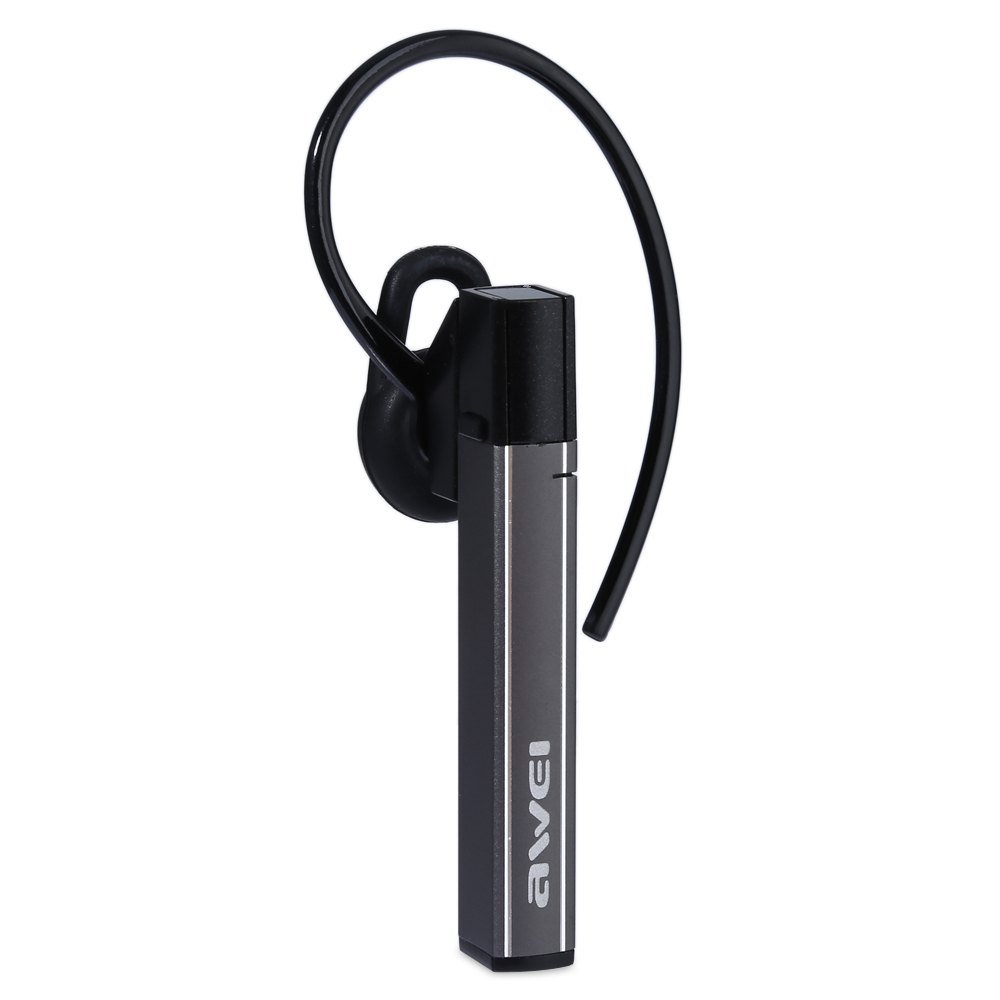
Image: The Awei A831BL Bluetooth In-Ear Headset in grey, showing the earbud design and inline controls.
The headset features an ergonomic in-ear design for comfortable wear, especially during activities. It includes an integrated microphone for hands-free calls and inline controls for managing audio and calls.
4. Орнотуу
4.1 Гарнитураны заряддоо
- USB кубаттоочу кабелди гарнитуранын кубаттоочу портуна туташтырыңыз.
- USB кабелинин экинчи учун USB кубат адаптерине (кошумча эмес) же компьютердин USB портуна туташтырыңыз.
- The indicator light will illuminate (e.g., red) during charging.
- Once fully charged, the indicator light will change (e.g., turn blue or turn off).
A full charge provides up to 8 hours of talk or music playback time.
4.2 Bluetooth жупташтыруу
- Гарнитура толугу менен заряддалганын жана өчүрүлгөнүн текшериңиз.
- Press and hold the Multi-function button (usually the center button on the inline control) for approximately 5-7 seconds until the indicator light flashes red and blue alternately, indicating pairing mode.
- On your mobile phone or Bluetooth-enabled device, enable Bluetooth and search for available devices.
- Табылган түзмөктөрдүн тизмесинен "Awei A831BL" тандаңыз.
- Эгер сырсөз суралса, "0000" (төрт нөл) киргизиңиз.
- Once successfully paired, the indicator light will flash blue slowly, and you may hear a confirmation tone.
Гарнитура күйгүзүлгөндө, ал акыркы жупташтырылган түзмөккө автоматтык түрдө кайра туташууга аракет кылат.
5. Иштөө нускамалары
5.1 Күйгүзүү/өчүрүү
- Күйгүзүү: Press and hold the Multi-function button for about 3 seconds until the blue indicator light flashes.
- Өчүрүү: Press and hold the Multi-function button for about 3-4 seconds until the red indicator light flashes briefly and then turns off.
5.2 Музыканы ойнотуу
- Ойнотуу/тындыруу: Көп функциялуу баскычты бир жолу басыңыз.
- Көлөмү: '+' баскычын басыңыз.
- Үнүн азайтуу: '-' баскычын басыңыз.
- Кийинки трек: '+' баскычын басып, кармап туруңуз.
- Мурунку трек: '-' баскычын басып, кармап туруңуз.
5.3 Чалууларды башкаруу
- Чакырууга жооп берүү: Чакыруу келгенде Көп функциялуу баскычты бир жолу басыңыз.
- Чакырууну аяктоо: Чалуу учурунда Көп функциялуу баскычты бир жолу басыңыз.
- Чакырууну четке кагуу: Press and hold the Multi-function button for about 2 seconds when a call comes in.
- Акыркы номерди кайра терүү: Көп функциялуу баскычты эки жолу басыңыз.
The integrated microphone allows for clear hands-free communication.
6. Техникалык тейлөө
- Гарнитураны дайыма жумшак, кургак чүпүрөк менен тазалаңыз.
- Avoid exposing the headset to extreme temperatures, humidity, or corrosive substances.
- Гарнитураны бөлүктөргө бөлүүгө же өзгөртүүгө аракет кылбаңыз, анткени бул кепилдикти жокко чыгарып, зыян келтириши мүмкүн.
- Колдонбогондо гарнитураны салкын, кургак жерде сактаңыз.
7. Кыйынчылыктарды
| Көйгөй | Чечим |
|---|---|
| Гарнитура күйбөйт. | Ensure the headset is fully charged. Connect it to a power source and try again. |
| Түзмөк менен жупташтыруу мүмкүн эмес. | Ensure the headset is in pairing mode (flashing red and blue). Turn off and on your device's Bluetooth. Move closer to the device. Clear previous Bluetooth connections on your device. |
| Үн жок же үнү төмөн. | Гарнитурадагы жана туташкан түзмөгүңүздүн үнүнүн деңгээлин текшериңиз. Гарнитура туура туташтырылганын текшериңиз. |
| Чалуу сапаты начар. | Ensure the microphone is not obstructed. Move to an area with less interference. Check your phone's signal strength. |
8. Техникалык шарттар
| Өзгөчөлүк | Деталь |
|---|---|
| Бренд | Awei |
| Модель номери | A831BL |
| Түс | Боз |
| Байланыш технологиясы | Зымсыз (Bluetooth) |
| Гарнитуранын түрү | In-Ear |
| Микрофон | Ооба |
| Noise Cancellation | Жок |
| Батареянын иштөө мөөнөтү | Up to 8 hours (talk/music) |
| Үн өзгөчөлүктөрү | Pure, high-quality bass sound |
| Материал | Пластик |
| Шайкеш түзмөктөр | Мобилдик телефондор |
9. Кепилдик жана колдоо
Awei products are designed and manufactured to the highest quality standards. For warranty information and customer support, please refer to the warranty card included in your package or contact your local retailer. Keep your purchase receipt as proof of purchase.
For further assistance, please visit the official Awei webсайтка же кардарларды тейлөө бөлүмүнө кайрылыңыз.