
Awei A831BL
Awei A831BL In-Ear Bluetooth Headset User Manual
Модель: A831BL
Introduction
This manual provides detailed instructions for the proper use and maintenance of your Awei A831BL In-Ear Bluetooth Headset. Please read this manual carefully before using the device to ensure optimal performance and longevity.
Продукт бүттүview
The Awei A831BL is a wireless in-ear Bluetooth headset designed for mobile phone use, offering clear audio and a built-in microphone. It is suitable for various activities, including sports.
Негизги өзгөчөлүктөрү:
- Зымсыз Bluetooth туташуусу
- Кулактагы дизайн
- Integrated microphone for calls
- Up to 8 hours of continuous talk/music time
- Pure bass and high-quality sound
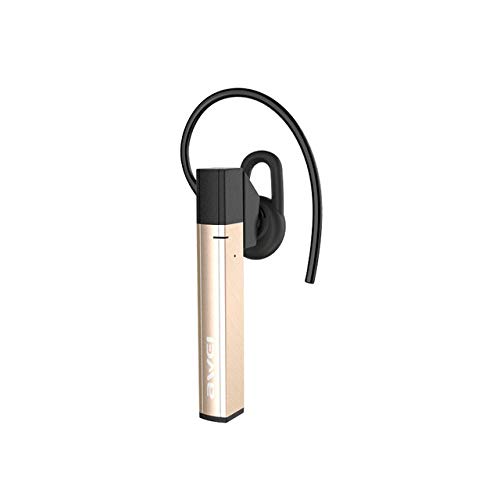
1-сүрөт: Awei A831BL In-Ear Bluetooth Headset. This image shows the compact design of the headset, highlighting its in-ear form factor and wireless nature.
Жайгашуу
1. Гарнитураны заряддоо
Before first use, fully charge the headset. Connect the charging cable to the headset's charging port and the other end to a USB power source (e.g., computer, wall adapter). The indicator light will typically show red during charging and turn blue or off when fully charged.
2. Bluetooth түзмөгү менен жупташуу
- Гарнитура өчүрүлгөнүн текшериңиз.
- Press and hold the multi-function button (usually the power button) for approximately 5-7 seconds until the indicator light flashes red and blue alternately. This indicates pairing mode.
- Уюлдук телефонуңузда же Bluetooth иштетилген түзмөгүңүздө Bluetooth жөндөөлөрүнө өтүп, Bluetooth'ту иштетиңиз.
- Издөө available devices. The headset should appear as "Awei A831BL" or similar.
- Select the headset from the list to connect. If prompted for a password, enter "0000".
- Once successfully paired, the indicator light will typically flash blue slowly or turn off, and you may hear an audible confirmation.
Эскертүү: The headset will automatically attempt to reconnect to the last paired device when turned on, if the device's Bluetooth is active and within range.
Иштөө нускамалары
Күйгүзүү/өчүрүү
- Күйгүзүү: Көк индикатор жарыгы күйүп-өчүп, сиз күйгүзүү сигналын укканга чейин көп функциялуу баскычты болжол менен 3 секунд басып туруңуз.
- Өчүрүү: Көп функциялуу баскычты кызыл индикатор жарыгы күйүп-өчүп, өчүрүү сигналын укканга чейин 3-4 секунд басып туруңуз.
Музыканы ойнотуу
- Ойнотуу/тындыруу: Көп функциялуу баскычты бир жолу басыңыз.
- Кийинки трек: Үндү жогорулатуу (+) баскычын басып, кармап туруңуз.
- Мурунку трек: Үндү азайтуу (-) баскычын басып, кармап туруңуз.
- Көлөмү: Үндү жогорулатуу (+) баскычын кыска басыңыз.
- Үнүн азайтуу: Үндү азайтуу (-) баскычын кыска басыңыз.
Чалууларды башкаруу
- Чалууга жооп берүү/аяктоо: Көп функциялуу баскычты бир жолу басыңыз.
- Чакырууну четке кагуу: Press and hold the multi-function button for about 2 seconds.
- Акыркы номерди кайра терүү: Көп функциялуу баскычты эки жолу басыңыз.
Техникалык тейлөө
- Keep the headset dry. Avoid exposure to moisture or liquids.
- Clean the headset with a soft, dry cloth. Do not use abrasive cleaners.
- Гарнитураны салкын, кургак жерде, өтө жогорку температурадан алыс сактаңыз.
- Гарнитураны түшүрүүдөн же катуу таасирлерге дуушар кылуудан качыңыз.
- Гарнитураны бөлүктөргө бөлүүгө же өзгөртүүгө аракет кылбаңыз, анткени бул кепилдикти жокко чыгарат.
Проблемаларды чечүү
| Көйгөй | Чечим |
|---|---|
| Гарнитура күйбөйт. | Ensure the headset is fully charged. Connect it to a power source and try again. |
| Түзмөк менен жупташтыруу мүмкүн эмес. |
|
| Үн жок же үнү төмөн. |
|
| Чалуу сапаты начар. |
|
Техникалык шарттар
| Өзгөчөлүк | Деталь |
|---|---|
| Модель номери | A831BL |
| Бренд | Awei |
| Түс | Алтын |
| Байланыш технологиясы | Зымсыз (Bluetooth) |
| Наушник форма фактору | In-Ear |
| Микрофон | Ооба |
| Noise Cancellation | Жок |
| Battery Life (Talk/Music) | 8 саатка чейин |
| Башкаруу түрү | Үндү көзөмөлдөө |
| Материал | Пластик |
| Камтылган компоненттер | Кулак жаздыкчалары |
| Продукциянын өлчөмдөрү | 16.8 x 10.4 x 3.6 см; 150 грамм |
Кепилдик жана колдоо
For warranty information or technical support, please refer to the documentation included with your purchase or contact the manufacturer directly. Keep your proof of purchase for warranty claims.
Ask a question about this manual
Ask about setup, troubleshooting, compatibility, parts, safety, or missing instructions. Manuals+ will review the question and use this page’s manual context to help answer it.