
Introduction
Сатып алганыңыз үчүн рахматasing the iLuv Bubble Gum True Wireless Air Earbuds. This manual provides detailed instructions on how to set up, operate, maintain, and troubleshoot your new earbuds. Please read this manual thoroughly before use to ensure proper operation and to maximize the lifespan of your device.
Коопсуздук маалыматы
To ensure safe and proper use of your iLuv Bubble Gum True Wireless Air Earbuds, please observe the following precautions:
- Кулакчындарды же кубаттоочу кутуну өтө температурага, нымдуулукка же суюктукка тийгизбеңиз.
- Аппаратты түшүрүүдөн, тийүүдөн же ажыратуудан качыңыз.
- Абразивдүү тазалагычтарды же катуу химиялык заттарды колдонбоңуз.
- Угуу жөндөмүнө зыян келтирбөө үчүн орточо үн деңгээлинде угуңуз.
- Балдар жана үй жаныбарлары жетпеген жерде сактаңыз.
Пакеттин мазмуну
Пакетиңизде бардык буюмдар бар экенин текшериңиз:
- iLuv Bubble Gum True Wireless Air Earbuds (Left and Right)
- Зымсыз кубаттоо кутусу
- USB заряддоо кабели (Type-C)
- Колдонуучунун Колдонмосу (бул документ)
Продукт бүттүview

1-сүрөт: iLuv Bubble Gum True Wireless Air Earbuds in their open charging case. The image shows both earbuds, one in its charging slot and the other slightly elevated, with the charging case open. The iLuv logo is visible on the earbuds, and blue indicator lights are present on both the earbuds and the front of the charging case.
The iLuv Bubble Gum True Wireless Air Earbuds consist of two independent earbuds and a portable charging case. Each earbud features a touch-sensitive surface for controls and an LED indicator. The charging case has LED indicators on the front to show battery status.
Жайгашуу
1. Кулакчындарды жана кутуну кубаттоо
Биринчи колдонуудан мурун, кулакчындарды жана заряддоо кутучасын толук заряддаңыз.
- Place both earbuds into the charging case. Ensure they are properly seated in their respective slots (L for left, R for right).
- USB кубаттоочу кабелди корпустагы кубаттоочу портко, ал эми экинчи учун USB кубаттоочу адаптерге (кошулмага кирбейт) же компьютердин USB портуна туташтырыңыз.
- The LED indicators on the charging case will illuminate to show charging status. Once fully charged, the indicators may turn solid or turn off, depending on the model.
- The earbuds' LED indicators will show charging status while inside the case. They will typically turn off when fully charged.
Эскертүү: A full charge provides up to 20 hours of total listening power with the charging case.
2. Түзмөгүңүз менен жупташтыруу
The iLuv Bubble Gum True Wireless Air Earbuds feature 1-step pairing for convenience.
- Смартфонуңузда, планшетиңизде же башка аудио түзмөгүңүздө Bluetooth иштетилгенин текшериңиз.
- Open the charging case. The earbuds will automatically enter pairing mode. The LED indicator on one of the earbuds will flash, indicating it's ready to pair.
- On your device, search for Bluetooth devices and select "iLuv Bubble Gum Air" (or similar name) from the list.
- Once connected, a voice prompt will confirm successful pairing, and the earbud LED indicators will stop flashing.
Кеңеш: If the earbuds do not connect automatically, try turning off and on your device's Bluetooth, or place the earbuds back in the case, close it, and then reopen it.
Иштөө нускамалары
Кулакчын тагынуу
Gently insert each earbud into your ear canal. Adjust them for a comfortable and secure fit. The "L" and "R" markings on the earbuds indicate left and right.
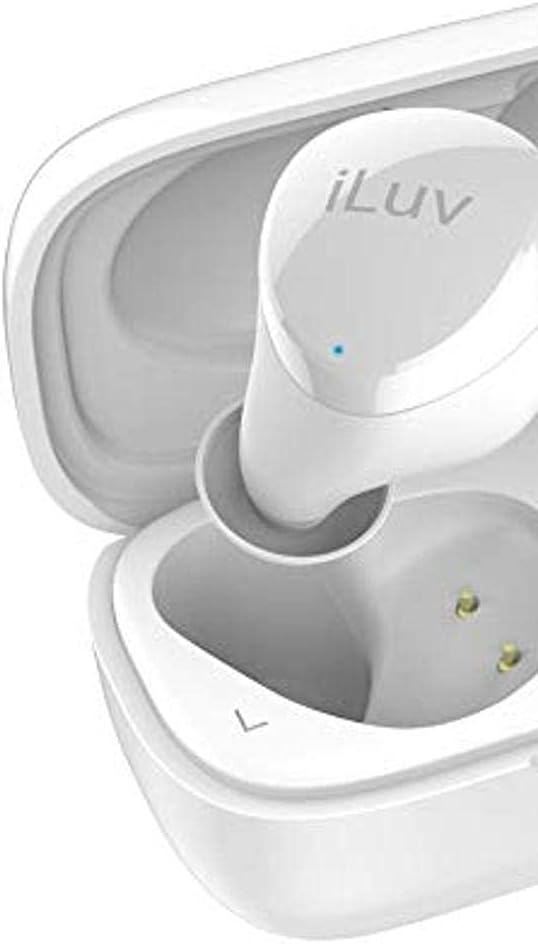
2-сүрөт: Жакын план view of the left iLuv Bubble Gum True Wireless Air earbud, showing the "L" marking and the iLuv logo on its surface. A small blue LED indicator is visible near the logo.

3-сүрөт: Жакын план view of the right iLuv Bubble Gum True Wireless Air earbud, showing the "R" marking and the iLuv logo on its surface. A small blue LED indicator is visible near the logo.
Touch Controls
The earbuds feature simple touch controls on their outer surface:
- Ойнотуу/тындыруу: Кулакчындарды бир жолу таптаңыз.
- Кийинки трек: Оң кулакчынды эки жолу таптаңыз.
- Мурунку трек: Сол кулакчынды эки жолу таптаңыз.
- Чалууга жооп берүү/аяктоо: Кирүүчү чалуу учурунда гарнитураны бир жолу таптаңыз.
- Чакырууну четке кагуу: Кирүүчү чалуу учурунда гарнитураны 2 секунд басып туруңуз.
- Үн Жардамчысын жандыруу: Кулакчындарды үч жолу таптаңыз.
Эскертүү: Volume control is typically managed via your connected device.
Техникалык тейлөө
Тазалоо
Үзгүлтүксүз тазалоо оптималдуу натыйжалуулукту жана гигиенаны сактоого жардам берет:
- Кулакчындарды жана кубаттоочу кутуну сүртүү үчүн жумшак, кургак, түксүз чүпүрөктү колдонуңуз.
- өжөр кир үчүн, бир аз гampчүпүрөктү суу же жумшак, абразивдүү тазалагыч менен жууп салыңыз.
- Do not allow any liquid to enter the openings.
- Gently clean the ear tips and speaker mesh with a cotton swab or a small, soft brush to remove earwax or debris.
Сактагыч
Колдонулбай турган учурда, кулакчындарды коргоо жана кубаттоо үчүн кубаттоочу кутучасында сактаңыз. Кутучаны салкын, кургак жерде, күндүн нуру түз тийбеген жана өтө жогорку температурадан алыс сактаңыз.
Батареяга кам көрүү
Батареянын иштөө мөөнөтүн узартуу үчүн:
- Батареяны бат-баттан толук кубаттап калуудан алыс болуңуз.
- Түзмөктү көпкө чейин колдонулбаса дагы, аны үзгүлтүксүз кубаттап туруңуз.
- Аппаратты 0°C (32°F) төмөн же 45°C (113°F) жогору температурага чыгарбаңыз.
Проблемаларды чечүү
Эгер кулакчыныңызда көйгөйлөргө туш болсоңуз, төмөнкү жалпы көйгөйлөрдү жана чечимдерди караңыз:
| Көйгөй | Мүмкүн себеп | Чечим |
|---|---|---|
| Кулакчындар жупташпай же туташпай жатат. | түзмөктө Bluetooth өчүк; кулакчындар жупташтыруу режиминде эмес; кийлигишүү. | Ensure Bluetooth is on. Place earbuds in case, close, then reopen. Forget device on your phone and re-pair. Move closer to your device. |
| No sound or sound cutting in/out. | Low battery; out of range; interference; earbud not properly seated. | Charge earbuds and case. Stay within 10 meters of your device. Avoid strong Wi-Fi signals. Ensure earbuds are clean and properly inserted. |
| Бир кулакчындын үнү жок. | Earbud not connected; low battery; earbud issue. | Place both earbuds back in the case, close, then reopen. Ensure both are charged. Try re-pairing. |
| Кулакчындар заряддалбай жатат. | Charging cable issue; dirty charging contacts; case battery empty. | Check cable connection. Clean charging contacts on earbuds and case with a dry cotton swab. Charge the case. |
If the problem persists, please contact iLuv customer support.
Техникалык шарттар
| Өзгөчөлүк | Деталь |
|---|---|
| Модель аты | ILVBBGTWSAIROR |
| Зымсыз байланыш технологиясы | Bluetooth 5.0 |
| Форма фактору | Кулакта |
| Башкаруу ыкмасы | тийүү |
| Камтылган компоненттер | Зымсыз кубаттоо кутусу |
| Батарея клеткасынын курамы | Литий ион |
| Total Listening Power (with case) | 20 саатка чейин |
| Материал | Пластик |
| Түс | Orange (Note: Product title indicates White, but specifications list Orange. User manual will reflect the provided specification data.) |
| Элемент Салмагы | 100 г (Пацелка өлчөмдөрү) |
Эскертүү: Техникалык мүнөздөмөлөр эскертүүсүз өзгөртүлүшү мүмкүн.
Кепилдик жана колдоо
iLuv products are designed and manufactured to the highest quality standards. For detailed warranty information and customer support, please visit the official iLuv webсайтка же кардарларды тейлөө бөлүмүнө кайрылыңыз. Кепилдик дооматтар үчүн сатып алганыңыздын далилин сактаңыз.
Кошумча жардам алуу үчүн төмөнкү дарекке кайрылыңыз: www.iluv.com/support