
WeMo WLS0403-BDL, F7C030-BDL
WeMo Wi-Fi Light Switch User Manual
Models: WLS0403-BDL, F7C030-BDL
Introduction
This manual provides comprehensive instructions for the installation, operation, and maintenance of your WeMo Wi-Fi Light Switch Bundle. This bundle includes both 3-Way and Smart WiFi Light Switches, designed to integrate seamlessly with your smart home ecosystem, offering control via Amazon Alexa, Google Assistant, and the WeMo app.

Image: The WeMo Wi-Fi Light Switch Bundle, showcasing both the 3-Way and Smart WiFi models.
Маанилүү коопсуздук маалыматы
Please read and understand all safety instructions before installation and use. Improper installation can lead to electric shock or fire. If you are unsure about any part of these instructions, consult a qualified electrician.
- ЭСКЕРТҮҮ: Risk of Electric Shock. Disconnect power at the circuit breaker or fuse box before installing.
- Үй ичинде гана орнотуңуз.
- Do not exceed the electrical ratings of the switch.
- Ensure wiring connections are secure and comply with local electrical codes.
Орнотуу жана орнотуу
Кутуда эмне бар

Image: Product packaging for the WeMo Wi-Fi Light Switch bundle.
Your WeMo Wi-Fi Light Switch bundle typically includes:
- WeMo Wi-Fi Light Switch (WLS0403-BDL)
- WeMo Smart WiFi Light Switch (F7C030-BDL)
- Бет каптар
- Зым гайкалар
- Quick Start Guide
Орнотууга чейинки текшерүү тизмеси
- Neutral wire required (usually white).
- Single-pole or 3-way wiring configuration.
- 2.4 ГГц Wi-Fi тармагы.
- Smartphone or tablet with the WeMo app installed.
Орнотуу кадамдары
- Электр кубатын өчүрүү: At the circuit breaker, turn off the power to the switch you are replacing. Verify power is off using a voltage сыноочу.
- Эски өчүргүчтү алып салуу: Дубалга орнотулган пластинаны этияттык менен алып салыңыз жана эски өчүргүчтү дубал кутусунан бурап чыгарыңыз. Зымдарды ажыратыңыз.
- Зымдарды аныктоо: Identify the Line (hot), Load, Neutral, and Ground wires. The neutral wire is essential for WeMo switches.
- Connect WeMo switch:
- Connect the WeMo switch's ground wire to your home's ground wire (bare copper or green).
- Connect the WeMo switch's neutral wire to your home's neutral wire (white).
- Connect the WeMo switch's line wire to your home's line wire (black, usually from the breaker).
- Connect the WeMo switch's load wire to your home's load wire (black, usually to the light fixture).
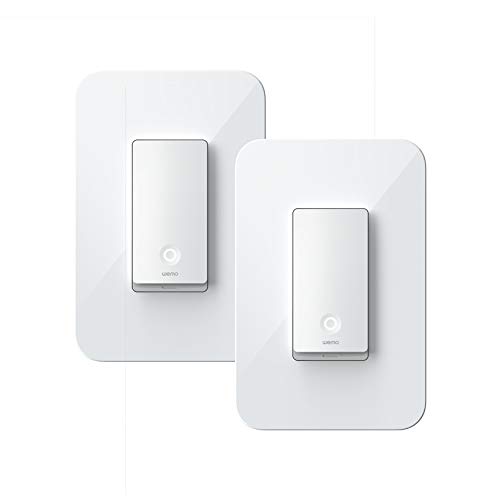
Image: A single WeMo Wi-Fi Light Switch, ready for installation.
- Secure switch: Gently push the wires into the wall box and secure the WeMo switch with screws. Attach the new faceplate.
- Күчтү калыбына келтирүү: Turn the power back on at the circuit breaker. The Wi-Fi indicator light on the WeMo switch should blink.
- Колдонмону орнотуу: Download the WeMo app from the App Store or Google Play. Follow the in-app instructions to connect your WeMo switch to your Wi-Fi network and complete the setup.
Operating Your WeMo Light Switch
Кол менен башкаруу
Press the physical button on the WeMo light switch to manually turn the connected lights on or off.

Сүрөт: деталдуу view of the WeMo Light Switch's power button and indicator light.
Колдонмо башкаруу
Once connected to the WeMo app, you can control your lights from anywhere using your smartphone or tablet. The app allows you to:
- Жарыкты алыстан күйгүзүү/өчүрүү.
- Set schedules and timers for automatic lighting.
- Create rules for specific events (e.g., turn on at sunset).
- Group multiple WeMo devices for simultaneous control.
Үн менен башкаруу (Alexa жана Google Жардамчысы)
Integrate your WeMo switches with Amazon Alexa or Google Assistant for convenient voice control. Follow the instructions in the WeMo app or your smart assistant's app to link your accounts.
Exampүн буйруктары:
- – Alexa, бөлмөнүн жарыгын күйгүз.
- "Эй, Google, ашкананын жарыгын өчүр."
- "Alexa, set the bedroom light to 50%." (If dimmer functionality is available on your specific model)

Image: WeMo switches integrated into a smart home environment, alongside other smart devices.
Техникалык тейлөө
WeMo light switches require minimal maintenance. Keep the device clean by wiping it with a soft, dry cloth. Do not use harsh chemicals or abrasive cleaners.
Periodically check for firmware updates through the WeMo app to ensure optimal performance and access to new features.
Проблемаларды чечүү
Которуу Жооп бербейт
- Электр өчүргүчтүн күйгүзүлгөнүн текшериңиз.
- Check the Wi-Fi indicator light on the switch. If it's off or blinking unusually, it may not be connected to Wi-Fi.
- Wi-Fi роутериңизди өчүрүп күйгүзүңүз.
- Try restarting the switch by turning off power at the breaker for 10 seconds, then turning it back on.
Wi-Fi'га туташпай жатат
- Ensure your Wi-Fi network is 2.4 GHz. WeMo switches do not support 5 GHz networks.
- Wi-Fi сырсөзүңүздүн туура экенин текшериңиз.
- Move your Wi-Fi router closer to the switch, or consider a Wi-Fi extender.
- Perform a factory reset on the WeMo switch (refer to the WeMo app or online support for specific instructions).
Үн менен башкаруу маселелери
- Ensure your WeMo account is correctly linked in the Alexa or Google Home app.
- Интернет байланышыңызды текшериңиз.
- Try re-discovering devices in your smart assistant's app.
Техникалык шарттар
| Өзгөчөлүк | Деталь |
|---|---|
| Бренд | WeMo |
| Модель номерлери | WLS0403-BDL, F7C030-BDL |
| Circuit Type | 3-way (WLS0403-BDL), Single-pole (F7C030-BDL) |
| Монтаж түрү | Дубалга орнотуу |
| Controller Type | Amazon Alexa, Google Assistant, WeMo App |
| Башкаруу ыкмасы | App, Voice, Manual |
| Connectivity Protocol | Wi-Fi (2.4 GHz) |
| Дата биринчи жеткиликтүү | 2-март, 2020-жыл |
Кепилдик жана колдоо
For detailed warranty information and technical support, please visit the official WeMo website or contact WeMo customer service. Keep your proof of purchase for warranty claims.
Official WeMo Webсайт: www.wemo.com
Ask a question about this manual
Ask about setup, troubleshooting, compatibility, parts, safety, or missing instructions. Manuals+ will review the question and use this page’s manual context to help answer it.