
Introduction
This Easytry123 Universal Remote Control serves as a direct replacement for various JVC LCD LED HDTV TV models. It is designed to provide essential control functions for your television. This remote operates using infrared (IR) technology and requires two AAA batteries for operation, which are not included with the product.
Compatible JVC TV Models: RM-C380, RM-C3801A, RM-C381, RM-C3812A, RM-C382, RM-C3822A, RM-C383, RM-C3832A, RM-C384.

Сүрөт: алдыңкы view of the Easytry123 Universal Remote Control. This image displays the layout of the buttons, including power, input selection, channel and volume controls, number pad, and navigation keys.
Жайгашуу
The Easytry123 Universal Remote Control is designed to work with the specified JVC TV models without requiring complex programming. Simply install the batteries, and the remote should be ready for use.
Батарея орнотуу
- Батарея бөлүмүн табыңыз: Turn the remote control over. The battery compartment is located on the back of the remote.
- Батарея капкагын ачуу: Gently slide the battery compartment cover downwards or press the latch (if present) and lift the cover off.
- Батареяларды салыңыз: Insert two (2) AAA batteries into the compartment. Ensure that the positive (+) and negative (-) terminals of the batteries match the polarity indicators inside the compartment. Incorrect insertion can prevent the remote from functioning.
- Батарея капкагын жабуу: Батарея бөлүкчөсүнүн капкагын бекем чыккыча ордуна жылдырыңыз.
After installing the batteries, the remote control is ready to operate your compatible JVC television.
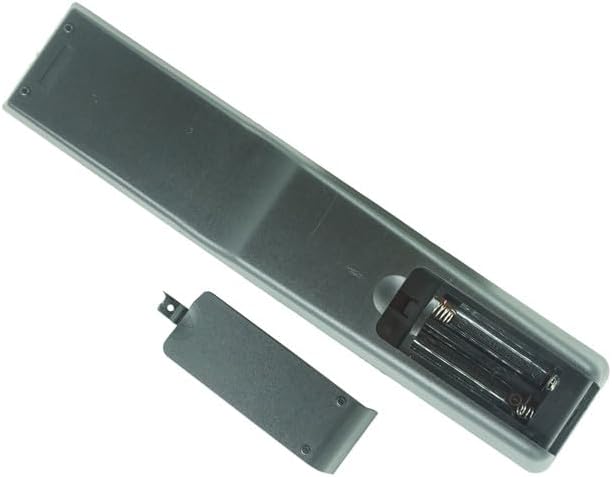
Сүрөт: Артка view of the remote control with the battery cover removed. This shows the empty battery compartment where two AAA batteries should be inserted according to the polarity markings.
Иштөө нускамалары
Point the remote control directly at the infrared sensor on your JVC television. Ensure there are no obstructions between the remote and the TV.
- Күйгүзүү/өчүрүү: басыңыз КҮЧ button (usually red, located at the top right) to turn your TV on or off.
- Үндү көзөмөлдөө: колдонуу VOL+ жана VOL - үн баскычын жөндөө үчүн баскычтар.
- Канал тандоо: колдонуу CH + жана CH - buttons to change channels sequentially. You can also use the number pad (0-9) to directly enter channel numbers.
- Үнсүз: басыңыз БАСУУ button to temporarily silence the TV audio. Press it again to restore sound.
- Киргизүү/Булак: басыңыз INPUT or БУЛАК button to cycle through available input sources (e.g., HDMI, AV, USB).
- Navigation and OK: Багыттоочу жебе баскычтарын колдонуңуз (Өйдө, ылдый, сол, оң) to navigate menus and select options. Press the OK тандоону ырастоо үчүн баскычты басыңыз.
- Меню: басыңыз МЕНЮ button to access the TV's main menu.
- Чыгуу/Артка: колдонуу ЧЫГУУ or КАЙТ button to exit menus or return to the previous screen.
- Атайын функциялар: Белгиленген баскычтар CC (Closed Caption), ZOOM, МЕДИА, USB, КОМП, HDMI, PC, NETFLIX (if present) provide direct access to specific features or inputs.
Note: Not all buttons or functions on this replacement remote may be fully identical to your original remote or supported by all JVC TV models.
Техникалык тейлөө
Proper care and maintenance will ensure the longevity and optimal performance of your remote control.
- Тазалоо: Пультту жумшак, кургак чүпүрөк менен сүртүңүз. Өтө кир болсо, бир азampкездемени суу же жумшак, абразивдүү эмес тазалоочу каражат менен сүртүңүз. Катуу химиялык заттарды же ашыкча нымдуулукту колдонуудан алыс болуңуз, анткени алар пульттун электроникасына зыян келтириши мүмкүн.
- Батареяны алмаштыруу: Replace batteries when the remote's response becomes sluggish or it stops working. Always replace both batteries at the same time with new AAA batteries. Do not mix old and new batteries, or different types of batteries.
- Сактагыч: If the remote control will not be used for an extended period, remove the batteries to prevent leakage, which can cause damage to the remote. Store the remote in a cool, dry place away from direct sunlight and extreme temperatures.
- Тамчылардан жана таасирлерден качыңыз: Ички компоненттер бузулуп калышы мүмкүн болгондуктан, пультту физикалык соккулардан коргоңуз.
Проблемаларды чечүү
If you encounter issues with your remote control, please refer to the following troubleshooting steps:
- Алыстан жооп бербейт:
- Батареяларды текшерүү: Ensure batteries are inserted correctly with the correct polarity (+/-). Replace old batteries with fresh AAA batteries.
- Көрүү сызыгы: Make sure there are no objects blocking the path between the remote's IR emitter and the TV's IR receiver.
- Аралык: Ensure you are within the effective range of the remote control (typically 15-20 feet).
- Телевизор сенсору: Verify that the TV's infrared sensor is not obstructed or dirty.
- Айрым функциялар иштебей жатат:
- This remote is a replacement and may not offer every single function or button layout identical to your original JVC remote. Some advanced or specific features of your TV might not be accessible via this remote.
- Refer to your JVC TV's original manual for specific functions if you suspect a compatibility issue with a particular button.
- Remote Buttons Stuck or Unresponsive:
- Clean the remote control, especially around the buttons, to remove any dirt or debris that might be causing them to stick.
- If a button remains unresponsive after cleaning and battery replacement, the remote may be damaged and require replacement.
Техникалык шарттар
| Бренд | Easytry123 |
| Моделдин шайкештиги | JVC RM-C380, RM-C3801A, RM-C381, RM-C3812A, RM-C382, RM-C3822A, RM-C383, RM-C3832A, RM-C384 LCD LED HDTV TVs |
| Power Source | 2 x AAA Батареялар (киргизилген эмес) |
| Байланыш технологиясы | Инфракызыл (IR) |
| Материал | New ABS Plastic |
| Controller Type | Control Button |
Кепилдик жана колдоо
Specific warranty information for this Easytry123 Universal Remote Control is not provided in the product details. For any warranty-related inquiries, product support, or further assistance, please contact the seller directly through the platform where the purchase was made.
Сатуучу: Easytry123
For the most up-to-date support information, please refer to your purchase documentation or the seller's contact details on the product listing page.