
1. Киришүү
This manual provides instructions for the Easytry123 replacement remote control. It is designed to function as a direct replacement for various JVC LCD LED HDTV TV models. Please read this manual carefully to ensure proper setup and operation of your new remote control.
2. Продукт бүтүп калдыview
The Easytry123 replacement remote control is constructed from durable ABS plastic and is designed to provide essential control functions for compatible JVC televisions. It does not include batteries or a separate manual in the packaging.

Сүрөт 2.1: Фронт view of the Easytry123 replacement remote control. This image displays the full layout of buttons, including power, input selection, channel and volume controls, number pad, and navigation buttons.
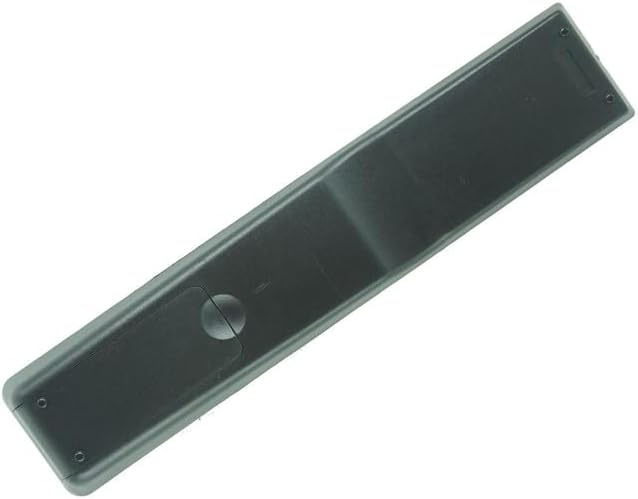
Сүрөт 2.2: Артка view of the Easytry123 replacement remote control. This image shows the smooth, ergonomic design of the remote's rear casing.
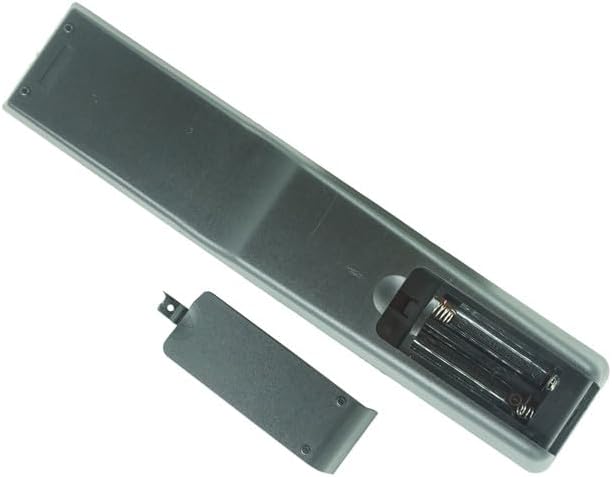
Сүрөт 2.3: Battery compartment of the Easytry123 replacement remote control. This image illustrates the open battery compartment, showing the slots for two AAA batteries and the removable cover.
3. Орнотуу
3.1 Батареяны орнотуу
Алыстан башкаруу пультун иштеши үчүн эки (2) AAA батарейкасы (кошулмага кирбейт) керек. Батарейкаларды орнотуу үчүн төмөнкү кадамдарды аткарыңыз:
- Пульттун артындагы батарея бөлүкчөсүнүн капкагын табыңыз.
- Бөлүмдү ачуу үчүн өтмөктү басып, капкакты ылдый жылдырыңыз.
- Оң (+) жана терс (-) терминалдары бөлүмдүн ичиндеги белгилер менен туура дал келишин камсыз кылып, эки AAA батарейкасын салыңыз.
- Батарея бөлүкчөсүнүн капкагын бекем чыккыча ордуна жылдырыңыз.
Эскертүү: Ар дайым эки батареяны тең бир убакта алмаштырыңыз. Эски жана жаңы батареяларды, же ар кандай типтеги батареяларды аралаштырбаңыз.
4. Операция
This replacement remote control is designed to function immediately with compatible JVC TV models without requiring programming. Point the remote directly at your television's infrared sensor.
4.1 Негизги функциялар
- КҮЧ: Телевизорду күйгүзөт же өчүрөт.
- КИРҮҮ: Cycles through available input sources (e.g., HDMI, AV, Component).
- HDMI / PC / MEDIA / TV: Direct access buttons for specific input sources.
- VOL +/-: Үн деңгээлин тууралайт.
- CH +/-: Телеканалды өзгөртөт.
- Үнсүз: Телевизордун үнүн өчүрөт же калыбына келтирет.
- Сандар тактасы (0-9): Түздөн-түз канал номерлерин киргизет.
- OK / Навигация жебелери: Менюларды багыттоо жана тандоолорду ырастоо.
- BACK / EXIT: Мурунку менюга кайтат же учурдагы менюдан чыгат.
- ZOOM: Adjusts the screen zoom level (functionality may vary by TV model).
- USB / COMP: Direct access to USB or Component video inputs.
- CC: Жабык субтитрлерди иштетет же өчүрөт.
Note: Specific button functions may vary slightly depending on your JVC TV model.
5. Шайкештик
This remote control is a replacement unit and is specifically designed to be compatible with the following JVC LCD LED HDTV TV models:
- RM-C20601C
- RM-C741
- RM-C740
- RM-C735
- RM-C734
- RM-C733
- RM-C732
- RM-C731
- RM-C730
- RM-C729
It is also noted to replace models such as RAV272, RAV273, RAV353, RAV352, RAV323, RAV361, RAV362, RAV358, RAV359. To ensure full compatibility, please compare the appearance and button layout of this remote with your original remote control.
6. Кыйынчылыктарды
6.1 Алыстан башкаруу жооп бербейт
- Батареяларды текшерүү: Ensure batteries are inserted correctly with the correct polarity (+/-). Replace old batteries with new AAA batteries.
- Көрүү сызыгы: Пульт менен сыналгынын инфракызыл сенсорунун ортосунда эч кандай тоскоолдук жок экенин текшериңиз.
- Аралык: Пультту телевизордон бир аз алыстыкта иштетиңиз.
- Телевизор сенсору: Verify that the TV's infrared sensor is clean and not blocked.
6.2 Чектелген функция
- Шайкештик: While designed as a replacement, some advanced or specific functions of your original remote may not be fully replicated. This remote provides core TV control.
- TV Model: Ensure your TV model is listed as compatible.
7. Техникалык шарттар
- Бренд: Easytry123
- Байланыш технологиясы: Инфракызыл (IR)
- Шайкеш түзмөктөр: Television (JVC LCD LED HDTV TV models)
- Өзгөчө өзгөчөлүгү: Ergonomic, Replacement
- Кубат булагы: 2 x AAA Батареялар (киргизилген эмес)
- Материал: New ABS Plastic
8. Техникалык тейлөө
- Тазалоо: Пультту жумшак, кургак чүпүрөк менен сүртүңүз. Суюк тазалагычтарды же абразивдүү материалдарды колдонбоңуз.
- Батареяга кам көрүү: Remove batteries if the remote will not be used for an extended period to prevent leakage. Dispose of used batteries responsibly according to local regulations.
- Сактагыч: Пультту күн нурунан жана экстремалдык температурадан алыс, салкын, кургак жерде сактаңыз.
9. Кепилдик жана колдоо
Information regarding specific warranty terms or direct customer support for this Easytry123 replacement remote control is not provided in the product details. For any inquiries or support needs, please refer to the seller or the platform where the product was purchased.