
Introduction
Сатып алганыңыз үчүн рахматasing the NGS SKYCHARM 50W Bluetooth Tower Speaker. This elegant tower speaker system delivers crisp and powerful sound, offering multiple connectivity options including Bluetooth, USB, FM Radio, AUX, and Optical input. This manual provides detailed instructions for setup, operation, maintenance, and troubleshooting to ensure you get the best experience from your device.
Кутуда эмне бар
Пакетиңиздин мазмунун текшериңиз. Эгерде кандайдыр бир буюмдар жок же бузулуп калса, сатуучуга кайрылыңыз.
- 1 x NGS SKYCHARM Tower Speaker
- 1 x 3.5 mm audio jack cable
- 1 x Кубат адаптери
- 1 x Алыстан башкаруу
- 1 x User manual (11 languages)
- 1 x 2-year warranty card
Продукт бүттүview
Familiarize yourself with the components and controls of your NGS SKYCHARM tower speaker.

1-сүрөт: Фронт view of the NGS SKYCHARM Tower Speaker, highlighting its sleek design and dimensions (83 cm height, 13 cm width, 11 cm depth). It features multiple speaker drivers and an LED display.
Top Panel Controls and Ports

2-сүрөт: Close-up of the top control panel, showing the power button, mode selection, DSP, volume controls, and track navigation buttons. Also visible are the USB port and AUX input.
- Кубат баскычы: Динамикти күйгүзөт же өчүрөт.
- Режим баскычы: Switches between input sources (Bluetooth, FM, USB, AUX, Optical).
- DSP баскычы: Digital Sound Processing for audio enhancement.
- Көлөм +/-: Негизги үндү тууралайт.
- Мурунку/Кийинки трек: Navigates tracks in Bluetooth or USB mode.
- Ойнотуу/тындыруу: Controls playback in Bluetooth or USB mode.
- USB порт: For MP3 playback from a USB drive or charging a device.
- AUX киргизүү: Тышкы аудио түзүлүштөрдү туташтыруу үчүн 3.5 мм уяча.
- Phone Slot: Integrated slot for holding a smartphone or tablet.
Арткы панелдин порттору

3-сүрөт: Арткы view of the speaker's connection panel, showing the Optical input, Audio IN, and Audio OUT ports for stereo pairing.
- Оптикалык киргизүү: For connecting to TVs or other devices with optical audio output.
- Audio IN (L/R): For connecting a secondary tower speaker for stereo sound.
- Audio OUT (L/R): For connecting to a secondary tower speaker for stereo sound.
Алыстан башкаруу

4-сүрөт: The included remote control, providing convenient access to power, DSP, volume, track navigation, and direct input selection buttons (AUX, FM, OP, BT, USB).
The remote control allows for convenient operation of all speaker functions from a distance.
Жайгашуу
- Жайгашкан жери: Place the tower speaker on a stable, flat surface. Ensure there is adequate space around the speaker for optimal sound dispersion and ventilation.
- Кубат туташуу: Connect the power adapter to the DC IN port on the back of the speaker, then plug the adapter into a wall outlet.
- Күйгүзүү: Press the Power button on the top panel or the remote control to turn on the speaker. The LED display will illuminate.
- Initial Mode Selection: The speaker will typically start in the last used mode. Press the 'Mode' button on the top panel or the remote to cycle through available input sources (Bluetooth, FM, USB, AUX, Optical).
Иштөө нускамалары
Bluetooth режими
- Press the 'Mode' button until 'BT' appears on the LED display, or press the 'BT' button on the remote. The speaker will enter pairing mode, indicated by a flashing 'BT' on the display.
- Смартфонуңузда, планшетиңизде же башка түзмөгүңүздө Bluetooth'ду иштетиңиз.
- Издөө 'NGS SKYCHARM' in your device's Bluetooth list and select it to pair.
- Once paired, the 'BT' indicator will stop flashing, and you can play audio from your device through the speaker.
FM радио режими
- Press the 'Mode' button until 'FM' appears on the LED display, or press the 'FM' button on the remote.
- To auto-scan and save stations, press and hold the 'Play/Pause' button. The speaker will scan for available stations and store them.
- Use the 'Previous/Next Track' buttons to navigate through saved FM stations.
USB ойнотуу режими
- MP3 аудиосу бар USB флэш-дискти салыңыз files into the USB port on the top panel.
- The speaker will automatically switch to USB mode, or you can select it using the 'Mode' button or 'USB' button on the remote.
- Use the 'Play/Pause' and 'Previous/Next Track' buttons to control playback.
- The USB port can also be used to charge compatible devices.
AUX киргизүү режими
- Connect one end of the 3.5mm audio jack cable to the AUX IN port on the top panel of the speaker.
- Connect the other end of the cable to the headphone jack or audio output of your external device (e.g., laptop, MP3 player).
- Press the 'Mode' button until 'AUX' appears on the LED display, or press the 'AUX' button on the remote.
- Туташкан тышкы түзмөгүңүздөн ойнотууну көзөмөлдөңүз.
Оптикалык киргизүү режими
- Connect an optical audio cable (not included) from the optical output of your TV or other audio source to the OPTICAL input port on the rear of the speaker.
- Press the 'Mode' button until 'OP' appears on the LED display, or press the 'OP' button on the remote.
- Телевизоруңуздун аудио чыгаруу жөндөөлөрү оптикалык чыгарууга конфигурацияланганын текшериңиз.
Stereo Pairing (Connecting Two Towers)
The NGS SKYCHARM speaker supports connecting two towers for a true stereo experience.
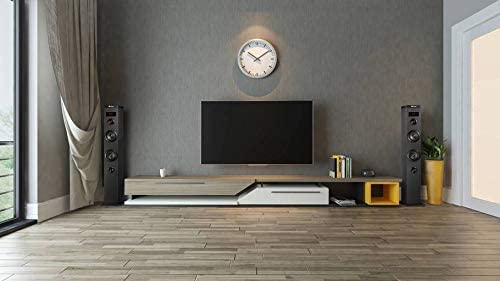
5-сүрөт: Мурункуample setup showing two NGS SKYCHARM tower speakers positioned for stereo audio, typically flanking a television or entertainment center.
- Ensure both NGS SKYCHARM tower speakers are powered off.
- Using an audio cable (e.g., RCA to RCA or 3.5mm to RCA, depending on the cable type for Audio IN/OUT), connect the 'Audio OUT' ports of the негизги tower to the 'Audio IN' ports of the орто мунара.
- Power on both speakers. The secondary tower will only respond to controls from the main tower.
- Select your desired input mode on the main tower. Audio will now play in stereo through both speakers.
Техникалык тейлөө
- Тазалоо: Динамиктин сыртын тазалоо үчүн жумшак, кургак чүпүрөктү колдонуңуз. Абразивдүү тазалагычтарды, момдорду же эриткичтерди колдонбоңуз.
- Вентиляция: Динамиктин ысып кетишинин алдын алуу үчүн желдетүү тешиктери бүтөлүп калбаганын текшериңиз.
- Сактагыч: Узак мөөнөткө колдонулбаганда, динамикти күн тийбеген жана өтө температурадан алыс, салкын, кургак жерде сактаңыз.
- Колдонуу: Спикерди түшүрүүдөн же катуу таасирлерге дуушар кылуудан качыңыз.
Проблемаларды чечүү
| Көйгөй | Мүмкүн себеп | Чечим |
|---|---|---|
| Күч жок | Кубат адаптери туташкан эмес же туура эмес розетка. | Ensure the power adapter is securely connected to the speaker and a working power outlet. Try a different outlet. |
| Үн жок | Volume too low; incorrect input mode; device not connected properly. | Increase volume on both the speaker and the connected device. Select the correct input mode. Check all cable connections. |
| Bluetooth жупташтыруу ишке ашпай калды | Динамик жупташтыруу режиминде эмес; түзмөк өтө алыс; тоскоолдук бар. | Ensure the speaker is in Bluetooth pairing mode. Move your device closer to the speaker. Turn off other Bluetooth devices to reduce interference. |
| Пульт иштебей жатат | Батареялар түгөнгөн; тоскоолдук; пульт иштебейт. | Replace the remote control batteries. Ensure there is no obstruction between the remote and the speaker's sensor. Use the remote within its effective range. |
| FM радиосу начар кабыл алат | Сигнал алсыз; антеннанын абалы. | Adjust the position of the speaker or its antenna (if external). Try auto-scanning again in a different location. |
Техникалык шарттар
- Модель аты: SKYCHARM
- Динамик түрү: Multimedia Tower Speaker
- RMS кубаттуулугу: 50 Ватт
- Байланыш технологиясы: Bluetooth, USB, Auxiliary (3.5mm), Optical
- Зымсыз байланыш: Bluetooth
- Аудио чыгаруу режими: Стерео (2.0 каналдуу)
- Башкаруу ыкмасы: Remote, On-device buttons
- Продукциянын өлчөмдөрү: 11D x 13W x 83H Сантиметр
- Элемент Салмагы: 2.39 килограмм
- Кубат булагы: Электр зымдары
- Сунушталган колдонуулар: Home Audio, TV, Smartphone, Tablet, Laptop
- Камтылган компоненттер: Speaker, 3.5mm audio cable, power adapter, remote control, user manual, warranty card
Кепилдик жана колдоо
Your NGS SKYCHARM Tower Speaker comes with a 2 жылдык кепилдик from the date of purchase. Please retain your proof of purchase and the warranty card for any claims.
For technical support, troubleshooting assistance, or warranty inquiries, please refer to the contact information provided in your included user manual or visit the official NGS webсайт.
Өндүрүүчү: NGS