
DPVR RYMEK
KNEWKEY RYMEK Typewriter Style Mechanical Wired & Wireless Keyboard User Manual
Model: RYMEK | Brand: DPVR
Introduction

Figure 1: The KNEWKEY RYMEK Typewriter Style Mechanical Keyboard.
This manual provides comprehensive instructions for the KNEWKEY RYMEK Typewriter Style Mechanical Keyboard. Designed for both wired and wireless connectivity, this keyboard offers a unique typing experience with its retro design, mechanical switches, and integrated tablet stand. It supports various operating systems including Windows, Mac, iOS, and Android, allowing seamless connection with multiple devices.
Негизги өзгөчөлүктөрү
- Классикалык ретро дизайн: вин бириктиретtagзаманбап функциялары менен эстетика.
- Кош байланыш: Supports both Bluetooth wireless and USB wired connections for versatile use.
- Көп OS шайкештиги: Compatible with Windows, Mac, iOS, and Android devices.
- Көп түзмөктү жупташтыруу: Бир эле учурда 3 түзмөккө чейин туташып жана которула аласыз.
- LED Dynamic Backlight: Enhances visibility and typing accuracy in low-light conditions.
- Integrated Tablet Stand: Conveniently holds your iPad or smartphone.
- Blue Switch Mechanical Keys: Provides a tactile and audible click feedback for an authentic typing feel.
Орнотуу колдонмосу
Пакеттин мазмуну:
- KNEWKEY RYMEK Keyboard
- USB кабели
- Колдонуучунун Колдонмосу (бул документ)
Алгачкы заряддоо:
Before first use, fully charge the keyboard using the provided USB cable. Connect the micro USB end to the keyboard's charging port and the USB-A end to a power source (e.g., computer USB port, USB wall adapter). The charging indicator light will show charging status.
Зымдуу туташуу:
To use the keyboard in wired mode, simply connect the provided USB cable from the keyboard to your computer's USB port. The keyboard will be recognized automatically.
Bluetooth зымсыз туташуусу:
- Баскычтоп кубатталып, күйгүзүлгөнүн текшериңиз.
- басып, кармап туруңуз Fn key and one of the Bluetooth device keys (BT1, BT2, BT3) for 3 seconds until the corresponding indicator light flashes rapidly. This indicates pairing mode.
- On your device (computer, tablet, smartphone), go to Bluetooth settings and search for available devices.
- Select "RYMEK Keyboard" from the list.
- Жупташтыруу процессин аяктоо үчүн экрандагы көрсөтмөлөрдү аткарыңыз. Клавиатурадагы индикатор жарыгы ийгиликтүү жупташтырылганда катуу күйөт.
- Repeat for up to two additional devices using BT2 and BT3.
Жупташтырылган түзмөктөр арасында которулуу үчүн жөн гана басыңыз Fn key and the corresponding BT1, BT2, or BT3 ачкыч бир жолу.

Figure 2: The integrated tablet stand securely holds your device for comfortable typing.
Иштөө нускамалары
Терүү тажрыйбасы:
The RYMEK keyboard features blue mechanical switches, providing a distinct tactile bump and an audible click sound with each keystroke. This design is intended to replicate the classic typewriter feel, enhancing the typing experience.
Жарыкты башкаруу:
The keyboard is equipped with LED dynamic backlighting. Use the dedicated backlight control keys (often combined with function keys) to adjust brightness levels or switch between different lighting modes. Refer to the keycap legends for specific backlight functions.
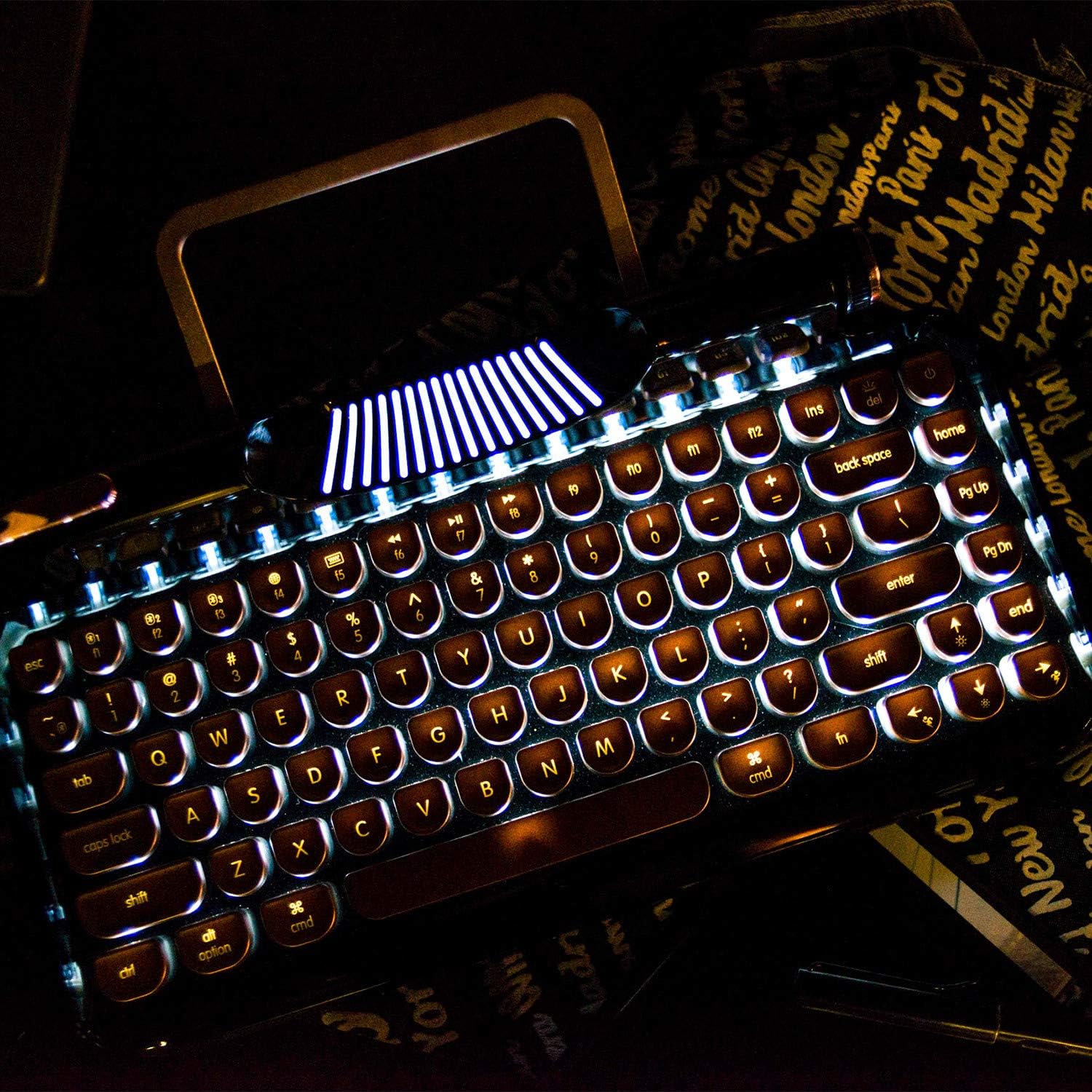
Figure 3: The dynamic LED backlight illuminates the keys for use in various lighting conditions.
Мультимедиа жана функция баскычтары:
The top row of keys includes various function keys (F1-F12) and multimedia controls. These often require pressing the Fn key in combination with the desired function key. Examples include volume control, media playback, and screen brightness adjustments.
Lever Functionality:
The decorative lever on the left side of the keyboard functions as a carriage return in some applications or can be programmed for custom actions depending on your operating system and software.
Видео 1: Расмий продукт көргөзмөсүasing the RYMEK Typewriter Style Mechanical Keyboard's features and usage, including typing experience and backlight.
Техникалык тейлөө
To ensure the longevity and optimal performance of your KNEWKEY RYMEK keyboard, follow these maintenance guidelines:
- Тазалоо: Use a soft, dry cloth to wipe down the keyboard surface. For deeper cleaning, use compressed air to remove dust and debris from between the keycaps. Avoid using harsh chemicals or abrasive materials.
- Сактагыч: Колдонбогондо, клавиатураны таза, кургак чөйрөдө күн нурунан жана өтө температурадан алыс сактаңыз.
- Суюктуктар: In case of liquid spills, immediately disconnect the keyboard from power and turn it off. Invert the keyboard to drain excess liquid and allow it to dry completely before reconnecting. Professional service may be required for significant spills.
Проблемаларды чечүү
| Көйгөй | Мүмкүн себеп | Чечим |
|---|---|---|
| Баскычтоп жооп бербей жатат (Зымдуу) | Loose USB connection, faulty cable, driver issue. | USB кабелинин бекем туташканын текшериңиз. Башка USB портун же кабелин колдонуп көрүңүз. Компьютериңизди өчүрүп-күйгүзүңүз. |
| Баскычтоп туташпай жатат (Bluetooth) | Keyboard not in pairing mode, device Bluetooth off, interference, low battery. | Ensure keyboard is in pairing mode (flashing indicator). Check if Bluetooth is enabled on your device. Recharge the keyboard. Move closer to the device. Forget the device in Bluetooth settings and re-pair. |
| Арткы жарык иштебейт | Арткы жарык өчүрүлгөн же эң төмөнкү жарыктыкка коюлган. | Press the backlight control keys to increase brightness or change modes. |
| Ачкычтар катталбайт | Баскыч капкагынын астындагы сыныктар, бузулган өчүргүч. | Use compressed air to clear debris. If problem persists for a specific key, contact support. |
Техникалык шарттар
- Продукциянын өлчөмдөрү: 14 x 42 x 2 дюйм
- Элемент Салмагы: 3.34 фунт
- Байланыш технологиясы: Микро USB, Bluetooth
- Баскычтоптун сүрөттөмөсү: Механикалык
- Ачкычтардын саны: 83
- Өзгөчө өзгөчөлүгү: Арткы жарык (RGB)
- Шайкеш түзмөктөр: Tablet, Smartphone, PC (Windows, Mac, iOS, Android)
- Стиль: ретро
Кепилдик жана колдоо
Кепилдик жөнүндө маалымат жана техникалык колдоо алуу үчүн, өндүрүүчүнүн расмий өкүлүнө кайрылыңыз webсайтка же түздөн-түз кардарларды тейлөөгө кайрылыңыз. Сатып алуу квитанциясын кепилдик дооматтары үчүн сатып алуунун далили катары сактаңыз.
Ask a question about this manual
Ask about setup, troubleshooting, compatibility, parts, safety, or missing instructions. Manuals+ will review the question and use this page’s manual context to help answer it.